A Trainual alternative
Your team learns how the work is done, follows the latest procedures and finds every answer in one place. You see who is ready, in English or Dutch, with your data stored in the EU.
- 14 days free
- No credit card needed
- Public help center included

Everything your team needs to learn the job, in one place
Helpable connects training, procedures and knowledge, so one update reaches everyone who needs it.
Procedures people confirm
Every new version of a procedure can ask for a read confirmation, and you see per person who read it.
Training that checks understanding
Quizzes with six question types, a pass mark and certificates show who really knows the work.
Answers for your team and your customers
An internal handbook for your team and a public help center for customers, both in the same tool.
Getting started with Trainual and with Helpable
Both help small businesses write down how the work is done and train people on it. With Helpable you see the price and start on your own content today.
Illustration with a fictional demo company. The Trainual side is a simple sketch of a pricing page, drawn by Helpable.
Helpable and Trainual side by side
A short overview of how the two tools compare. Both help small businesses write down how the work is done and train people on it.
| Helpable and Trainual side by side | Helpable | Trainual |
|---|---|---|
| FocusHelpable and Trainual both help small businesses write down the work and train on it; Helpable is sized for teams of 5 to 50. | Training, procedures and knowledge base for teams of 5 to 50 | Training and SOP platform for owners, managers and operations teams |
| Pricing and trialTrainual shares prices in a demo; with Helpable you see the price and start on your own content today. | Public prices; 14-day free trial, no credit card | Prices through a demo; one-off implementation fee; no trial named |
| Where data is storedWhere data lives is often the first question in a client's security check; Helpable stores it in the EU. | In the EU | Google Cloud, region not stated |
| Step-by-step proceduresBoth tools document processes; Helpable gives every procedure an owner, a review date and a version history. | Numbered steps, checklists, images, versions and review dates | SOPs, checklists and flowcharts |
| Read confirmation per versionHelpable asks everyone to confirm each new version of a procedure, so you see who knows the change; Trainual offers e-signatures. | Yes, with a per-person overview | E-signatures on content |
| QuizzesA quiz shows who understood the work; both tools offer tests, and Helpable adds a pass mark and attempt limits. | Six question types, pass mark, attempts and time limit | Tests, also drafted with AI |
| Practice conversations with AIPracticing a hard conversation before the real one builds confidence; Helpable gives feedback on every practice conversation. | Included in Business Plus and Business Max | Not found on Trainual's site |
| Certificates with public check codeA certificate with a public check code shows clients and auditors who is trained; Helpable issues them from Business Plus. | Yes, from Business Plus, with expiry dates on Business Max | Check their website |
| Public help center for customersCustomers find answers themselves; Helpable includes a public help center next to the team handbook. | Included, can be multilingual | Check their website |
| App languagePeople learn faster in their own language; Helpable's whole app is in English and Dutch. | English and Dutch | Content translation into many languages, Dutch included |
Based on public information, October 2026. Check each company's website for the latest details.
The short answer
- When Trainual fits
Pick Trainual if you want a large paid course library, HR links like Gusto and BambooHR, a native mobile app, SCORM on its Pro plan and SSO on Premium, and you are fine starting with a demo.
- When Helpable fits
Pick Helpable over Trainual if you want public prices and a 14-day trial today, an app in English and Dutch, data stored in the EU and practice conversations with AI next to procedures, quizzes and certificates.
- When both fit
Use Trainual and Helpable side by side only during a trial: they cover the same ground, so test Helpable on one real procedure and one onboarding before you decide.
Questions small teams ask when they compare tools
These are the points that usually decide which tool fits a small team best.
Will people really read the procedures?
Writing procedures down is step one. Knowing that the team read the latest version is step two.
With Helpable Ask for a read confirmation per version and see per person who still needs to read it.
Can we test what people learned?
Reading a page is different from understanding it.
With Helpable Add a quiz with six question types, a pass mark and an attempts limit, and issue a certificate on completion.
Does it work in our language?
A team that works in Dutch learns faster in Dutch.
With Helpable Helpable works in English and Dutch, and your help center can be multilingual.
Where is our data stored?
For many European companies this matters for privacy and peace of mind.
With Helpable Helpable stores your data in the EU.
Switch to Helpable in three steps
Most teams have their first training ready on the first day.
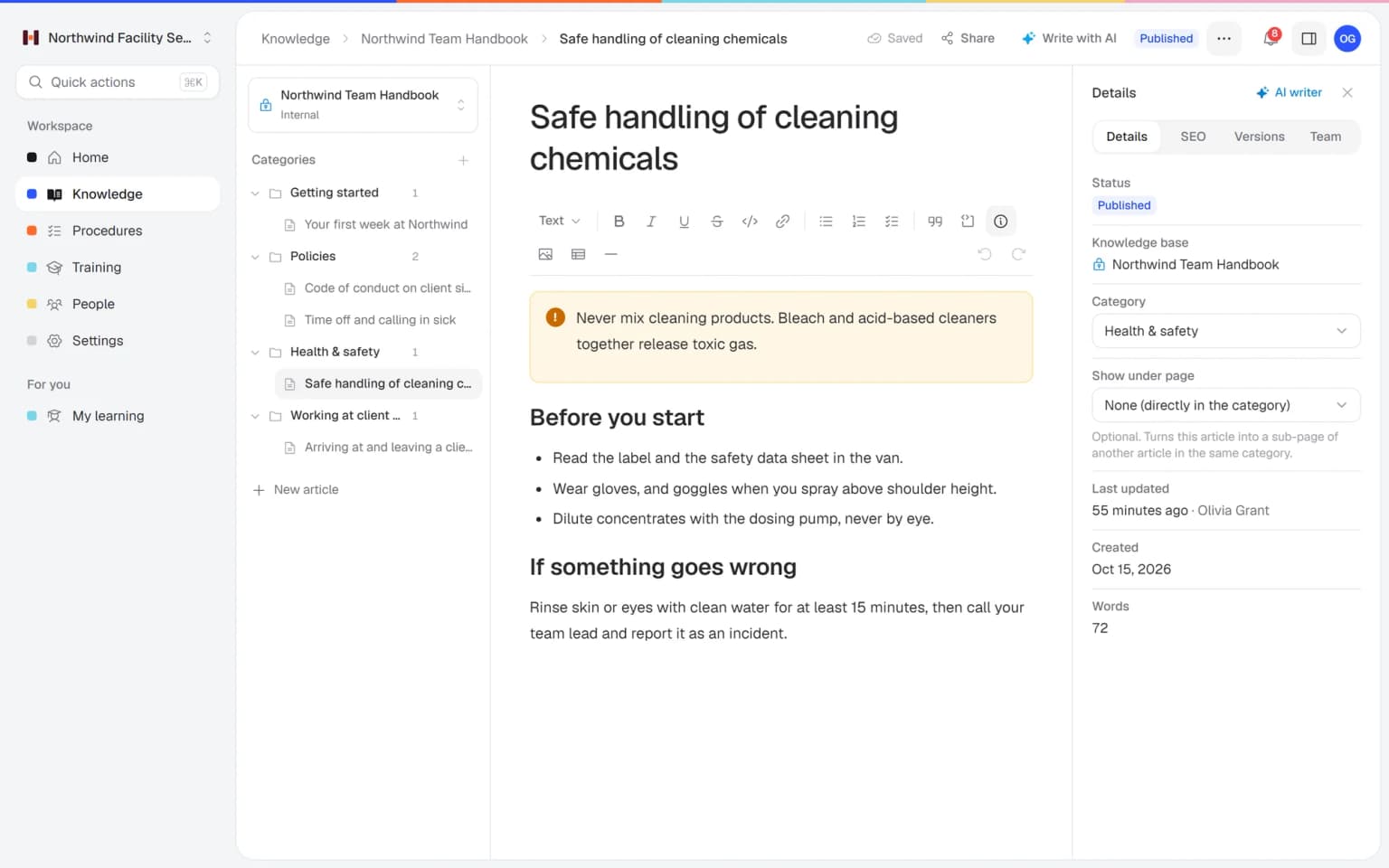
Bring in what you already have
Add procedures and articles, or let AI draft knowledge articles from your PDF, Word, TXT, Markdown or CSV files and links.
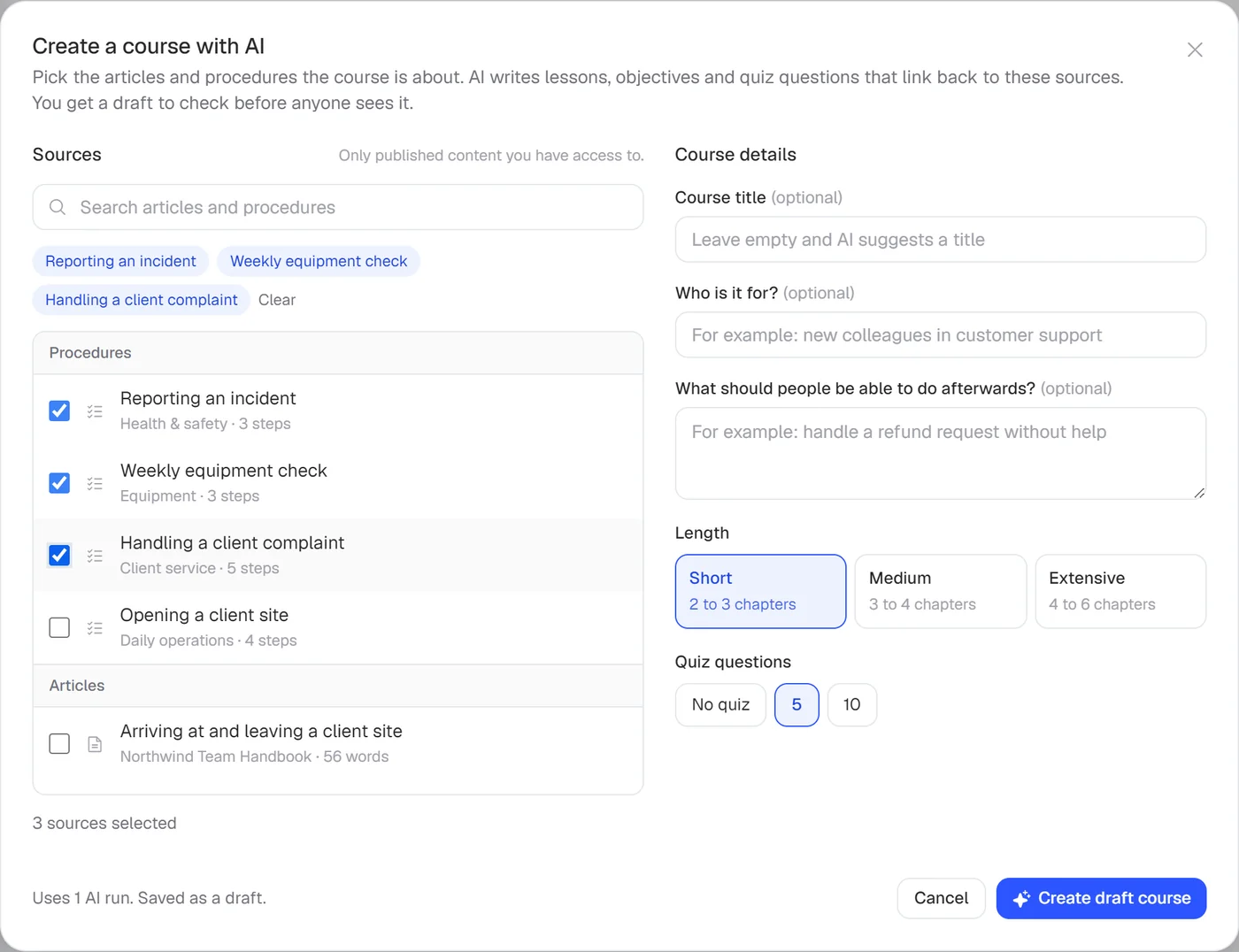
Turn it into training
Let AI build lessons and a quiz from your procedures and articles, or start from one of six templates.
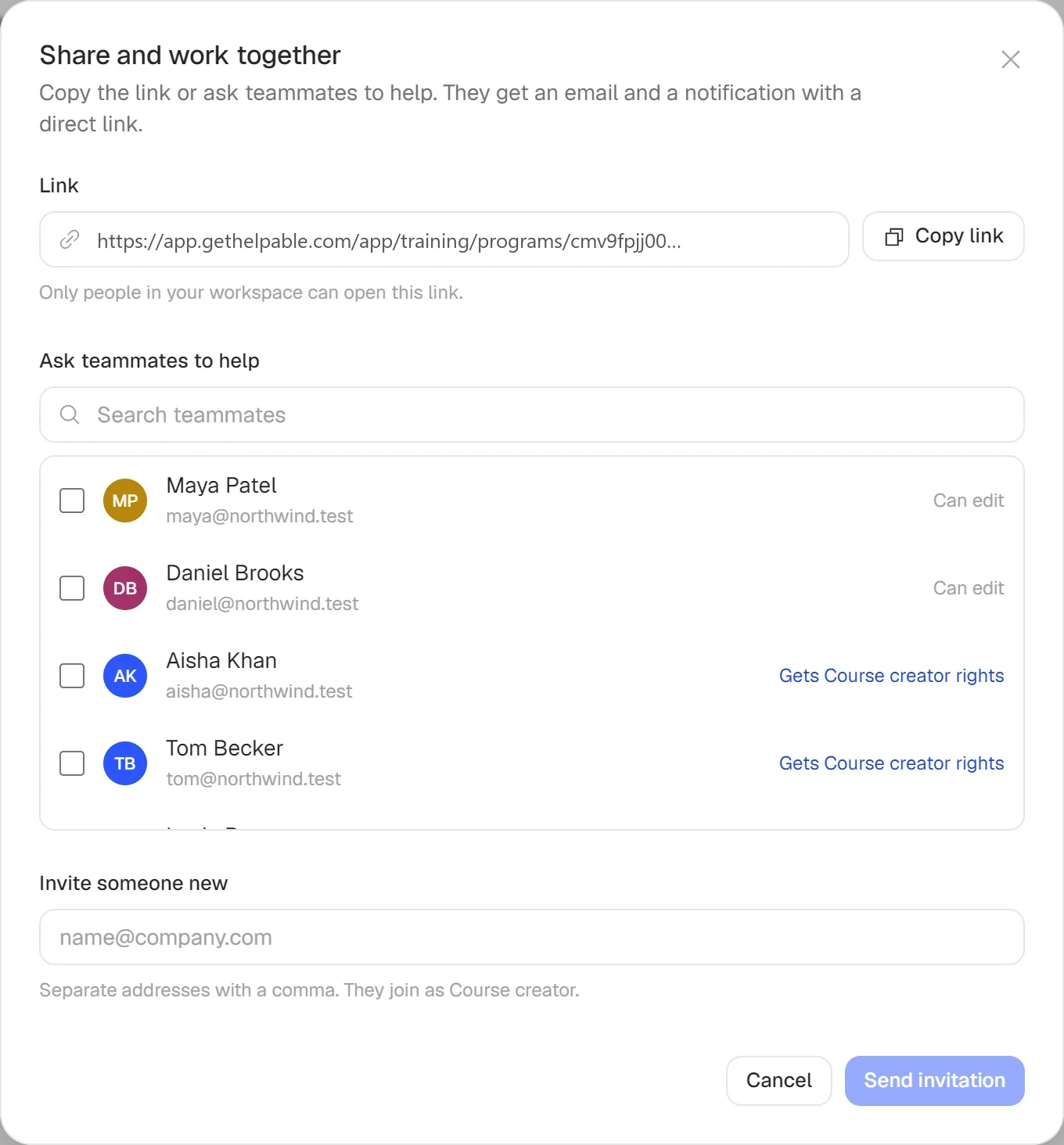
Assign it and see who is ready
Give people a due date. Helpable sends reminders and shows who finished and how they scored.
- 14 days free
- No credit card needed
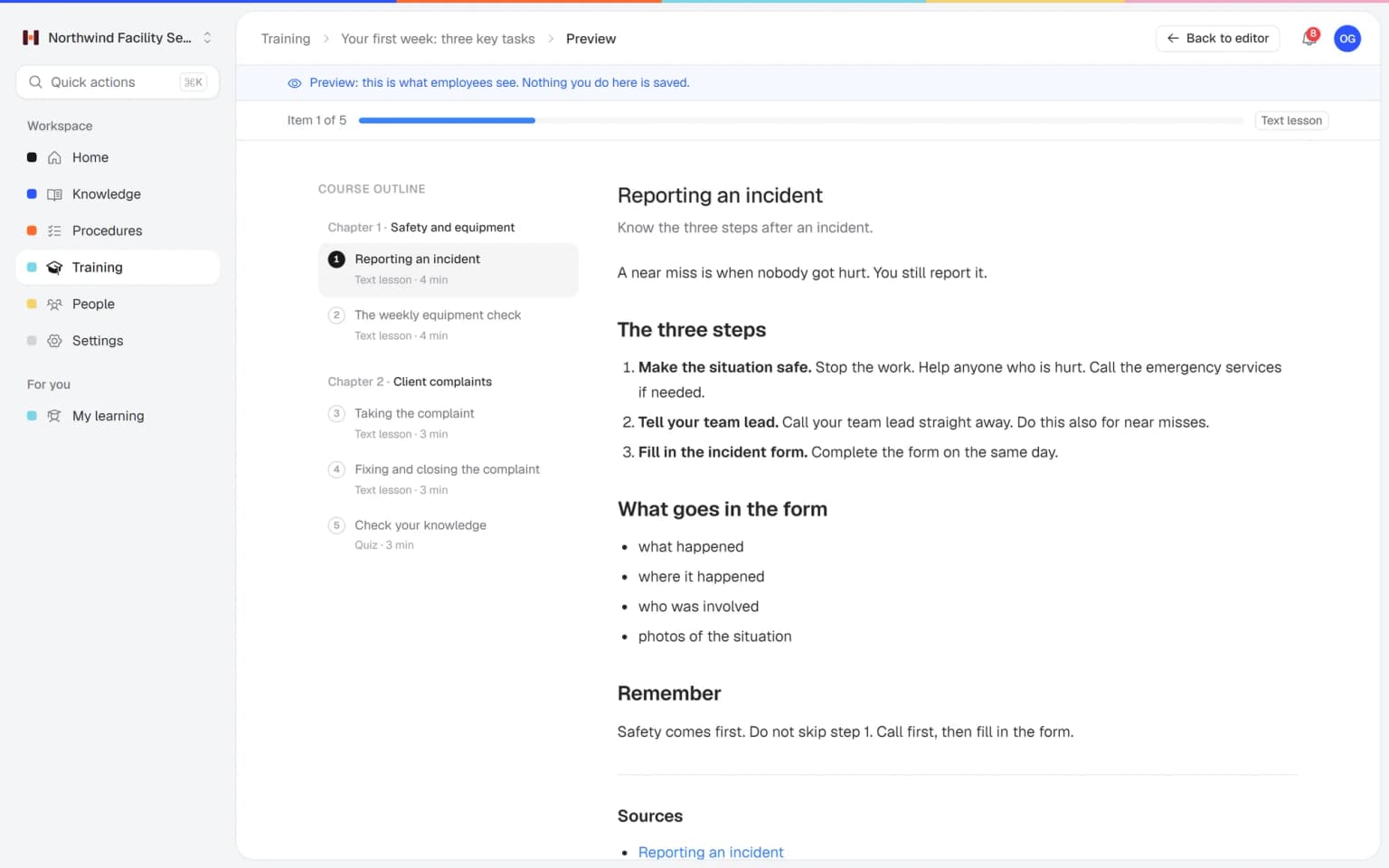
Training built from your own procedures
Pick the procedures and articles people need to learn and say who it is for. Helpable writes lessons, learning goals and quiz questions, with a link to every source. When a procedure changes, the training shows the new version.
- Draft ready in about a minute
- Uses only knowledge you pick
- Nothing goes live by itself
What you get with Helpable
All the parts you need to train people and keep them up to date, in one tool.
Procedures with versions
Numbered steps, checklists and images, with an owner, a review date and a change summary per version.
Training people finish
Lessons with text, video and documents, with estimated time and learning goals.
Quizzes and assessments
Six question types, pass mark, time limit, question banks and manual grading.
Certificates
PDF certificates with an optional expiry date and a code anyone can verify.
Knowledge base and help center
An internal handbook and a public help center, with one search across everything.
Reports
Completion, scores and overdue training per training, team and employee, with CSV export.
Your team finds the answer on its own in seconds, with the source
Employees ask a question in their own words and get a short answer from your own articles, procedures and documents, with a link to the exact page it came from. You stop being the person everyone asks.
- Answers come from your own knowledge
- Every answer shows where it came from
- Says so plainly when it doesn't know
- Each person only sees what they may see
- Works with your existing documents
- You approve every new article
Start with the documents you already have
Upload your handbook or policies. Helpable makes them searchable right away and suggests articles you check, change and approve. Nothing goes live until you say so.
A gap becomes a to-do
When the answer isn't there, Helpable says so and the question lands on your list of things to write down, with no name attached.
A plan that grows with your team
Try Helpable free for 14 days, no credit card needed. Then pick the plan that fits your team.
Business
Your knowledge base for team and customers, written faster with AI.
$29/month
Billed monthly
That's $0.95 a day
Start free trial- 3 team members included
- An internal knowledge base and a public help center
- AI writes first versions from your own documents
- Start from what you have: documents, Word files and your website
- Procedures everyone follows, with read confirmations
- Your help center on your own web address
- 250 AI credits per month
- Recommended · your free trial runs on this plan
Business Plus
Train your team on that knowledge: courses, quizzes and progress per person.
$89/month
Billed monthly
That's $2.93 a day
Start free trialEverything in Business, plus:
- 5 team members included
- Training with quizzes, due dates and reminders
- See per person who finished what
- Practice conversations with AI, included
- Video lessons and final tests
- Certificates you can show clients and inspectors
- Results exported in one click
- 3 help centers and 3 internal knowledge bases
- 750 AI credits per month
What's in Business
- 3 team members included
- An internal knowledge base and a public help center
- AI writes first versions from your own documents
- Start from what you have: documents, Word files and your website
- Procedures everyone follows, with read confirmations
- Your help center on your own web address
- 250 AI credits per month
Business Max
Training that runs by itself, and proof of who really knows what.
$179/month
Billed monthly
That's $5.88 a day
Start free trialEverything in Business Plus, plus:
- 9 team members included
- New colleagues get their training automatically
- A fixed onboarding route from day one
- Learning insights: who really studied and who clicked through
- Skills matrix and a training record per person
- Practical work signed off on the floor
- Locations with their own managers
- Refresher training that comes back by itself
- Certificates that expire on time, in your own design
- Your help center fully in your own brand
- 10 help centers and 10 internal knowledge bases
- 1,500 AI credits per month
What's in Business Plus
- 5 team members included
- Training with quizzes, due dates and reminders
- See per person who finished what
- Practice conversations with AI, included
- AI writes first versions from your own documents
- Start from what you have: documents, Word files and your website
- Procedures everyone follows, with read confirmations
- Video lessons and final tests
- Certificates you can show clients and inspectors
- Results exported in one click
- Your help center on your own web address
- 3 help centers and 3 internal knowledge bases
- 750 AI credits per month
Grow when you need to
Add these to Business and up, any time. You only pay for what you use.
- More people
Add people one by one as your team grows, for a fixed price per person on every plan.
$9/month
- A second help center
A help center and handbook for another brand, location or client.
$10/month
- Only your brand
Remove “Powered by Helpable” from your help center. Included in Business Max.
$19/month
- Cancel any time
- Data stored in the EU
Switching from Trainual: what it involves
You can have your most-used knowledge and a first training in Helpable on the same day. Trainual keeps working for as long as you want it to.
- Typical time: 10 to 20 minutes
Bring in what you have
Upload the files you have (Word, PDF, Markdown, text or CSV), import a public website or connect Notion under Settings › Integrations. Each one becomes a searchable document. Copy the text of each Trainual subject into a document, or export what Trainual allows on your plan.
- Typical time: 1 to 2 hours for your key pages
Check the drafts and name owners
AI turns each document into a draft article or procedure. You read it, fix what is off, give it an owner and a review date, and publish. Nothing goes live by itself.
- Typical time: About 15 minutes
Let AI build the first training
Pick the articles and procedures a new colleague needs and say who it is for. AI drafts lessons and quiz questions that link back to them. You check and publish.
- Typical time: About 15 minutes
Invite the team and assign
Invite people by email, put them in teams and assign training and procedures with a due date. Ask for read confirmations; reminders go out by email.
- Typical time: 14 days
Run both side by side
Try Helpable free for 14 days on Business Plus, no credit card. Keep Trainual running until you see the team use Helpable, then decide.
What moves over
- Pages and documents, as searchable documents and draft articles
- Step-by-step instructions, as procedures with an owner and review date
- Onboarding checklists, as training with lessons and a quiz
- Your team, invited by email and grouped in teams
What you keep
- Everything in Trainual stays where it is: importing only reads it
- Your own words: AI drafts from your text and you approve every change
- Connected sources stay current: Helpable checks them for changes every day
- Your history from now on: every new version keeps a short change summary
Rather have us set it up?
We bring in your documents, write your first procedures and build your first training for you. You pay once, next to your plan, and we confirm the scope before we start.
- Quick LaunchHelpable set up and your first training ready within days.
- Training LaunchA complete start: your knowledge, training and onboarding ready for the whole team.
- Complete Training AcademyYour full training program built, from first day to recurring training.
What is a good Trainual alternative for small teams?
Helpable is a Trainual alternative for teams of 5 to 50 people that want training, step-by-step procedures and a knowledge base in one tool. It also includes quizzes, certificates and a public help center for customers.
How is Helpable different from Trainual?
Helpable and Trainual both help small businesses document how the work is done and train people on it. Helpable works in English and Dutch, stores data in the EU, and includes a public help center next to the internal knowledge base. For Trainual's current features, check their website.
Can we move our procedures from another tool to Helpable?
Yes. In Helpable you can add procedures and articles yourself, or let the AI writer draft knowledge articles from your own PDF, Word, TXT, Markdown or CSV files and links. You check everything before you publish.
Does Helpable work in Dutch?
Yes. The Helpable app is available in English and Dutch, and the public help center can be multilingual.
Who is Helpable the best fit for?
Helpable fits small and growing companies where people learn the job while doing it, such as cleaning and facility services, hospitality, retail, installation and maintenance, customer service teams, SaaS companies and agencies.
Is there a free trial of Helpable?
Yes. Helpable has a free trial of 14 days on Business Plus, and no credit card is needed to start.
Read more
Trainual alternative: what small teams ask
Owners and operations managers who search for a Trainual alternative usually like the idea of one playbook for the business and want to check the details. Here are the questions that come up most for teams of 5 to 50.
Trainual alternative for small teams in Europe
For a team of 5 to 50 in Europe, Helpable is a Trainual alternative with the app in English and Dutch and your data stored in the EU. Trainual comes from a US company, hosts on Google Cloud in a region it does not state, and can translate content into 25 languages, Dutch included.
For a cleaning company in Rotterdam or a chain of shops in Antwerp, that means the new colleague reads the training in Dutch from the first screen, and the owner can tell clients where the data lives. You can start a 14-day free trial straight away; Trainual's site mentions no trial and shows no public prices. See pricing for the plans.
SOP software where people confirm the latest version
In Helpable every new version of a procedure can ask for a read confirmation, and you see per person who confirmed it and who still has to.
Trainual offers SOPs, checklists and flowcharts plus e-signatures, and its version history depends on the plan. In Helpable version history and read confirmations are on every plan. A practical case: a franchise changes its opening checklist after a break-in. The operations manager publishes version three with one line on what changed, announces it, and the next morning sees which two locations still have people pending. More on SOP software.
Employee training software with quizzes and certificates
With Helpable you turn procedures into training people finish: lessons with text, video and documents, a quiz with six question types and a pass mark, and a PDF certificate with a code anyone can verify.
Trainual has training paths on its Pro plan and above, tests and a paid course library. Helpable's AI builds a training from the procedures and articles you pick, with learning goals, quiz questions and a link to every source, and nothing goes live until you publish it. A new shift lead in hospitality, for example, gets the opening routine, the till and the hygiene rules as one training with a due date, and reminders go out by themselves. See employee training software.
How to move from Trainual to Helpable
Moving to Helpable works best one subject at a time, starting with the procedures your team opens every week.
Copy the steps into Helpable procedures, or let the AI writer draft knowledge articles from your PDF, Word, TXT, Markdown or CSV files and links, and check each draft before you publish. Next, let AI build lessons and a quiz from those procedures, or start from one of six templates. Then invite the team, put people in teams and assign the training with a due date. Most teams have their first training ready on the first day. The page on training with AI shows the steps.
When is Trainual the better fit?
Trainual fits better if you rely on HR system links such as Gusto or BambooHR, Slack, a native mobile app, SCORM or SSO, or want an org chart with roles and responsibilities in the same tool.
Helpable has no integrations, SSO, SCORM or native app today, and works in the phone's browser. Choose Helpable when you want procedures, training, an internal knowledge base and a public help center for customers in one tool, in English or Dutch, with data in the EU.
Try Helpable next to what you use today
Start with your own procedures or a ready-made template.
- 14 days free
- No credit card needed
- Cancel any time