Childcare staff training platform
Helpable is a childcare staff training platform and knowledge base for centers where every adult in the room has to know the same rules. A substitute reads the pick-up rules and the allergy procedure the evening before, every worker confirms a changed safeguarding procedure per version, and when an inspector asks who knows the latest version, you show it per person.
- Substitutes ready on day one
- Policies on every phone
- See who read each version

Where it pinches in childcare
A substitute who doesn't know the pick-up rules, a protocol that changed after an incident, an inspector who asks who read it: here is how you handle each with Helpable.
From staff room binder to a team that knows the rules, in four steps
A small childcare team builds this in steps, starting with the policies every adult in the room has to know.
- 1Every adult works by the same policiesAdd your policy documents as PDF or Word and get searchable drafts. Safeguarding, pick-up rules, the sick child policy and safe sleep become procedures with numbered steps, an owner and a review date.
- 2Substitutes ready before the first parents arriveBuild a short first day with the key policies, a few lessons and a quiz, and assign it with a due date. From Business Max a rule assigns it to everyone who joins.
- 3Everyone confirms every changePublish a new version with a short summary, announce it to everyone assigned and ask them to confirm they read it.
- 4See who is up to datePer person: which policy version they confirmed, which training they finished and what is overdue. On Business Max refresher training comes back on a schedule you set.
What childcare teams get
What a childcare team uses when a substitute covers the toddler room, the safeguarding procedure changes or an inspector visits.
A clear answer while the children keep playing
A worker asks in their own words when a child with a fever has to go home, and Answers replies from your own sick child policy with a link to it. When the answer isn't written down yet, it says so and the question lands on your list of gaps.
- Answers from your own policies
- A link to the source with every answer
- Works on any phone in the room
- Open questions show what to write next

Your team practices the hard talk with a parent before it happens
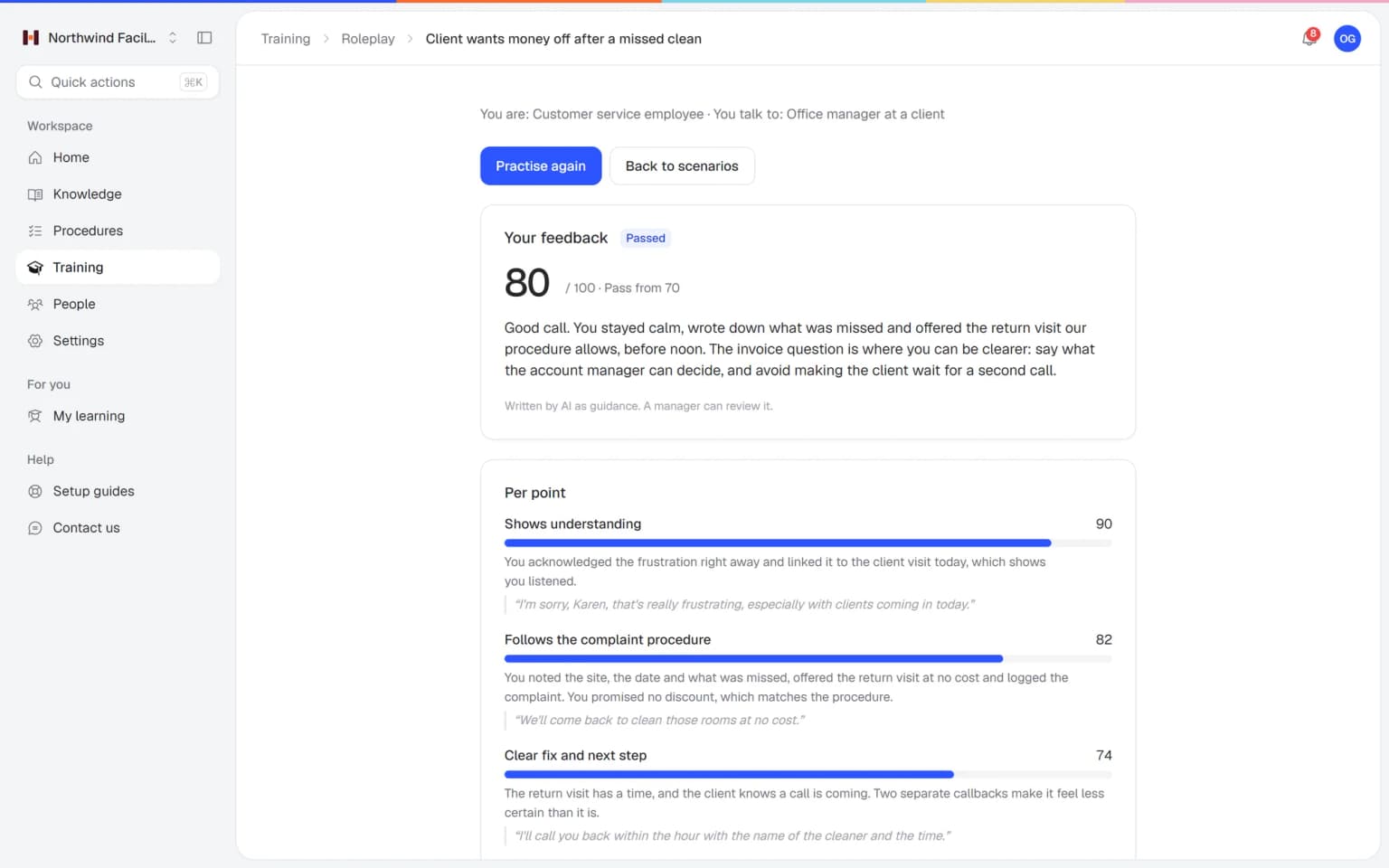
A parent is upset about a bump at pick-up, worried about how their child is settling in or unhappy with a policy. Staff practice those conversations with an AI that plays the parent, in a scenario you build from your own policies. Every conversation ends with a score and concrete tips.
- Scenarios from your own policies
- A score and tips after every conversation
- Practice during nap time, on a phone
- You see who is ready
What else belongs with your policies
What you need after a new safeguarding version, a new substitute or an inspection plugs straight into the same policies.
Made for a day on the floor
What Helpable takes off your plate, and what it doesn't
An honest list for childcare: Helpable holds your policies and staff training, and child records stay in your own childcare system.
- Answers staff questions from your own policies, with the source
- Assigns onboarding to every new worker and substitute automatically (from Business Max)
- Sends reminders before and after a training due date
- Asks people to confirm a changed policy and tracks who did
- Reminds the owner when a policy is due for review
- Assigns refresher training again on your schedule (on Business Max)
- Turns your existing policy documents into searchable drafts
- Child records, attendance and parent communication: those stay in your own childcare system
- Staff rosters and staff-to-child ratios
- Writing your policies: Helpable holds and shares the ones you write
- Deciding whether you meet the rules: your own quality system does that
One fixed price for your whole team
Try Business Plus free for 14 days. No credit card needed.
Business
Your knowledge base for team and customers, written faster with AI.
- AI answers with the source
- An internal knowledge base and a public help center
- AI writes first versions from your own documents
- Start from what you have: documents, Word files and your website
- Procedures everyone follows, with read confirmations
- Your help center on your own web address
- 250 AI credits per month
Business Plus
Train your team on that knowledge: courses, quizzes and progress per person.
- Everything in Business, plus:
- Training with quizzes, due dates and reminders
- See per person who finished what
- Practice conversations with AI, included
- Video lessons and final tests
- Certificates you can show clients and inspectors
- Results exported in one click
- 3 help centers and 3 internal knowledge bases
- 750 AI credits per month
Business Max
Training that runs by itself, and proof of who really knows what.
- Everything in Business Plus, plus:
- New colleagues get their training automatically
- A fixed onboarding route from day one
- Learning insights: who really studied and who clicked through
- Skills matrix and a training record per person
- Practical work signed off on the floor
- Locations with their own managers
- Refresher training that comes back by itself
- Certificates that expire on time, in your own design
- Your help center fully in your own brand
- 10 help centers and 10 internal knowledge bases
- 1,500 AI credits per month
Questions from childcare organizations
Is Helpable suitable for a small childcare organization?
Yes, Helpable is built for childcare staff training in teams of roughly 5 to 50 people, which fits most childcare centers and after-school programs. Every adult in the room gets the pick-up rules, the sick child policy and the safeguarding procedure on their phone, and you see who confirmed each version.
How fast can we start, and can we use our existing policies?
You can start with Helpable on the day you sign up, with a free trial of 14 days on Business Plus. Helpable takes your existing handbooks and policies as PDF, Word or text files, makes them searchable and suggests article drafts a manager checks. Start with the policies every adult in the room has to know, such as pick-up rules and the sick child policy.
Can staff use Helpable on their phone during the day?
Yes, Helpable works in the browser on phones, tablets and laptops, so a worker can check a step while the children carry on playing. Helpable has no native app to install, so a substitute can open a policy from a link.
How do we onboard substitutes with Helpable?
In Helpable you build a short first day with the pick-up rules, the sick child policy and the emergency plan, plus a quiz, and assign it to the substitute with a due date. Helpable counts every invited person as a team member, and extra team members can be added to your plan. From Business Max, a rule assigns the onboarding to everyone who joins.
Can we see who read the latest version of a policy?
Yes, in Helpable each worker confirms the version of a procedure they read, and after a change you ask them to confirm again. Helpable includes read confirmations on every plan; there are no automatic reminders for confirmations.
How do we see who is ready to work in a room?
Helpable shows per person which training they finished, their quiz scores, which policy version they confirmed and what is overdue. Helpable sends reminders before and after a training due date. Business Plus adds a CSV export, and Business Max adds results per team.
Can Helpable repeat training every year?
Yes, with recurring training on Business Max, Helpable assigns a training again on the schedule you set, with reminders before the due date. On that plan, Helpable certificates can also carry an expiry date, so you see what runs out soon.
Does Helpable help when an inspector asks about our policies?
Helpable shows which policy version each person confirmed and when, and which training they finished. Helpable does not decide whether you meet the rules: your own quality system and the standards you work with do that.
Does Helpable keep child records or talk to parents?
No, Helpable holds your policies, training and staff knowledge. Helpable does not connect to your childcare system, so child records, attendance and parent messages stay there. Parents see nothing in Helpable unless you publish a public help center yourself.
Is Helpable available in Dutch, and where is our data stored?
Helpable works in English and Dutch, so staff can use it in either language. Helpable stores your data in the EU, and roles decide who can edit, publish and see reports. Keep data about children in your childcare system.
What does Helpable cost, and which plan does a childcare team need?
Helpable starts at $29 per month for Business, with 3 team members, policies as procedures, read confirmations and a knowledge base. Helpable Business Plus at $89 per month adds 5 team members, training, quizzes, assigning with due dates, video lessons and certificates. For automatic assignment, yearly refresher training and certificates that expire you need Business Max, and you can try Business Plus free for 14 days.
How is Helpable different from a binder in the staff room?
Helpable gives every policy one owner, one current version, a review date and a record of who confirmed it. In a binder you can't see who read the latest version; Helpable shows it per person and adds training, quizzes and reminders. Keep the binder for paper forms if you like, and put the steps every adult must follow into Helpable.
Helpable for childcare, in more detail
Childcare staff training: what centers search for
Owners, center managers and policy officers start searching when the health and safety policy changes, an inspection is coming up or a substitute covers the toddler room tomorrow. These are the questions behind those searches, answered with how Helpable fits a day with children.
Childcare staff training software for a small team
For a childcare center or after-school program with 5 to 50 staff, Helpable brings policies, onboarding, refresher training and a searchable staff handbook together in one place that works on a phone.
Childcare staff learn in short moments: during nap time, before the first parents arrive or after the last child is picked up. A lesson holds text, photos, a short video and a quiz, so a new worker can finish one between two rooms. Learning paths put trainings in a set order, such as your educational approach first, then safeguarding, then safe sleep, allergies and medication. From Business Max, a rule enrolls each new hire automatically.
Childcare policies and procedures every staff member knows
With Helpable, your health and safety policy and your educational policy become procedures and articles with an owner, a review date and a version history, and every staff member confirms the version they read.
A policy on the shelf helps nobody at a quarter past eight, when a child falls off the climbing frame. Break it into short steps people can find: what to do after a fall, how to check the outdoor play area, the four-eyes principle and who your backup is when you are alone in a room. When an inspector asks a worker about the policy, a short quiz in the training has already shown whether they know it. Our page on SOP software shows how procedures are built.
Allergy and medication procedures in childcare
In Helpable, your allergy and medication procedures are clear steps every adult in the room can open: how to check the allergy list before a meal, what to do when a child reacts and how to give medication with the parents' written consent.
Which child has which allergy, and the signed consent forms, stay in your own childcare system. The steps live in Helpable, and the child record holds the child. The procedure can say where staff find that list, so a substitute knows where to look before lunch. When something changes, such as a new rule for birthday treats, everyone confirms the new version, and you see per person who did on the read and acknowledge overview.
Onboarding new childcare workers and substitutes
A substitute from the pool who covers the toddler room tomorrow can have a short first day ready in Helpable today: the pick-up rules, the sick child policy, the emergency plan and the allergy procedure, with a quiz and a due date.
They open it from a link on their phone the evening before, so the room lead doesn't have to explain everything while children arrive. During the day they look up a policy or ask a question in their own words, and Answers replies from your own policies with a link to the source. When it doesn't know, it says so, and the question shows up as a gap for the policy officer.
New permanent staff follow a longer onboarding, with reminders before the due date and a manager who sees who is ready to work in a room.
Showing an inspector who read the latest policy
When an inspector asks who knows the updated safeguarding procedure, Helpable shows per person which version they confirmed and when, which training they finished and how they scored, with an export to CSV from Business Plus.
The list of who is still open shows the colleague who was on leave and the substitute who hasn't confirmed yet. You send them a request yourself, since there are no automatic reminders for confirmations. Training that comes back every year, such as safeguarding or the evacuation plan, repeats every 6, 12 or 24 months with recurring training on Business Max, with certificates that expire. Helpable records who read and learned what, and whether you meet the rules is up to your own quality system.
Answering parents' questions with a help center
Parents ask the same questions every week, and a public help center in Helpable answers them at any hour: when a sick child has to stay home, what to bring on the first day, how settling in works and how to swap a day.
Each article asks the reader whether it helped, and Insights show what parents searched for and couldn't find, so you know which answer to write next. The help center holds general information only, and messages about a specific child stay in your parent app.
Every adult in the room on the current policy
Put the policies every worker has to know on every phone this week, prepare your next substitute and see who is up to date.
Start free trial- 14 days free
- No credit card needed
- Cancel any time