Start training today
Six editable templates or an AI draft from your own procedures. Lessons stay linked to their source.
- Onboarding, SOP training, company policies and more
- AI drafts from your own content
- Stays a draft until you publish
Turn SOPs into training people complete, with quizzes, certificates, reports and practice conversations with AI. Whale is strong at capturing SOPs fast from screen recordings and video; Helpable focuses on what happens after. Here is how they compare.
Whale captures SOPs fast from screen recordings and video. Helpable adds practice: your team rehearses the conversation with an AI customer and gets feedback.
Illustration with a fictional demo company. The Whale side is a simple sketch of an SOP, drawn by Helpable.
Whale's column is based on its own website and help center. Many features depend on the plan; check their site for details.
| Whale and Helpable side by side | Helpable | Whale |
|---|---|---|
| Procedures (SOPs)Steps people can follow on the job cut mistakes; Helpable gives every procedure an owner and a review date, so it stays current. | Numbered steps with images and checklists, owner, review date, versions | SOPs from screen recordings, video or documents |
| Screen recording to SOPWhale records the screen and turns video into an SOP; Helpable does not, and builds procedures from text and documents. | Not available | Yes (screen recording and Video-to-SOP) |
| Training and quizzesWhale has training flows and AI quizzes; Helpable adds certificates, reports and practice conversations with AI feedback. | Lessons, quizzes with six question types, certificates from Business Plus (expiry on Business Max) | Role-based training flows and AI quizzes |
| AI answers to employee questionsAn answer with its source is one people can trust and check; Helpable answers only from your own content and says so when it doesn't know. | Yes: answers from your own articles, procedures and documents, with the source | Yes (AI assistant) |
| Read confirmationsWhen a procedure changes, you need to know who knows; Helpable asks for a confirmation per version and shows who is still pending. | Per version, with an overview of who confirmed and who is pending | Read assignments with due dates; e-signatures on higher plans |
| Checklists and tasksA checklist keeps people on track during the work; in Helpable it sits inside the procedure step it belongs to. | Checklists inside procedure steps; no recurring task lists | Checklists |
| IntegrationsImporting what you have saves days of copy and paste; Helpable reads Notion pages, websites and GitHub and checks them for changes every day. | Imports from Notion, websites and GitHub; email and in-app notifications | Slack and Zapier on higher plans; HR systems on Enterprise |
| Interface languagesWhale translates content into Dutch, among others; Helpable's whole app is in English and Dutch, so every screen speaks the team's language. | English and Dutch | Not listed (content translation to Dutch and others) |
| Where data is storedWhere data lives is often the first question in a client's security check; Helpable stores it in the EU on every plan. | EU | EU (Belgium) or US, your choice |
Based on public information from usewhale.io and help.usewhale.io, checked on October 14, 2026. Features change; check Whale's site before you decide.
Pick Whale if you want to capture SOPs from screen recordings or video, need a browser extension, Slack, Zapier or HR system links, or want to start on its free plan for one creator.
Pick Helpable over Whale if you want procedures turned into training people complete, with certificates, reports and practice conversations with AI, in an app available in English and Dutch.
Use Whale and Helpable together if Whale records your software SOPs and you want training, certificates and conversation practice in Helpable; since both cover SOPs, one tool is usually enough.
Whale calls itself an SOP platform for teams to document, share and manage their standard operating procedures. You can create SOPs from screen recordings, from video or from imported documents.
It adds verified knowledge libraries, role-based training flows that can start when someone is hired, AI quizzes, an AI assistant that writes and checks SOPs, a browser extension, and integrations such as Slack and Zapier on its higher plans. It has a free plan and lets you choose EU or US hosting.
Common reasons we hear, which may or may not apply to you.
Teams that need certificates with expiry dates and reports per team and person look at how each tool handles training.
Helpable's app is available in English and Dutch. Whale can translate content into Dutch; its interface languages are not listed on its site.
Helpable can publish a public help center next to the internal knowledge base.
Employees ask a question in their own words and get a short answer from your own articles, procedures and documents, with a link to the exact page it came from. You stop being the person everyone asks.
Upload your handbook or policies. Helpable makes them searchable right away and suggests articles you check, change and approve. Nothing goes live until you say so.
When the answer isn't there, Helpable says so and the question lands on your list of things to write down, with no name attached.
Helpable picks up where documenting stops: people learn the procedure, prove it, and you see the result.
Six editable templates or an AI draft from your own procedures. Lessons stay linked to their source.
A short quiz after the lesson, with feedback per answer and a pass mark.
See who is on track and who is overdue.
Turn your procedures into training people finish, and see who is ready.
Start from employee onboarding, remote onboarding, customer service basics, company policies, security awareness or SOP training.
AI builds a training from the articles and procedures you choose, and each lesson links back to its source.
Set a pass mark and the number of attempts, so you know people understood the procedure.
Certificates are issued on completion, with an optional expiry date and a public link to verify them.
Assign training with a due date, give every new team member the right training and send reminders when it is due or overdue.
See completion, overdue work, scores and certificates per training, team and person, and export to CSV.
Try Helpable free for 14 days, no credit card needed. Then pick the plan that fits your team.
Your knowledge base for team and customers, written faster with AI.
$29/month
Billed monthly
That's $0.95 a day
Start free trialTrain your team on that knowledge: courses, quizzes and progress per person.
$89/month
Billed monthly
That's $2.93 a day
Start free trialEverything in Business, plus:
Training that runs by itself, and proof of who really knows what.
$179/month
Billed monthly
That's $5.88 a day
Start free trialEverything in Business Plus, plus:
Add these to Business and up, any time. You only pay for what you use.
Add people one by one as your team grows, for a fixed price per person on every plan.
$9/month
A help center and handbook for another brand, location or client.
$10/month
Remove “Powered by Helpable” from your help center. Included in Business Max.
$19/month
You can have your most-used knowledge and a first training in Helpable on the same day. Whale keeps working for as long as you want it to.
Upload the files you have (Word, PDF, Markdown, text or CSV), import a public website or connect Notion under Settings › Integrations. Each one becomes a searchable document. Copy the text and images of each Whale SOP into a document, or export what Whale allows on your plan.
AI turns each document into a draft article or procedure. You read it, fix what is off, give it an owner and a review date, and publish. Nothing goes live by itself.
Pick the articles and procedures a new colleague needs and say who it is for. AI drafts lessons and quiz questions that link back to them. You check and publish.
Invite people by email, put them in teams and assign training and procedures with a due date. Ask for read confirmations; reminders go out by email.
Try Helpable free for 14 days on Business Plus, no credit card. Keep Whale running until you see the team use Helpable, then decide.
We bring in your documents, write your first procedures and build your first training for you. You pay once, next to your plan, and we confirm the scope before we start.
Helpable suits teams of about 5 to 50, in almost any sector, that need people to learn the procedures and show they did.
Hospitality and retail teams where new people need to learn the procedures fast.
In practice: A hotel kitchen has every new cook pass the allergen quiz before the first service, and the head chef can show the certificate when the inspector visits.
See howInstallers, cleaners and field staff who learn the work on site.
In practice: An installation company sees per technician who passed the safety training and who is overdue, and reminders reach the late ones by email.
See howTeams that must prove everyone read the latest protocol.
In practice: A childcare center assigns the new medication protocol to every carer and exports the report when the inspector asks for proof.
See howKeep procedures current, ask for read confirmations and get a weekly summary of overdue training.
In practice: Every Monday the operations manager of three stores reads the weekly summary and calls only the store where people are overdue.
Teams that need support and sales trained on product changes, with proof of who finished the training.
In practice: Sales and support pass a short quiz on each product change, so the team lead knows who is ready to talk about the new feature.
See howHelpable is a good Whale alternative for teams that care most about training people on their procedures, with quizzes, certificates and reports, in English or Dutch. If you mainly want to capture SOPs from screen recordings or video, Whale does that and Helpable does not.
No. In Helpable you write procedures as numbered steps with text, images and checklists, or start from a template. The AI writer can draft knowledge base articles from your files and links.
Helpable has a free trial of 14 days on Business Plus with no credit card needed, followed by Business, Business Plus or Business Max. There is no free-forever plan.
Yes. Helpable stores data in the EU. Whale also offers EU hosting as an option.
Yes. From Business Max, Helpable assigns a training automatically to every new member of the workspace or of a team, with a due date counted from the day they join, and sends reminders.
Helpable has no automatic import from Whale. Paste your SOPs into procedures, or add exported PDF and Word files to the AI writer to draft articles you check and publish.
Helpable starts at $29 per month for Business, with 3 team members, a knowledge base, read confirmations and the AI writer. Business Plus ($89) adds training with quizzes, due dates and progress per person, and Business Max ($179) adds automatic assignment and more AI credits. Whale charges a flat price per workspace plus paid creator seats; check its pricing page to compare.
Yes. Helpable's app is available in English and Dutch, and you can write your content in either language.
Yes. Helpable works in the browser on a phone, tablet or laptop, so people can open a procedure or a lesson on site. There is no native app yet.
Helpable is for service companies with roughly 10 to 50 people that want to write down how the work is done and train people on it. Owners, operations managers and team leads use it to onboard new people and see who has finished which training.
Whale is strong at capturing SOPs fast, so people searching for a Whale alternative usually want to know what happens after the SOP is written. Here are the common questions, answered for teams of 5 to 50.
For teams where the hard part is getting people to learn the work and prove it, Helpable is a Whale alternative built around employee training: lessons, quizzes with a pass mark, certificates and reports per team and person. Whale calls itself an SOP platform, with role-based training flows, AI quizzes and read assignments with a due date.
In a hotel kitchen, for example, writing the allergen procedure is the easy part. The head chef needs every cook to learn it, pass a short check and show proof when the inspector visits. In Helpable the procedure becomes a lesson, the quiz offers six question types with feedback after each answer, and the certificate comes as a PDF with a public page anyone can check. Read more about quizzes.
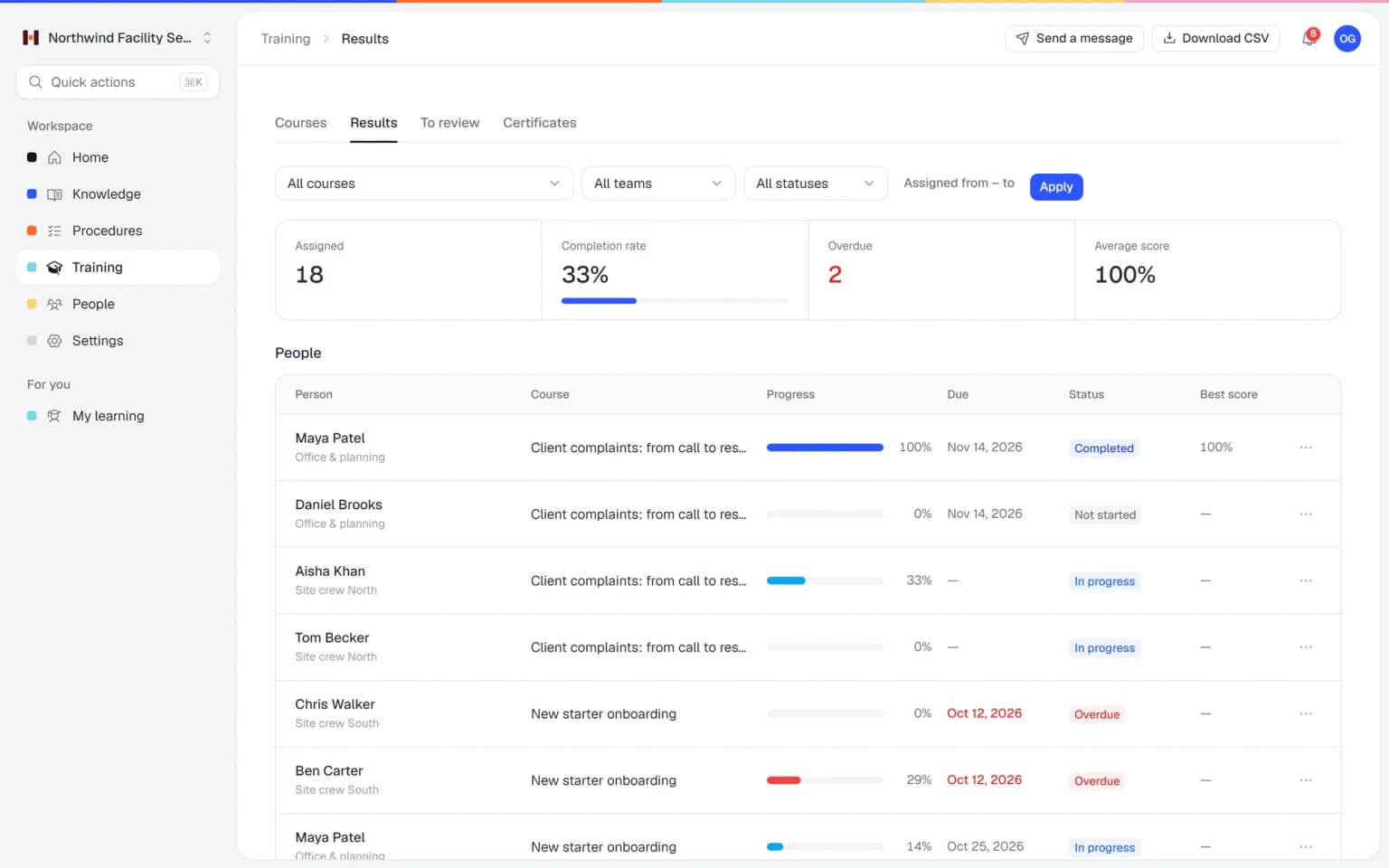
With Helpable you see completion, overdue work, scores, pass rate and certificates per training, team and person, and you can export everything to CSV.
That is the screen an operations manager with three locations opens on Monday. One location is on track, another has four people overdue on the new opening procedure. Reminders already went out before the due date and when it passed, so the manager only has to call the location lead. A weekly summary by email brings the same status to people who do not log in every day. More on employee training software.
No, Helpable has no screen recording: you write procedures as numbered steps with text, images and checklists, or start from a template.
Whale creates SOPs from screen recordings, from video and from imported documents, which saves time when the work happens on a screen. In Helpable the time savings come later in the chain. The AI writer drafts articles from your PDF or Word files, and AI drafts a training from finished procedures, with each lesson linked to its source. For hands-on work like installing a device or cleaning a room, short numbered steps with a photo per step are easy to follow on a phone. See how procedures work.
Switching to Helpable starts with copying the text and images of your most used SOPs, or exporting what Whale allows on your plan.
There is no direct Whale connection, so pick the procedures people open every week and move them first. Paste the steps into Helpable procedures, give each one an owner and a review date, and ask the team for a read confirmation. Then choose a template, such as employee onboarding or SOP training, or let AI draft a training from the new procedures. Assign it with a due date, and new people can get it automatically when they join. The page on employee onboarding software shows that flow.
Whale fits better if you want to create SOPs from screen recordings or video, start on a free plan, use a browser extension that shows guidance inside other tools, or need Slack, Zapier or HR system integrations.
Helpable has no free plan and no integrations today; it has a 14-day free trial with no credit card needed. Both tools can keep your data in the EU. Choose Helpable when structured training, certificates, reports and an app in Dutch weigh most for your team.
Put one procedure into Helpable, build a short training on it and compare.