Your team trained and ready to work.
Helpable puts your knowledge, procedures and training in one place, for teams of 5 to 50. Your team finds every answer on its own, AI writes articles from your documents and code, and new people learn the job with short courses. You spend less time explaining and chasing.
- Live in a day
- Works on any phone
- 14 days free

Request leave in the planner at least two weeks ahead. Your manager approves it.
Employee handbook · Section 4 · page 12Ask it. Or let it write.
Ask a question and get the answer from your own knowledge base, with the source. Switch to Write, say what the article is about, and Helpable drafts it. If something is missing, it asks you first, so it never makes up how your team works.
- Answers with a link to the source
- It asks rather than guesses
- You see what it costs before it writes
Every question becomes a finished article
Helpable sees what your team and your customers search for without an answer, and suggests the article. One tap, a few quick questions, and the article writes itself from your knowledge base, your documents and your code. Connect GitHub and Helpable also fixes the sentences a release made wrong.
- Suggestions from real searches
- A few questions first, so the facts are right
- Writes from your knowledge base, documents and code
- Kept up to date on every push to GitHub
From your own know-how to a team that can do the job
You put your knowledge in once. AI turns it into training, and your team practices the real conversation before a customer is on the line.
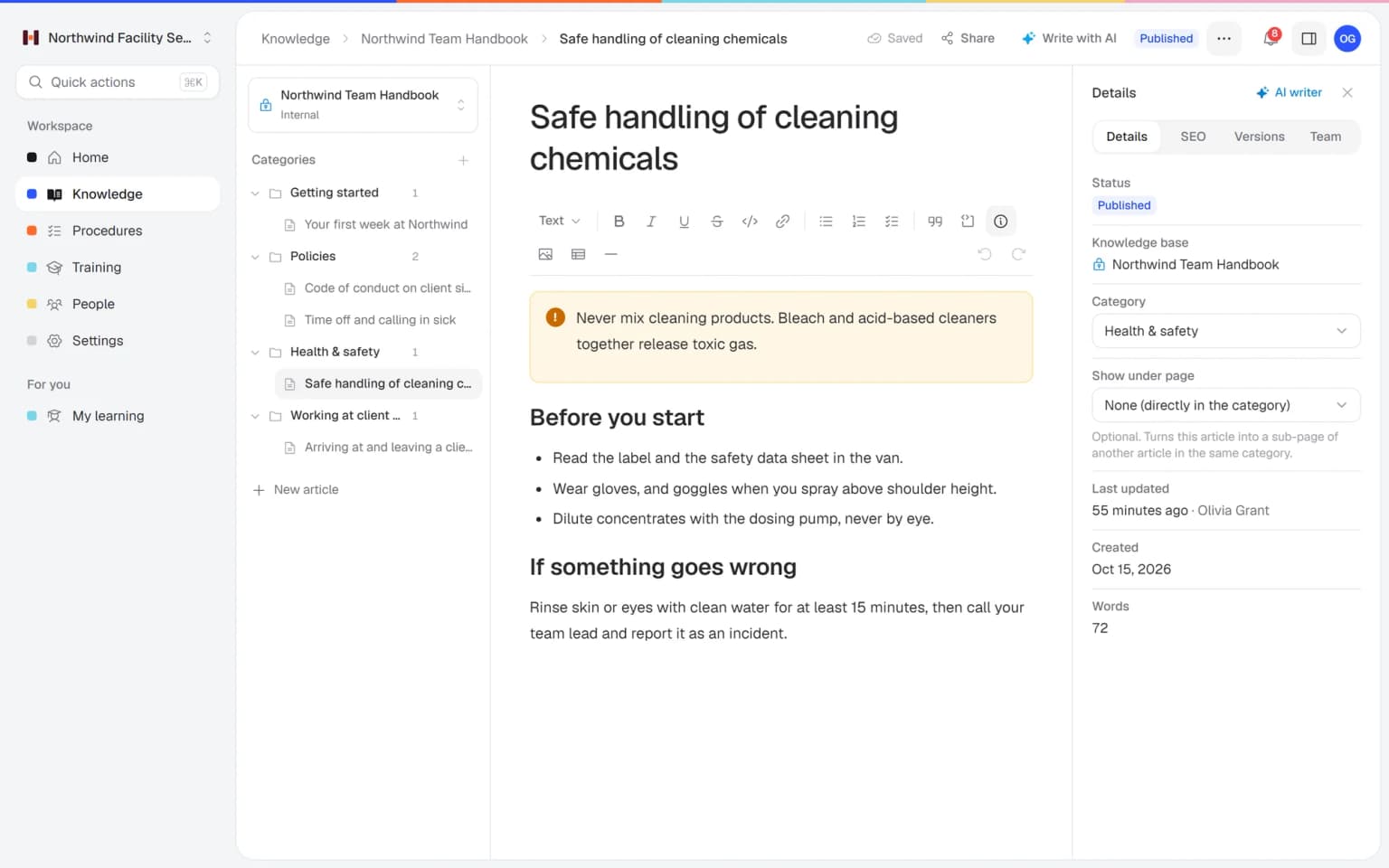
- 1. Add what your team must knowUpload your handbook, procedures or website. Your team can search it right away.
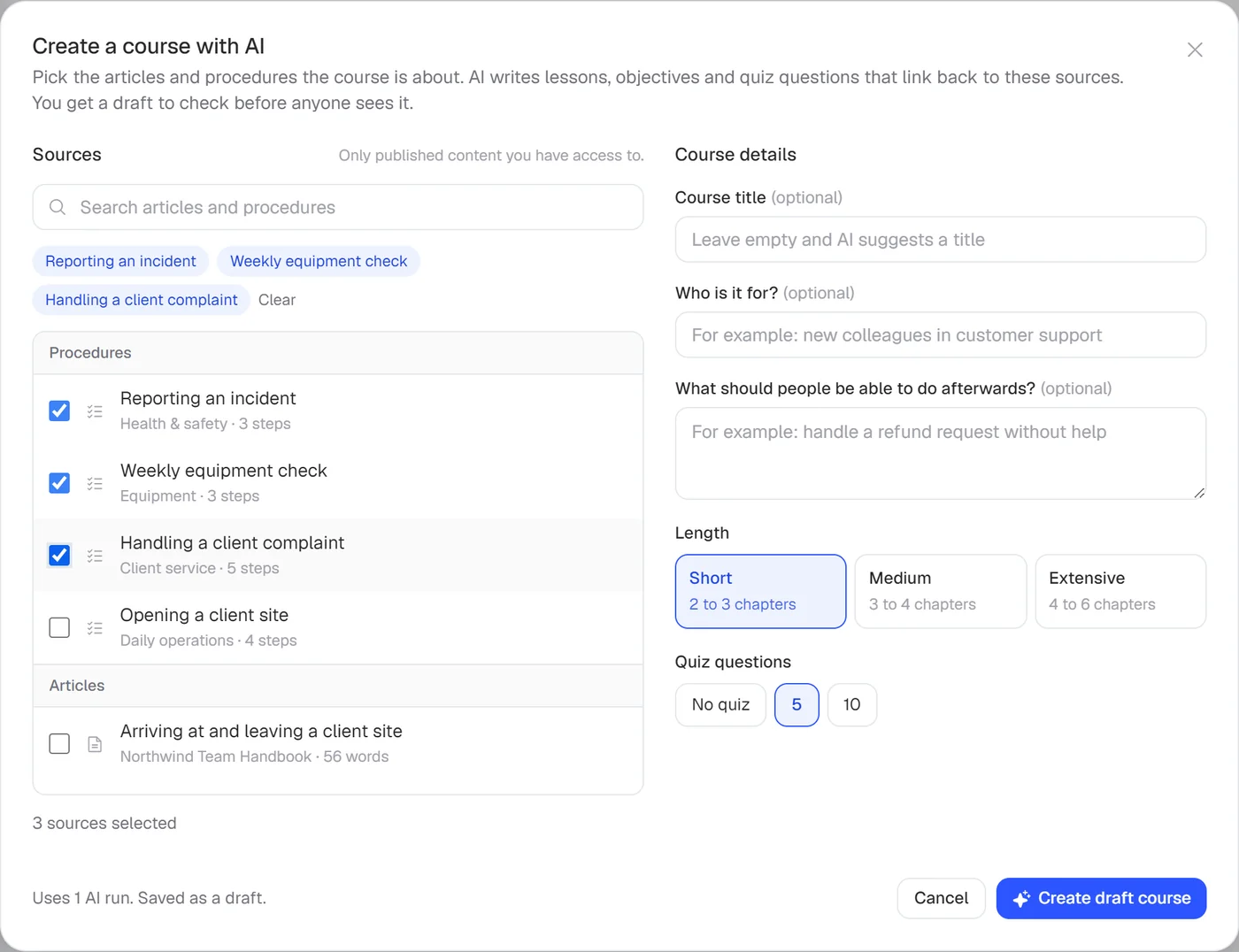
- 2. AI turns it into trainingLessons and a quiz from your own knowledge, in a few minutes. You check it and publish.
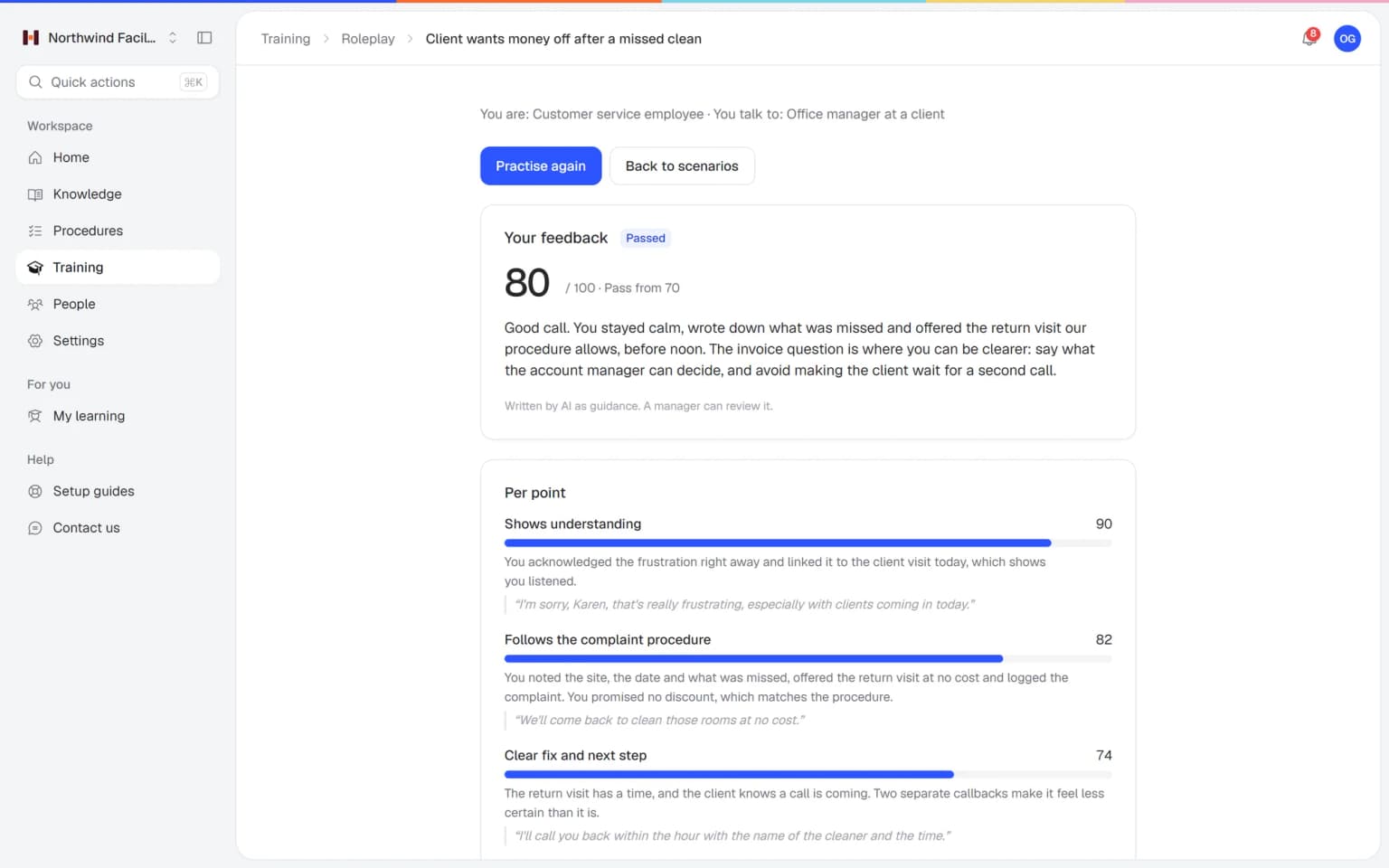
- 3. Your team practices the real conversationWith an AI customer, by typing or out loud, and feedback right away based on how you work. New people are ready on their first day.
Everyone knows how the work is done
With Helpable, every employee knows how the work is done. New colleagues are ready for the job sooner, fewer things go wrong and you stop answering the same questions. Training, procedures and your knowledge base work together in one place.
- New hires trained automatically
- A quiz proves they got it
- Refreshers repeat by themselves
- Fewer mistakes on the job
- Review dates keep steps current
- Proof of who read each version
- Answers in seconds
- Knowledge stays in your company
- One search across everything
One place where your team learns the work
Real screens from Helpable. Pick a part and see what it does for your team.
New colleagues ready for the job, sooner
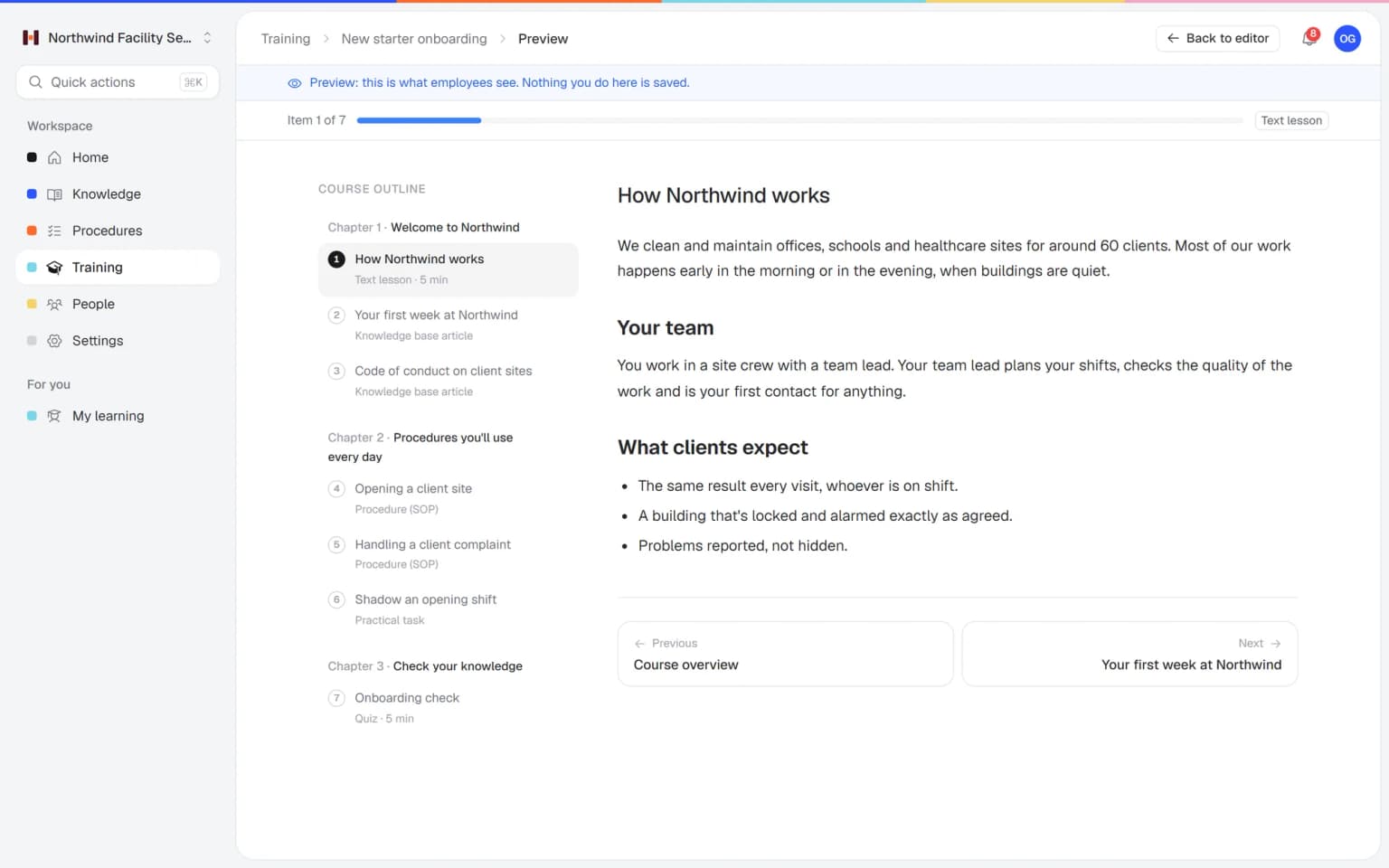
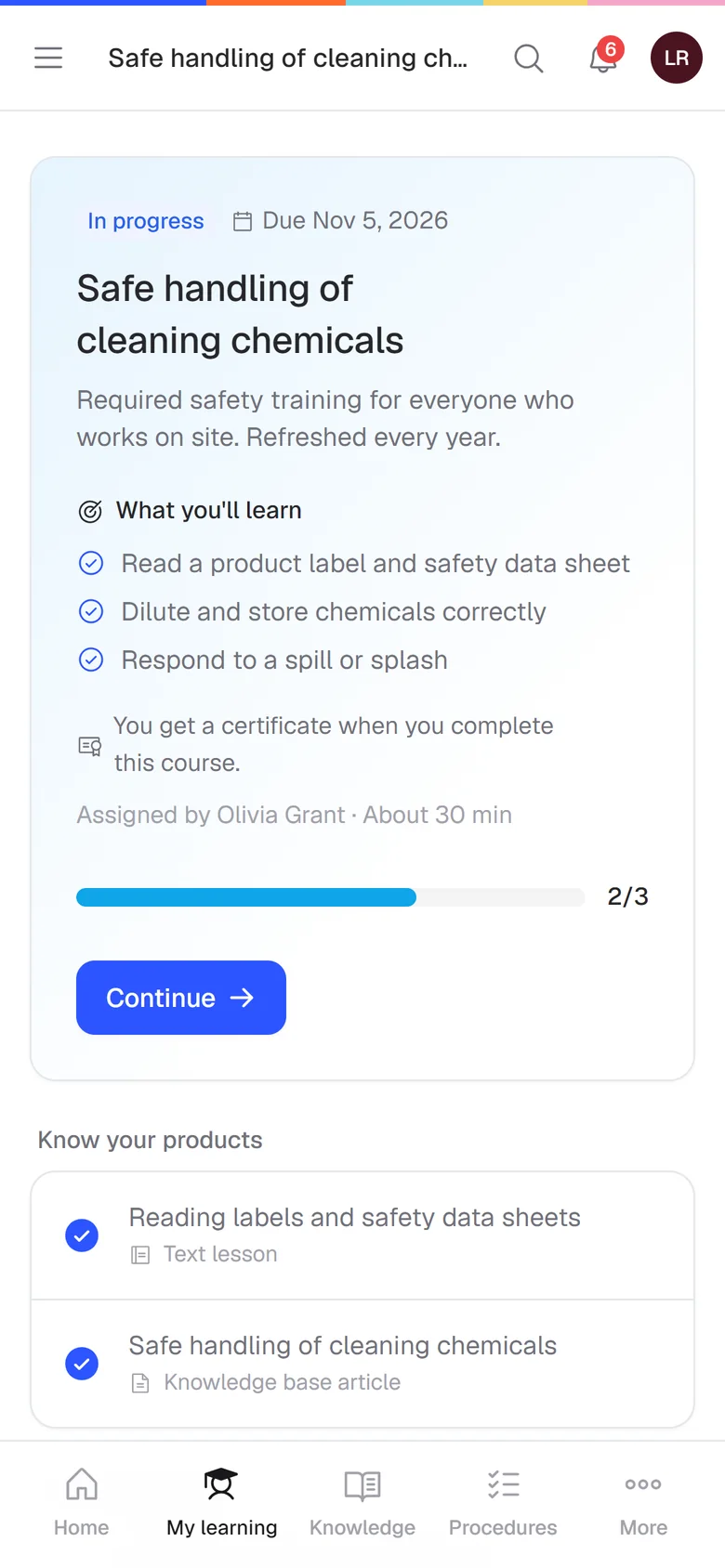
Give every new colleague the same clear training from day one. They learn at their own pace on their phone or laptop, and you only answer the questions that are left. You assign it once and Helpable sends the reminders.
- Picks up where they stopped
- A quiz shows what they know
- Certificate when they finish
Your team handles difficult customers with confidence
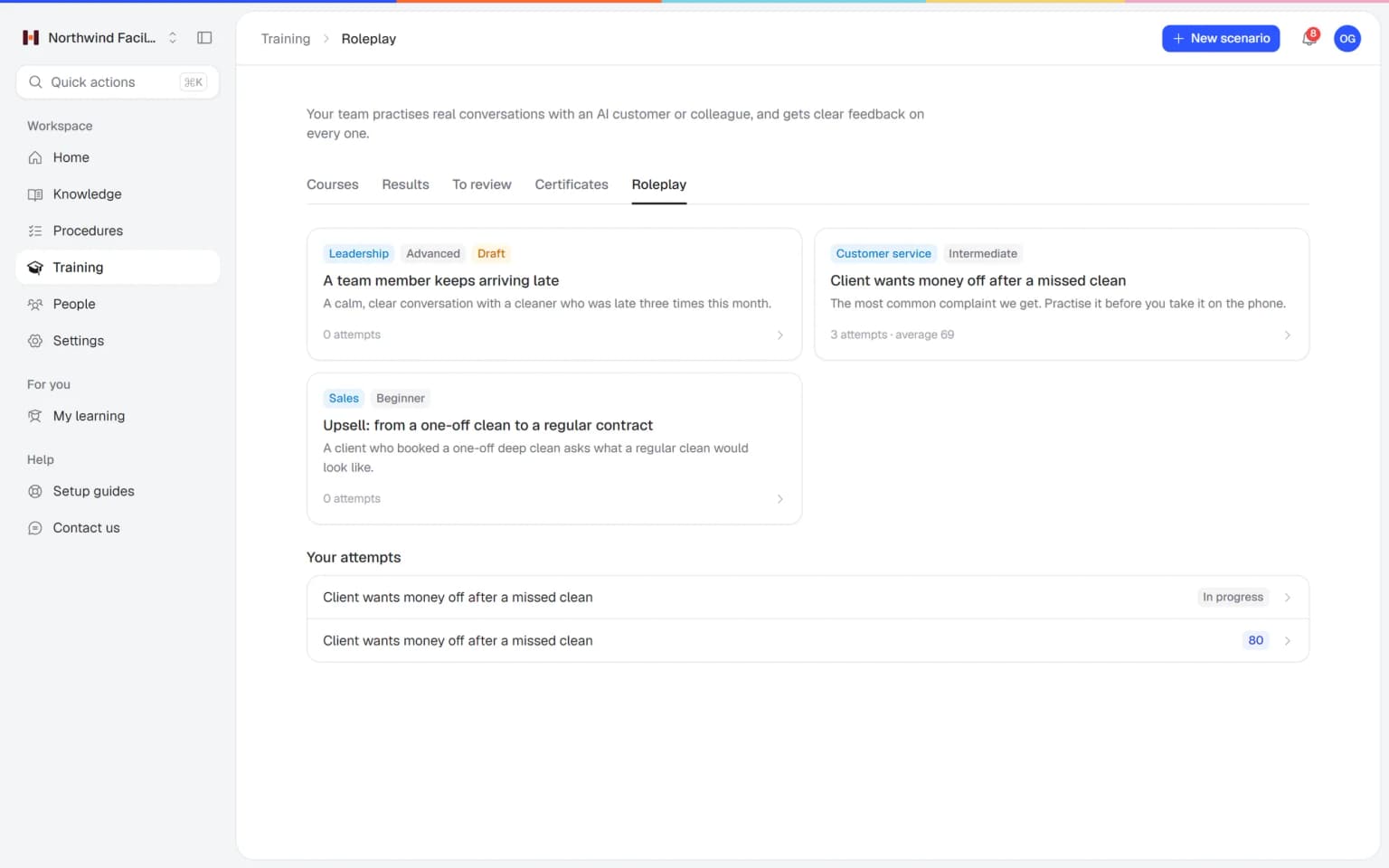
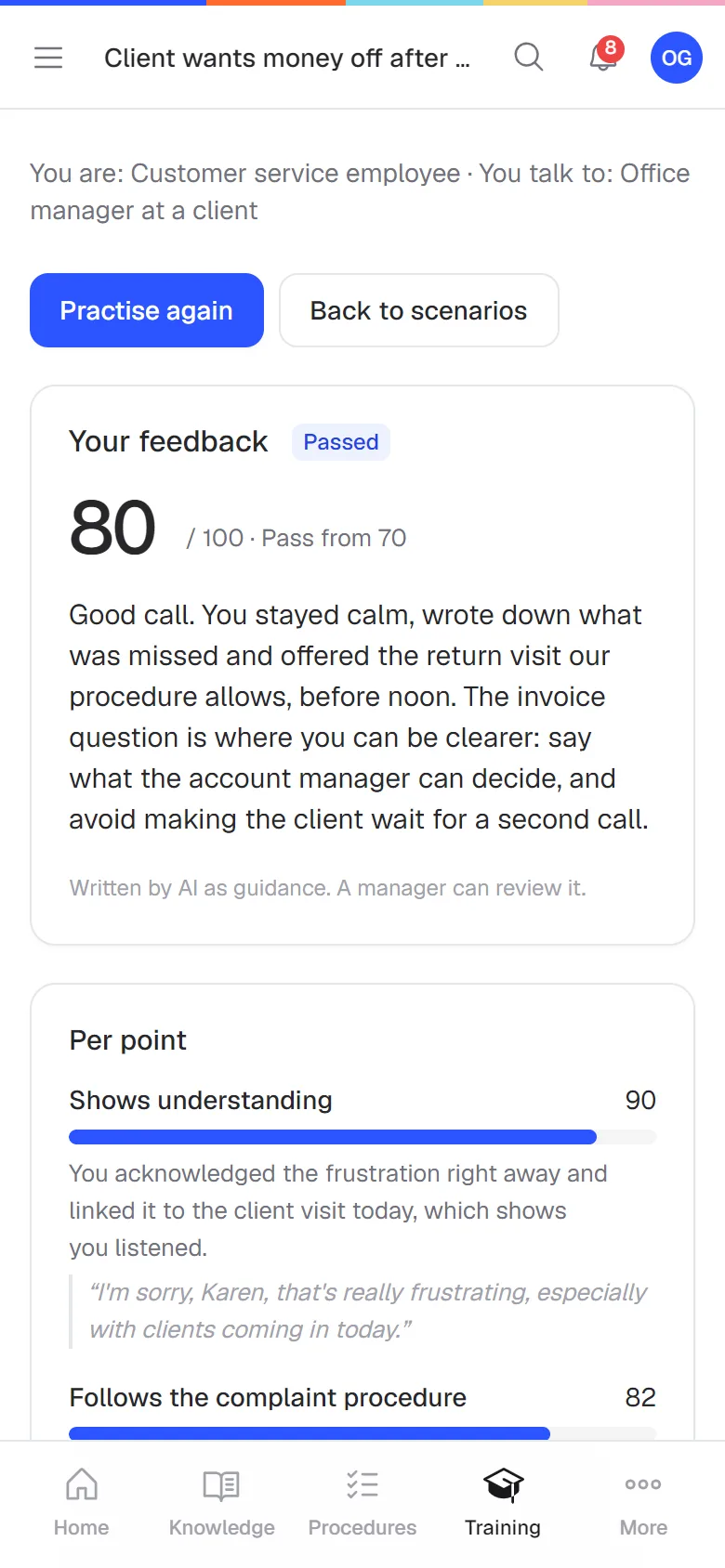
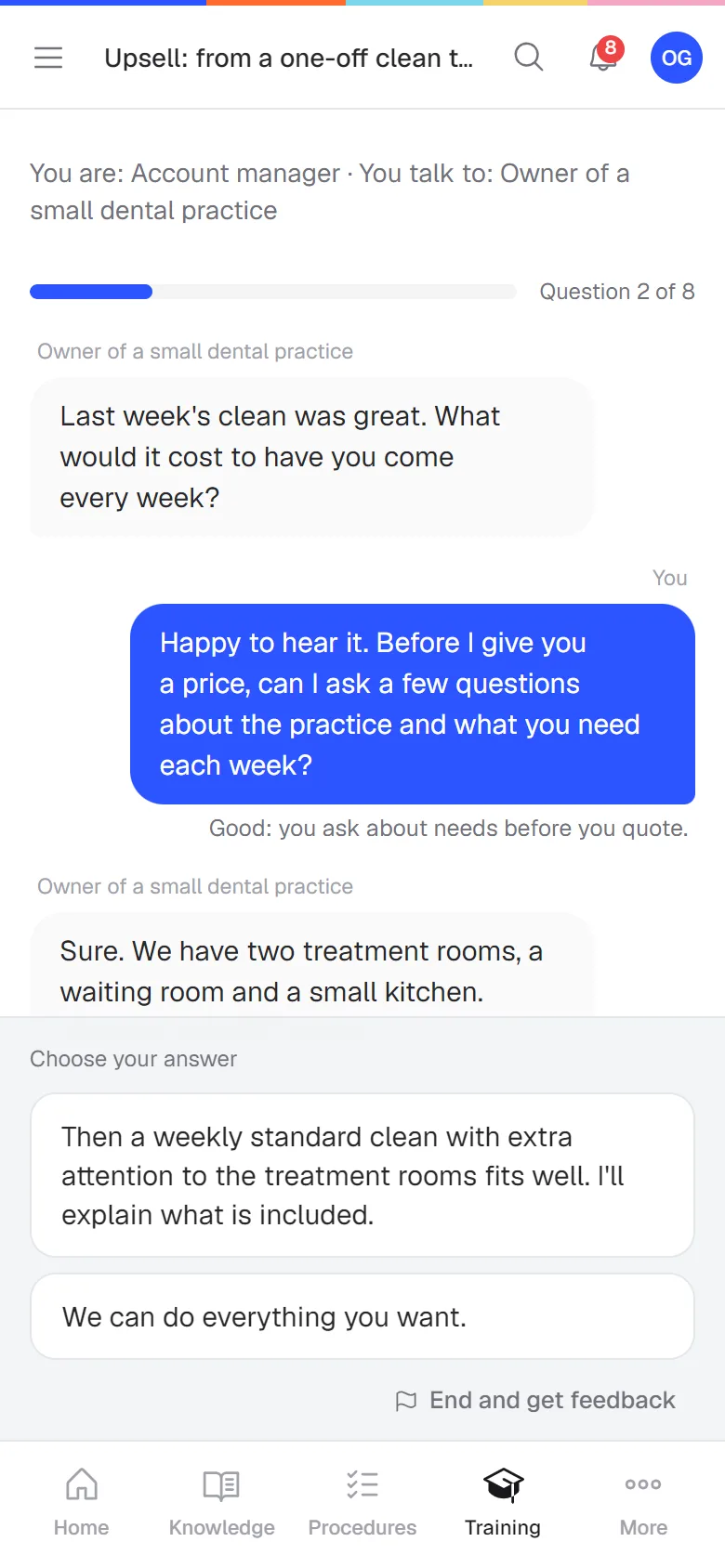
Your team practices real conversations with an AI customer or colleague, by typing or out loud, before it happens for real. Right after, they see what went well and what to say next time, based on your own procedures.
- Practice by typing or out loud
- Feedback on your own way of working
- Included in Business Plus and Business Max
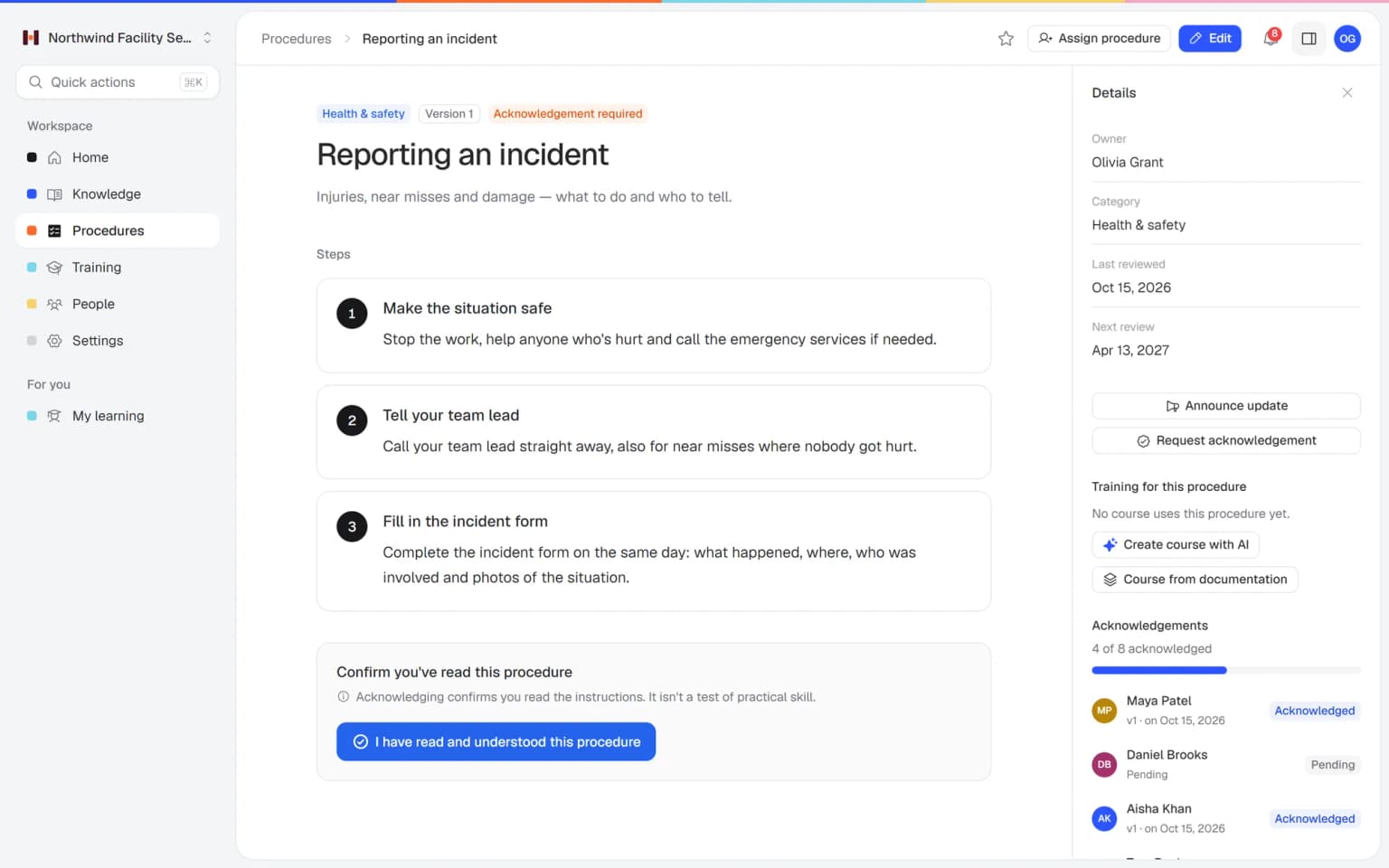
Everyone does the job the right way
Every task is written down once, step by step. When something changes, your team gets the new version and confirms they read it, so nobody keeps working the old way.
- Fewer mistakes and complaints
- Checklists and photos per step
- A review date for every task
Your team finds the answer on its own
Rules, ways of working and handy tips sit in one searchable place. Your team looks it up in seconds and keeps working, and you get interrupted less. Share part of it with your customers as a help center.
- Know-how stays when people go
- AI drafts from your own files
- Only your team sees the handbook
Know who is ready before something goes wrong
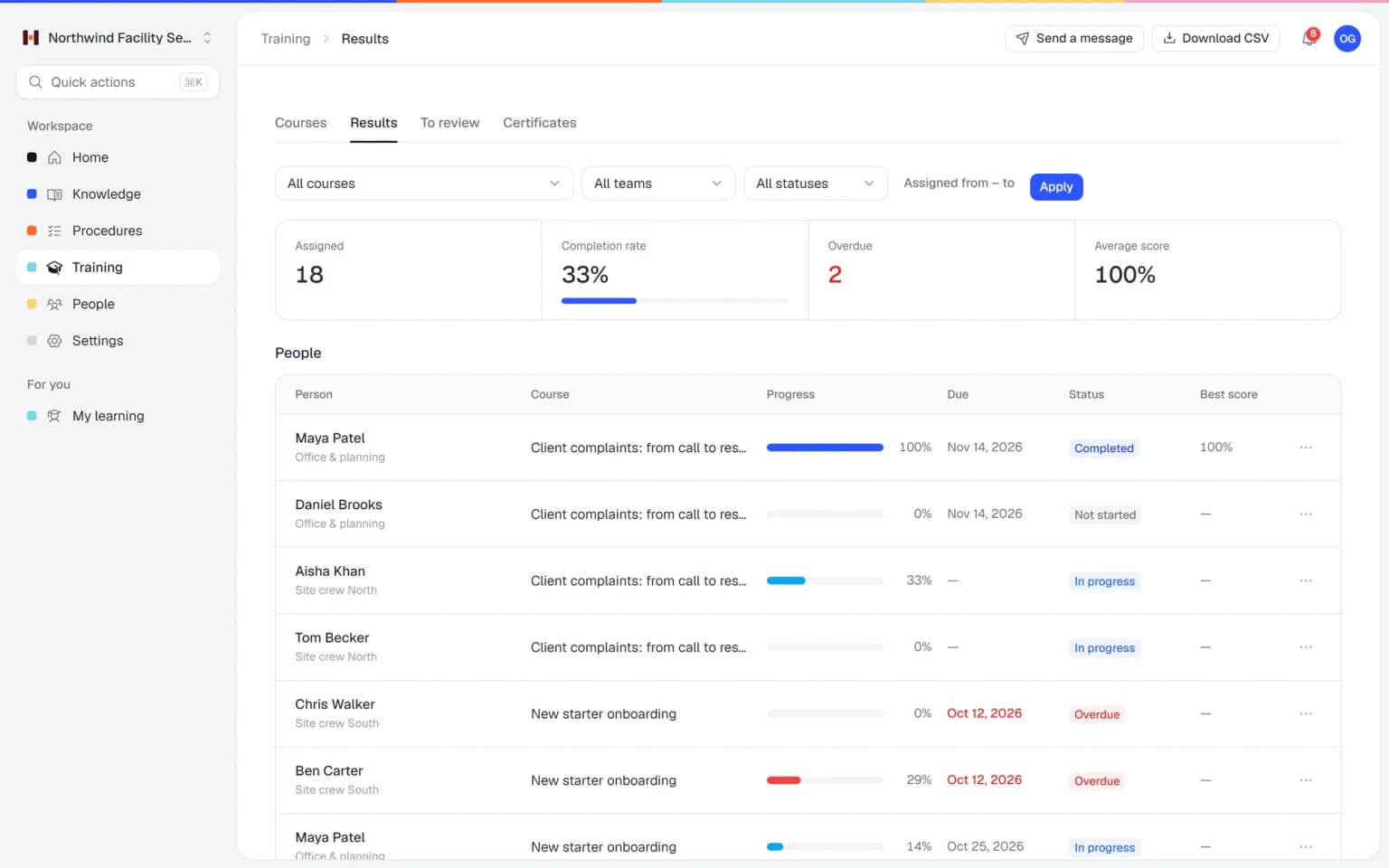
See per person who finished which training, how they scored and who is late. Help people in time and show clients or auditors who is trained.
- Scores per person and team
- Managers hear about overdue work
- Export a report in one click
Start every day knowing what needs you
One screen shows who is behind on training, which procedures still need a confirmation and what changed this week. You know right away where to start.
- A weekly summary by email
- Overdue training stands out
- One search across everything
Training people by hand costs more than you think
Most growing teams lose hours every week to the same four problems. Here is how Helpable solves each one.
Training that fits between two jobs
Your team opens training, procedures and answers on the phone they already carry, on site, in the kitchen or in the van. It runs in the browser, so there is nothing to install.
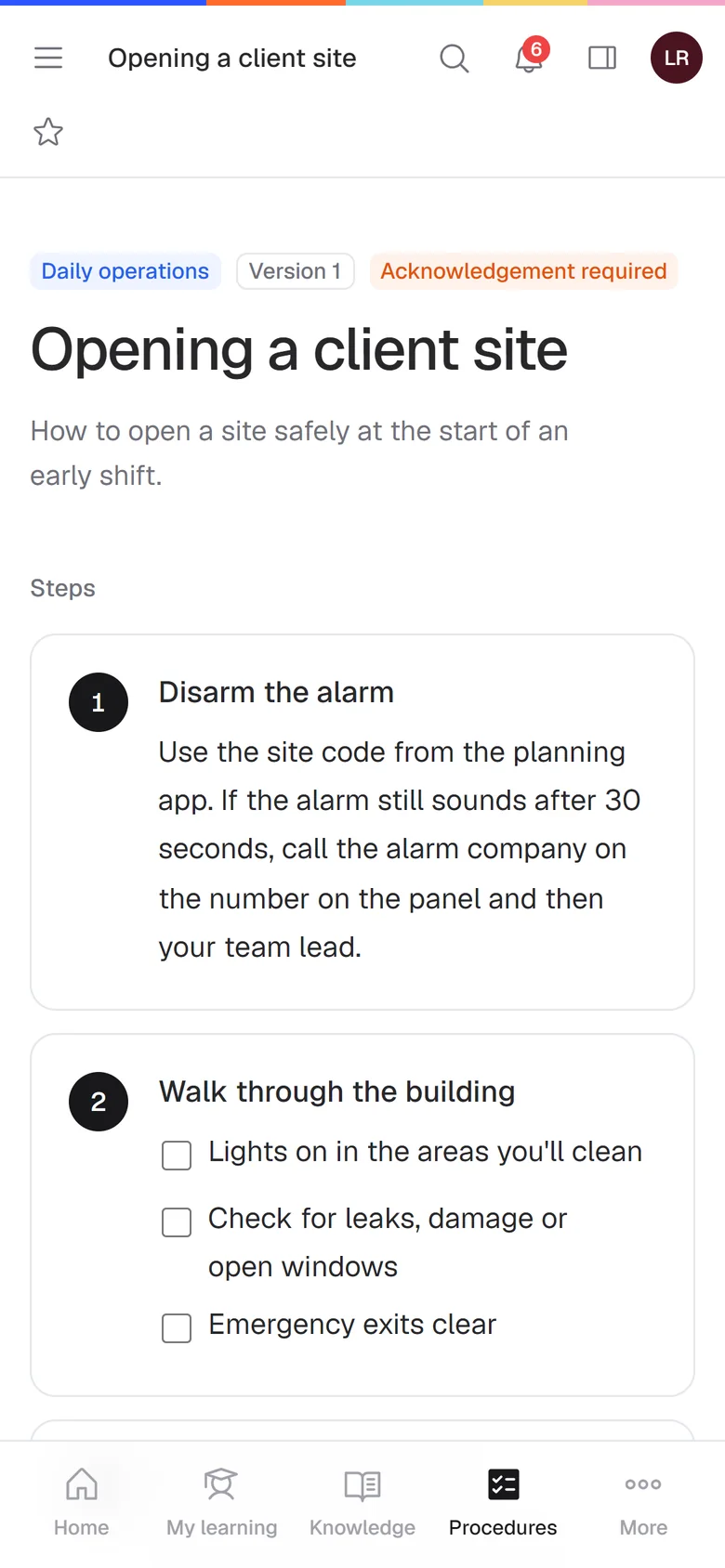
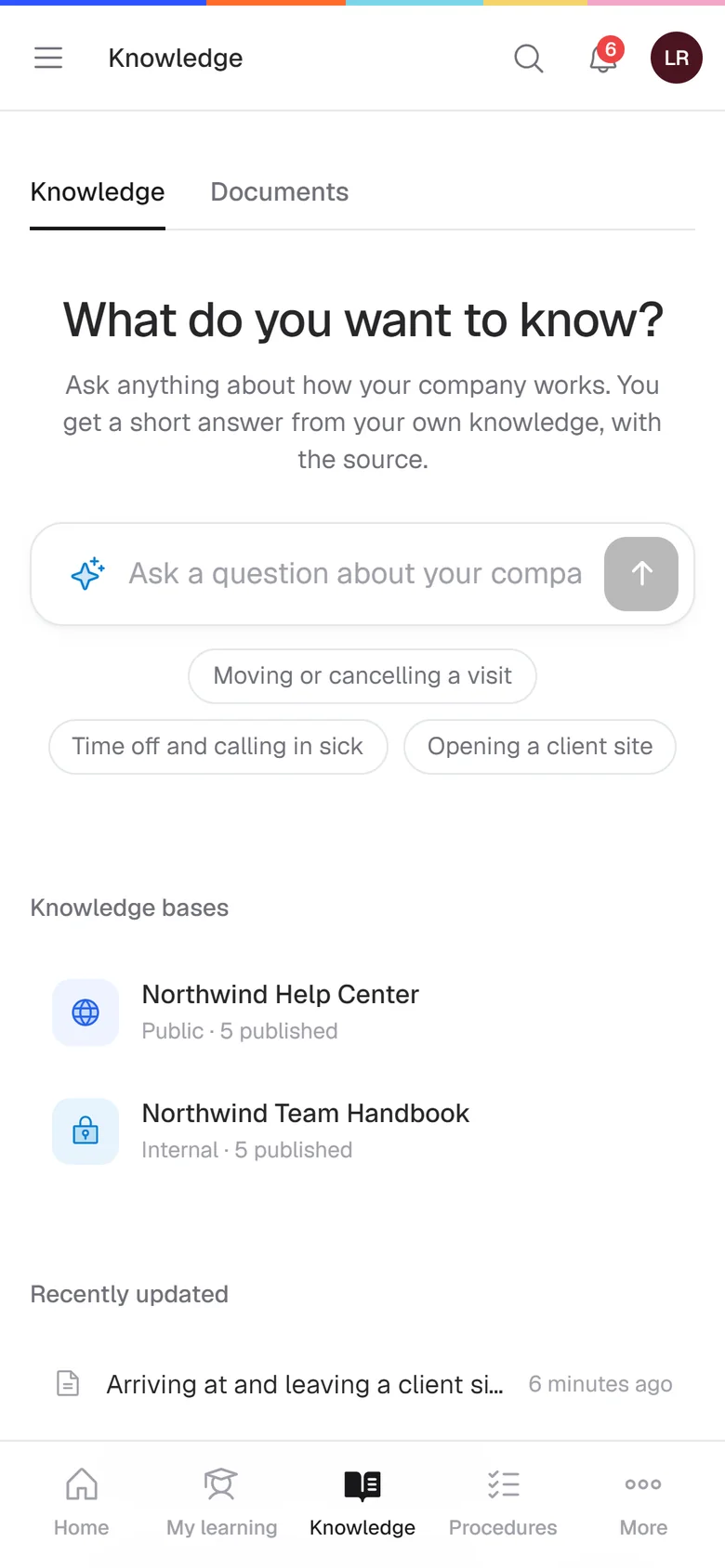
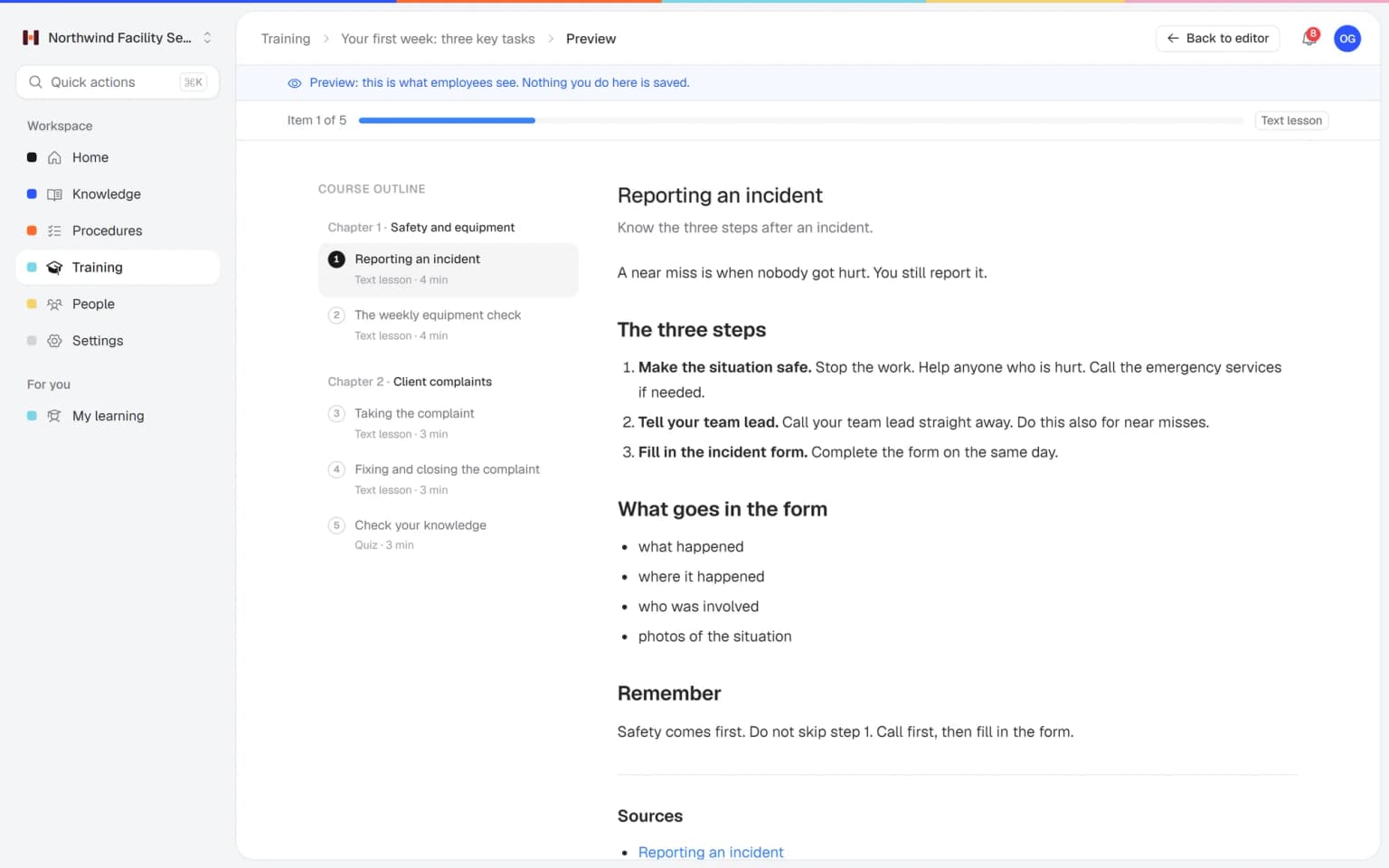
Your procedures become training in about a minute
Pick the articles and procedures you want people to learn and say who it is for. Helpable writes the lessons, learning goals and quiz questions for you. You check it, change what you like and publish.
- Only uses knowledge you pick
- Each lesson links its sources
- You pick length and quiz size
- Six ready-made templates
New people handle difficult customers with confidence from day one.
Your team practices real conversations with an AI customer or colleague, by typing or out loud, and hears right away what could be better, so the real conversations go well. Included in Business Plus and Business Max.
See how roleplay training works →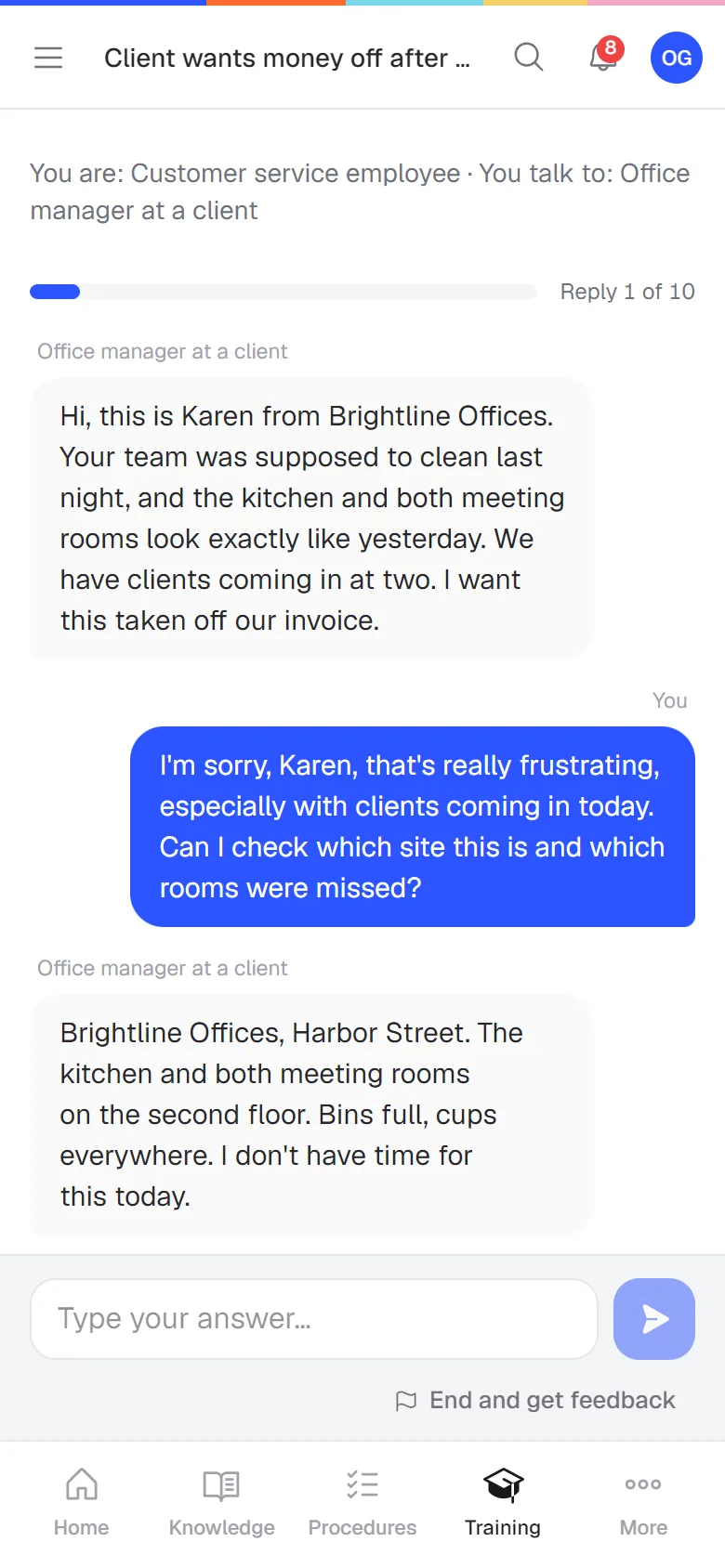
Everything a growing team needs
New people working on their own sooner
Set up the training for a first week once. Every new colleague gets it automatically, in the right order, with a reminder when it stalls. You spend your time on the work again.
- The same good start for everyone
- Less time spent explaining
- Reminders go out by themselves
Show that your team knows the work
For a client, an audit or a new contract, one overview shows who passed which training and what expires soon. That builds trust and saves you the digging.
- One overview of who can do what
- Dated certificates
- A training record per person to share
Fewer questions, more time
Your team asks in plain words and gets an answer right away from your own documents, with the source. You get interrupted less and the answer is the same every time.
- Answers with the exact source
- Says so when it doesn't know
- Open questions show what to write down next
Request leave in the planner at least two weeks ahead. Your manager approves it.1
Section 4 · page 12
See what goes well and where it stalls
One overview of who's done, who's behind and how it went. You see right away where someone needs help, with one team or several locations.
- Per person, team or location
- A short summary by email every week
- Download as CSV
For small teams that are growing
Helpable fits companies of about 5 to 50 people: a startup hiring its first people, an agency, or a team that works on site or at clients.
- 14 days free
- Live in a day
Works with the tools you already use
Build training from a chat in Claude or Codex, bring in your knowledge from GitHub, Notion or your website, and tell your team in Slack when something new is ready. Your Word files, PDFs and videos come along too.
 Claude
Build training from a chat
 Codex
Articles from your code and notes
 Slack
New procedures in your channel
 GitHub
Docs become plain articles
 Notion
Your wiki becomes searchable
 Word
Documents become articles
Lesson files and AI sources
 YouTube and Vimeo
Video lessons
 Excel and Sheets
Open your reports
 Microsoft Teams
Coming soon
 Google Drive
Coming soon
Your procedures and training in one tool
Of these five tools, Helpable is the one that puts training with quizzes, step-by-step procedures with read confirmations and a knowledge base in one place, for one price for your whole team. Training tools rarely handle procedures, and a wiki doesn't check whether people learned anything.
In short
- Helpable vs Trainual
- Trainual and Helpable both combine procedures and training. Helpable shows its prices openly, includes team members in every plan and starts with a 14-day free trial, while Trainual works with a demo and one-time implementation costs.
- Helpable vs TalentLMS
- TalentLMS is a learning management system for courses. Helpable also trains with courses and quizzes, and adds step-by-step procedures with read confirmations and a knowledge base, so the way of working and the training stay in one place.
- Helpable vs Notion
- Notion is a flexible wiki for notes and documents. Helpable adds what a wiki doesn't do: training with quizzes, a read confirmation per version and progress per employee.
- Helpable vs Confluence
- Confluence suits documentation for teams that work in Jira. Helpable is built to train people and to show who read and passed what, also for teams who work on the floor.
- When to pick Helpable
- Pick Helpable when a team of 5 to 50 people has to learn the work, follow the same procedures and find answers on its own. Pick a pure wiki when you only need to write things down, and a pure LMS when you only sell or run courses.
Based on public product information, October 2026. Other tools change too; check their websites for the latest.
Compare Helpable in more detail →Your knowledge stays yours
Plans for every stage
Try it free for 14 days. AI answers on every plan.
Business
Your knowledge base for team and customers, written faster with AI.
- AI answers with the source
- An internal knowledge base and a public help center
- AI writes first versions from your own documents
- Start from what you have: documents, Word files and your website
- Procedures everyone follows, with read confirmations
- Your help center on your own web address
- 250 AI credits per month
Business Plus
Train your team on that knowledge: courses, quizzes and progress per person.
- Everything in Business, plus:
- Training with quizzes, due dates and reminders
- See per person who finished what
- Practice conversations with AI, included
- Video lessons and final tests
- Certificates you can show clients and inspectors
- Results exported in one click
- 3 help centers and 3 internal knowledge bases
- 750 AI credits per month
Business Max
Training that runs by itself, and proof of who really knows what.
- Everything in Business Plus, plus:
- New colleagues get their training automatically
- A fixed onboarding route from day one
- Learning insights: who really studied and who clicked through
- Skills matrix and a training record per person
- Practical work signed off on the floor
- Locations with their own managers
- Refresher training that comes back by itself
- Certificates that expire on time, in your own design
- Your help center fully in your own brand
- 10 help centers and 10 internal knowledge bases
- 1,500 AI credits per month
Practical guides for your team's knowledge
Good to know
What is Helpable?
Helpable is employee training software for teams of 5 to 50 people. Companies use Helpable to train employees with short courses and quizzes, to write clear step-by-step procedures, and to keep all company knowledge in one searchable place. Managers see per employee who has read and completed what.
Who is Helpable for?
Helpable is made for small and growing companies where people learn the job while doing it, such as cleaning and facility services, hospitality, retail, SaaS and software companies, installation and maintenance, customer service teams and agencies.
How does Helpable help onboard new employees?
In Helpable you give every new employee a course with the articles, procedures and quizzes they need, with a due date. Helpable sends reminders and shows the manager when the new employee is ready to work on their own.
How do read confirmations for procedures work in Helpable?
When you publish a new version of a procedure in Helpable, employees confirm that they read it. Helpable shows who confirmed which version and when, so you know everyone works with the latest instructions.
How does Helpable create a course with AI?
You pick the articles and procedures the course should cover and say who it is for. Helpable's AI writes chapters, lessons, learning goals and quiz questions from those sources only, links every lesson to its sources and saves the course as a draft for you to review.
How is Helpable different from Trainual, TalentLMS, Notion or Confluence?
Helpable combines training, procedures and a knowledge base in one tool for small and growing teams. Training tools like TalentLMS focus on courses, wikis like Notion and Confluence focus on documents, and Helpable connects both so the same content is used to inform and to train.
What does Helpable cost?
Helpable has three plans: Business for $29, Business Plus for $89 and Business Max for $179 per month. You can try Helpable free for 14 days, and no credit card is needed to start.
How long does it take to set up Helpable?
Most teams have their first training ready on the first day. You can start from one of six course templates or let Helpable's AI build a draft course from your own procedures in about a minute.
Where does Helpable store our data?
Helpable is a European company and stores your data in the EU. Only people in your workspace can open your internal content, and roles decide who can edit, assign training or see results.
Can we move our existing documents into Helpable?
Yes. You can paste text into the Helpable editor or let the AI writer turn an existing document into an article. A good start is the ten questions your team hears most often.
Employee training software for small and growing teams
What is employee training software?
Employee training software helps a company teach its people how the work is done and keeps track of who has learned what. You put the steps, rules and know-how in one place and turn them into short courses, so you no longer explain every task in person. Employees learn at their own pace, on a laptop or phone, and managers see progress per person.
Helpable is employee training software built for teams of about 5 to 50 people. It combines three things that most small companies now keep apart: courses and quizzes, step-by-step procedures, and a searchable knowledge base. Because all three use the same content, you write something once and use it to inform people and to train them.
Why training, procedures and knowledge belong together
A procedure tells people how to do a task. A knowledge base lets them look it up later. A course makes sure they actually learned it. When these live in different tools, they drift apart: the course still shows last year's steps, and nobody knows which document is current. In Helpable, a course can use your procedures and articles directly, so when you update a procedure, the course shows the new version too.
Read confirmations close the loop. When a procedure changes, your team gets a message and confirms they read the new version. You see who confirmed and who still needs to, which is useful for safety rules, quality checks and client requirements.
Onboarding new employees faster
Most small companies onboard by letting a new colleague follow someone around. That works, but it takes the time of your best people and every new hire learns something slightly different. With Helpable you give each new employee a clear learning path with a due date: the house rules, the key procedures and a short quiz. Helpable sends reminders, so nobody has to chase, and shows the manager when the new colleague is ready to work on their own.
With automatic rules, new team members and whole teams get the right courses by themselves. Recurring training, such as a yearly safety course, starts again every 6, 12 or 24 months.
Create training with AI, from your own knowledge
Writing training material takes time. Helpable can turn your existing procedures and articles into a draft course in about a minute, with chapters, lessons, learning goals and quiz questions. The AI only uses the knowledge you choose, every lesson links back to its sources, and the course is always saved as a draft so you can check and change it before anyone sees it. You can also start from one of six ready-made templates for onboarding, customer service, company policies, security awareness, SOP training and remote onboarding.
Who uses Helpable?
Helpable is used by companies where people learn the job while doing it: cleaning and facility services, hospitality, retail and webshops, SaaS and software companies, installation and maintenance companies, customer service teams and agencies. If you regularly hire new people, work in shifts or at client sites, or need everyone to follow the same steps, Helpable gives your team one place to learn and look things up.
You can try Helpable free for 14 days, and no credit card is needed. Most teams publish their first training on the first day.