Training software for installers
Helpable is training software for installers and maintenance teams: new technicians work on their own sooner, every job is done your way and you know who is ready for which work. Fewer callbacks to fix work, fewer calls to the office from a customer's basement, and proof of safety training when a client asks for it.
- 14 days free
- Works on every phone
- Proof of who learned what
Where it pinches in an installation company
Callbacks to fix work, a senior technician tied up with a trainee, a client who wants proof of safety training: here is how you handle each with Helpable.
From the know-how of your best technician to a trained team
Three steps. Most teams finish the first one in an afternoon.
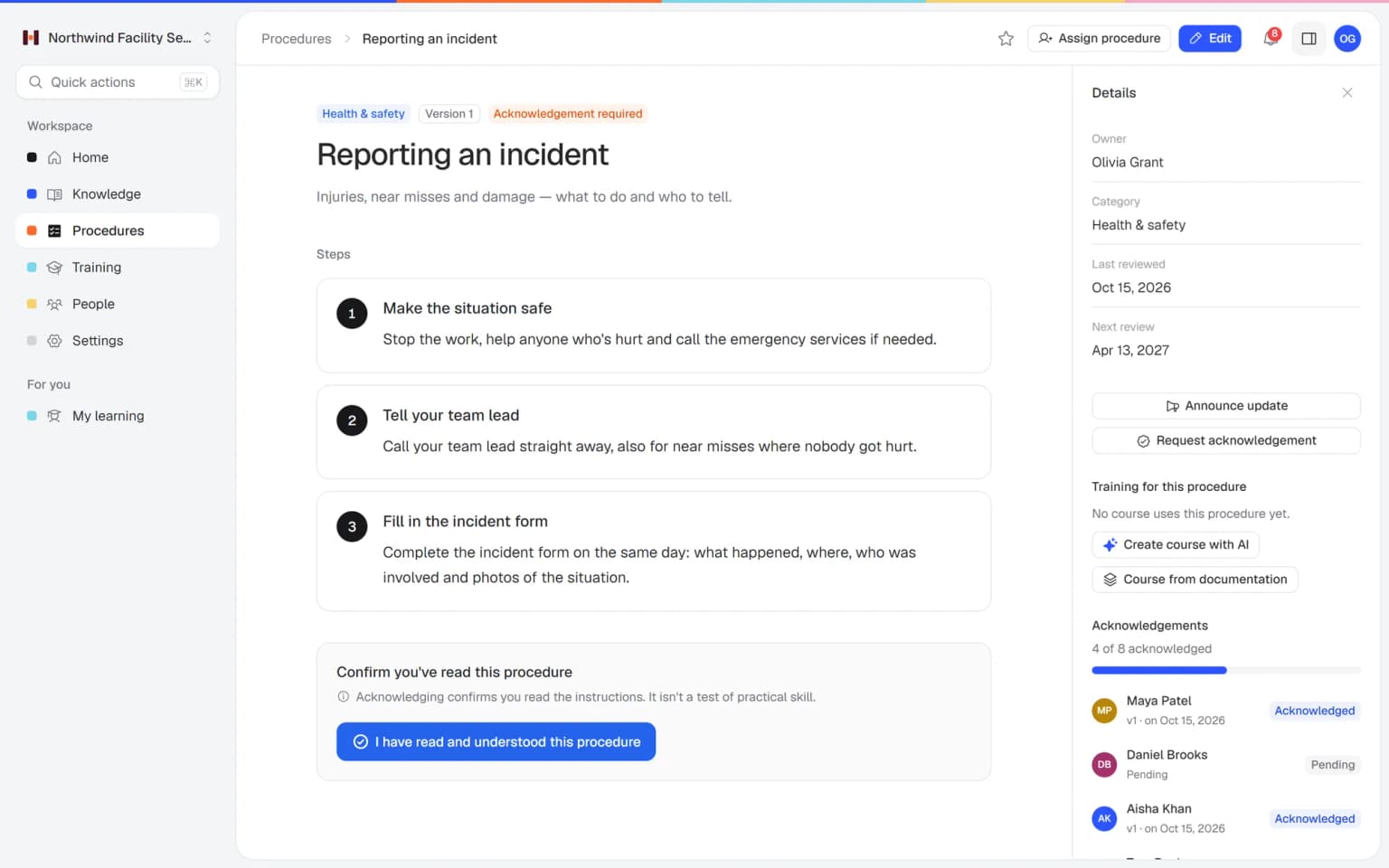
- 1Every job written down onceUpload supplier manuals and AI drafts knowledge articles from them. Write each job as a procedure with steps, checklists and photos.
- 2New technicians trained before they ride alongLet AI build lessons and a quiz from your procedures, or start from the SOP training template, and put the lessons in a set order.
- 3You see who is ready for which jobAssign training with a due date and ask for a confirmation on every new safety instruction. Helpable sends reminders and shows who finished, how they scored and who confirmed.
Built for teams that work at the customer's address
What a service manager uses to get new technicians on the road, keep every job the same and show a client who is qualified.
A technician asks a question at the customer and gets your company's answer
When a technician stands in front of a boiler with a fault code they don't recognize, they ask in their own words. Answers gives a short answer from your own procedures and manuals, with a link to the source. When it doesn't know, it says so, and the question goes on a list for the office.
- Answers from your own knowledge
- Always with a link to the source
- Works on a phone in the van
- You see which manuals are still missing

Your technicians practice the hard customer conversation before they ring the bell
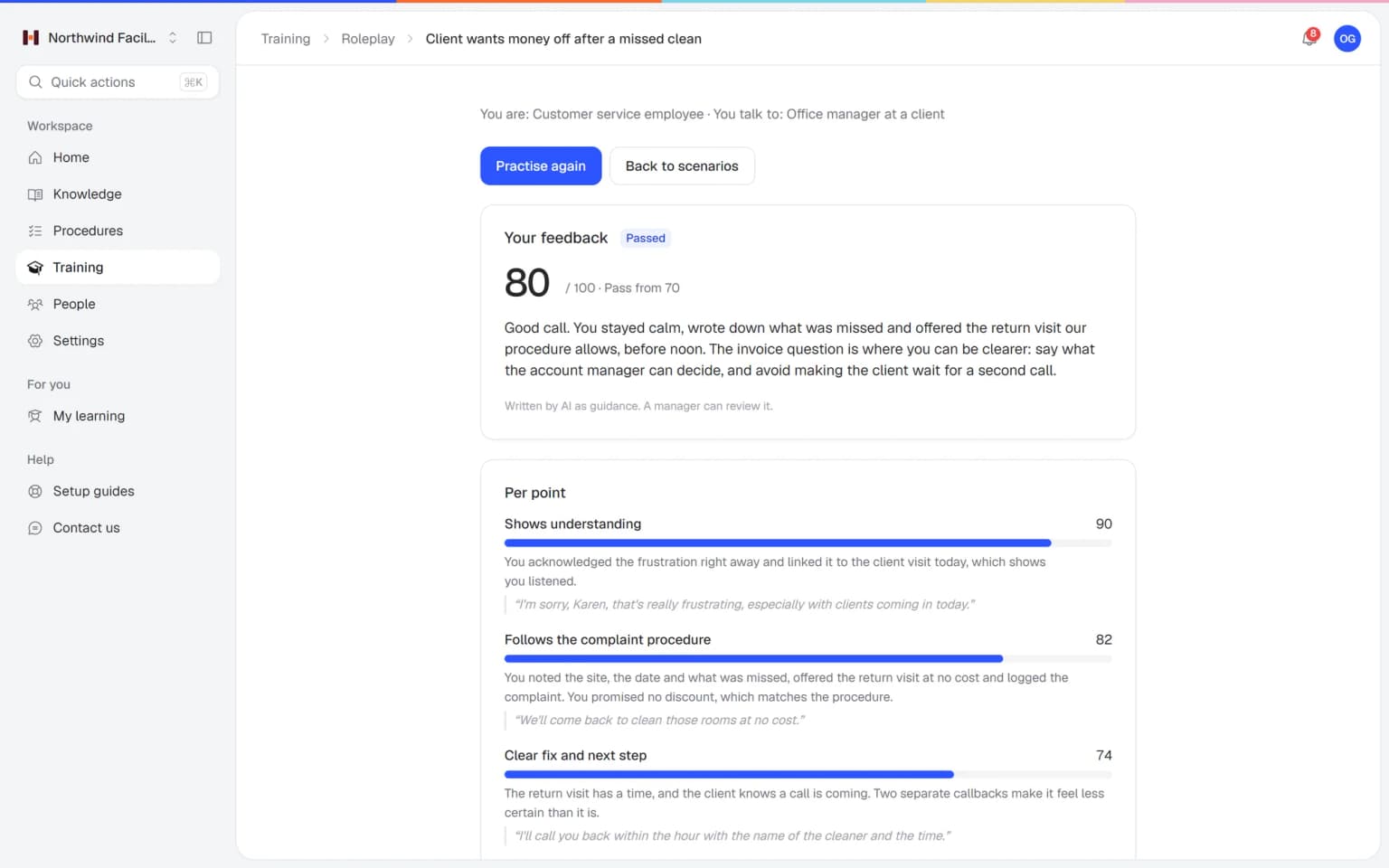
A customer is unhappy with an installation, finds the bill too high or wants the technician back today. Your technicians practice those conversations with an AI that plays the customer, in a scenario you build from your own procedures. Every conversation ends with a score and concrete tips.
- Scenarios from your own procedures
- A score and tips after every conversation
- Practice on phone or laptop
- You see who is ready
What else belongs with your technician training
For the planner who needs to know who may do the heat pump, the apprentice who still has a lot to learn and the subcontractor who should only see their own jobs.
Made for companies with technicians on the road
One fixed monthly price for your whole field team
Try Business Plus free for 14 days. No credit card needed.
Business
Your knowledge base for team and customers, written faster with AI.
- AI answers with the source
- An internal knowledge base and a public help center
- AI writes first versions from your own documents
- Start from what you have: documents, Word files and your website
- Procedures everyone follows, with read confirmations
- Your help center on your own web address
- 250 AI credits per month
Business Plus
Train your team on that knowledge: courses, quizzes and progress per person.
- Everything in Business, plus:
- Training with quizzes, due dates and reminders
- See per person who finished what
- Practice conversations with AI, included
- Video lessons and final tests
- Certificates you can show clients and inspectors
- Results exported in one click
- 3 help centers and 3 internal knowledge bases
- 750 AI credits per month
Business Max
Training that runs by itself, and proof of who really knows what.
- Everything in Business Plus, plus:
- New colleagues get their training automatically
- A fixed onboarding route from day one
- Learning insights: who really studied and who clicked through
- Skills matrix and a training record per person
- Practical work signed off on the floor
- Locations with their own managers
- Refresher training that comes back by itself
- Certificates that expire on time, in your own design
- Your help center fully in your own brand
- 10 help centers and 10 internal knowledge bases
- 1,500 AI credits per month
Questions about training software for installers
What is training software for installers?
Training software for installers teaches new technicians how your company does each installation, inspection and service visit, and shows the service manager who is ready to go out alone. Helpable combines training, step-by-step procedures and a knowledge base for teams of 5 to 50 people.
Can technicians use Helpable on site?
Yes. Helpable works in the browser on a phone, tablet or laptop, so technicians can open procedures and knowledge articles at the customer's address when they have a connection.
Can Helpable remind people about yearly safety training?
Yes. On Business Max, Helpable repeats a training every 6, 12 or 24 months. People get reminders before the due date and when it is overdue, and managers get an overdue notice. On Business Plus and up, a training you assign with a due date gets those reminders.
Can we use our manufacturer manuals in Helpable?
Yes. Helpable's AI writer can draft a knowledge article from your own PDF, Word, TXT, Markdown or CSV files, and you can add documents to lessons. You check everything before you publish.
Do Helpable certificates replace official certification?
Helpable certificates are your company's own proof that someone finished a training, with a code anyone can verify and, on Business Max, an expiry date. Legally required certification stays with the official bodies.
How fast can an installation company start with Helpable?
An installation company can start with Helpable on the day it signs up. Write the procedure for your most common job first, or let AI draft knowledge articles from your manuals, then turn it into a training with the SOP training template. You add the other jobs one by one.
Can temporary technicians and subcontractors use Helpable?
Yes. In Helpable temporary technicians and subcontractors you invite get the same procedures, safety training and quizzes as your own staff. Every person who signs in uses a seat: Business includes 3 people, and you can add extra people when you need more.
How do we see which technician is ready for which job?
Helpable shows per technician which training is finished, how they scored, which safety instructions they confirmed and who is overdue. Make a training per type of work, such as heat pumps or gas, and you see who has passed it before you plan the job. Results per team come with Business Max.
What does Helpable cost for an installation company, and which plan do we need?
Helpable starts at $29 per month for Business, with 3 people, procedures, read confirmations and a knowledge base. Business Plus ($89) has 5 people and adds training, quizzes, due dates, video lessons and certificates. Choose Business Max ($179) when you need automatic assignment per team, yearly safety refreshers and certificates that expire and get renewed.
How is Helpable different from a shared drive or a WhatsApp group?
Helpable keeps one current version of every work instruction, asks technicians to confirm they read it and shows who finished which training. In a shared drive or a WhatsApp group, old manuals and photos stay next to new ones, and you can't see who read the latest safety rules.
Is Helpable available in Dutch, and where is our data stored?
Helpable works in English and Dutch, and you write your procedures and training in the language your technicians speak. Your data is stored in the EU.
Is there a free trial of Helpable?
Yes. Helpable has a free trial of 14 days on Business Plus, and you don't need a credit card to start.
Training software for installers and maintenance teams
Owners and service managers of installation and maintenance companies search for this when a new technician starts, when a supplier launches a new product line or when a client asks for proof of safety training. These are the common questions, answered for how the work goes on the road.
Work instructions for technicians, on a phone at every job
With Helpable, your technicians open the work instruction for the job on their phone in the van or in the customer's basement, so a heat pump, furnace or EV charger is installed the same way whoever rings the doorbell. The know-how usually sits with two senior technicians, and the rest call them from the job or work it out on site. Callbacks follow.
In Helpable you write each job as numbered steps with photos and checklists inside the steps: what to check before you start, the installation itself, how you test and what you tell the customer at handover. Every instruction has an owner, a review date and a version history with a short summary of what changed. AI can draft a first version from a task you describe in plain words, with steps, checks and safety notes, and you edit it before you publish. Read more about work instruction software.
Commissioning checklists for heat pumps and boilers
In Helpable the commissioning checklist sits inside the procedure, so the technician runs every check in the same order at the customer before the job is closed. Think of the pressure and leak test, supply and return temperatures, the settings on the controller, a photo of the rating plate and a walk through the thermostat with the customer.
Suppliers update their products often, and every new model comes with its own settings. When a supplier launches a new product line, upload the manual as a document, let the AI writer draft a knowledge article from the PDF and add the checks for that model to your commissioning procedure. Publish the new version, announce it and see which technicians confirmed it before you schedule the first installation.
Safety training for technicians, with certificates that expire
Your safety rules and internal certificates live in one place in Helpable, and on Business Max people get a reminder before a certificate expires, so on Monday morning you know who may do which work. Think of working at height, lockout and tagout, gas and refrigerant handling and the quick risk check before you start.
Make the safety training required with a pass mark, and ask technicians to confirm every new version of a safety instruction. Certificates from Helpable carry a code anyone can check, which helps when a client asks for proof on site. For a client's safety audit you have dated read confirmations per version, training results and certificates, all exportable to CSV. Official certifications such as EPA 608 for refrigerants still come from the official bodies, and Helpable shows what your own company trained. Read more about certificates.
Installer training for apprentices and new technicians
With a learning path in Helpable, apprentices and new technicians learn your products, standard jobs, safety rules and the paperwork at the customer before they ride along, so the senior technician spends the ride on what really has to be shown. Today a trainee rides along for weeks, the senior gets less done, and what gets explained depends on the jobs that happen to come up.
Put the trainings in a set order, with a quiz after each part and a due date. On Business Max, a new technician is enrolled automatically when you add them to a team. A procedure can be a lesson in a training, and that lesson always shows the latest version. You see per person which training is finished and how they scored, and the weekly summary tells the service manager who is behind. Make a training per type of work, such as heat pumps or gas, and schedule the job with someone who passed it. It is technician training software sized for an installation or HVAC company of 5 to 50 people, and a practical LMS for a small business in the field.
Field service training and a knowledge base for the road
For field service training on the road, Helpable gives your technicians one knowledge base for fault codes, product notes and manuals, and Answers gives them a short answer from your own content, with a link to the source, when they ask a question in their own words. A technician in front of a boiler with a fault code they don't recognize asks how your company handles it and gets the steps you wrote down.
When Answers doesn't know, it says so, and the question goes on a list for the office to write up. That list shows you which manuals are still missing. Subcontractors and temporary technicians you invite get the same instructions as your own staff, and people only see what they are allowed to see. Everything works in the browser on a phone, tablet or laptop when there is a connection, in English and Dutch, and your data is stored in the EU.
The right steps for every job, on every phone
Start with your most common job or a ready-made template.
Start free trial- 14 days free
- No credit card needed
- Cancel any time