A knowledge base editor for everyone
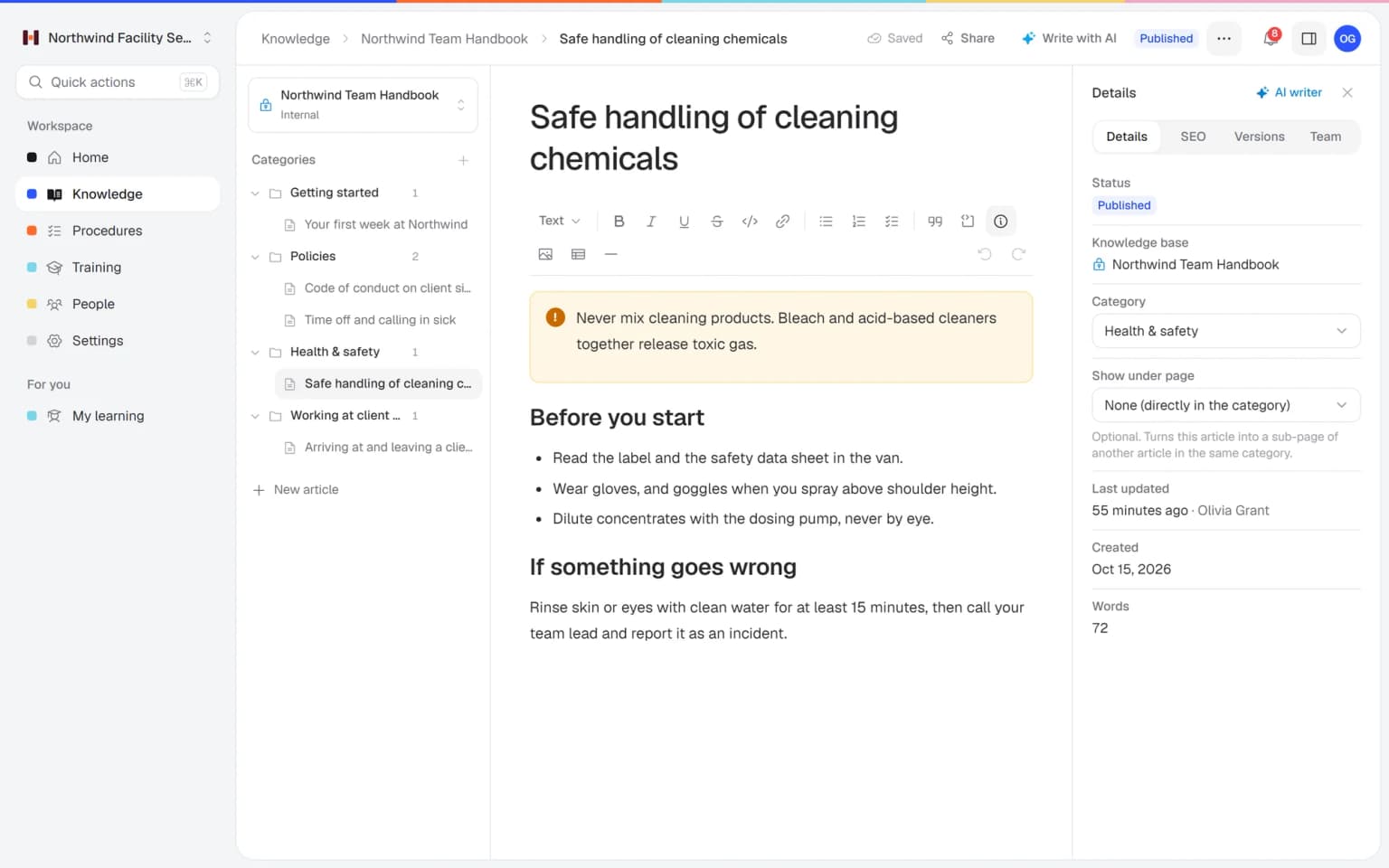
Your people write clear articles in a few minutes, even if they have never built a web page. Changes stay in a draft until you publish them, and every published version can be brought back with one click.
- 14 days free
- No credit card needed
- Saves your work as you type
Knowledge that is easy to write and safe to change
The editor in Helpable lets the people who know the work write it down, and keeps your published articles safe while they do.
Anyone can write
If you can write an email, you can write an article. The people who know the work best share what they know, and you no longer have to write everything yourself.
Nothing goes live by accident
Edits are saved as a draft next to the published article. Readers keep seeing the published version until someone presses publish.
Every mistake can be undone
Helpable keeps the history of each article. Preview an older version and restore it when a change turns out wrong.
Changes live on the right day
A new price or rule reaches readers exactly when it starts. Write the change now and schedule the publish date and time.
Fewer mistakes on the job
Clear steps, checklists and warning callouts show people exactly what to do. They follow the article and get it right the first time.
Customers find your answers
Public articles show up in search engines with the right title and description. You set them in the search panel of each article.
Keeping articles up to date gets stuck on the writing
Most knowledge goes out of date for the same few reasons.
Only one person can update the articles
Everyone waits for the one colleague who knows how the tool works.
With Helpable The editor is as simple as a word processor. Type "/" to add a heading, checklist, table or image, and anyone can help.
Half-finished changes show up for readers
Someone saves a change in the middle of editing, and customers see it.
With Helpable Changes stay in a draft until you publish. Throw the draft away if you change your mind.
A good text gets overwritten
A colleague edits an article and the old, better version is gone.
With Helpable Version history keeps every published version. Preview it and restore it in one click.
Nobody checks before it goes out
Articles go live with mistakes because there is no simple way to ask for a second look.
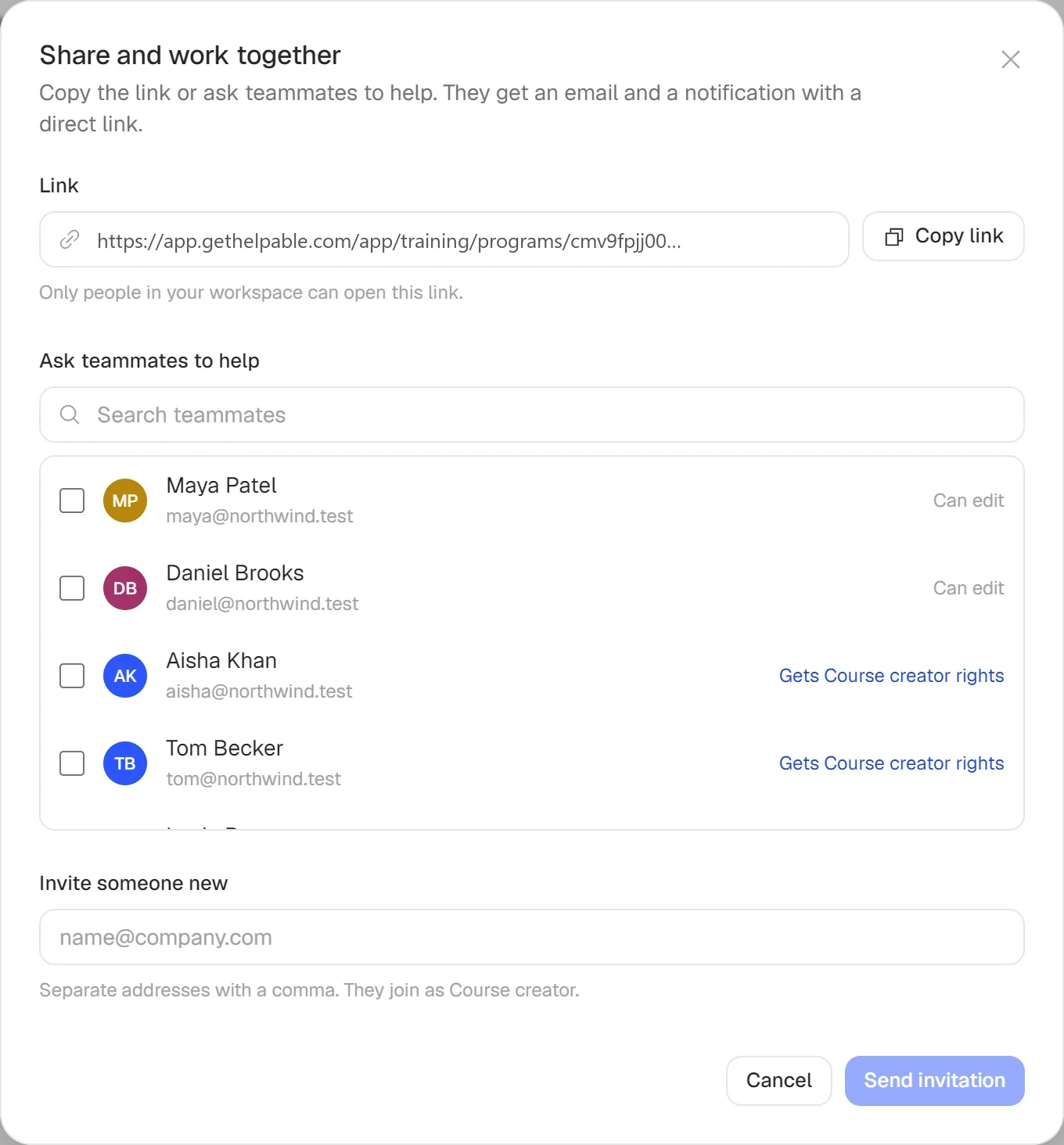
With Helpable Ask a teammate for a review before you publish, or invite them to help write.
From a blank page to a published article
Three steps. Your first article is ready in minutes.
Write it down
Type your text and add headings, steps, images or a tip. Helpable saves your work as you go.
Ask for a second look
Ask a teammate to review it, or invite someone who knows the subject to help write.
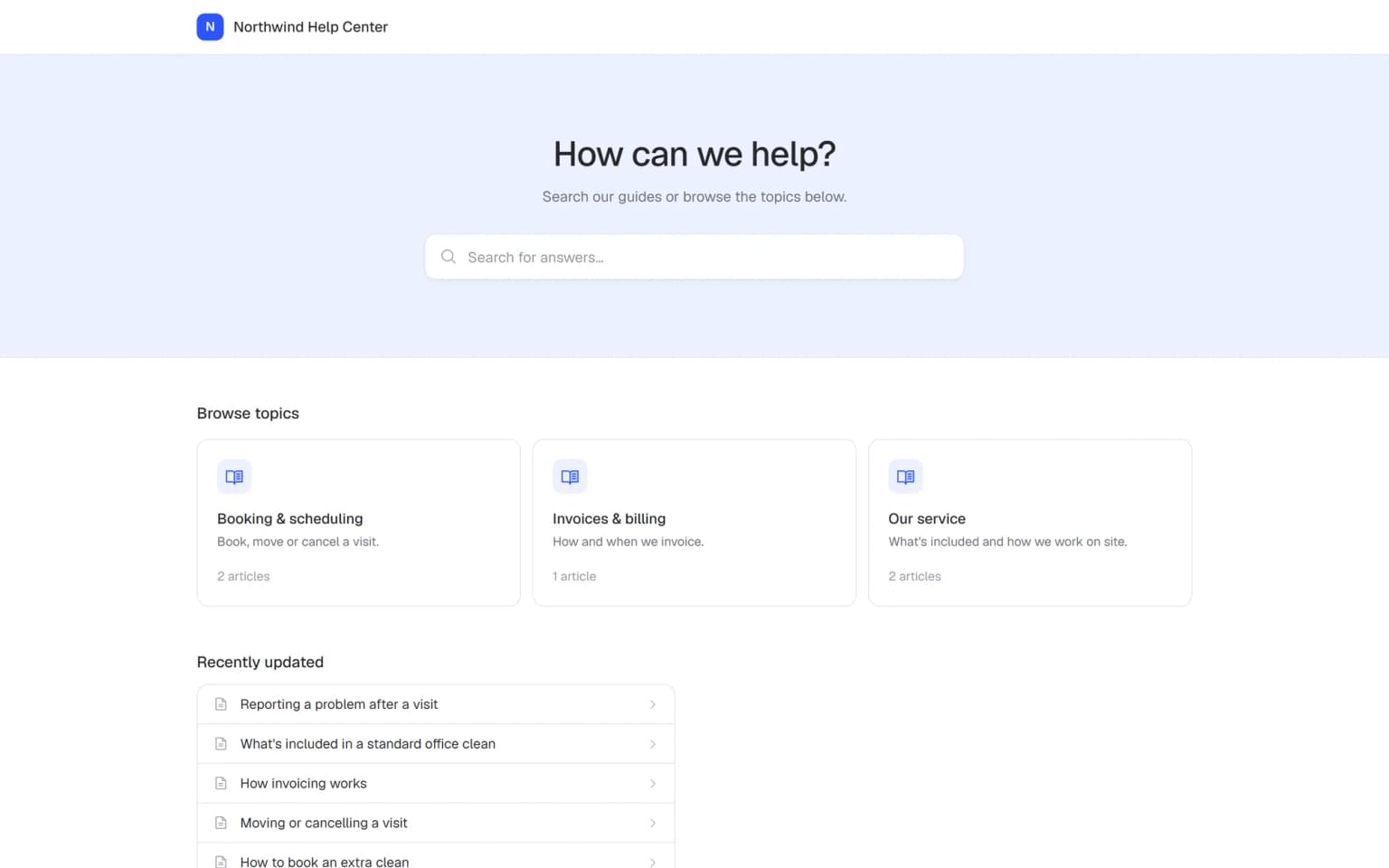
Publish now or later
Publish right away, or pick a date and time. You can unpublish or restore an older version at any time.
- 14 days free
- No credit card needed
Write it once, and put it to work everywhere
The editor is where your knowledge takes shape. Combined with the AI writer, insights and training, every article helps more people.
Start from a draft, finish it together
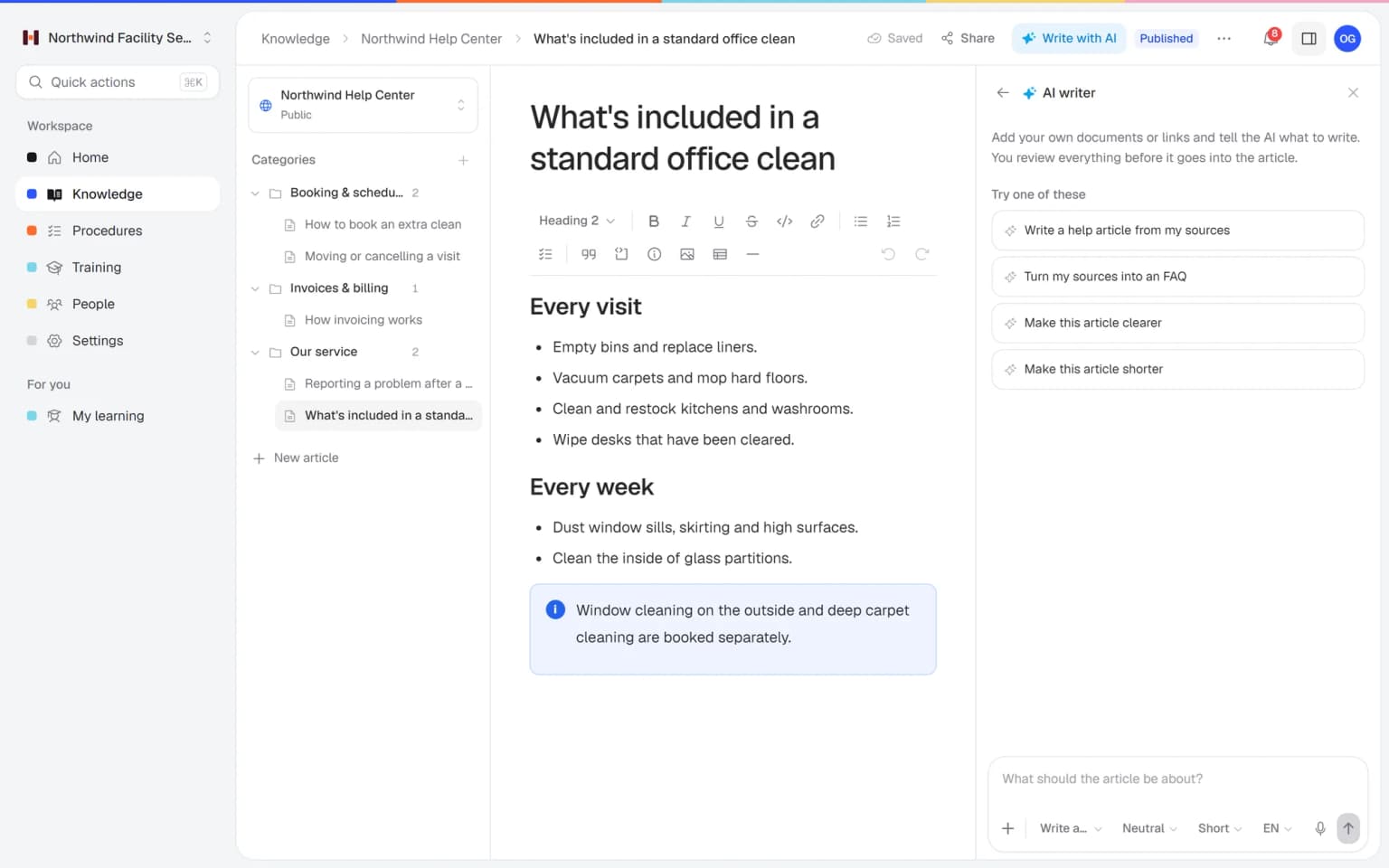
The AI writer drafts the article from your files right in the editor. Invite a colleague to help write it and ask a teammate to review it, and it goes live correct and complete.
AI writerWrite what customers are looking for
Insights show the searches in your help center that found nothing. One click turns that gap into a draft article, you finish it in the editor, and later you see its views and helpful votes.
Help center insightsTurn articles into training
Pick your published articles and let Helpable make a training with lessons, learning goals and quiz questions. Each lesson links to the article it came from, so new people learn the same way of working.
Training with AI
The editor is where your knowledge takes shape
Every article you write in the editor can do more with these features. Together they help you write faster, keep things correct and put the knowledge to work.
- + AI writerStart from a draft written from your own filesAdd a PDF, Word file or link and the AI writer drafts the article right in the editor. You only check and finish it, and nothing goes live until you publish.
- + Version controlEvery change can be traced and undoneEach published version of an article is kept. Preview an older one and restore it with one click, so a colleague's edit never costs you a good text.
- + Team and rolesThe right people write, everyone else readsInvite teammates by email to help write or review an article, and give each person a role. The people who know the work write it down, and the rest of the team reads the published version.
- + Help center SEOSet the search title and description per articleFor public articles you set the web address, search title and description in the search panel. Customers searching Google land on the article that answers their question.
- + Training with AITurn finished articles into trainingPick published articles and Helpable makes a training with lessons, learning goals and quiz questions. Each lesson links to the article it came from, so new people learn the same way of working.
- + Knowledge basePublish to your handbook or your help centerEvery article lands in an internal handbook for your team or a public help center for customers. One search in the dashboard finds it next to procedures and training.
A first draft from your own documents
Drop in a PDF, Word file or a link, and the AI writer turns it into a clear article in the editor. It can also shorten, expand, summarize or translate a text you already have. The result is saved as a draft, so you check it before anyone reads it.
- Pick short, medium or long
- Writes in five languages
- Dictate your instructions
Everything you need to write and maintain articles
Simple to start with, and enough to keep a whole knowledge base in good shape.
Clear formatting
Headings, lists, checklists, tables, quotes and callouts for tips and warnings.
Images in seconds
Upload, drag in or paste an image straight into the article.
Version history
See earlier versions, preview them and restore one when needed.
Scheduled publishing
Pick a date and time, and the article goes live by itself.
Review and write together
Ask a teammate for a review, invite people to help write or share a link.
Search settings per article
Set the web address, search title and description for public articles.
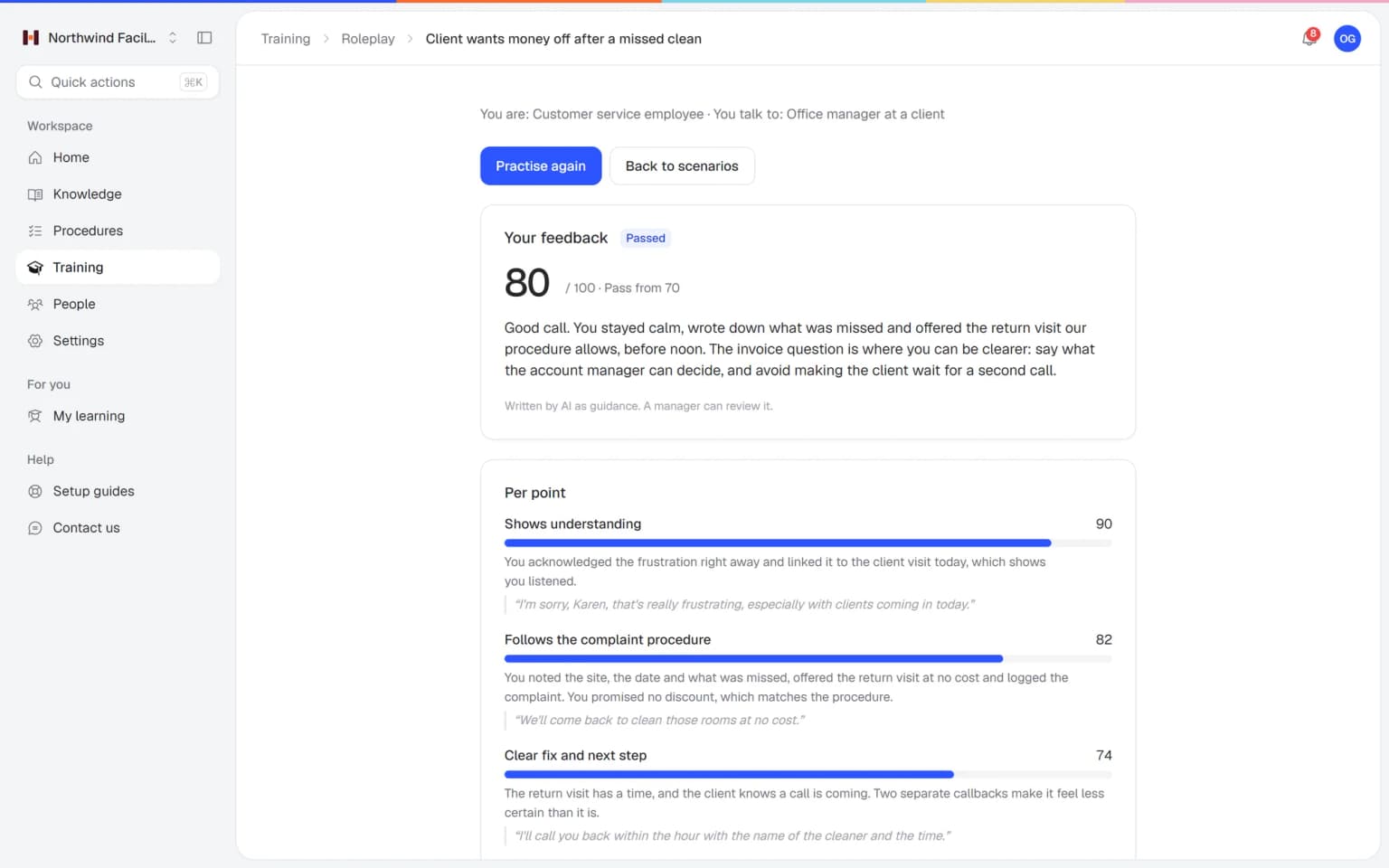
Your team practices hard conversations before a real customer hears them
Employees talk with an AI that plays a customer, colleague or manager, in a scenario you build from your own procedures. After each conversation they get a score and concrete tips, and you see who is ready.
- Scenarios built from your own knowledge
- A score and feedback after every conversation
- Free conversation or multiple choice
- Results per person for the trainer
A plan that grows with your team
Try Helpable free for 14 days, no credit card needed. Then pick the plan that fits your team.
The editor, version history, scheduled publishing and reviews are on every plan, from Business up. The AI writer inside the editor uses your monthly AI credits.
Business
Your knowledge base for team and customers, written faster with AI.
$29/month
Billed monthly
That's $0.95 a day
Start free trial- 3 team members included
- An internal knowledge base and a public help center
- AI writes first versions from your own documents
- Start from what you have: documents, Word files and your website
- Procedures everyone follows, with read confirmations
- Your help center on your own web address
- 250 AI credits per month
- Recommended · your free trial runs on this plan
Business Plus
Train your team on that knowledge: courses, quizzes and progress per person.
$89/month
Billed monthly
That's $2.93 a day
Start free trialEverything in Business, plus:
- 5 team members included
- Training with quizzes, due dates and reminders
- See per person who finished what
- Practice conversations with AI, included
- Video lessons and final tests
- Certificates you can show clients and inspectors
- Results exported in one click
- 3 help centers and 3 internal knowledge bases
- 750 AI credits per month
What's in Business
- 3 team members included
- An internal knowledge base and a public help center
- AI writes first versions from your own documents
- Start from what you have: documents, Word files and your website
- Procedures everyone follows, with read confirmations
- Your help center on your own web address
- 250 AI credits per month
Business Max
Training that runs by itself, and proof of who really knows what.
$179/month
Billed monthly
That's $5.88 a day
Start free trialEverything in Business Plus, plus:
- 9 team members included
- New colleagues get their training automatically
- A fixed onboarding route from day one
- Learning insights: who really studied and who clicked through
- Skills matrix and a training record per person
- Practical work signed off on the floor
- Locations with their own managers
- Refresher training that comes back by itself
- Certificates that expire on time, in your own design
- Your help center fully in your own brand
- 10 help centers and 10 internal knowledge bases
- 1,500 AI credits per month
What's in Business Plus
- 5 team members included
- Training with quizzes, due dates and reminders
- See per person who finished what
- Practice conversations with AI, included
- AI writes first versions from your own documents
- Start from what you have: documents, Word files and your website
- Procedures everyone follows, with read confirmations
- Video lessons and final tests
- Certificates you can show clients and inspectors
- Results exported in one click
- Your help center on your own web address
- 3 help centers and 3 internal knowledge bases
- 750 AI credits per month
Grow when you need to
Add these to Business and up, any time. You only pay for what you use.
- More people
Add people one by one as your team grows, for a fixed price per person on every plan.
$9/month
- A second help center
A help center and handbook for another brand, location or client.
$10/month
- Only your brand
Remove “Powered by Helpable” from your help center. Included in Business Max.
$19/month
- Cancel any time
- Data stored in the EU
What is a knowledge base editor?
A knowledge base editor is where you write and update the articles in your knowledge base. Helpable's editor works like a simple word processor, with headings, lists, checklists, tables, images and callouts, so anyone on your team can write help articles.
Do I need technical skills to write help articles in Helpable?
No. You type your text and add blocks with the "/" menu or the toolbar. Helpable saves your work automatically while you write.
Can readers see my changes before I publish?
No. Helpable keeps your changes in a draft next to the published article. Readers see the published version until you publish the draft, and you can discard the draft at any time.
How do I undo a change to an article in Helpable?
Helpable keeps every published version of an article. You open an earlier version, preview it and restore it with one click.
Can I schedule an article to go live later?
Yes. In Helpable you pick a date and time, and the article is published by itself at that moment. You can also unpublish an article later.
Can a colleague review an article before it goes live?
Yes. In Helpable you can ask a teammate for a review, invite people to help write and share a link to the article. Each article also has an owner, so everyone knows who keeps it up to date.
Read more
Read more about this
- How to organize a knowledge base: 3 methodsThree ways to structure a knowledge base, common mistakes and how to name categories.Read the article
- How to write knowledge base articles: 8 rulesConcrete writing rules with good and bad examples, plus a copy-paste template.Read the article
- Sample knowledge base articles and free templatesFour article types with templates: how-to, troubleshooting, FAQ and reference.Read the article
Knowledge base editor: write, review and publish help articles
What a knowledge base editor does, how to write and publish an article in Helpable, and how it compares to the editors in other tools.
What is a knowledge base editor?
Helpable's knowledge base editor is where your team writes and updates the articles in your handbook and help center. It works like a simple word processor: type your text and add headings, lists, checklists, tables, quotes, images and callouts for tips and warnings with the "/" menu or the toolbar.
The gain is that the people who know the work can write it down. If you can write an email, you can write an article, and Helpable saves your work as you type. Articles land in your knowledge base, next to your procedures and training.
How to write and publish a help article, step by step
In Helpable an article goes from blank page to published in three steps. Write your text, or let the AI writer draft it from your PDF, Word, TXT, Markdown or CSV files and links.
Then ask a teammate for a review, or invite someone who knows the subject to help write. Your changes stay in a draft next to the published article, so readers keep seeing the live version until you publish.
Finally, publish right away or pick a date and time. Every published version is kept, so you can preview an older one and restore it with one click. Read more on document version control.
How the editor works with SEO, languages and training
Helpable connects the editor to the rest of your knowledge work, so one article helps more people. For public articles you set the web address, search title and description in the search panel, and help center SEO explains how that helps articles get found.
With the AI writer you can translate an article into English, Dutch, German, French or Spanish for a multilingual help center. Once articles are published, training with AI turns them into lessons with learning goals and quiz questions, each linked to the article it came from.
An easy article editor for non-technical teams
Helpable's editor is made for teams where the experts are busy doing the work. Writing an article should take minutes, and the way your team works decides what goes in it.
Teams on the floor, such as cleaning and facility services, hospitality and retail, let a team lead write house rules and how-tos with checklists and photos. Teams that serve customers, such as customer service, SaaS companies and agencies, keep their public help center current and schedule updates for a new price or rule.
Care, childcare, installation and maintenance, webshops and offices write the same way: short steps, clear warnings and one version everyone reads.
An alternative to the Notion or Confluence editor for help articles
Helpable fits when you want an editor built for help articles and handbooks, with training and procedures in the same tool. Notion and Confluence offer flexible editors for docs, wikis and projects, with templates and comments. Google Drive keeps documents as files with sharing rights.
Helpable focuses on articles people need to find and follow: drafts kept apart from the live version, version history, scheduled publishing, a review by a teammate, an owner per article and search settings for public articles. The app is in English and Dutch, your data is stored in the EU, and you can try it free for 14 days with no card. Compare on the Notion alternative, Confluence alternative and Google Drive alternative pages.
Knowledge base editor pricing
Helpable includes the editor on every plan, with drafts, version history, scheduled publishing and reviews. The AI writer inside the editor uses AI credits: 250 a month on Business, 750 on Business Plus and 1,500 on Business Max, and you can buy extra packs.
The plans differ in team size and extras, such as 3 knowledge bases from Business Plus and up to 10 knowledge bases on Business Max. See the pricing page for everything per plan.
Let your team write the knowledge they carry around
Write your first article today and publish it when it is ready.
- 14 days free
- No credit card needed
- Cancel any time