Retail staff training platform
Helpable is a retail staff training platform for shops and small chains: new staff are ready for their first shift, every register gives the same answer and every store works the same way. Holiday hires learn the register and the returns rules before their first Saturday, and the answer about sizes, care or exchanges is one search away on the sales floor.
- 14 days free
- No credit card needed
- Ready before the holidays
Where it pinches in a store or retail chain
A new hire who calls you over for every exchange, a second store that does returns its own way, a promotion nobody heard about: here is how you handle each with Helpable.
From your way of working to a team that sells with confidence
Three steps you can finish before you hire for the holidays.
- 1Every routine written down onceAdd procedures for the register, returns, opening and closing, with checklists and photos, and articles about your products and policies.
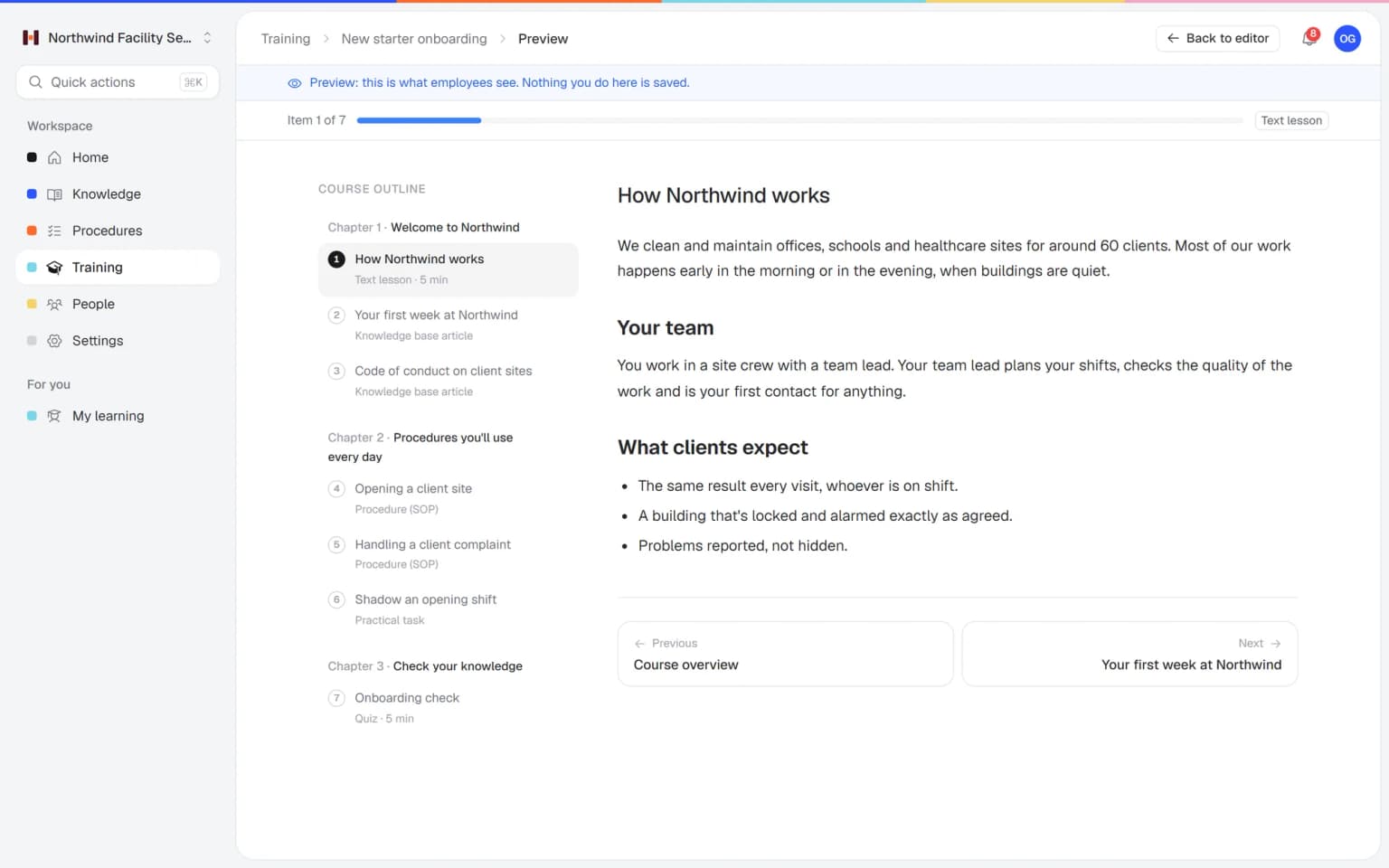
- 2New staff trained before their first shiftStart from the employee onboarding or customer service basics template, or let AI build lessons and a quiz from your procedures.
- 3You see per store who is up to dateAssign training per store team with a due date and announce updates to everyone. Helpable shows who finished and who read the latest version.
Built for shops, stores and the people on the floor
What a store manager uses to get new hires on the floor, keep returns the same at every register and know who can work alone.
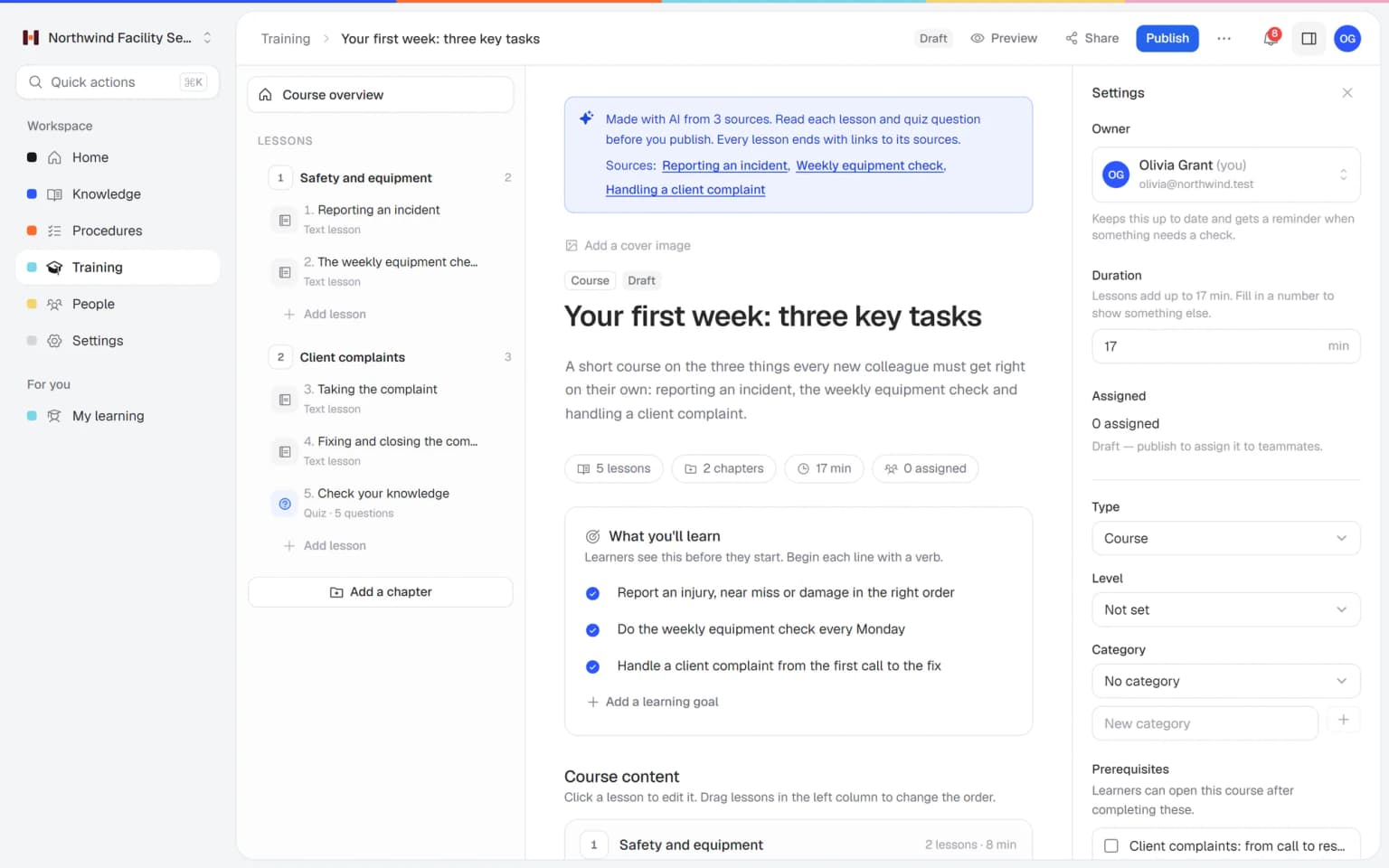
From your product articles to a training for the new collection
Pick the articles about the new collection, your returns policy or the register, and AI turns them into lessons, learning goals and quiz questions, with a link to every source. You check it and publish, and your sales associates know the range before it hits the floor.
- Made from your own articles
- Saved as a draft first
- You pick the length and number of quiz questions
- A link to every source
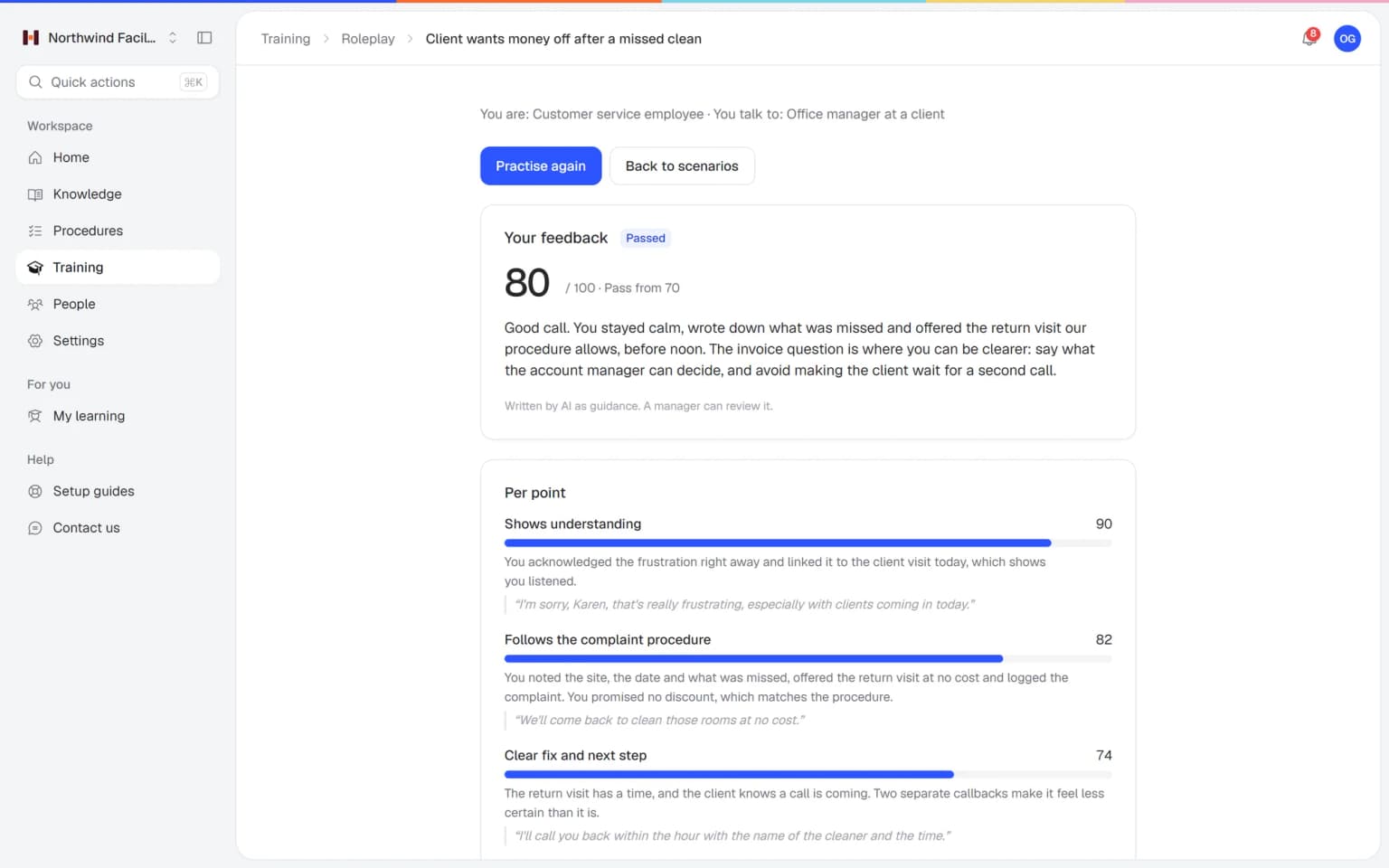
Your sales associates practice the hard customer conversation before it happens at the register
A customer lost the receipt and still wants an exchange, is upset about a broken item or can't choose between two products. Your team practices those conversations with an AI that plays the customer, in a scenario you build from your own returns policy and product knowledge. Every conversation ends with a score and concrete tips.
- Scenarios from your own procedures
- A score and tips after every conversation
- Practice on phone or laptop
- You see who is ready
What else belongs with your store training
Once the register and returns are covered, these parts help with the rest of the season: last month's policy, who may work the register alone and staff who read another language better.
Made for stores with part-timers and more than one location
One fixed monthly price, for one store or a few
Try Business Plus free for 14 days. No credit card needed.
Business
Your knowledge base for team and customers, written faster with AI.
- AI answers with the source
- An internal knowledge base and a public help center
- AI writes first versions from your own documents
- Start from what you have: documents, Word files and your website
- Procedures everyone follows, with read confirmations
- Your help center on your own web address
- 250 AI credits per month
Business Plus
Train your team on that knowledge: courses, quizzes and progress per person.
- Everything in Business, plus:
- Training with quizzes, due dates and reminders
- See per person who finished what
- Practice conversations with AI, included
- Video lessons and final tests
- Certificates you can show clients and inspectors
- Results exported in one click
- 3 help centers and 3 internal knowledge bases
- 750 AI credits per month
Business Max
Training that runs by itself, and proof of who really knows what.
- Everything in Business Plus, plus:
- New colleagues get their training automatically
- A fixed onboarding route from day one
- Learning insights: who really studied and who clicked through
- Skills matrix and a training record per person
- Practical work signed off on the floor
- Locations with their own managers
- Refresher training that comes back by itself
- Certificates that expire on time, in your own design
- Your help center fully in your own brand
- 10 help centers and 10 internal knowledge bases
- 1,500 AI credits per month
Questions about retail staff training
What is retail staff training software?
Retail staff training software teaches sales associates the register, returns, product knowledge and how to help a customer, and shows the store manager who is ready to work alone. Helpable does this with short training, step-by-step procedures, a knowledge base and quizzes, for teams of 5 to 50 people.
How does Helpable help train temporary holiday staff?
In Helpable you build your training once and reuse it every busy season. You assign it with a due date and Helpable sends reminders, so temporary staff are ready for their first shift. On Business Max, automatic rules give new team members the right training as soon as they join.
Can staff look things up in Helpable during their shift?
Yes. Helpable has one search across knowledge, procedures and training, and it works in the browser on a phone, tablet or laptop. Staff can find the returns policy or product details while they help a customer.
How do we keep shop staff up to date with Helpable?
In Helpable you publish a new version of a procedure or article and announce the update to your team. You can request an acknowledgement, and Helpable shows per person who read the new version.
We also run a webshop. Can Helpable help there too?
Yes. Besides the internal handbook for your store staff, Helpable includes a public help center where webshop customers find answers about delivery, returns and products. Store and webshop staff then give the same answer.
Can we bring our existing store manual and checklists into Helpable?
Yes. Helpable's AI writer drafts an article from your own PDF, Word, TXT, Markdown or CSV files, and you can attach documents to lessons. Opening, closing and till checklists become procedures with numbered steps, checklists and photos. You check every draft before your staff see it.
Do holiday and weekend staff count as users in Helpable?
Yes. In Helpable every person who signs in to train uses a seat, including holiday and weekend staff. Business includes 3 people and Business Plus includes 5, and from Business you can add extra people for the busy season.
How do we see who is ready to work the till or the shop floor alone?
Helpable shows per employee which training is finished, which procedures they confirmed, how they scored and who is overdue. Make a team per store and a training for the till and returns, and you see who has passed it before you put them on the rota. Results per team come with Business Max.
What does Helpable cost for a shop, and which plan do we need?
Helpable starts at $29 per month for Business, with 3 people, procedures, read confirmations and a knowledge base. Business Plus ($89) has 5 people and adds training, quizzes, due dates, practice conversations with AI and certificates. Business Max ($179) adds automatic assignment per store team, recurring training, certificates with an expiry date and up to 10 knowledge bases, for example one per brand.
How is Helpable different from a WhatsApp group for the shop?
Helpable keeps one current version of every store procedure, asks staff to confirm they read it and shows who finished which training. In a WhatsApp group, a new returns rule or price change gets lost between shift swaps and photos, and you can't see who read it.
Is Helpable available in Dutch, and where is our data stored?
Helpable works in English and Dutch, and you write your training and procedures in the language your staff speak. Your data is stored in the EU.
Is there a free trial of Helpable for shops?
Yes. Helpable has a free trial of 14 days on Business Plus, and you don't need a credit card. You can write your till and returns procedures on the day you sign up.
Read more
Retail staff training for shops and store teams
Store owners and managers search for this before the holiday rush, when a new collection lands or when the second store starts doing things its own way. These are the common questions, answered for how a sales floor really works.
How to train retail staff before the holiday rush
With Helpable, seasonal staff for November and December learn the register, returns, gift wrapping and your house rules on their phone before their first shift, so your regular team keeps serving customers in the busiest weeks. The usual alternative is a quick tour on a Saturday morning while the store fills up, and a new colleague who calls a manager to the register for every exchange.
Build one short onboarding for the season: where to clock in, the dress code, how the register handles card, cash and gift cards, how to process a return when the customer has no receipt and who to call when the line grows. Assign it with a due date, and reminders go out by themselves. On Business Max, everyone you add to a store team gets it automatically. Every person who signs in uses a seat, and you can add extra employee packs for the busy season. The page on employee onboarding software explains the setup step by step.
Product knowledge training for a new collection
In Helpable you put product knowledge in your internal knowledge base and in short training with a quiz, so every sales associate can help a customer the week the new collection lands. Product knowledge tends to sit with one or two people: the buyer who knows which fabric shrinks, or the colleague who has tried every coffee machine on the shelf. When they're off, the customer gets a vague answer.
Write an article per product line with sizes, materials, care tips and the questions customers ask most, with photos. When a new season arrives, pick those articles and let AI draft a short training with lessons and quiz questions, with a link to every source. You check it before anyone sees it. A quiz with a pass mark shows who knows the range. Training with AI shows how the drafting works.
Returns and exchanges policy every employee applies the same way
Helpable turns your returns and exchanges policy into a procedure with clear steps, so a customer gets the same answer at every register and in every store. Today one colleague gives a refund, the next offers store credit, and the customer comes back with a screenshot of what the first one said.
Write the policy as numbered steps: how many days, what counts as proof of purchase, sale items, damaged goods, gift receipts and when a manager has to approve. Add the register steps for a refund and an exchange. When the policy changes, for example for the extended holiday return period, publish a new version with a short summary and ask staff to confirm they read it. Read confirmations come with every plan, and you see per person who still needs to. More on procedures.
Register procedures and loss prevention for store staff
For the register and loss prevention, Helpable gives every employee the same steps for closing out, refunds and what to do when something looks off, so the end-of-day count holds fewer surprises. Write down how you count the cash drawer, close out the register, void a sale, check large bills and what staff do when they suspect shoplifting: who to call, what to say and what never to do.
Make the training required with a pass mark for anyone who works the register, and you see who passed before you put them on the schedule. Security rules that need a yearly refresh can come back every 12 months on Business Max, with reminders before the due date. Retail staff training software like this fits stores with about 5 to 50 people, and it also works as simple e-learning for retail and a light LMS for a small business beyond the register.
Retail staff training software for multiple stores
With teams per store in Helpable, you run one set of procedures and training for every location and still see per store who is up to date. A chain of three or four stores drifts apart quickly. Each store manager adds a habit for opening, displays or returns, and customers notice.
Write the procedure once and assign it per store team. When you change the window display schedule or the opening routine, announce the update and see per store who read it. On the sales floor, staff search once across knowledge, procedures and training, or ask Answers a question in their own words and get a short answer from your own content with a link to the source. If you also run a webshop, the public help center gives online customers answers on delivery and returns that match what your store staff say. On Business Max you can run up to 10 knowledge bases, for example one per brand. Your data is stored in the EU.
Your team ready for the next busy season
Start with your register and returns procedures or a ready-made template.
Start free trial- 14 days free
- No credit card needed
- Cancel any time