Training tracking software for teams
Helpable is training tracking software that shows at a glance who finished their training, who is falling behind and who needs help. Helpable keeps track for you and sends the reminders, so you can act before something goes wrong.
- 14 days free
- No credit card needed
- Export to CSV any time
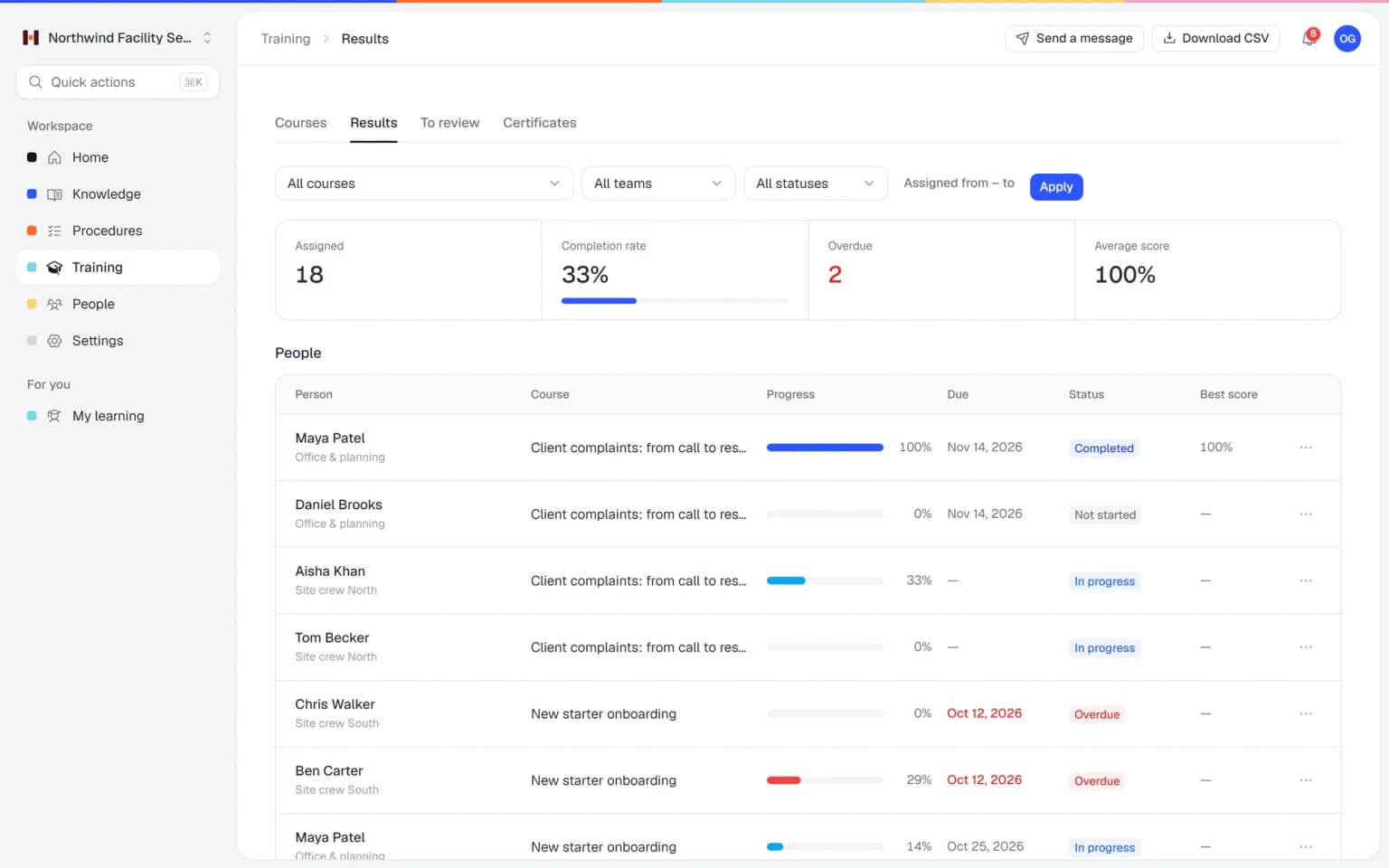
Peace of mind about what your team knows
You can't stand next to everyone. The reports show you what is going on.
Know who is ready for the job
See per employee which training is done, how they scored and which certificates they hold. You plan shifts and tasks with confidence.
Help people before they get stuck
Low scores and overdue training stand out, so you can offer help early, while it is still a small thing.
Stop chasing people
Helpable sends the reminders and tells managers when training is overdue. You only step in when it is really needed.
Less time on admin
Completion, scores and certificates are tracked for you as people learn. The spreadsheet you kept up by hand can go.
Training that gets better
Average score and pass rate show which part of a training people find hard. You improve that lesson, and the next group gets it right sooner.
Proof ready when asked
Certificates and read confirmations per person are in one place, and every overview exports to CSV. When a customer or inspector asks for proof of training, you have it at hand.
Keeping track by hand eats your time and still leaves gaps
These are the questions most small teams can't answer quickly today.
Who actually finished it?
You keep a spreadsheet or ask around, and it is never quite complete.
With Helpable Completion is tracked per training, team and employee, and always up to date.
Did they understand it?
Finishing a training says little about what someone remembers.
With Helpable Average score and pass rate show how well people did, and where a lesson needs more explanation.
Whose certificate runs out soon?
An expired certificate only comes up when someone asks for it.
With Helpable Certificates can have an expiry date, and Helpable sends a reminder before they expire.
How do I share this with others?
A manager or client wants proof of training, and you start copying data by hand.
With Helpable Export the overview to CSV with one click and share it.
Progress tracking that runs by itself
You set it up once. After that, the follow-up happens on its own.
Assign training with a due date
Give training to people, teams or everyone, required or optional, and pick a due date.
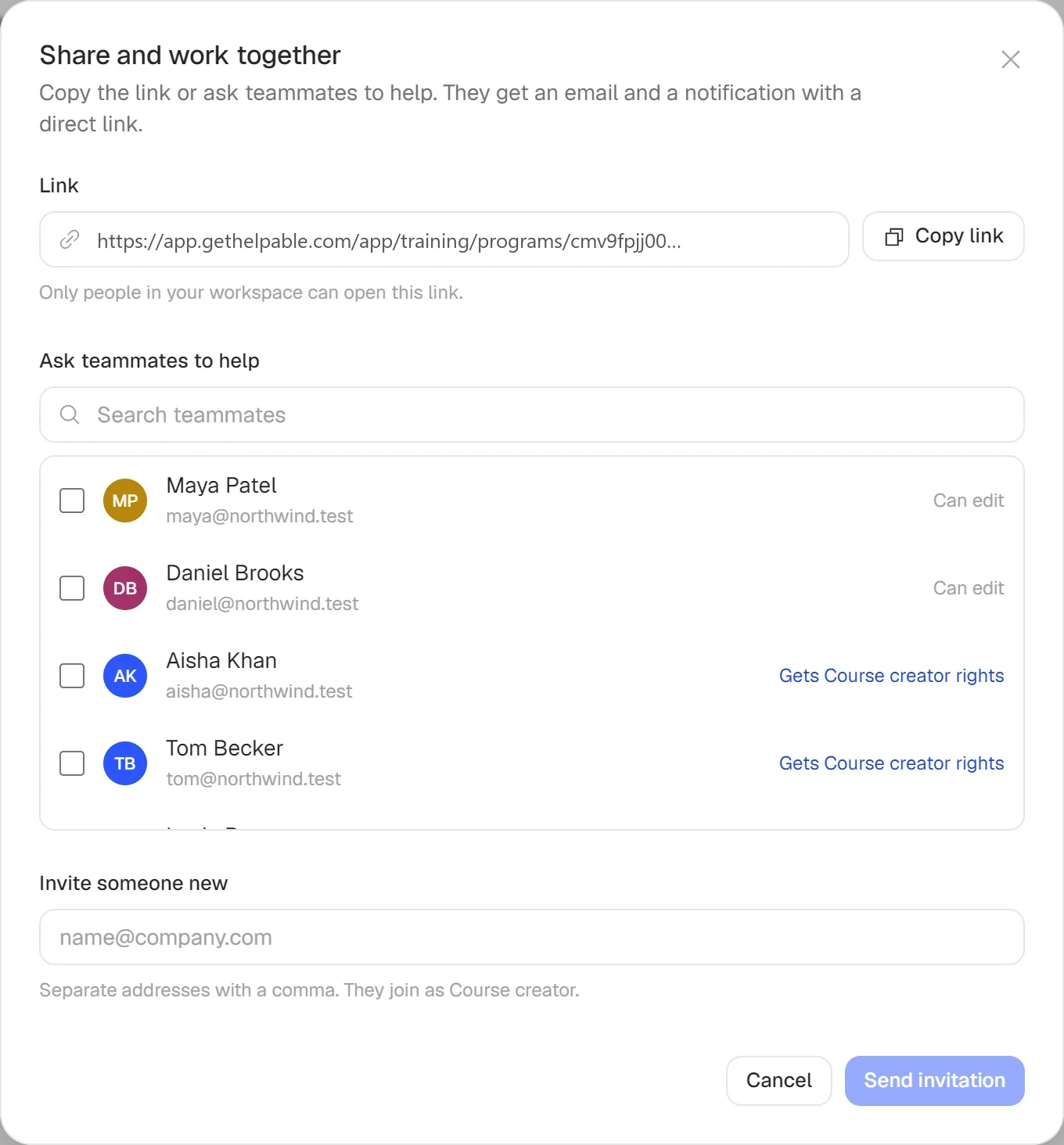
Let Helpable follow up
People get reminders before the due date and when they are late. Managers get an overdue notice.
Check the reports
Open a report per training, team or employee, or read the weekly summary email.

- 14 days free
- No credit card needed
One overview of training, quizzes, certificates and procedures
Training progress tracking in Helpable pulls in what happens across your training and procedures. You see who is ready, and Helpable does the follow-up.
Assign once, follow-up runs itself
Start from a template, adjust it with your own procedures and assign it to people, teams or everyone with a due date. Reminders go out before and after the due date, managers get an overdue notice, and the report shows who is done.
Training templatesScores that show what to explain better
Quizzes inside a training fill the report with scores and pass rate. A required quiz must be passed to continue, and the certificates people earn on completion appear in the same reports.
QuizzesProcedure updates you can follow
Publish a new version of a procedure and people confirm they read it. You see per person who confirmed, and you can ask those who finished the training to redo it.
Procedures
Progress tracking that pulls everything together
Progress and reports in Helpable collect what happens in your training, quizzes, certificates and procedures. Here is what each combination adds.
- + QuizzesScores and pass rate next to completionQuizzes inside a training add average score and pass rate to the report. You see who finished and who really understood it.
- + CertificatesSee who is qualified at a glanceEvery certificate earned on completion shows up in the reports per training and employee. On Business Max, expiring certificates come with a reminder.
- + Read and acknowledgeRead confirmations in the same overviewAsk people to confirm a procedure or policy and see per person who confirmed. You see what still needs attention, next to training progress.
- + Team and rolesThe right people get the follow-upTraining managers assign training and read the reports, and managers get overdue notices and a weekly summary email. Members see their own progress on their My training page.
- + Recurring trainingRefreshers tracked round after roundOn Business Max, a training repeats every 6, 12 or 24 months. The report shows who renewed in time and who is overdue.
- + Employee trainingProgress from the first lessonEvery training you build is tracked from the moment you assign it. Employees continue where they stopped, and you see where each of them is.
Start each week knowing what needs attention
The overview shows training progress per course, who is late and what still needs a confirmation. Managers also get a weekly summary by email, so the status comes to them.
- Reminders go out by themselves
- Expiring certificates flagged
- Data stored in the EU
All the numbers you need, and only those
Clear reports a busy owner reads in a minute.
Reports per training
Completion, overdue training, average score, pass rate and certificates.
Per team and employee
Zoom in on one team or one person to see exactly where they stand.
Reminders and overdue notices
Automatic reminders for employees and a notice for managers when training is late.
Certificate tracking
See who holds which certificate and get a reminder before one expires.
Read confirmations
See per person who confirmed the latest version of each procedure.
CSV export
Take your data to a spreadsheet or share it with whoever needs it.
Your team finds the answer on its own in seconds, with the source
Employees ask a question in their own words and get a short answer from your own articles, procedures and documents, with a link to the exact page it came from. You stop being the person everyone asks.
- Answers come from your own knowledge
- Every answer shows where it came from
- Says so plainly when it doesn't know
- Each person only sees what they may see
- Works with your existing documents
- You approve every new article
Start with the documents you already have
Upload your handbook or policies. Helpable makes them searchable right away and suggests articles you check, change and approve. Nothing goes live until you say so.
A gap becomes a to-do
When the answer isn't there, Helpable says so and the question lands on your list of things to write down, with no name attached.
A plan that grows with your team
Try Helpable free for 14 days, no credit card needed. Then pick the plan that fits your team.
Read confirmations are on every plan. Progress per person, reminders, overdue notices and a CSV export with a date range come with Business Plus, and results per team with Business Max.
Business
Your knowledge base for team and customers, written faster with AI.
$29/month
Billed monthly
That's $0.95 a day
Start free trial- 3 team members included
- An internal knowledge base and a public help center
- AI writes first versions from your own documents
- Start from what you have: documents, Word files and your website
- Procedures everyone follows, with read confirmations
- Your help center on your own web address
- 250 AI credits per month
- Recommended · your free trial runs on this plan
Business Plus
Train your team on that knowledge: courses, quizzes and progress per person.
$89/month
Billed monthly
That's $2.93 a day
Start free trialEverything in Business, plus:
- 5 team members included
- Training with quizzes, due dates and reminders
- See per person who finished what
- Practice conversations with AI, included
- Video lessons and final tests
- Certificates you can show clients and inspectors
- Results exported in one click
- 3 help centers and 3 internal knowledge bases
- 750 AI credits per month
What's in Business
- 3 team members included
- An internal knowledge base and a public help center
- AI writes first versions from your own documents
- Start from what you have: documents, Word files and your website
- Procedures everyone follows, with read confirmations
- Your help center on your own web address
- 250 AI credits per month
Business Max
Training that runs by itself, and proof of who really knows what.
$179/month
Billed monthly
That's $5.88 a day
Start free trialEverything in Business Plus, plus:
- 9 team members included
- New colleagues get their training automatically
- A fixed onboarding route from day one
- Learning insights: who really studied and who clicked through
- Skills matrix and a training record per person
- Practical work signed off on the floor
- Locations with their own managers
- Refresher training that comes back by itself
- Certificates that expire on time, in your own design
- Your help center fully in your own brand
- 10 help centers and 10 internal knowledge bases
- 1,500 AI credits per month
What's in Business Plus
- 5 team members included
- Training with quizzes, due dates and reminders
- See per person who finished what
- Practice conversations with AI, included
- AI writes first versions from your own documents
- Start from what you have: documents, Word files and your website
- Procedures everyone follows, with read confirmations
- Video lessons and final tests
- Certificates you can show clients and inspectors
- Results exported in one click
- Your help center on your own web address
- 3 help centers and 3 internal knowledge bases
- 750 AI credits per month
Grow when you need to
Add these to Business and up, any time. You only pay for what you use.
- More people
Add people one by one as your team grows, for a fixed price per person on every plan.
$9/month
- A second help center
A help center and handbook for another brand, location or client.
$10/month
- Only your brand
Remove “Powered by Helpable” from your help center. Included in Business Max.
$19/month
- Cancel any time
- Data stored in the EU
What is training progress tracking?
Training progress tracking means keeping an overview of which employees started, finished or are late with their training, and how they scored. Helpable does this automatically for every training, team and employee.
Which numbers does Helpable show in its training reports?
Helpable training reports show completion, overdue training, average score, pass rate and certificates, per training, team and employee. You can export every overview to CSV.
Does Helpable send reminders when training is late?
Yes. Helpable reminds employees before the due date and when training is overdue. Managers get an overdue notice and a weekly summary email.
Can I see who confirmed a procedure in Helpable?
Yes. Helpable keeps a read confirmation per version of each procedure, with an overview per person of who confirmed and who still needs to.
Which Helpable plans include progress per person?
Progress per person, assigning with due dates and read confirmations are part of every Helpable plan. A CSV export with a date range comes with Business Plus, and results per team with Business Max. The free trial of 14 days runs on Business Plus, so you can try the CSV export too.
What do employees see of their own progress?
In Helpable, employees have a My training page with their training, due dates and certificates. They continue where they stopped with one click.
Read more
Read more about this
- Roleplay training for employees: a practical guideHow to let employees practice customer, sales and team conversations before they happen for real, and how to score it.Read the article
- 10 customer service roleplay scenarios, with scoringTen scenarios to practice with your team, each with the situation, how the customer behaves, the goals and what to score on.Read the article
- 9 best onboarding software for small businessHR tools for paperwork and training tools for learning the job, compared for small teams.Read the article
Training progress tracking for small teams
What training progress tracking in Helpable shows, how the follow-up runs by itself, how it works with quizzes and certificates, and how Helpable compares to other tools.
What is training progress tracking?
Helpable tracks training progress so you always know who started, who finished and who is late. For every training you see completion, overdue training, average score, pass rate and certificates. You open the same view per team or per employee.
The spreadsheet you kept up by hand can go. Progress is recorded as people learn, so the overview is always current. Employees see their own training, due dates and certificates on their My training page and continue where they stopped.
How to track training progress step by step
Helpable starts tracking as soon as you assign a training. Give it to people, teams or everyone, mark it required or optional and pick a due date.
Helpable then does the follow-up. Employees get reminders before the due date and when they are late. Managers get an overdue notice and a weekly summary email, so the status comes to them. When you need the numbers elsewhere, Business Plus lets you export the overview as CSV for an audit, a client or your own records. On Business Max, rules assign training to new members and teams automatically, so new people show up in the report from day one.
Progress tracking with quizzes, certificates and procedures
Helpable brings progress from every part of your training into one overview. Quizzes add scores and pass rate, so you see who understood the material. Certificates show who is qualified.
Read confirmations from your procedures appear per person, so you see who confirmed the latest version. Together they answer the questions a busy owner asks most: who is ready, who needs help and what still needs attention.
Progress reports for teams that learn on the job
Helpable progress reports help teams where people learn while they work and the manager cannot stand next to everyone. Teams spread over several locations, in cleaning and facility services, retail and hospitality, see per team who finished onboarding.
Field teams in installation and maintenance track safety training. Care and childcare teams follow protocols, and customer service teams follow product training. Agencies and SaaS companies track policies and tools for office and remote staff.
Helpable vs Waybook and Whale for progress tracking
Helpable is a good fit when you want progress tracking for training and procedures in one place. Waybook combines training, onboarding and documentation, with role-based training paths and read confirmations. Whale offers SOPs, role-based training flows and read assignments with a deadline.
Helpable tracks training, quiz scores and read confirmations in one set of reports, with progress per person and certificates from Business Plus. The app is in English and Dutch, data is stored in the EU, and the 14-day free trial needs no credit card. See the Waybook alternative and Whale alternative for details.
Which plan includes training progress tracking?
Helpable includes progress per person from Business Plus, together with assigning with due dates, reminders, overdue notices and a CSV export with a date range. Read confirmations are on every plan, and results per team come with Business Max.
Business Max adds recurring training, so refreshers and their progress run on their own. Compare the plans on the pricing page, or see how tracking fits training management software.
Know who is ready, starting this week
Assign your first training and watch the progress come in.
- 14 days free
- No credit card needed
- Cancel any time