Home care training software
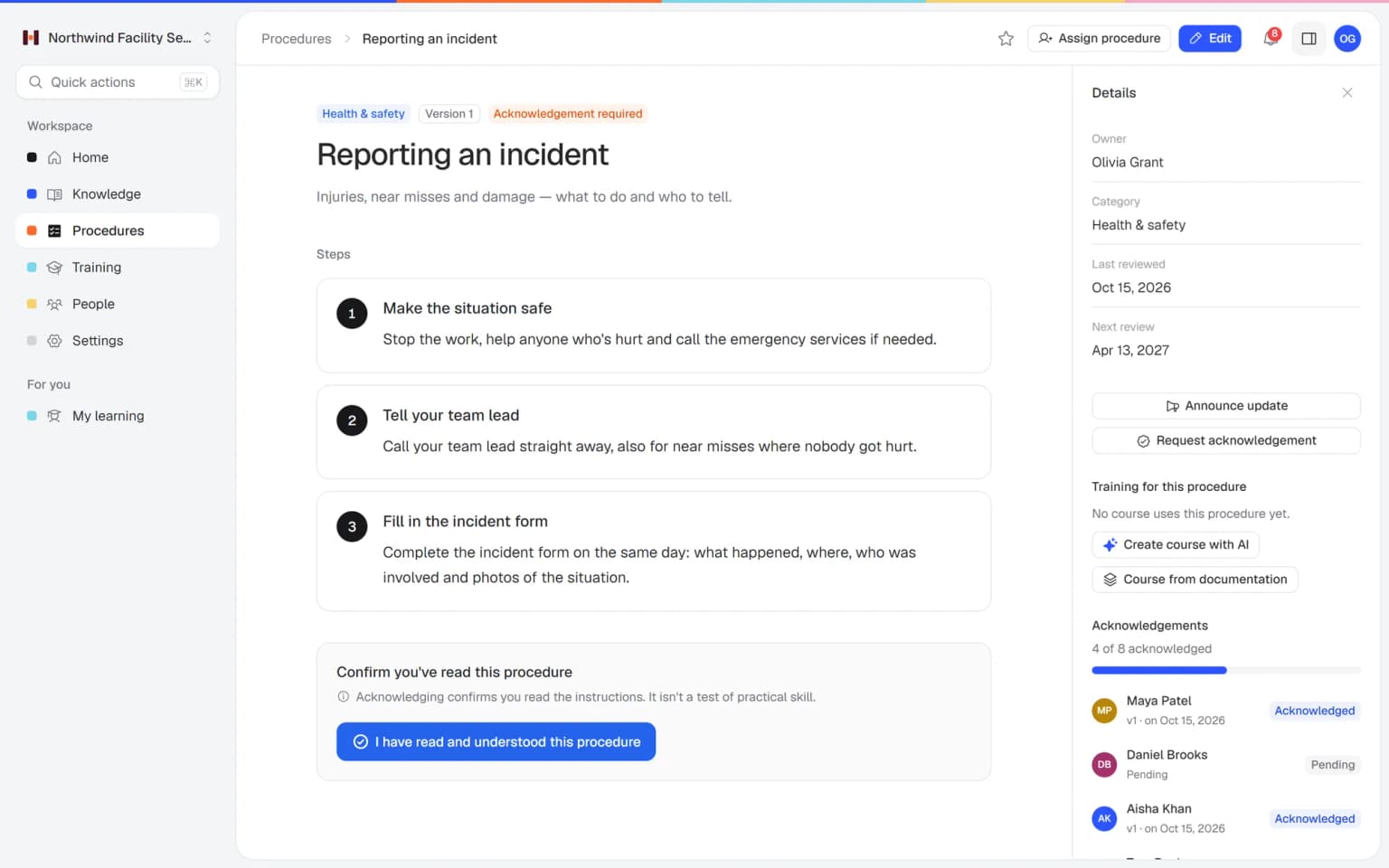
Helpable is home care training software for small care organizations whose caregivers work alone at a client's door. A temp opens the current hand hygiene and fall protocols on their phone the evening before the first shift, every caregiver confirms a changed protocol per version, and when an auditor asks who knows the latest fall protocol, you show it per person.
- Temps ready for their shift
- Protocols on every phone
- See who read each version
Where it pinches in a home care organization
A temp alone at a client's door, a fall protocol that changed last month, an auditor who asks who knows it: here is how you handle each with Helpable.
From binder to a team that works the same way, in four steps
A small care team builds this in steps, starting with the protocols that matter most on a visit.
- 1Every caregiver works from the same protocolAdd your handbook and protocols as PDF or Word and get searchable drafts. Hand hygiene, falls and the medication round become procedures with numbered steps, an owner and a review date.
- 2Temps ready before their first shiftBuild a first week with the key protocols, a few short lessons and a quiz, and assign it with a due date. From Business Max a rule assigns it to everyone who joins.
- 3The answer at the client's doorCaregivers ask in their own words on their phone and get a short answer from your own protocols, with a link to the source.
- 4Show who read the latest versionAfter a change you publish a new version and ask everyone to confirm. You see per person who read it, and on Business Max refresher training comes back on schedule.
What home care teams get
What a small care team uses when a temp starts tomorrow, a protocol changes after a fall or an audit is coming up.
A training with a quiz from the protocols you already have
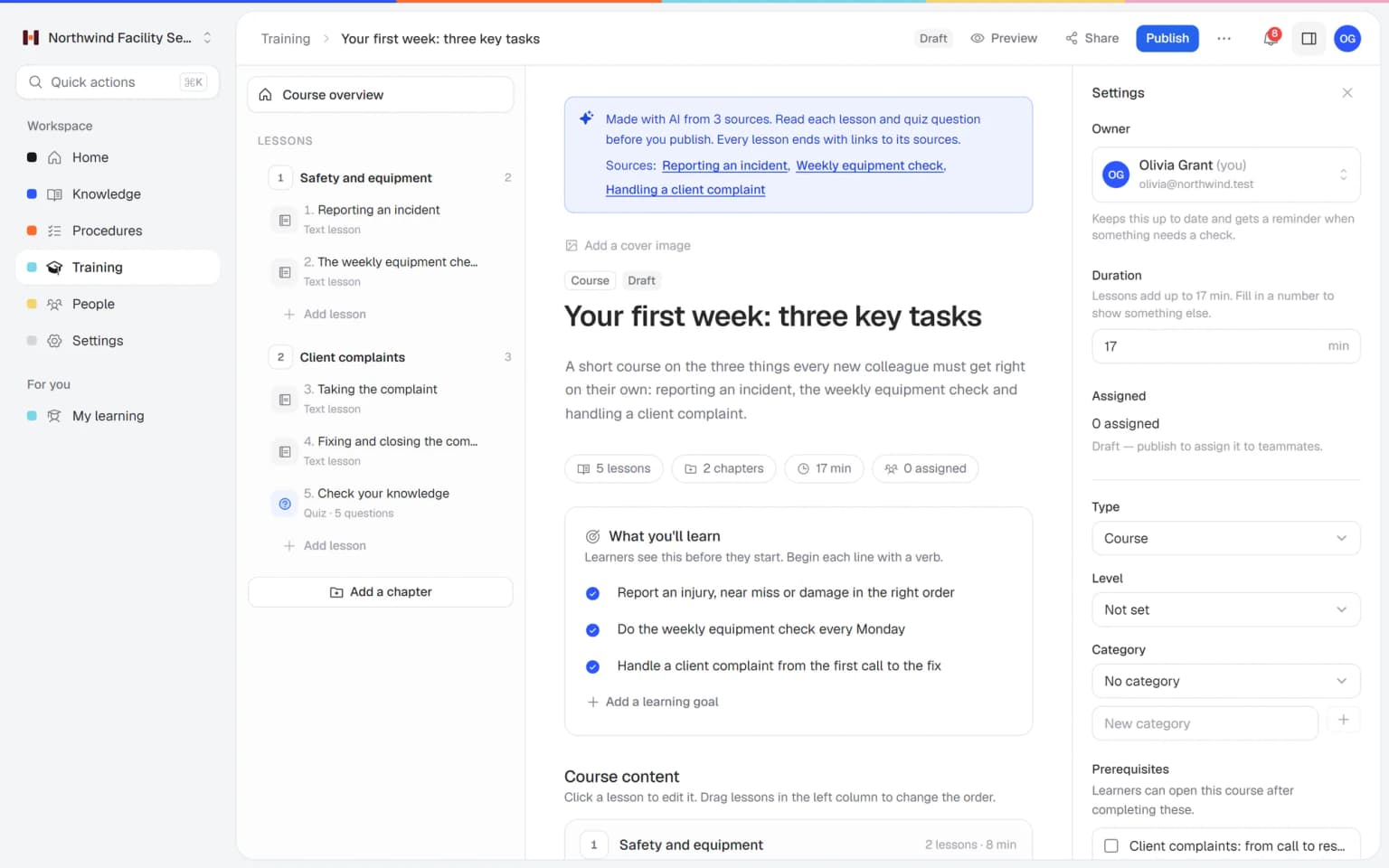
Pick your published protocols, such as hand hygiene and reporting a fall, and AI drafts a short training with lessons and a quiz that link to their source. You check it, assign it and see who passed.
- Made from your own protocols
- Lessons and a quiz in one draft
- Every lesson links to its source
- Nothing goes out until you approve it
Caregivers practice the hard conversation before they're at the door
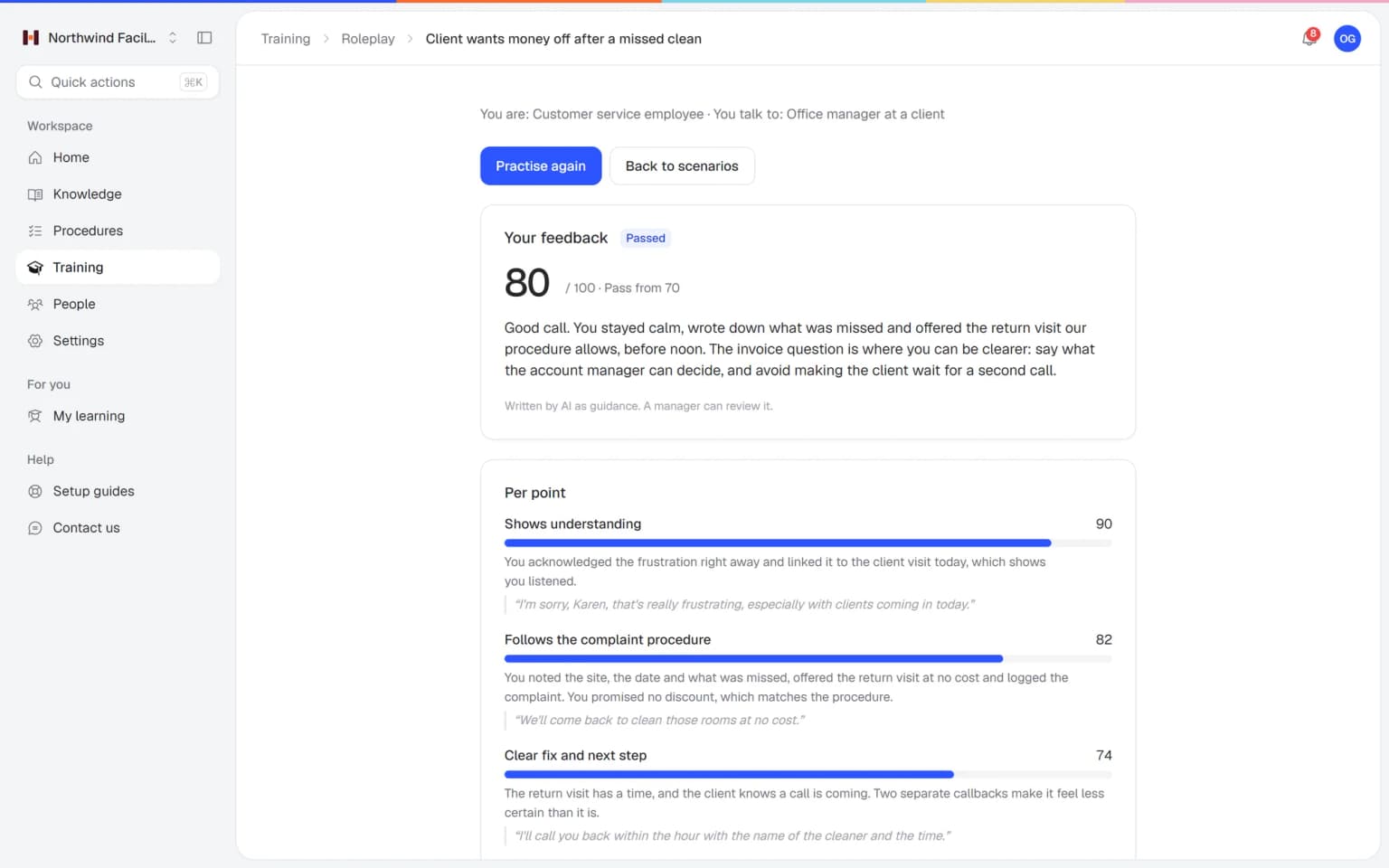
A daughter is worried about her mother, a client turns down care, a family member is upset about a late visit. Your team practices those conversations with an AI that plays the other person, in a scenario you build from your own protocols. Every conversation ends with a score and concrete tips.
- Scenarios from your own protocols
- A score and tips after every conversation
- Practice on a phone between two visits
- You see who is ready
What else belongs with your protocols
What you need after a fall, a new temp or an audit plugs straight into the same protocols.
Made for small care teams that work on the road
What Helpable takes off your plate, and what it doesn't
An honest list for care organizations: Helpable holds how your team works, and the client stays in your own client record system.
- Answers caregivers' questions from your own protocols, with the source
- Assigns onboarding to every new caregiver and temp automatically (from Business Max)
- Sends reminders before and after a training due date
- Asks people to confirm a changed protocol and tracks who did
- Assigns refresher training again on your schedule (on Business Max)
- Issues certificates with an expiry date (on Business Max)
- Turns your existing handbooks and policies into searchable drafts
- Client files and care plans: those stay in your own client record system
- Recording which medication was given: Helpable is not a medication system
- Rosters and time tracking
- Deciding whether you meet the rules: your own quality system does that
One fixed price for your whole care team
Try Business Plus free for 14 days. No credit card needed.
Business
Your knowledge base for team and customers, written faster with AI.
- AI answers with the source
- An internal knowledge base and a public help center
- AI writes first versions from your own documents
- Start from what you have: documents, Word files and your website
- Procedures everyone follows, with read confirmations
- Your help center on your own web address
- 250 AI credits per month
Business Plus
Train your team on that knowledge: courses, quizzes and progress per person.
- Everything in Business, plus:
- Training with quizzes, due dates and reminders
- See per person who finished what
- Practice conversations with AI, included
- Video lessons and final tests
- Certificates you can show clients and inspectors
- Results exported in one click
- 3 help centers and 3 internal knowledge bases
- 750 AI credits per month
Business Max
Training that runs by itself, and proof of who really knows what.
- Everything in Business Plus, plus:
- New colleagues get their training automatically
- A fixed onboarding route from day one
- Learning insights: who really studied and who clicked through
- Skills matrix and a training record per person
- Practical work signed off on the floor
- Locations with their own managers
- Refresher training that comes back by itself
- Certificates that expire on time, in your own design
- Your help center fully in your own brand
- 10 help centers and 10 internal knowledge bases
- 1,500 AI credits per month
Questions from home care and care organizations
Is Helpable suitable for a small home care organization?
Yes, Helpable is home care training software built for teams of roughly 5 to 50 people, which fits most small home care and care organizations. Caregivers who work alone at a client's door get the current protocols, the onboarding for temps and their training on their own phone.
How fast can we start, and can we use our existing protocols?
You can start with Helpable on the day you sign up, with a free trial of 14 days on Business Plus. Helpable takes your existing handbooks and protocols as PDF, Word or text files, makes them searchable and suggests article drafts a manager checks. Start with the protocols that matter most on a visit, such as hand hygiene and reporting a fall.
Can caregivers use Helpable on their phone at a client's home?
Yes, Helpable works in the browser on phones, tablets and laptops, so a caregiver can open a protocol at the client's door. Helpable has no native app to install, so a temp can open a protocol from a link.
How do we onboard temps and agency staff with Helpable?
In Helpable you build a short first week with the protocols that matter on a visit, a few lessons and a quiz, and assign it to the temp with a due date. Helpable counts every invited person as a team member, and extra team members can be added to your plan. From Business Max, a rule assigns the onboarding to everyone who joins.
Can we see who read the latest version of a protocol?
Yes, in Helpable each caregiver confirms the version of a procedure they read, and after a change you ask them to confirm again. Helpable includes read confirmations on every plan; there are no automatic reminders for confirmations.
How do we see who is ready for a shift?
Helpable shows per person which training they finished, their quiz scores, which protocol version they confirmed and what is overdue. Helpable sends reminders before and after a training due date. Business Plus adds a CSV export, and Business Max adds results per team.
Can Helpable repeat mandatory training every year?
Yes, with recurring training on Business Max, Helpable assigns a training again on the schedule you set, with reminders before the due date. On that plan, Helpable certificates can also carry an expiry date, so you see what runs out soon.
Does Helpable help when an inspector or auditor asks about our protocols?
Helpable shows which protocol version each person confirmed and when, and which training they finished. Helpable does not decide whether you meet the rules: your own quality system and the standards you work with do that.
Is Helpable a medication system or a client record system?
No, Helpable holds your protocols, training and knowledge, such as your own instruction for a medication round. Helpable does not connect to your care systems, so recording medication and keeping client files stay there. Clients see nothing in Helpable unless you publish a public help center yourself.
Is Helpable available in Dutch, and where is our data stored?
Helpable works in English and Dutch, so caregivers can use it in either language. Helpable stores your data in the EU, and roles decide who can edit, publish and see reports. Keep client data in your client record system.
What does Helpable cost, and which plan does a care team need?
Helpable starts at $29 per month for Business, with 3 team members, protocols, read confirmations and a knowledge base. Helpable Business Plus at $89 per month adds 5 team members, training, quizzes, assigning with due dates, video lessons and certificates. For automatic assignment, yearly refresher training and certificates that expire you need Business Max, and you can try Business Plus free for 14 days.
How is Helpable different from binders or a shared drive?
Helpable gives every protocol one owner, one current version, a review date and a record of who confirmed it. In a binder or shared drive you can't see who read the latest version; Helpable shows it per person and adds training, quizzes and reminders. Keep the binder for paper forms if you like, and put the steps people must follow into Helpable.
Helpable for care teams, in more detail
Home care training software: what care organizations search for
Owners, team leaders and quality officers in home care start searching when a protocol changes after an incident, an audit is coming up or a flex worker starts tomorrow. These are the questions behind those searches, answered with how Helpable fits a working day on the road.
Home care training software for a small team
For a home care team of 5 to 50 people, Helpable puts protocols, onboarding, refresher training and a searchable knowledge base in one place that caregivers open on their own phone. The content is yours: the way your team does a hand hygiene round, a wound check or a handover, written by the people who know your clients.
Most care workers never sit at a desk. They read a protocol in the car between two visits, at the client's door or during a short break, so everything works in the browser and opens from a link. A lesson holds text, photos, a short video and a quiz. Learning paths put trainings in a set order, for example the basics first, then client safety, then your medication round instruction, and from Business Max a rule enrolls every new colleague automatically.
Home care policies and procedures on every caregiver's phone
In Helpable each protocol becomes a procedure with numbered steps, photos, an owner and a review date, and one search on a phone finds it together with the related articles and lessons. That is what most teams mean when they look for SOP software for care.
A sensible first set: hand hygiene, reporting a fall or incident, lifting and transfers with a hoist, stoma or catheter care, what to do when a client doesn't open the door, the handover between shifts and your own instruction for the medication round. What belongs to one client, such as the care plan or the medication list, stays in your client record system. The way your team works lives in Helpable, and the client file holds the client.
When a question comes up halfway through a visit, the caregiver asks it in their own words. Answers replies from your own protocols with a link to the source, and says so when the answer isn't written down yet. That question then lands on a list of gaps for the quality officer.
New protocol after an incident: who has read it?
After a fall, a medication error or a near miss, Helpable lets you publish the improved protocol as a new version with a short summary of what changed, announce it to the team and see per person who confirmed it.
Confirmations are stored per version, so the record shows exactly who read the text that applies today. The overview lists who is still open, and you send those people a request yourself, because there are no automatic reminders for confirmations. When the change matters enough to test, link the protocol to a short training with a quiz. After the next change, you ask everyone who finished that training to take it again with a new due date. More on read and acknowledge.
Onboarding temps and flex workers in home care
A temp or flex worker who starts tomorrow can have a short first shift ready in Helpable today: the five protocols that matter most on a visit, a few short lessons and a quiz, assigned with a due date and reminders.
Agency staff often get an address and a key code, and little else. Send them a link the evening before, and they read the hand hygiene protocol, the fall procedure and the after-hours contact list on their phone. The planner sees who finished and who hasn't started, so nobody walks into a client's home unprepared.
For new permanent caregivers the onboarding runs longer: a first week with the shadow shifts you plan and the lessons in between. Every invited person counts as a team member, and from Business Max a rule assigns the onboarding the moment someone joins.
Proving staff read the latest protocol for an audit or inspection
When an auditor or inspector asks who knows the current fall protocol, Helpable shows per person which version they confirmed and when, which training they finished, their quiz scores and their certificates, with an export to CSV from Business Plus.
That saves the week of chasing signatures on paper lists before an audit. It also shows the open ends early: the three caregivers who never confirmed the new version, or the temp whose onboarding stopped halfway. Helpable records who read and learned what. Whether your organization meets the standards is decided by your own quality system and the auditor. A quiz checks knowledge, and a nurse or team leader still checks a skill in practice.
Home care e-learning and yearly refresher training
Training that has to come back every year, such as hand hygiene, lifting technique or the theory behind resuscitation, runs on a fixed schedule in Helpable with recurring training on Business Max.
Every 6, 12 or 24 months the training is assigned again to the same people, with reminders before and after the due date. On that plan certificates carry an expiry date, managers hear about overdue training and they can get a weekly summary email. For employee training that has to stay current, that replaces the spreadsheet someone forgets to update.
Every caregiver on the current protocol
Put your five most important protocols on every phone this week, prepare your next temp and see who is up to date.
Start free trial- 14 days free
- No credit card needed
- Cancel any time