Practice real conversations
Hiring people for customer service or support? Let them rehearse first. In AI roleplay, new hires talk to an AI customer who wants a refund, misses a parcel or calls in angry, by typing or out loud, and get feedback right after based on your own procedures. They give the right answer from their first shift, so fewer tickets come back.
- Typed or out loud
- English and Dutch
- Included in Business Plus and up
A team that knows what to say
The hard conversations stop being a surprise. Your team has rehearsed them before a real customer is on the line.
Confident from day one
New people rehearse the tricky moments first, so their first angry caller is a situation they already know.
The same answer from everyone
Scenarios use your own procedures, so every employee learns to offer what your company allows, and nothing more.
Fewer tickets that come back
An agent who rehearsed the right answer solves it the first time. Customers need to get back in touch less often, and your queue stays shorter.
New hires productive sooner
Whether you hire agents yourself or through an agency, they practice your real cases before they take live chats or calls. A clumsy answer in practice costs a few credits, never a customer.
From scenario to feedback in four steps
You set up a scenario once. Your team practices whenever it suits them.
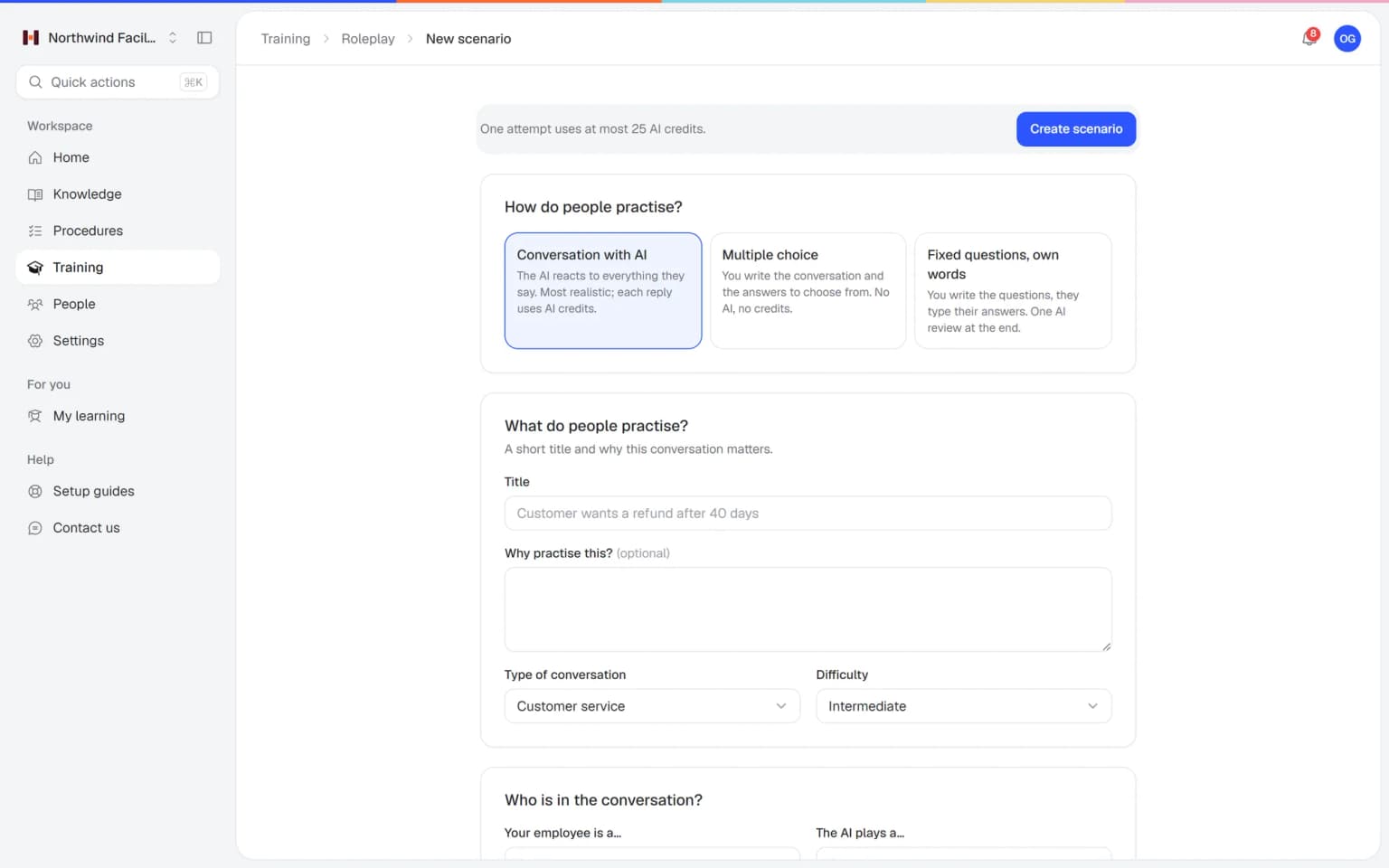
Describe the conversation
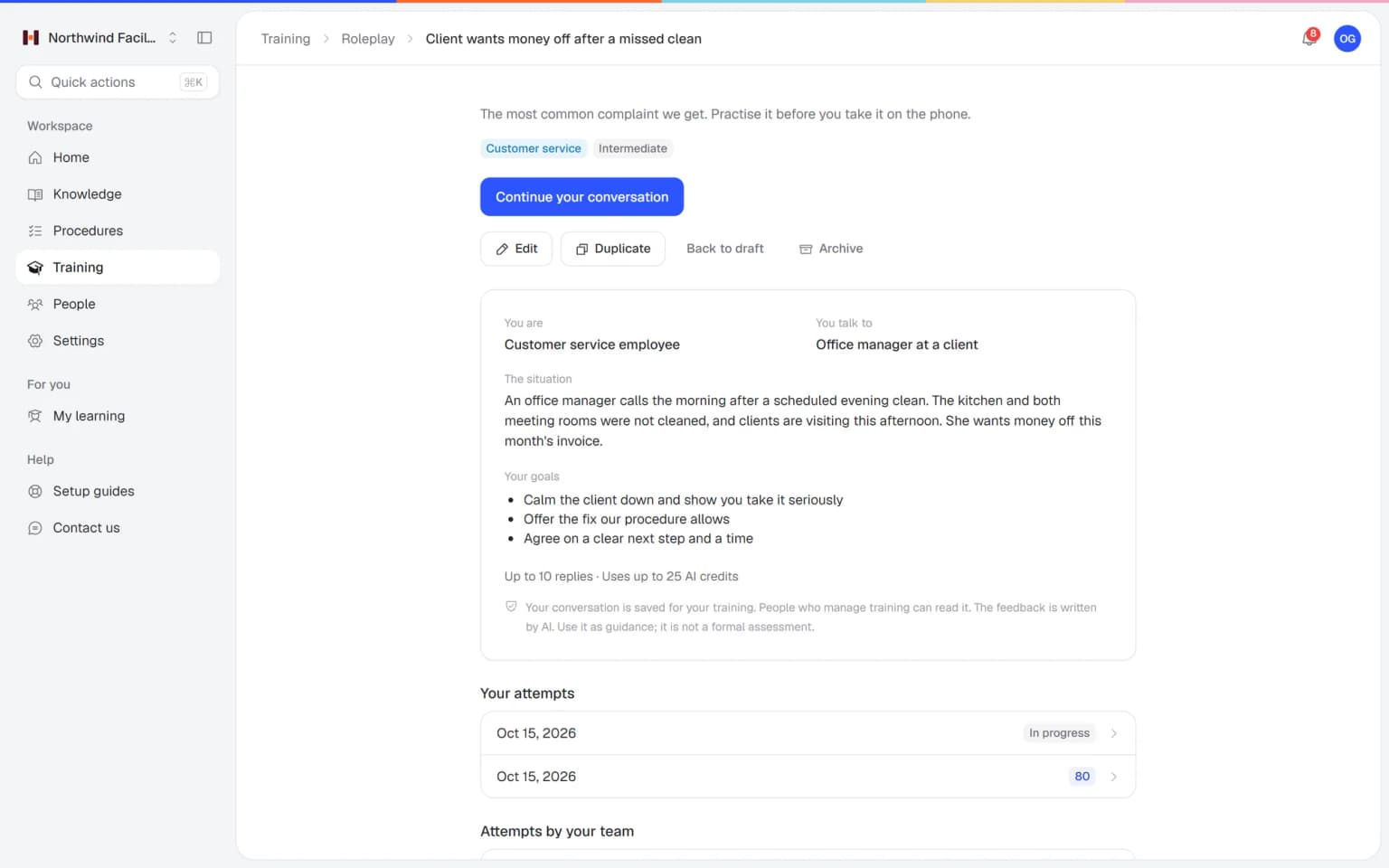
Pick how people practice. Then describe who your employee is, who the AI plays and how they behave, the situation, the learning goals and what to score on.
Share it with your team
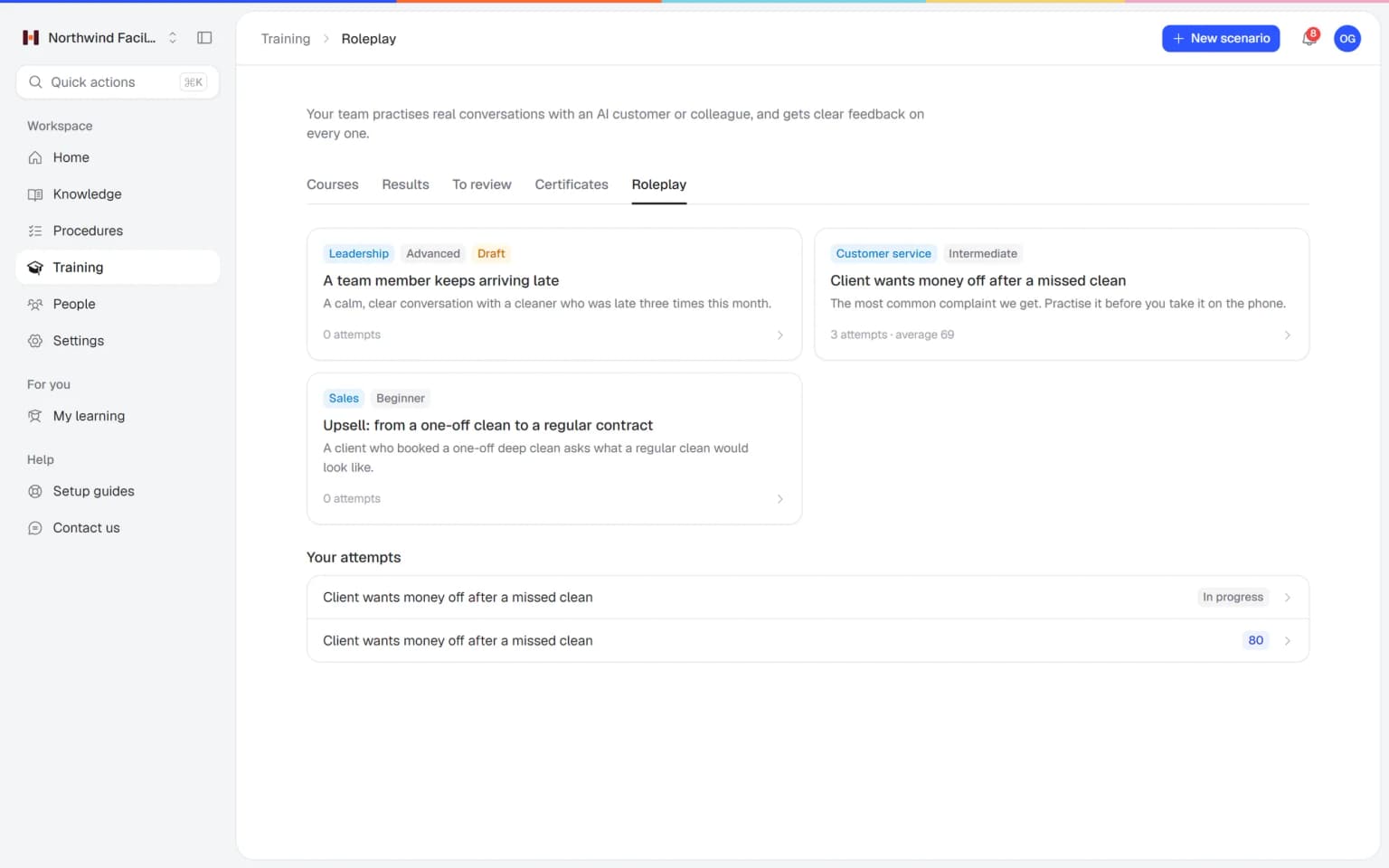
Publish the scenario, add it to a training or onboarding program and assign it to people or teams with a deadline.
Practice on any device
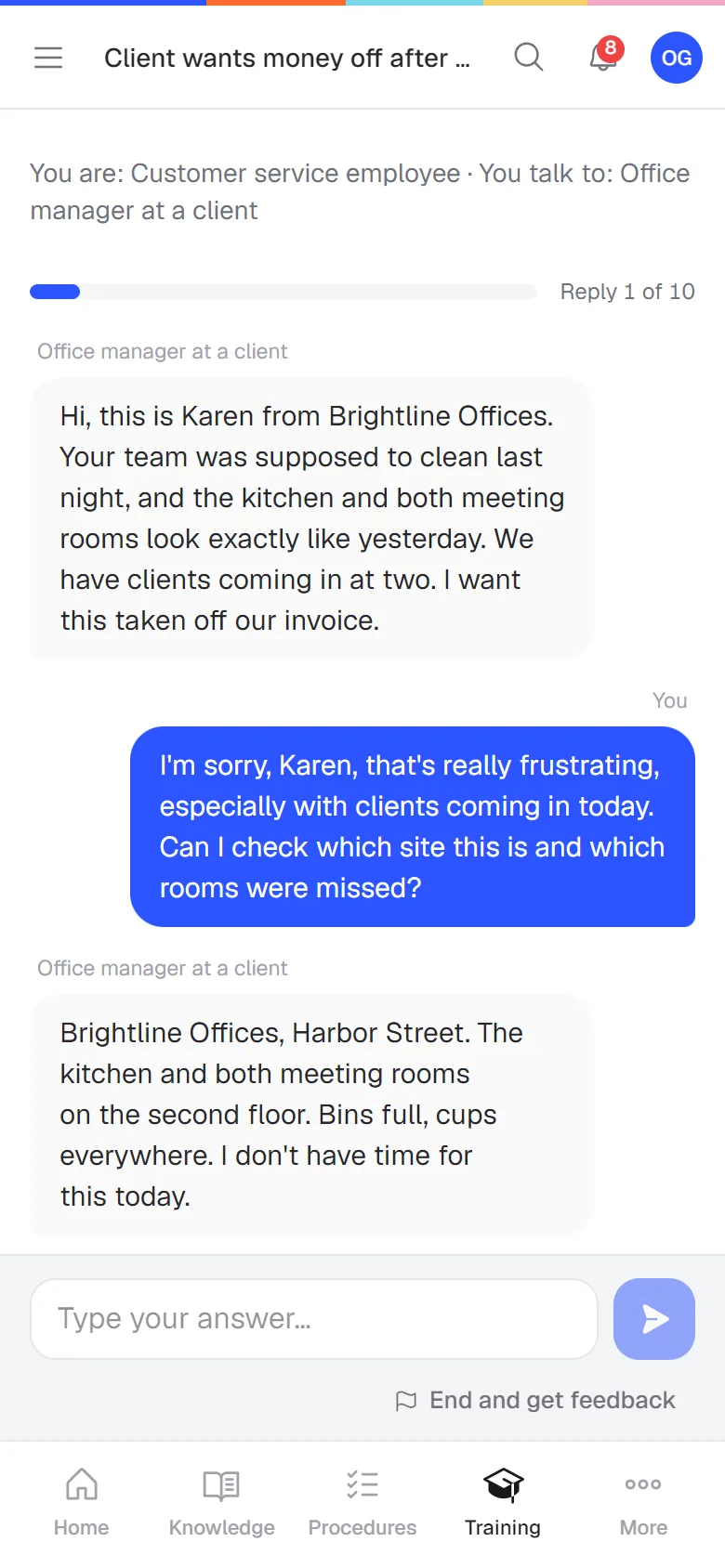
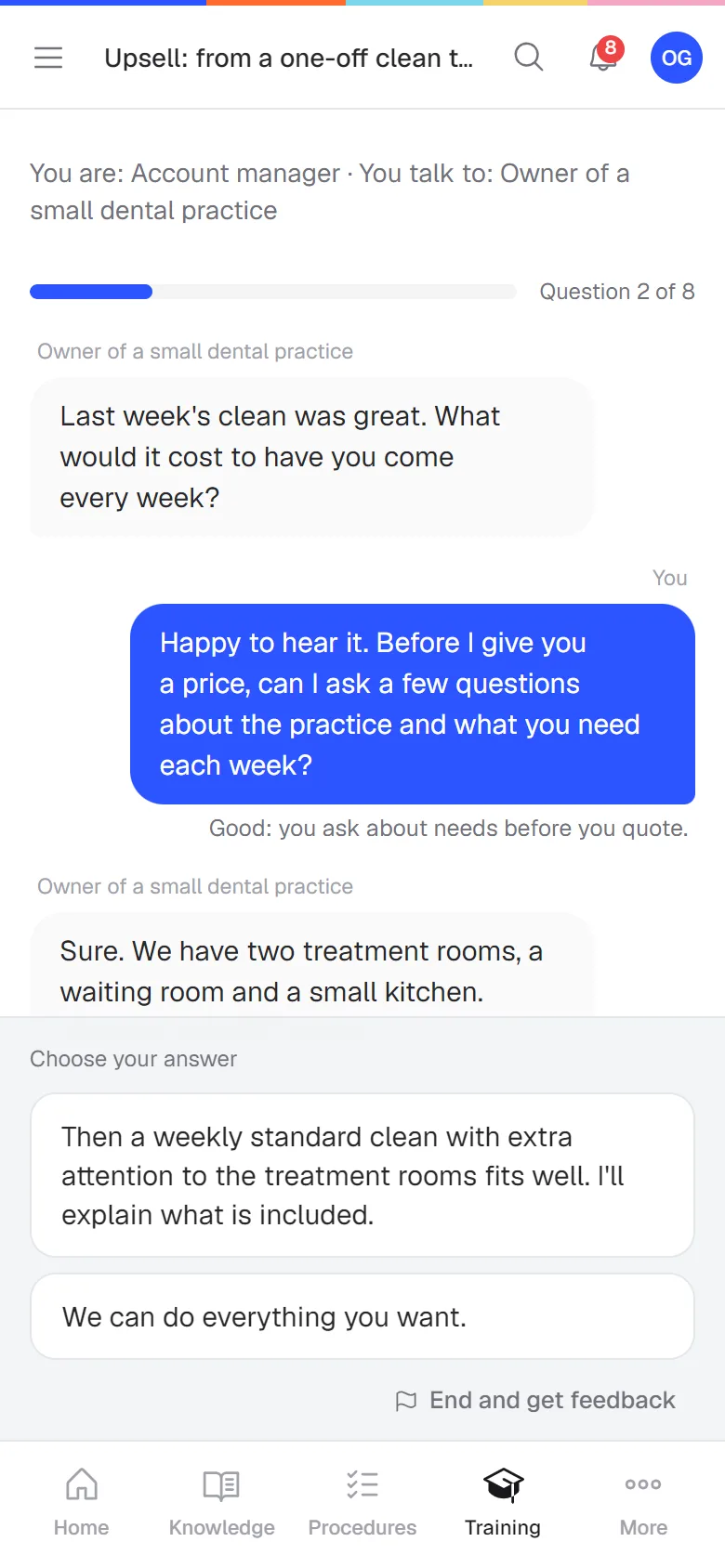
Employees see their role, the situation and their goals, and the most credits the attempt can use. Then the conversation starts on a phone or laptop: typed as a chat, or out loud with the AI customer answering in a spoken voice.
Get feedback right after
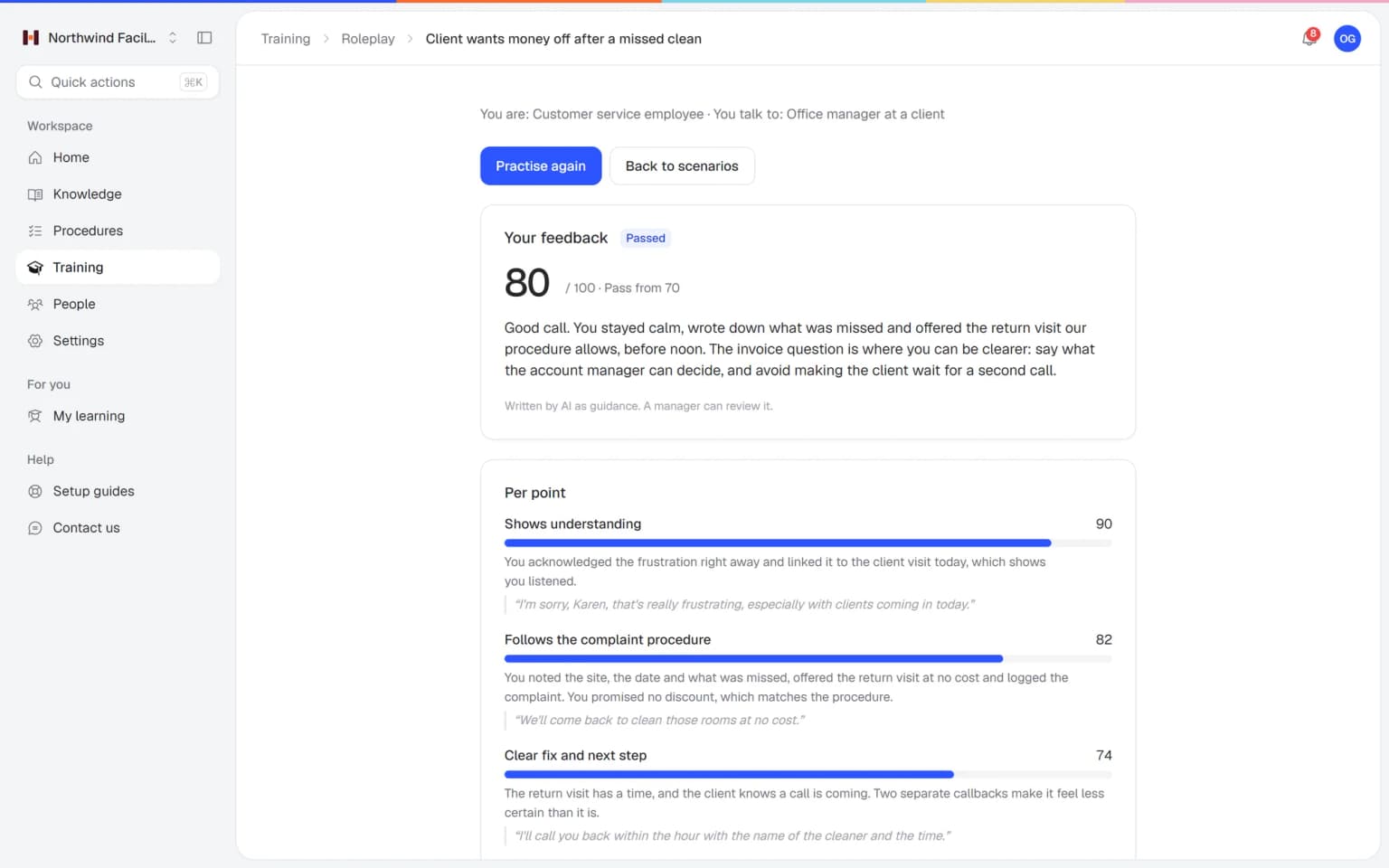
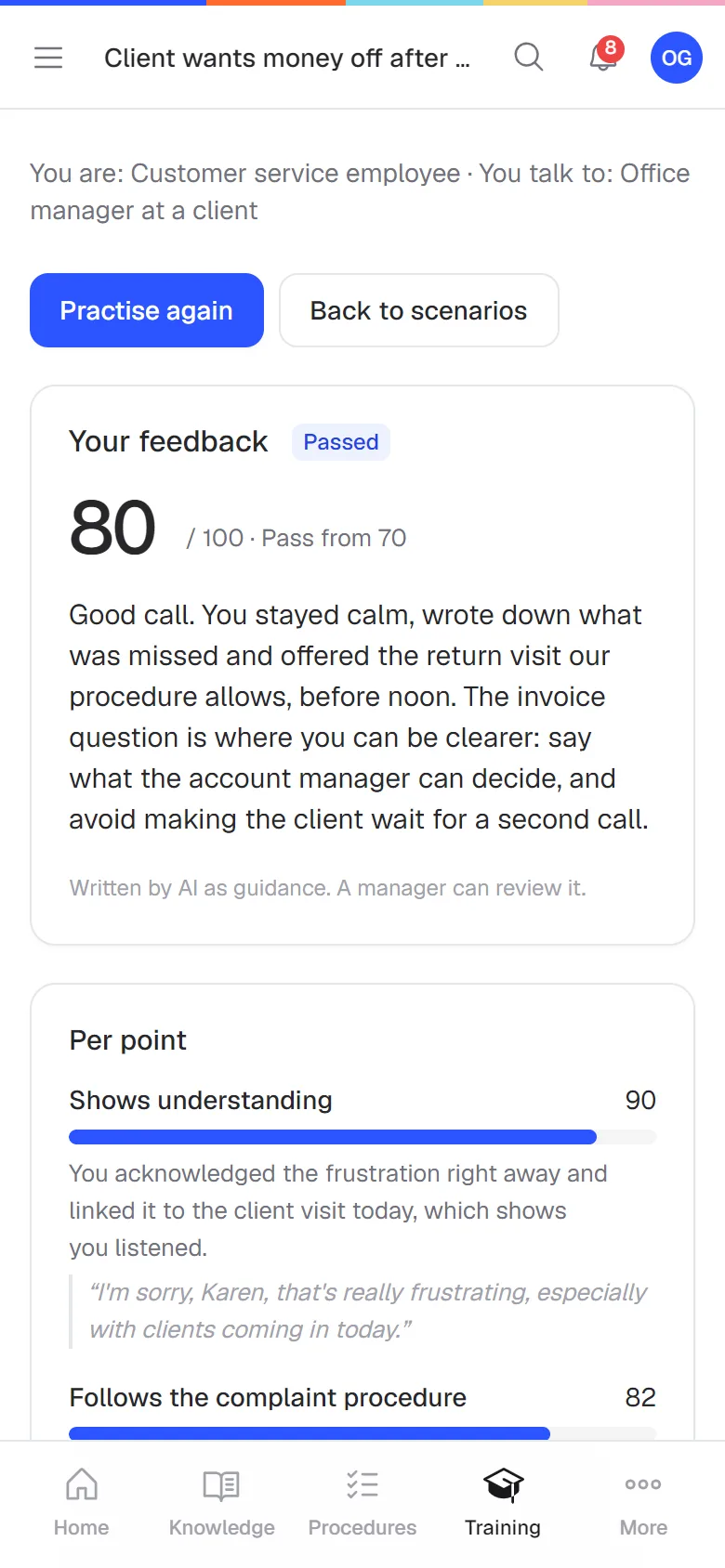
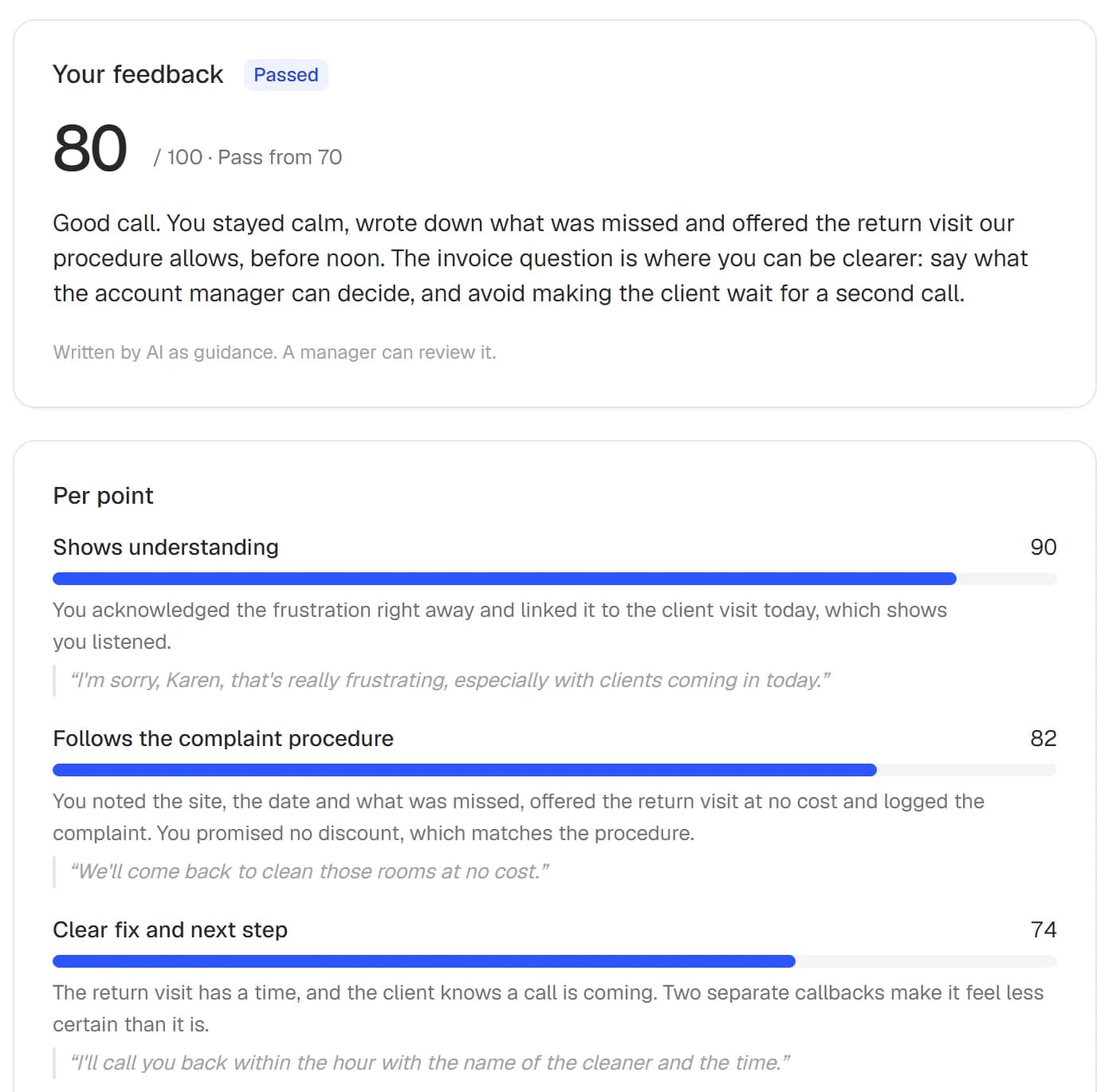
A score from 0 to 100, passed or not, and a short explanation with a quote for every scoring point. Plus better sentences to try next time.
Pick the depth that fits the moment
Choose per scenario. Start with fixed answers for new people and move to a free conversation once they're ready.
- AI credits per reply
Free conversation with AI
The AI reacts to everything your employee says. The most realistic way to practice, for conversations that never go the same way twice.
- Feels like a real customer
- Set a difficulty level
- A limit on replies per attempt
- Uses no AI credits
Multiple choice
You write the conversation and the answers to choose from. Each answer gets points and a short explanation, and the conversation can branch depending on the answer.
- No AI during practice
- Explanation after every answer
- Branches by answer
- One AI review
Fixed questions, own words
You write the questions and your employee types the answers in their own words. One AI review at the end gives the feedback, so it uses only a few credits.
- Your questions, their words
- One review at the end
- Low cost per attempt
Practice in a quiet moment, wherever people are
Helpable works in the browser on any phone, tablet or laptop, in English and Dutch. People type their answers or say them out loud, and there is nothing to install.
Feedback based on your own procedures
Attach your articles and procedures to a scenario. The AI takes its facts from them and checks every answer against them, so it never makes up company rules. When an employee may open a source, the feedback links straight to it.
- Facts only from your own knowledge
- A quote from the conversation for every score
- Better sentences to try next time
Roleplay works best next to your training and procedures
Practice sticks when it uses the same rules people read about and is part of the same program. These features make that happen.
- + ProceduresPractice the answer your procedures giveLink a refund or complaint procedure to a scenario. The AI takes its facts from it, and when an answer misses a step the feedback links straight to that procedure.
- + Knowledge baseFeedback that points to the right articleAttach knowledge base articles to a scenario. Employees who may open them get a direct link in the feedback, so they read the right answer while the conversation is still fresh.
- + OnboardingRehearse the hard moments in the first weekAdd a roleplay to an onboarding program next to lessons and procedures. Passing it counts toward finishing the program, so new people practice before they meet real customers.
- + QuizzesCheck the rules first, then the conversationStart with a short quiz on the rules, then a roleplay where people use them in their own words. Knowing and doing sit in the same training.
- + Training with AIFrom procedure to training to practiceLet AI draft a training from your published procedures, then add a roleplay so people practice the same rules in a real conversation.
- + Progress and reportsSee who is ready to talk to customersFollow who finished the training around the roleplay, and see per scenario who practiced, how they scored and who could use another round.
Built for the people who train the team
Everything you need to set up practice, follow progress and keep the bar the same for everyone.
Guided scenario builder
Roles, behavior, situation, goals, difficulty, maximum replies, passing score and attempts, in one form.
Scoring you decide
Choose the points that matter, give each a weight and set the score people need to pass.
Your own knowledge
Link articles and procedures from Helpable. The AI uses those facts and checks answers against them.
Manager review
The feedback is AI guidance. A manager can review a conversation, correct the score and add a note.
Part of onboarding
Add a roleplay to a training or onboarding program. Passing it counts toward completion.
See who needs practice
Managers see who practiced, how they scored and who could use another round.
AI costs you can predict
Every attempt has a limit, and you always know what a conversation can cost before it starts.
A budget per attempt
Each attempt has a maximum number of credits, shown to the employee before they start.
Nothing charged automatically
When credits run out, the attempt ends with a clear message. Helpable never tops up or bills extra on its own.
Failed steps are refunded
If an AI step fails, the credits for it go back to your balance.
Conversations stay private
Conversations are saved for the employee's training. Only the people who manage training can read them, and each company's data stays separate.
Included in Business Plus and Business Max
AI Roleplay Studio comes with Business Plus and Business Max, the plans with training. Conversations with AI use the AI credits that come with your plan each month.
AI Roleplay Studio
$89 per month
- All three ways to practice
- Your own scenarios and knowledge
- Feedback with quotes and better sentences
- Manager review and team results
Included in
- Business Plus750 AI credits a month included$89 per month
- Business Max1,500 AI credits a month included$179 per month
One AI reply uses 2 credits and the feedback at the end 5. Multiple choice uses none. Extra credit packs can be added any time.
Compare all plansAI Roleplay Studio is part of a Helpable plan, so you need a plan to use it. It is included in Business Plus and Business Max, the plans with training, from $89 a month.
What is AI Roleplay Studio?
AI Roleplay Studio is the part of Helpable where employees practice work conversations with an AI that plays a customer, colleague or manager. It is included in Business Plus and Business Max. After each conversation they get a score and concrete feedback on what to do better.
What does AI Roleplay Studio cost?
AI Roleplay Studio is included in Helpable Business Plus and Business Max, from $89 a month. Conversations with AI use AI credits: every plan includes credits each month, and you can buy extra packs when you need more.
Which conversations can my team practice?
Helpable lets you build any work conversation as a scenario. Think of a customer who wants a refund after 40 days, an upsell call, a complaint about a missed visit or a talk with an employee who keeps arriving late.
Does the AI make up company rules?
Helpable's AI takes facts only from the articles and procedures you attach to a scenario, and checks the employee's answers against them. If something isn't in your knowledge, the AI won't present it as company policy.
How reliable is the score?
The feedback in Helpable is AI guidance that helps people improve. For a formal assessment, a manager reviews the conversation: they can correct the score and add a note.
How do I keep AI costs under control?
Helpable gives every attempt a maximum credit budget and shows it before the conversation starts. Nothing is charged automatically when credits run out, and credits for a failed AI step are refunded. Multiple-choice practice uses no credits at all.
Who can read the conversations?
In Helpable, conversations are saved for the employee's training. The employee and the people who manage training can read them, and each company's data stays separate.
Can roleplays be part of onboarding?
Yes. In Helpable you add a roleplay to a training or onboarding program and assign it to people or teams with a deadline. Passing the roleplay counts toward completing the program.
Can I hire customer service agents through Helpable?
No. Helpable doesn't supply staff. Helpable trains the people you hire yourself or contract through an agency or contact center, so they know your way of working and have rehearsed the difficult conversations before they help live customers.
Does AI roleplay help reduce support tickets?
Helpable reduces tickets in two ways. Agents rehearse the right answer, so a question is solved the first time and comes back less often. And with the knowledge base and AI answers with the source, your team and your customers find many answers themselves before a ticket is needed.
Does it work on a phone, and in Dutch?
Yes. Helpable works in the browser on phones, tablets and laptops, in English and Dutch. Employees type their answer or say it out loud, and the AI customer then answers in a spoken voice. There is no app to install.
AI roleplay training: how it works and what to look for
What AI roleplay training is, which work conversations teams practice with it, and how Helpable ties every practice conversation to your own way of working.
What is AI roleplay training?
AI roleplay training in Helpable is practice for work conversations. An employee chats with an AI that plays a customer, colleague or manager, and gets feedback as soon as the conversation ends. First they read their role, the situation and their goals, then they answer in their own words, the way they would on the job.
It closes the gap between reading the rules and using them. Most people learn your way of working from a training or a step-by-step procedure, and then meet their first upset customer with nobody to rehearse with. A roleplay gives them that rehearsal, as often as you allow and at a moment that suits them.
Conversation training with AI, step by step
Helpable builds every practice conversation from a scenario you set up once. You describe who the employee is, who the AI plays and how that person behaves, the situation, the learning goals and up to eight scoring points, each with its own weight. You also pick a level (beginner, intermediate or advanced), the most replies an attempt may have and the score people need to pass.
Then you publish the scenario and assign it to people or teams with a deadline. Employees practice in the browser on a phone or laptop. After the last reply they see a score from 0 to 100, whether they passed, a short explanation with a quote from their own conversation for every scoring point, and better sentences to try next time.
Sales roleplay practice for small sales teams
Helpable lets sales people rehearse the moments that decide a deal: the first call, a question about the price, a buyer who wants to think it over, or an upsell after a support question. The AI plays a buyer with the personality you describe, from friendly and curious to short and doubtful, and reacts to every answer.
You choose the scoring points, so the feedback checks what your company cares about, such as asking about the need before pitching, naming the right package or agreeing on a next step. A new sales hire can repeat the scenario until the score holds, and a manager can read the conversation and add a note before the real calls start.
Practice customer conversations before they happen
Helpable gives your team a safe place to practice customer conversations that are hard to learn on the job: a refund request after the return period, a parcel that never arrived, a complaint about a missed visit or a guest who is unhappy with the room. The AI takes its facts from your own procedures, so employees learn the answer your company really gives.
For teams that talk to customers all day, like customer service teams, webshops and shops, new people have handled the tricky moments before a real customer is on the line. The same goes for the conversation at the door in hospitality or on site in cleaning and facility services and installation and maintenance.
Roleplay based on your own procedures and knowledge
Helpable takes the facts for a roleplay from the published articles and procedures you link to the scenario, up to ten per scenario. The AI uses them to play the other person and to check every answer, so it never makes up a refund rule or a delivery time your company doesn't have.
Those sources live in your knowledge base and your SOPs. When an employee may open a source, the feedback links straight to it, so a weak answer leads to the page with the right one. Publish a change to a procedure and the next roleplay uses the new text.
Three ways to practice, from first week to expert
Helpable offers three ways to practice, chosen per scenario. A free conversation with AI is the most realistic: the AI reacts to everything the employee says. Multiple choice uses no AI at all: you write the conversation and the answers, each with points and an explanation, and the conversation can branch by answer. Fixed questions in their own words sit in between: you write the questions, the employee types the answers and one AI review at the end gives the feedback.
A sensible order for new people is multiple choice in the first week, fixed questions after that and a free conversation once they are ready. Put the scenarios next to lessons and quizzes, so knowledge and practice sit in one program.
Roleplay as part of onboarding and training
Helpable treats a roleplay as one more step in your training, next to lessons, procedures and quizzes. Add it to a training or onboarding program and passing it counts toward finishing the program. Managers see per scenario who practiced, how they scored and who could use another round.
That makes Helpable one place for the whole learning path of a new employee: employee training, procedures, a knowledge base to look things up and roleplays to rehearse the conversations. Teams that want a simple learning platform can read more about the LMS for small business, and training with AI turns your procedures into lessons.
What to look for in an AI roleplay tool
Helpable was built around four questions worth asking any AI roleplay tool. Where do the facts come from: your own procedures or the general knowledge of the model? Can you predict the cost? Can a manager review a conversation and correct the score? And who can read the conversations?
In Helpable every attempt has a credit limit the employee sees before starting, nothing is charged automatically when credits run out and credits for a failed AI step are refunded. Conversations are saved for the employee's training, and only the people who manage training can read them. Read how Helpable handles your data on the security page.
Hiring customer service agents and getting them ready fast
Helpable is for companies that hire or contract people for customer service or support: a SaaS company with a support team, an online store with busy seasons, a booking business or salon with a front desk, a care organization with a phone line, or a contact center working for several clients. A new agent first takes a short training on your product and way of working in Helpable, reads the procedures for refunds and complaints, and then rehearses the difficult conversations in AI roleplay.
When you hire through a staffing agency or an outsourcing partner, you put those people in their own team in Helpable with the same onboarding program. Everyone works to the same rules, permanent or temporary, and you see per person who is ready to help live customers.
Reduce support tickets with training, a knowledge base and AI answers
Helpable cuts tickets in three places. Agents rehearse the right answer in a roleplay, so a question is solved the first time and comes back less often. Your knowledge base and help center let customers and colleagues find answers themselves, and AI answers with the exact source get your team unstuck in seconds.
Questions nobody could answer show up as open questions, so you see which article or procedure is still missing. Your knowledge grows with what customers really ask, and every new support hire is trained on the situations that come up most.
What AI roleplay costs
Helpable includes AI Roleplay Studio in Business Plus and Business Max, the plans with training. Conversations with AI use the AI credits that come with every plan each month: one AI reply uses 2 credits and the feedback at the end 5. Multiple choice uses none, and extra credit packs can be added any time. Compare the plans and what they include on the pricing page.
Read more about this
- Roleplay training for employees: a practical guideHow to let employees practice customer, sales and team conversations before they happen for real, and how to score it.Read the article
- 10 customer service roleplay scenarios, with scoringTen scenarios to practice with your team, each with the situation, how the customer behaves, the goals and what to score on.Read the article
- 9 best onboarding software for small businessHR tools for paperwork and training tools for learning the job, compared for small teams.Read the article
Works together with AI roleplay
Let your team practice the hard conversations first
Build your first scenario and see how your team handles it.
- 14 days free
- No credit card needed
- Cancel any time