Free tool

Free SOP generator

This free SOP generator turns a common task into a clear standard operating procedure. Pick your sector and task, change the steps to match your workplace, then copy or print the result.

  • Free, no account needed
  • Copy or print as PDF
  • Runs in your browser

How the SOP generator works

Three steps, and you have an SOP your team can follow.

  1. Pick your sector and task

    Choose from eight sectors and a list of common tasks, or start your own task from a simple outline.

  2. Make it yours

    Edit the title, purpose, materials, safety and every step with its check. Add, remove or move steps. The preview updates as you type.

  3. Copy or print it

    Copy the SOP as text for Word, Google Docs or your knowledge base, or print it and save it as a PDF.

Build your SOP

Everything you type stays in your browser. Fill in an owner and a review date so the SOP stays up to date.

1. Pick your sector
2. Pick a task
3. Edit the details
Steps

Your browser keeps your latest version on this device.

Preview

Clean the restrooms

Standard operating procedure. Follow the steps in order and do each check before you go on.

Details

For whom
Cleaners on site
Purpose
Toilets and sinks are clean, fresh and restocked when the round is done.
What you need
Gloves, bathroom cleaner, color-coded cloths (red for toilets), toilet brush, paper and soap to restock, wet floor sign
Safety
Wear gloves. Never mix cleaning products. Put out a wet floor sign.

Steps

  1. Place the wet floor sign at the entrance of the room.

    Check: The sign is easy to see.

  2. Spray the toilet bowl, seat and sink with bathroom cleaner and let it work for a moment.

    Check: All surfaces are sprayed.

  3. Clean the sink, taps and mirror with a clean cloth.

    Check: No limescale or soap marks left.

  4. Clean the toilet from top to bottom with the red cloth and the brush, the base last.

    Check: Under the rim is clean too.

  5. Restock toilet paper, paper towels and soap.

    Check: All dispensers are full.

  6. Mop the floor toward the door and sign off the round on the checklist.

    Check: The checklist shows the time and your initials.

Management

Owner
[fill in]
Version
1.0
Review date
[fill in]

Made with the free SOP generator from Helpable
Tips for a good SOP

Short and specific works best. These tips help people follow it on their first day.

  • One action per step

    "Switch off the machine and unplug it" is two steps. Short steps are easier to follow and to check.

  • Start with a verb

    "Close the valve", "Scan the receipt". People see right away what to do.

  • Add a check where mistakes happen

    A check tells people how they know a step went right, for example: the light is green.

  • Write for the newest person

    Use the words people use on the floor. Explain what feels obvious to experienced coworkers.

  • Test it with someone new

    Let a coworker who does not know the task follow the SOP while you watch. Fix every spot where they hesitate.

  • Give it an owner and a review date

    One person keeps it up to date and checks it on the review date, or sooner when the work changes.

Put it in Helpable

A document shows the steps. In Helpable your team also finds the SOP in one place, and you see who read the latest version.

  1. Publish it as a work instruction

    Paste your SOP into a work instruction in Helpable. Each step gets its own text, images and a checklist. Set an owner and a review interval, and Helpable shows the next review date.

    Publish it as a work instruction: how it looks in Helpable
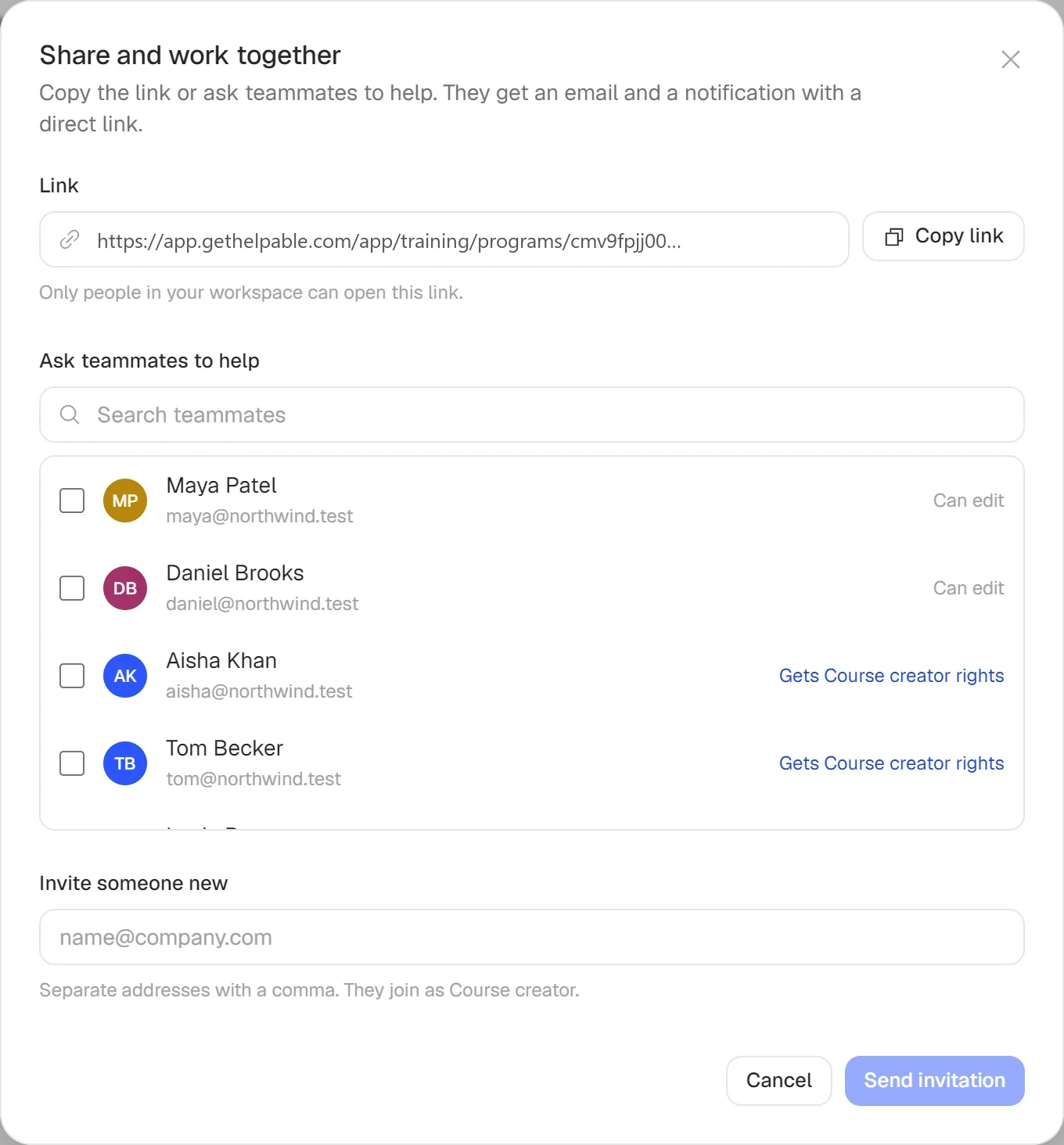
  2. Share it with the people who do the task

    Assign the work instruction to a team or a person, with a deadline. Helpable sends email reminders to everyone who has not finished yet.

    Share it with the people who do the task: how it looks in Helpable
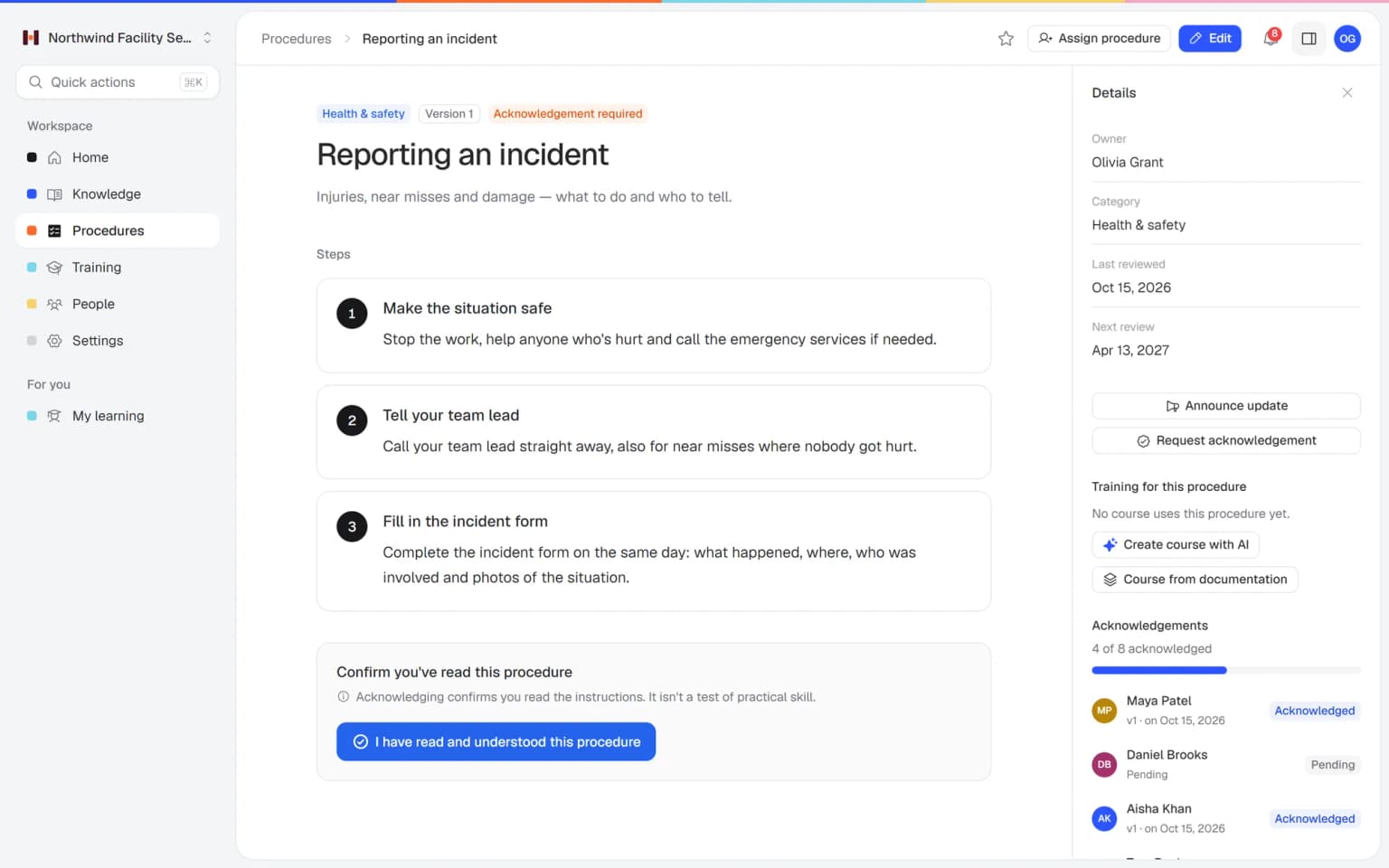
  3. Ask your team to confirm each version

    People confirm they read and understood the instruction. After a change you publish a new version and ask again. Read confirmations are part of every plan.

    Ask your team to confirm each version: how it looks in Helpable

Or let AI write the first draft in Helpable

In Helpable, open Procedures and click Write with AI. Describe the task in a few words and AI writes numbered steps with checks and safety notes. You get a draft to check and change before anyone sees it. Each draft costs 3 AI credits from your plan.

Pricing

A plan that grows with your team

Try Helpable free for 14 days, no credit card needed. Then pick the plan that fits your team.

Grow when you need to

Add these to Business and up, any time. You only pay for what you use.

  • More people

    Add people one by one as your team grows, for a fixed price per person on every plan.

    $9/month

  • A second help center

    A help center and handbook for another brand, location or client.

    $10/month

  • Only your brand

    Remove “Powered by Helpable” from your help center. Included in Business Max.

    $19/month

  • Cancel any time
  • Data stored in the EU

Questions about the SOP generator

Can't find your answer? We're happy to help.

Is the SOP generator really free?

Yes. The SOP generator from Helpable is free and you need no account or email address. Make as many SOPs as you like and use them however you want.

Does the SOP generator use AI?

No. Helpable's free SOP generator fills in a built-in library of tasks and runs fully in your browser, so nothing you type is sent to Helpable. If you want AI, Helpable has Write with AI inside Procedures, which writes a draft from a task description and uses AI credits.

Can I save the SOP as Word or PDF?

Helpable's Copy button copies the SOP as text with headings, ready to paste into Word or Google Docs. The Print button prints only the SOP, and in the print window you can choose Save as PDF.

Is my SOP saved?

Helpable stores nothing on a server for this tool. Your browser keeps your latest version on this device, so you can come back to it later; clear your browser data and it is gone.

How do I write an SOP for a task that is missing from the list?

Pick Your own task in Helpable's SOP generator. You get a simple outline with six steps to adapt: give the task a title that starts with a verb, describe each action and add a check.

Which sectors and tasks are included?

Helpable's library covers cleaning, hospitality, retail, installation and maintenance, care, childcare, office and customer service, and logistics. Each sector has a set of common tasks, and Your own task gives you a simple outline for anything else.

Are the care and childcare examples a protocol?

Helpable's examples are general starting points and do not replace medical advice or your organization's own protocol. Always check them with the people responsible before you use them.

What should an SOP include?

Helpable's generator covers the basics: a title that starts with a verb, who it is for, purpose, what you need, safety, numbered steps with checks, owner, version and review date. Leave out what does not apply. Always keep the owner and review date.

How do I know my team read the SOP?

In Helpable you ask for a read confirmation per published version and see per person who confirmed and who is still open. After a change you ask again; read confirmations are part of every plan.

Turn your SOPs into a habit

Publish your SOPs in Helpable, share them with your team and see who read the latest version. Try it free for 14 days.

  • 14 days free
  • No credit card needed
  • Cancel any time