Help center analytics that find gaps
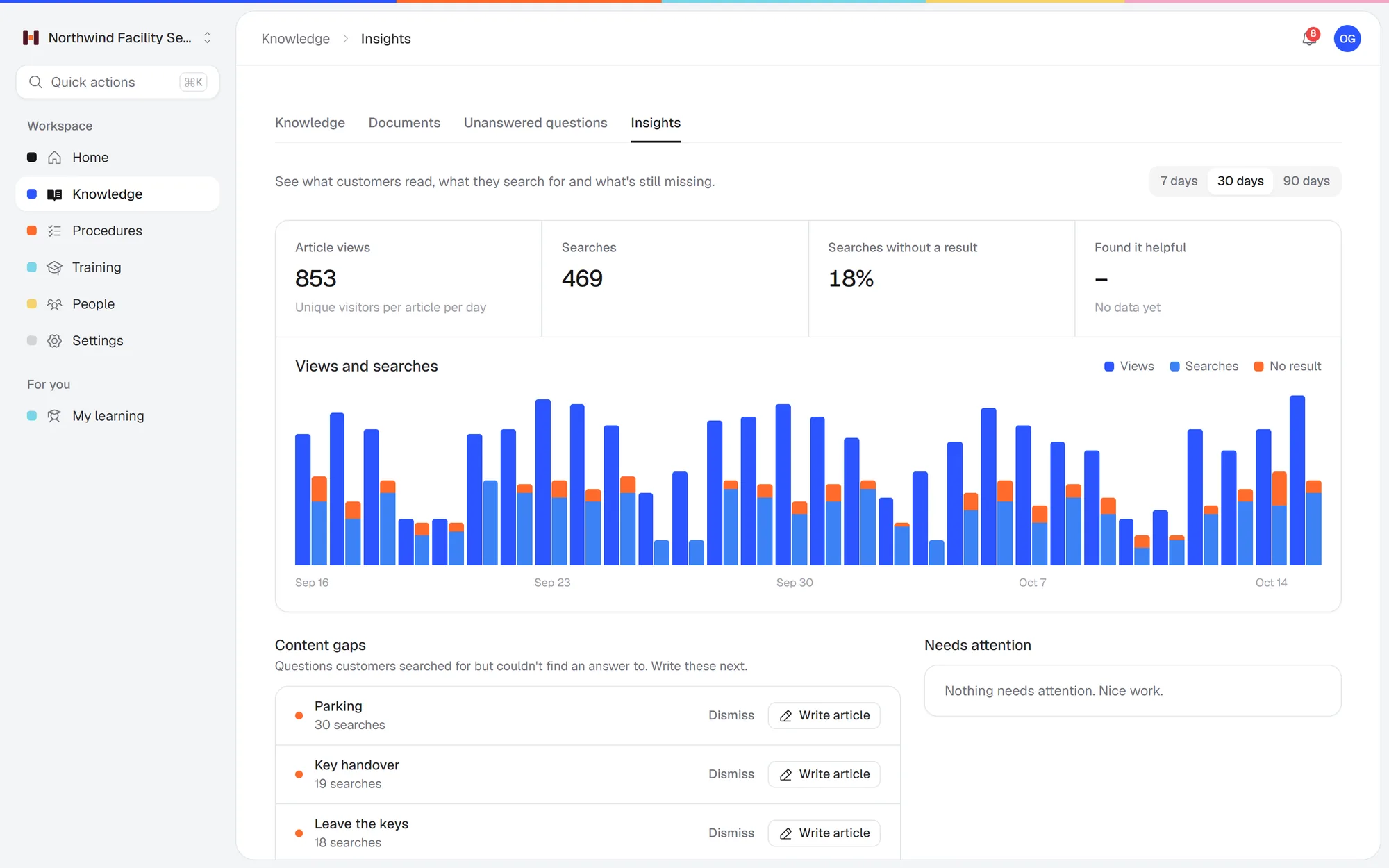
Help center analytics in Helpable show what your customers look for, which searches come up empty and which articles really help. You know which article to write next, and fewer customers have to ask you the same question.
- 14 days free
- No credit card needed
- Content gaps found for you
A help center that answers more questions every month
Helpable shows you where your help center falls short, so every new article solves a real customer question.
Fewer repeat questions
When you see which searches find nothing, you write the missing answer once. Customers find it on their own next time.
Articles that actually help
Readers vote whether an article was helpful. You see which ones to improve first and which ones already do their job.
Time spent where it counts
Content gaps come with a priority, so you work on the questions most customers ask and skip the guesswork.
Customers helped sooner
More searches end in an answer, so customers solve things on their own at any hour. Each gap you close shows up in the share of searches that found nothing.
No outdated answers online
Customers read answers that are still true. Helpable flags published articles that have not been updated in over 180 days, so you check them in time.
See your work pay off
You know the effort on your help center is worth it. Views are compared with the period before, and helpful votes show which articles do their job.
Writing help articles in the dark wastes your time
Most small teams publish articles and never find out what happens next. These are the blind spots.
You guess which article to write
You write about what you think customers need, and the real questions keep coming in.
With Helpable Content gaps group the searches that found nothing, so you see exactly which answer is missing.
Customers search and give up
Someone types a question, gets no result and contacts your team.
With Helpable See the share of searches that found nothing, and turn a gap into a draft article with one click.
Bad articles stay online
An article is unclear, but nobody tells you, so it keeps confusing people.
With Helpable Needs attention lists the articles readers found unhelpful, so you know what to rewrite.
Old articles go out of date
Products and rules change, and older articles quietly stop being true.
With Helpable Helpable flags published articles that were not updated in over 180 days, so you can check them.
From customer searches to better answers
Three steps. The numbers start as soon as customers use your help center.
Publish your help center
Customers read articles, search for answers and vote whether an article was helpful.
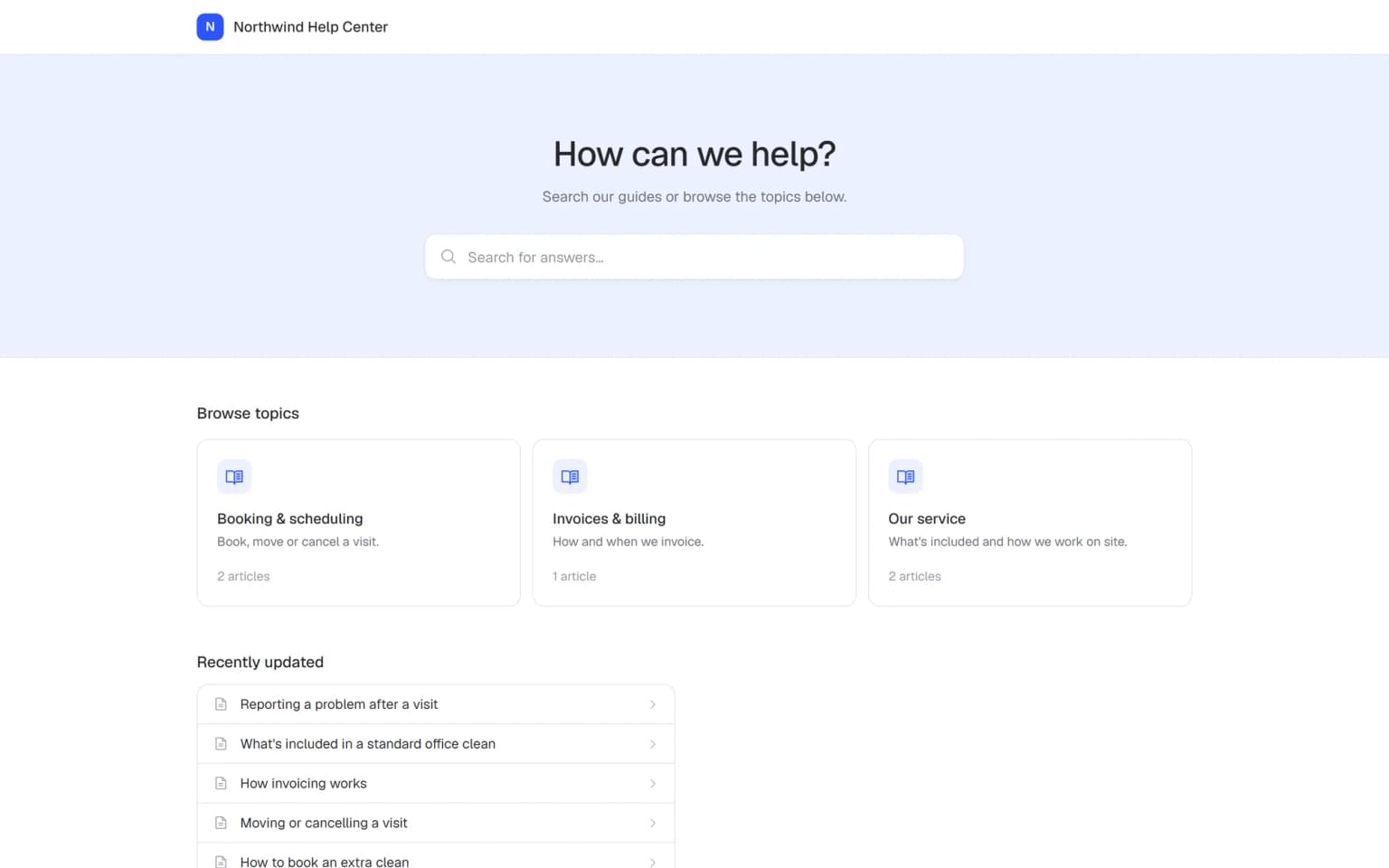
Open Insights
Pick a help center and the last 7, 30 or 90 days. See views, searches, helpful votes and content gaps.
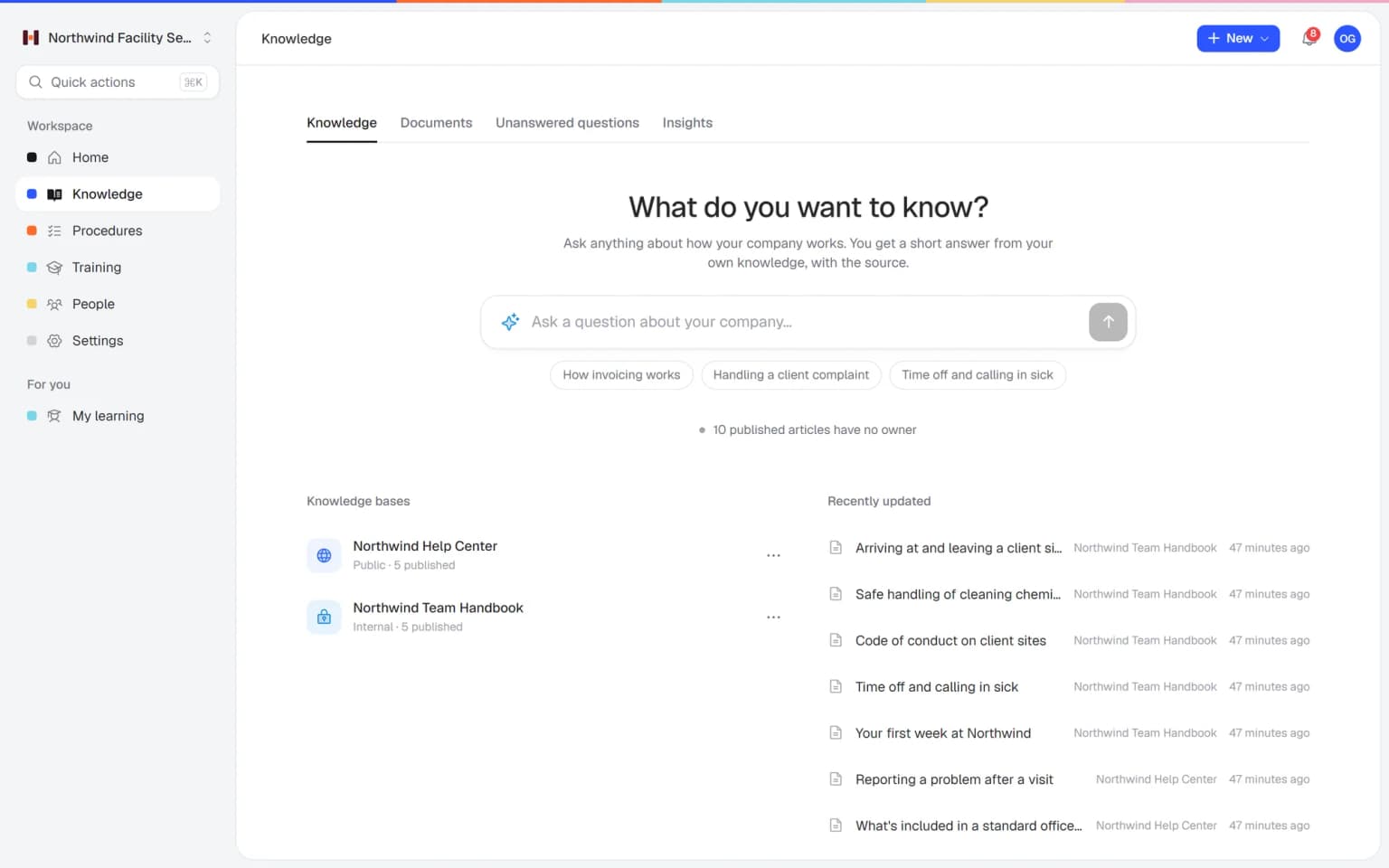
Write what is missing
Turn a content gap into a draft article, improve unhelpful ones and update the old ones.
- 14 days free
- No credit card needed
From a missing answer to a published article in one afternoon
Insights tell you what to write. The AI writer, the editor and search settings in Helpable help you write it and get it found.
Close a gap with the AI writer
One click turns a content gap into a draft article. The AI writer improves it with your own files, you publish it, and Insights then show its views and helpful votes.
AI writerLet the expert check it
Finish the draft in the editor, invite the colleague who knows the subject to help write, and ask a teammate to review it before it goes live. Customers get a correct answer the first time.
Article editorGet found, then measure
Give each public article a clear search title and description so customers find it in search engines. Insights then show how many people read it and whether it helped.
Help center SEO
Insights show the gap, the rest of Helpable closes it
Help center analytics are most useful when you act on them. These combinations turn numbers into better answers for your customers.
- + AI writerTurn a content gap into a finished draftCreate a draft from a content gap with one click, then let the AI writer fill it from your own files or links. You review it and publish, and the next customer finds the answer.
- + Article editorFix the articles readers found unhelpfulNeeds attention lists the articles with unhelpful votes. Open one in the editor, rewrite the unclear part, ask a teammate to review it and watch the votes over the next weeks.
- + Help center SEOGet the new answer found in Google tooGive each article you write from a gap a clear search title and description. Customers who search in Google land on it, and Insights show the views it gets.
- + BrandingMeasure a help center that looks like your companyCustomers trust answers that carry your logo and color, so they read on. Insights then show which of those pages they read and rate as helpful.
- + Multiple languagesSee what is missing in each languageRun a separate public help center per language and open Insights for each one. You see which questions customers abroad cannot answer yet, and you write or translate those first.
- + Knowledge baseKeep old answers true with the 180-day flagInsights flag published articles that were not updated in over 180 days. Check them in your knowledge base, update what changed and keep outdated answers away from customers.
The questions your help center can't answer yet
Helpable groups the searches that found nothing and gives each group a priority. Turn a gap into a draft article with one click, or dismiss it when it doesn't matter. The new article appears in your help center, so the next customer finds the answer.
- Fewer repeat questions by email
- Nothing goes live by itself
- Stats per article in the editor
All the numbers you need, none you don't
Clear figures for one help center at a time, made for the person who writes the articles.
Views and change
Article views over the period, compared with the period before.
Search insights
How often people search and what share of searches found nothing.
Helpful votes
The share of positive votes, plus the articles readers found unhelpful.
Daily chart
Views, searches and empty searches per day for the last 7, 30 or 90 days.
Content gaps
Groups of searches that found nothing, with a priority and a one-click draft.
Top articles and searches
See what customers read and search for most. Per-article numbers show in the editor too.
Your team finds the answer on its own in seconds, with the source
Employees ask a question in their own words and get a short answer from your own articles, procedures and documents, with a link to the exact page it came from. You stop being the person everyone asks.
- Answers come from your own knowledge
- Every answer shows where it came from
- Says so plainly when it doesn't know
- Each person only sees what they may see
- Works with your existing documents
- You approve every new article
Start with the documents you already have
Upload your handbook or policies. Helpable makes them searchable right away and suggests articles you check, change and approve. Nothing goes live until you say so.
A gap becomes a to-do
When the answer isn't there, Helpable says so and the question lands on your list of things to write down, with no name attached.
A plan that grows with your team
Try Helpable free for 14 days, no credit card needed. Then pick the plan that fits your team.
Help center Insights are included in every plan, for each public help center you run. Business Plus adds a CSV export with a date range, and Business Max adds results per team.
Business
Your knowledge base for team and customers, written faster with AI.
$29/month
Billed monthly
That's $0.95 a day
Start free trial- 3 team members included
- An internal knowledge base and a public help center
- AI writes first versions from your own documents
- Start from what you have: documents, Word files and your website
- Procedures everyone follows, with read confirmations
- Your help center on your own web address
- 250 AI credits per month
- Recommended · your free trial runs on this plan
Business Plus
Train your team on that knowledge: courses, quizzes and progress per person.
$89/month
Billed monthly
That's $2.93 a day
Start free trialEverything in Business, plus:
- 5 team members included
- Training with quizzes, due dates and reminders
- See per person who finished what
- Practice conversations with AI, included
- Video lessons and final tests
- Certificates you can show clients and inspectors
- Results exported in one click
- 3 help centers and 3 internal knowledge bases
- 750 AI credits per month
What's in Business
- 3 team members included
- An internal knowledge base and a public help center
- AI writes first versions from your own documents
- Start from what you have: documents, Word files and your website
- Procedures everyone follows, with read confirmations
- Your help center on your own web address
- 250 AI credits per month
Business Max
Training that runs by itself, and proof of who really knows what.
$179/month
Billed monthly
That's $5.88 a day
Start free trialEverything in Business Plus, plus:
- 9 team members included
- New colleagues get their training automatically
- A fixed onboarding route from day one
- Learning insights: who really studied and who clicked through
- Skills matrix and a training record per person
- Practical work signed off on the floor
- Locations with their own managers
- Refresher training that comes back by itself
- Certificates that expire on time, in your own design
- Your help center fully in your own brand
- 10 help centers and 10 internal knowledge bases
- 1,500 AI credits per month
What's in Business Plus
- 5 team members included
- Training with quizzes, due dates and reminders
- See per person who finished what
- Practice conversations with AI, included
- AI writes first versions from your own documents
- Start from what you have: documents, Word files and your website
- Procedures everyone follows, with read confirmations
- Video lessons and final tests
- Certificates you can show clients and inspectors
- Results exported in one click
- Your help center on your own web address
- 3 help centers and 3 internal knowledge bases
- 750 AI credits per month
Grow when you need to
Add these to Business and up, any time. You only pay for what you use.
- More people
Add people one by one as your team grows, for a fixed price per person on every plan.
$9/month
- A second help center
A help center and handbook for another brand, location or client.
$10/month
- Only your brand
Remove “Powered by Helpable” from your help center. Included in Business Max.
$19/month
- Cancel any time
- Data stored in the EU
What are help center analytics?
Help center analytics show how customers use your help center: what they read, what they search for and whether they found an answer. Helpable shows article views, searches, searches that found nothing, helpful votes and content gaps on one Insights page.
How does Helpable show which searches find nothing?
Helpable shows the share of searches that found nothing, a daily chart of these searches, and content gaps that group them by topic with a priority. From a gap you can create a draft article with one click.
Can I see which articles are not helpful?
Yes. Readers can vote whether an article was helpful. Helpable shows the share of positive votes and lists the articles that readers found unhelpful under Needs attention.
Which period do Helpable analytics cover?
Helpable Insights show the last 7, 30 or 90 days for one public help center at a time. Views are compared with the previous period, so you see whether things go up or down.
Is this the same as training progress?
No. Help center analytics are about how customers use your public help center. Helpable shows training progress and scores for your employees on a separate reports page.
Is there a free trial of Helpable?
Yes. Helpable has a free trial of 14 days on Business Plus, and no credit card is needed to start.
Read more
Read more about this
- How to organize a knowledge base: 3 methodsThree ways to structure a knowledge base, common mistakes and how to name categories.Read the article
- How to write knowledge base articles: 8 rulesConcrete writing rules with good and bad examples, plus a copy-paste template.Read the article
- Sample knowledge base articles and free templatesFour article types with templates: how-to, troubleshooting, FAQ and reference.Read the article
Help center analytics in Helpable: a practical guide
What help center analytics are, how they work in Helpable, how they fit with the rest of the product and how to compare tools.
What are help center analytics?
Helpable help center analytics show you how customers use your public help center: what they read, what they search for and whether they found an answer. You see it all on one Insights page, so you know which article to write next. That means fewer repeat questions by email and phone, and more customers who solve things on their own.
The page covers one public help center at a time and the last 7, 30 or 90 days. Article views are compared with the period before, so you see at a glance whether your help center is used more or less. The articles themselves live in your knowledge base, next to the internal handbook for your team.
How to find missing help articles, step by step
Helpable turns searches that found nothing into a short to-do list. Here is how most teams use it.
First, publish your help center and let customers use it for a while. Second, open Insights and pick a period. Third, look at content gaps: searches that found nothing, grouped by topic and given a priority. Fourth, turn the top gap into a draft article with one click, and finish it with the AI writer from your own files. Fifth, publish and check the numbers again after a few weeks. Readers vote whether an article helped, and the articles they found unhelpful show under Needs attention.
How Insights work with SEO, branding and languages
Helpable analytics show what to fix, and the other help center features help you fix it. Give a new article a clear search title and description with help center SEO, so people who search in Google land on your answer. Your logo, color and welcome text from branding make them trust what they read.
If you serve customers in more than one language, run a separate help center per language and read the Insights for each one. You then see which questions are missing in German or Spanish, and the AI writer drafts the answer. Read more about multiple languages. Published articles that were not updated in over 180 days are flagged, so old answers get checked in time.
Help center analytics for small teams in any sector
Helpable is built for teams of 5 to 50 people who answer the same customer questions every week. Webshops and stores see which questions about delivery, returns and products come up most, see ecommerce. Service businesses such as cleaning and facility services or installers learn what clients ask before a visit.
Software companies and agencies can use it for product and client questions, see SaaS companies and customer service teams. The same workspace also holds your training and procedures for employees, so what customers ask can feed what your team learns.
Helpable vs Confluence and Tettra for help center insights
Helpable combines a public help center, an internal knowledge base, procedures and employee training in one tool, with Insights for every public help center. Confluence is a workspace for docs, whiteboards and databases, and it shows page views from its Premium plan. Tettra is an AI knowledge base with usage statistics on its Scaling plan. Compare the details on Helpable vs Confluence and Helpable vs Tettra.
Helpable has an English and Dutch app and stores your data in the EU. You can try Business Plus free for 14 days, and no credit card is needed to start.
How much do help center analytics cost in Helpable?
Helpable includes Insights in every plan, so you pay nothing extra for help center analytics. Every plan has at least one public help center and one internal knowledge base, Business Plus has 3 of each, Business Max has 10 of each, and from Business extra knowledge bases are also an add-on. See all plans on the pricing page, or start a free trial of 14 days on Business Plus.
Find out what your customers are looking for
Publish your help center and see the first searches come in.
- 14 days free
- No credit card needed
- Cancel any time