A branded help center on your domain
Your help center shows your logo, your color and your own words. Customers know they are in the right place, trust the answers they read and find their way faster. Setting it up takes a few minutes.
- 14 days free
- No credit card needed
- No designer needed
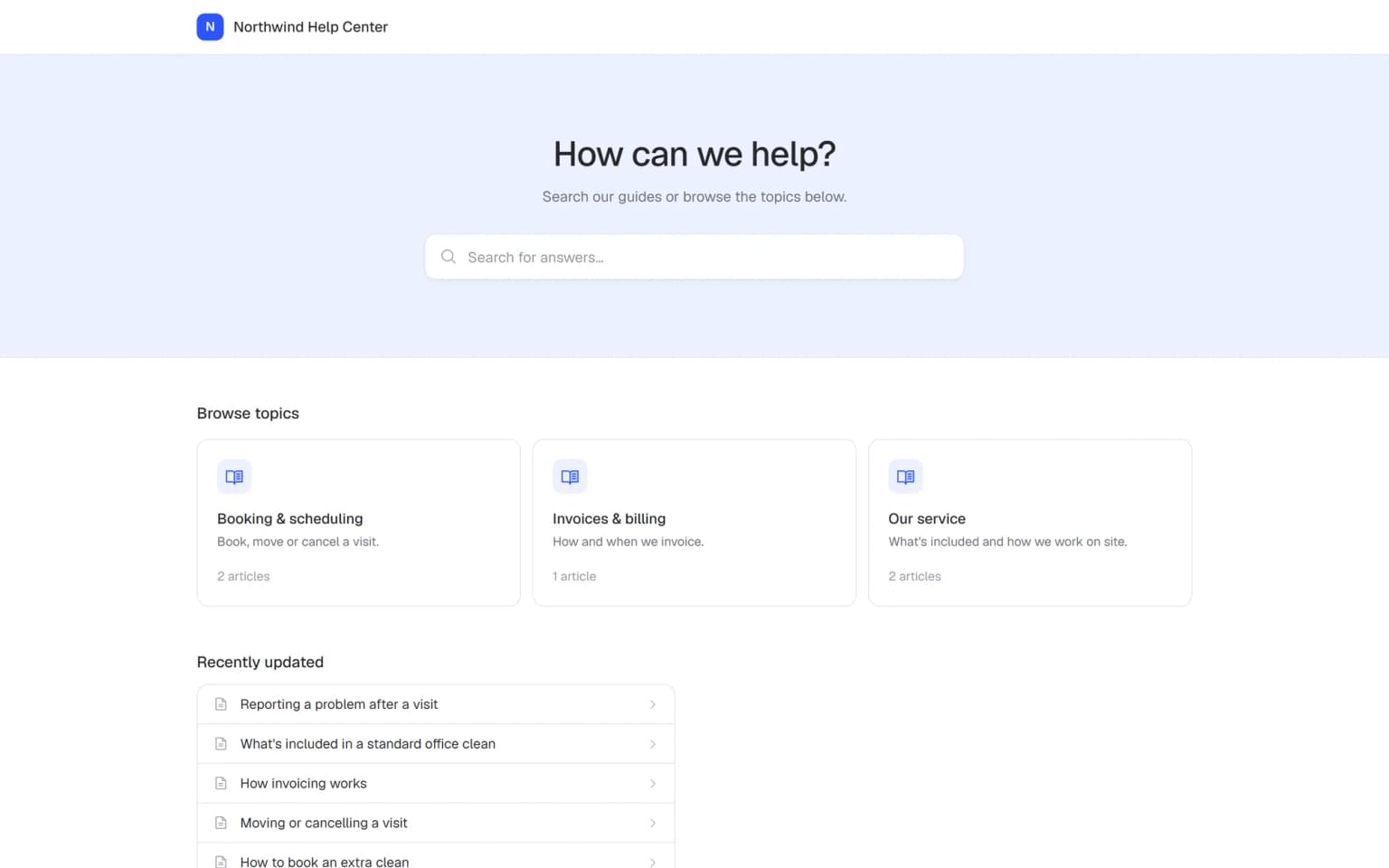
A help center that feels like part of your company
When your help center looks like your business, customers feel at home and read on with confidence.
Customers trust the answers
Your logo and color show that the answers come from you. Customers act on what they read with more confidence.
One look from site to help center
Customers move from your website to your help center and still see the same company. Nothing feels like a detour.
Done in a few minutes
Upload a logo, pick a color and write a few lines of text. You need no designer and no developer.
Fewer questions reach your team
Customers who trust what they see read the answer and solve their question themselves. Your team spends less time on the same emails and calls.
Each language greets customers well
Branding is saved per public help center, so a help center for each language gets its own title, welcome text and footer.
Keeps up when your company changes
New logo or new color? Change it on one settings page and your whole help center shows the new look.
A help center that looks like someone else's feels less reliable
Small details decide whether customers trust what they read.
Customers wonder if they are in the right place
The help center looks plain or unfamiliar, so people hesitate before they read on.
With Helpable Your logo and accent color sit at the top of every page, so customers recognize your company at a glance.
The start page says nothing about you
A generic heading gives customers no idea what they can find there.
With Helpable Write your own title and welcome text that tell customers in your own words where to start.
Customers can't find how to reach you
When an article doesn't answer the question, people look for your details and give up.
With Helpable Put a footer text on every page, for example your email address, opening hours or a short note.
Another brand name sits at the bottom
Some companies want the help center to carry only their own name.
With Helpable With the white-label add-on, you can hide "Powered by Helpable" from your help center.
From plain to your own look in three steps
All settings sit on one page. Most teams are done in a few minutes.
Add your logo and color
Upload your logo and pick the accent color that matches your company.
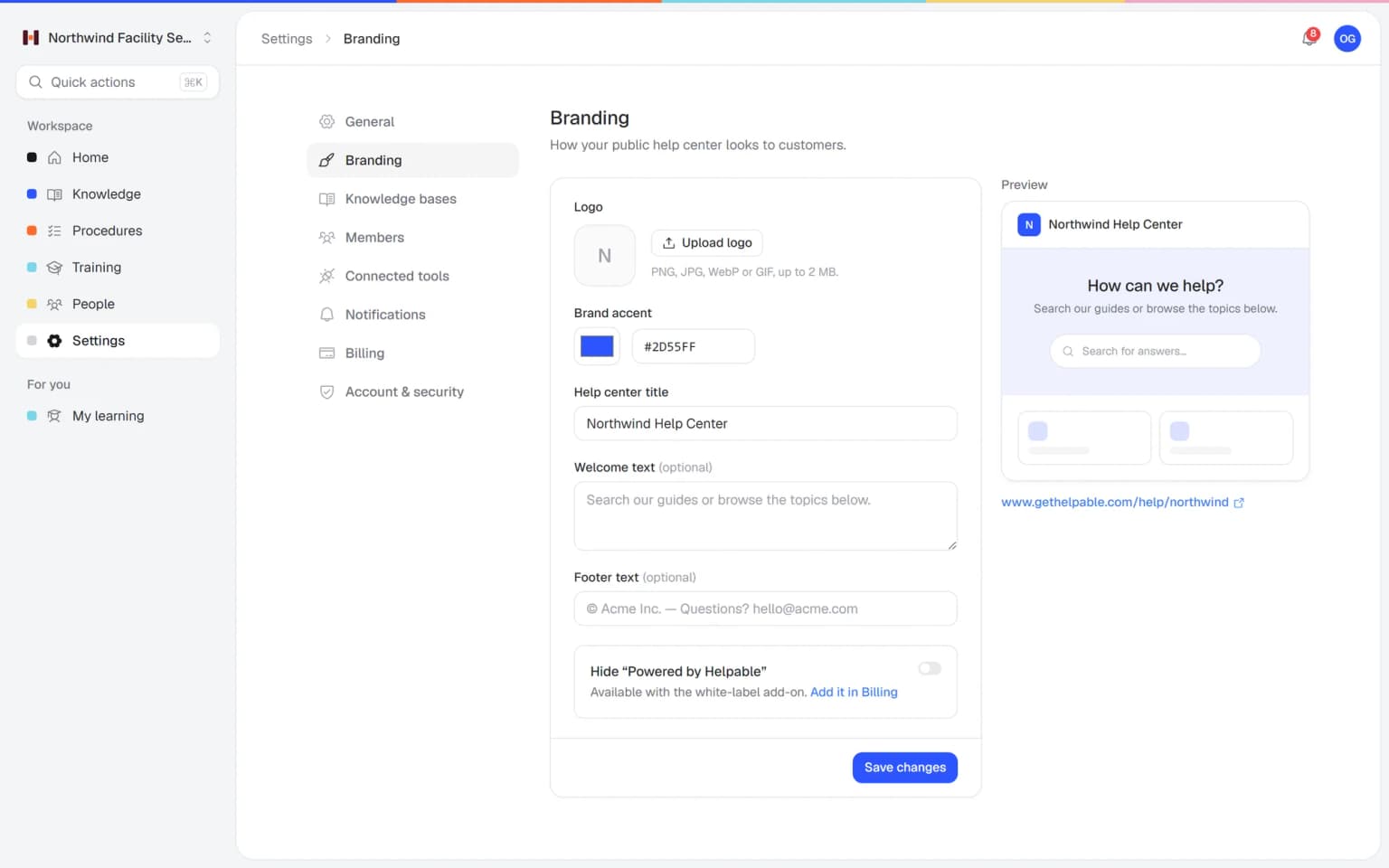
Write your own words
Set the help center title, a short welcome text and a footer text.
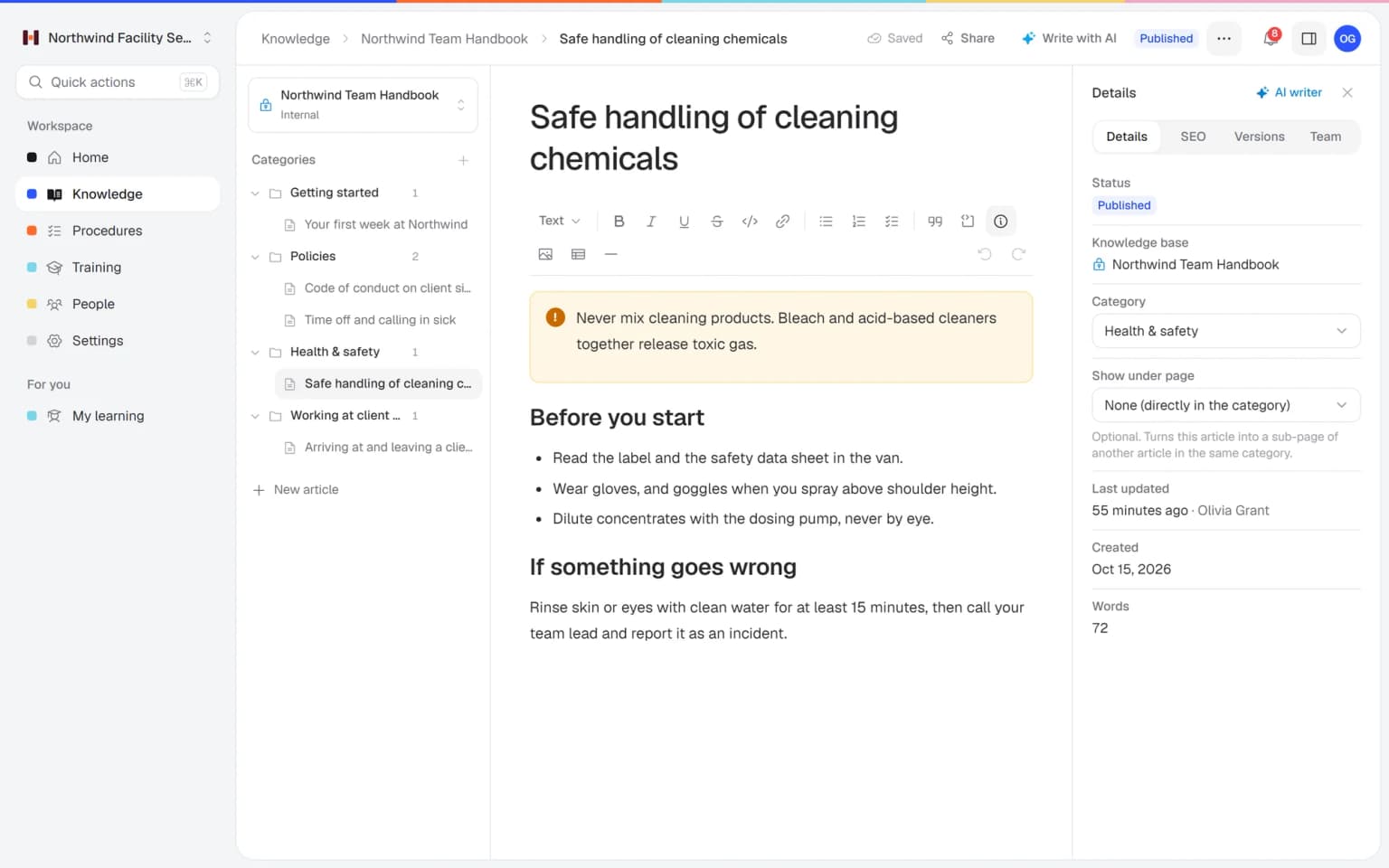
Save and take a look
Save your settings and open your help center to see it the way your customers do.
- 14 days free
- No credit card needed
Your own look, found in Google and read in every language
Your branding shows on every page of your public help center. Combine it with search settings, the AI writer and insights, and customers find, trust and use your answers.
Found in Google, recognized on arrival
Set a search title and description per article, and customers who click a Google result land on a page with your logo and color. They see right away that the answer comes from you.
Help center SEOYour look in every language
Run a separate public help center per language and give each one its own title, welcome text and footer. The AI writer translates your articles into English, Dutch, German, French or Spanish, and a teammate reviews them before you publish.
Multiple languagesSee what customers look for
Insights show views, helpful votes and searches that found nothing on your branded help center. Turn a gap into a draft article with one click, improve it with the AI writer and publish.
Help center insights
Your brand works harder with the rest of Helpable
Your branding shows on every page of your public help center. These combinations make customers find it, trust it and use it.
- + Help center SEOCustomers from Google land on a page they recognizeSet a search title and description per article so customers find it in Google. When they click, they see your logo, color and welcome text, and they trust the answer.
- + Multiple languagesThe same trusted look in every languageRun a separate public help center per language and give each its own title, welcome text and footer in that language. The AI writer translates the articles, and a teammate checks them first.
- + Help center insightsSee how customers use your branded help centerInsights show views, searches and helpful votes on your help center. You see which pages customers read and which questions still find nothing, and you write those answers next.
- + Knowledge baseA public help center next to your internal handbookYour public help center carries your brand for customers, and the internal knowledge base stays with your team. Both live in one workspace, with one search for your employees.
- + Article editorArticles as tidy as the help center around themWrite articles with headings, images, tables and tips in the editor. They show inside your branded help center, so every answer clearly comes from one company.
- + AI writerFill your branded help center with answers fastThe AI writer drafts help articles from your own files and links. You check and publish them, and customers read them in a help center with your logo and color.
Everything about your look on one simple page
Open the branding settings of your public help center and change what customers see first: the logo, the accent color, the title, the welcome text and the footer. You can change it again whenever your company changes.
- Same look on every page
- Contact details always in view
- A look per help center
The settings that make a help center yours
A short list of settings that covers what customers notice most.
Your logo
Upload your logo so it shows at the top of your help center.
Accent color
Pick one accent color that matches your company and your website.
Help center title
Give your help center a name your customers recognize.
Welcome text
Greet customers and tell them where to find what they need.
Footer text
Add contact details or a short note at the bottom of every page.
White-label add-on
Hide "Powered by Helpable" so the help center carries only your name.
Your team finds the answer on its own in seconds, with the source
Employees ask a question in their own words and get a short answer from your own articles, procedures and documents, with a link to the exact page it came from. You stop being the person everyone asks.
- Answers come from your own knowledge
- Every answer shows where it came from
- Says so plainly when it doesn't know
- Each person only sees what they may see
- Works with your existing documents
- You approve every new article
Start with the documents you already have
Upload your handbook or policies. Helpable makes them searchable right away and suggests articles you check, change and approve. Nothing goes live until you say so.
A gap becomes a to-do
When the answer isn't there, Helpable says so and the question lands on your list of things to write down, with no name attached.
A plan that grows with your team
Try Helpable free for 14 days, no credit card needed. Then pick the plan that fits your team.
Help center branding is included in every plan. Hiding "Powered by Helpable" is included in Business Max and an add-on on Business and Business Plus. A custom domain comes with every plan.
Business
Your knowledge base for team and customers, written faster with AI.
$29/month
Billed monthly
That's $0.95 a day
Start free trial- 3 team members included
- An internal knowledge base and a public help center
- AI writes first versions from your own documents
- Start from what you have: documents, Word files and your website
- Procedures everyone follows, with read confirmations
- Your help center on your own web address
- 250 AI credits per month
- Recommended · your free trial runs on this plan
Business Plus
Train your team on that knowledge: courses, quizzes and progress per person.
$89/month
Billed monthly
That's $2.93 a day
Start free trialEverything in Business, plus:
- 5 team members included
- Training with quizzes, due dates and reminders
- See per person who finished what
- Practice conversations with AI, included
- Video lessons and final tests
- Certificates you can show clients and inspectors
- Results exported in one click
- 3 help centers and 3 internal knowledge bases
- 750 AI credits per month
What's in Business
- 3 team members included
- An internal knowledge base and a public help center
- AI writes first versions from your own documents
- Start from what you have: documents, Word files and your website
- Procedures everyone follows, with read confirmations
- Your help center on your own web address
- 250 AI credits per month
Business Max
Training that runs by itself, and proof of who really knows what.
$179/month
Billed monthly
That's $5.88 a day
Start free trialEverything in Business Plus, plus:
- 9 team members included
- New colleagues get their training automatically
- A fixed onboarding route from day one
- Learning insights: who really studied and who clicked through
- Skills matrix and a training record per person
- Practical work signed off on the floor
- Locations with their own managers
- Refresher training that comes back by itself
- Certificates that expire on time, in your own design
- Your help center fully in your own brand
- 10 help centers and 10 internal knowledge bases
- 1,500 AI credits per month
What's in Business Plus
- 5 team members included
- Training with quizzes, due dates and reminders
- See per person who finished what
- Practice conversations with AI, included
- AI writes first versions from your own documents
- Start from what you have: documents, Word files and your website
- Procedures everyone follows, with read confirmations
- Video lessons and final tests
- Certificates you can show clients and inspectors
- Results exported in one click
- Your help center on your own web address
- 3 help centers and 3 internal knowledge bases
- 750 AI credits per month
Grow when you need to
Add these to Business and up, any time. You only pay for what you use.
- More people
Add people one by one as your team grows, for a fixed price per person on every plan.
$9/month
- A second help center
A help center and handbook for another brand, location or client.
$10/month
- Only your brand
Remove “Powered by Helpable” from your help center. Included in Business Max.
$19/month
- Cancel any time
- Data stored in the EU
What is a branded help center?
A branded help center is a public help center for customers that shows the look of your own company, such as your logo, color and own words. Helpable lets you give each public help center your logo, an accent color, a title, a welcome text and a footer text.
What can I change in the look of my Helpable help center?
In Helpable you can upload a logo, pick one accent color and set the help center title, a welcome text and a footer text. With the white-label add-on, you can also hide "Powered by Helpable".
Can I hide "Powered by Helpable"?
Yes. Helpable offers a white-label add-on that hides "Powered by Helpable" from your public help center. It is included in Business Max, and on Business and Business Plus it is an add-on.
Do I need a designer or developer to brand my help center?
No. In Helpable you upload a logo, pick a color and type your texts on one settings page. Most teams are done in a few minutes.
Can each Helpable help center have its own look?
Yes. Helpable saves the branding per public help center, so a second help center, for example for another language, can have its own title, welcome text and footer.
Can I try help center branding for free?
Yes. Helpable has a free trial of 14 days on Business Plus, so you can set up a branded help center before you decide. No credit card is needed to start.
Read more
Read more about this
- 8 best internal knowledge base softwareInternal knowledge base tools for small teams compared on features and fit.Read the article
- Internal knowledge base: when you need oneWhat goes in an internal knowledge base, how to secure access and which tools fit.Read the article
- How to organize a knowledge base: 3 methodsThree ways to structure a knowledge base, common mistakes and how to name categories.Read the article
Branded help center software: a guide to Helpable branding
What a branded help center is, how to set one up in Helpable, how it combines with other features and how it compares with other tools.
What is a branded help center?
A Helpable branded help center is a public help center for customers that carries your own logo, color and words. Customers see right away that the answers come from you, so they trust them and act on them. More people solve their question on their own, and fewer of them email or call your team.
In Helpable the branding settings sit on one page per public help center. You set the logo, one accent color, the help center title, a welcome text and a footer text. The articles themselves live in your knowledge base, next to the internal handbook for your team.
How to set up a branded help center in five steps
Helpable lets you brand your help center in a few minutes, and you need no designer for it. First, open the branding settings of your public help center. Second, upload your logo. Third, pick the accent color that matches your website. Fourth, write a title, a short welcome text that tells customers where to start, and a footer with your contact details or opening hours. Fifth, save and open the help center to see it the way your customers do.
When your company gets a new logo or color, you change it on the same page and every article shows the new look.
Branding, SEO and languages working together
Helpable branding works best together with the other help center features. With help center SEO each article gets a clean address, a search title and a description, so customers find it in Google and land on a page they recognize. With multiple languages you run a separate public help center per language, each with its own title, welcome text and footer.
Help center insights then show what customers read, what they search for and which searches found nothing. You write the missing answers with the AI writer, and they appear in the same branded help center.
A branded help center for small businesses in many sectors
Helpable is made for teams of 5 to 50 people who want customers to find answers on their own. Businesses that sell, such as webshops and retail, use a help center for delivery, returns and product questions. Service companies in installation and maintenance or hospitality explain how to prepare for a visit or a booking.
Software companies and agencies answer product and client questions in their own look. Whatever the sector, the same workspace also holds training and procedures for your own employees.
Helpable vs SweetProcess and Trainual for a branded help center
Helpable puts a branded public help center, an internal knowledge base, procedures and employee training in one tool. SweetProcess documents processes and procedures and offers a public or private knowledge base on your own domain. Trainual focuses on SOPs, checklists and training paths for owners and managers, and offers a custom domain from its Premium plan. Compare the details on Helpable vs SweetProcess and Helpable vs Trainual.
Helpable has an English and Dutch app and stores your data in the EU. You get 14 days to try Business Plus, and no credit card is needed.
Which Helpable plan includes help center branding?
Helpable includes the branding settings in every plan, for each public help center you run. Hiding "Powered by Helpable" is included in Business Max and is the white-label add-on on Business and Business Plus. A custom domain is included in every plan. See all plans and add-ons on the pricing page.
Give your help center your own look, starting today
Upload your logo, pick your color and publish your first articles.
- 14 days free
- No credit card needed
- Cancel any time