
Employee onboarding

New employee onboarding in one plan

Helpable makes new employee onboarding repeatable. You set it up once: each new employee gets the right training, procedures and due dates, reminders do the chasing, and you can see who is ready to work on their own.

  • Onboarding template included
  • Assigned to new people for you
  • Progress per person
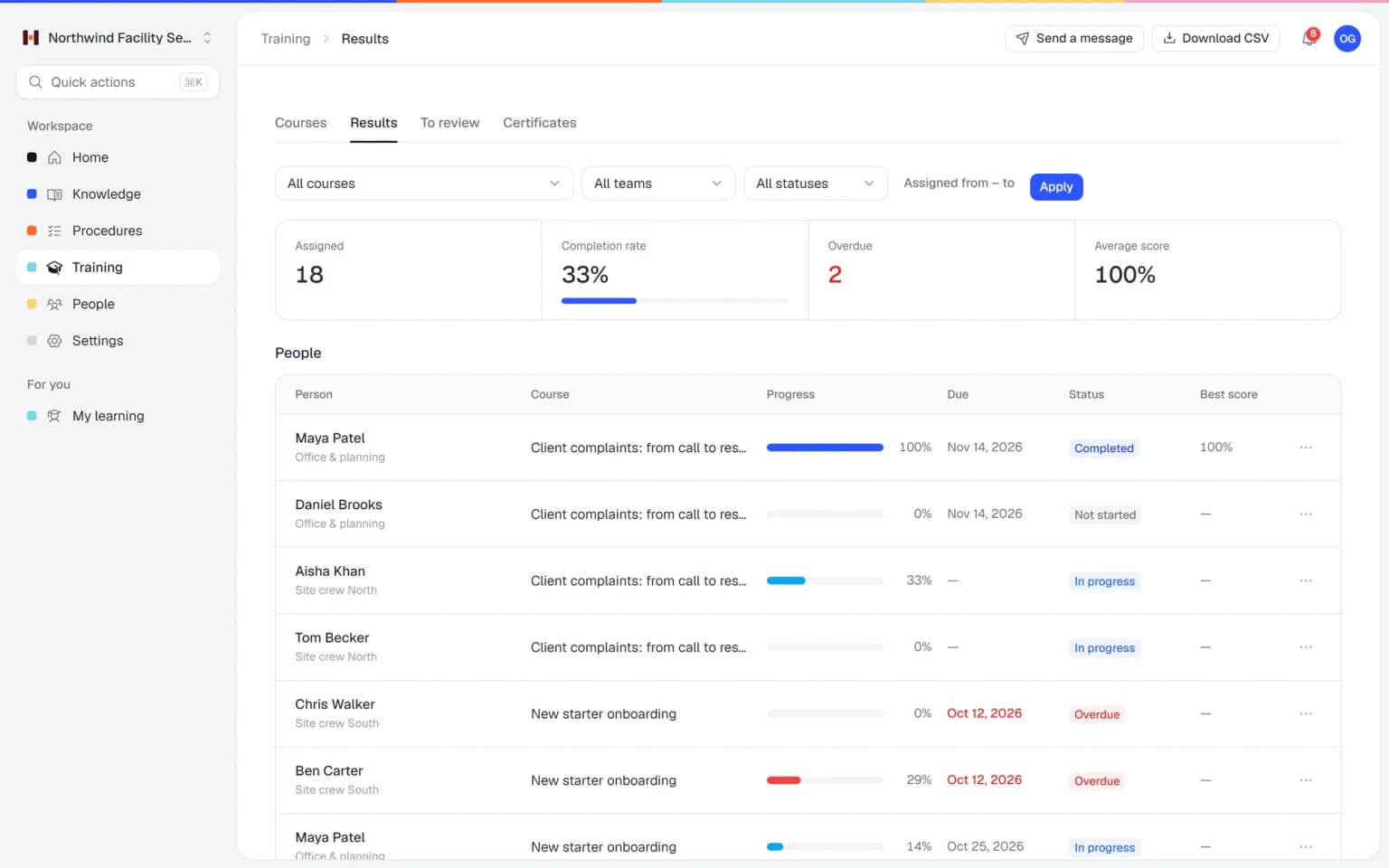
Helpable overview with people in onboarding, open acknowledgements, two new starters overdue on onboarding and progress per training

Sounds familiar?

These are the moments that make onboarding slow. They happen in almost every growing team.

  • Can someone show the new guy how we do the end-of-day report?

    Team lead, Monday morning
  • I didn't know we had a procedure for that.

    New hire, week two
  • I think I explained it differently to the last person.

    Supervisor
  • Has she actually done the safety training yet?

    Owner, before a client visit

How do you onboard new employees faster?

Write down how the work is done once, turn it into a short onboarding training, and give it to every new person with a due date. In Helpable you keep procedures and training in one place, assign them to new members or a whole team, let reminders go out when something is overdue, and follow each person's progress on one screen.

Who this is for

Teams that hire regularly and want every new person to start the same way.

  • Teams on location and at client sites

    Cleaning, installation and maintenance teams where new people start at a client site, far from the office.

    In practice: A new cleaner does the site training on their phone before day one, so the first shift starts with someone who knows the routine. The team lead sees progress per person.

    See how
  • Shift teams with new and temporary staff

    Hospitality, retail and warehouse teams that welcome new and seasonal staff every month.

    In practice: Every new waiter gets the same onboarding training automatically when added to the team, with a due date counted from their start. The manager sees who is overdue on the overview.

    See how
  • Office and client teams

    Agencies, accountancy firms and recruiters where each new hire still costs a senior colleague days of explaining.

    In practice: A new project manager follows a learning path: company basics, then how you run client projects, then the tools. Their senior colleague spends the first week on client work.

    See how
  • Startups and software companies

    Teams that hire every month give engineers, support and sales the same good start, even while the product keeps changing.

    In practice: Engineers, support and sales each get their own onboarding training, assigned to everyone who joins the team. When the product changes, you update the lesson once and every new hire sees it.

    See how
  • Care, childcare and education teams

    Teams where new colleagues must know the protocols before they work alone.

    In practice: New carers complete the protocols and a quiz before their first shift alone, and the certificate shows they passed. You check it in the report before you schedule them.

    See how
Made for teams in
Illustrative example

A new hire's first week, before and after

A service company with about 25 people hires someone new. This is how the week tends to go, and how it goes with Helpable.

Before

  1. The supervisor spends the morning explaining the basics again and forgets the incident procedure.

  2. The new hire asks where the latest client checklist is. Three versions float around in the group chat.

  3. A mistake on site. The step was in an old document nobody pointed to.

  4. Nobody can say what the new hire has actually covered.

With Helpable

  1. The new hire joins the team in Helpable and gets the New starter onboarding training with a due date.

  2. They start on their phone: short lessons that link to the current procedures. The supervisor spends the morning on the job itself.

  3. They look up the incident procedure in search and confirm they have read it.

  4. The supervisor opens the overview: done, in progress, overdue. A reminder already went to the one person who was behind.

How Helpable runs onboarding for you

Five steps you set up once. After that, every new person goes through the same path.

  1. Write down how the work is done

    Put key tasks into numbered procedures with photos and checklists. Start from a template or paste in what you already have.

    Write down how the work is done: how it looks in Helpable
  2. Build the onboarding training

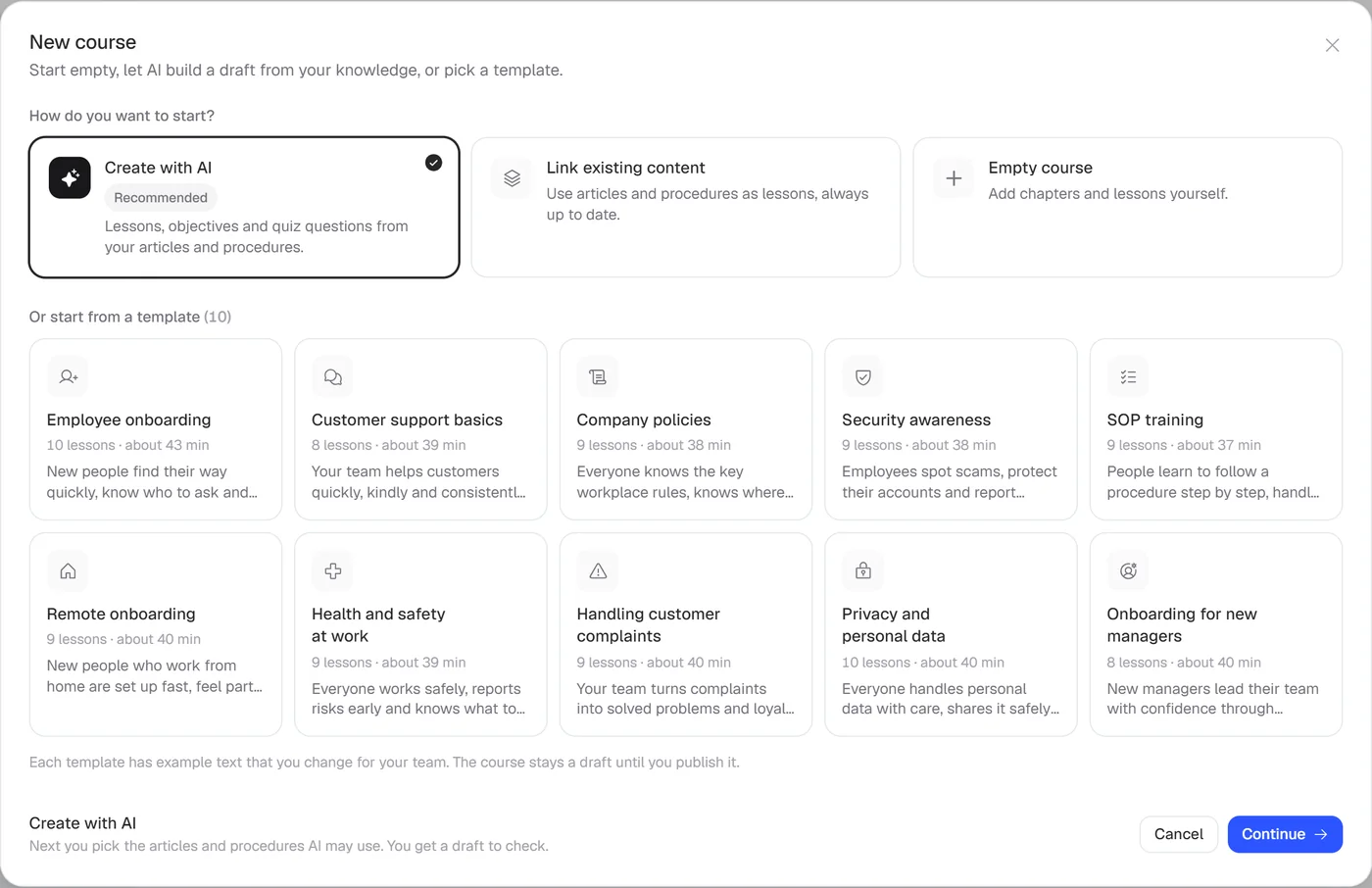
    Use the onboarding template, let AI draft lessons and quiz questions from your procedures, or link procedures as lessons so they stay current.

    Build the onboarding training: how it looks in Helpable
  3. Assign it to new people

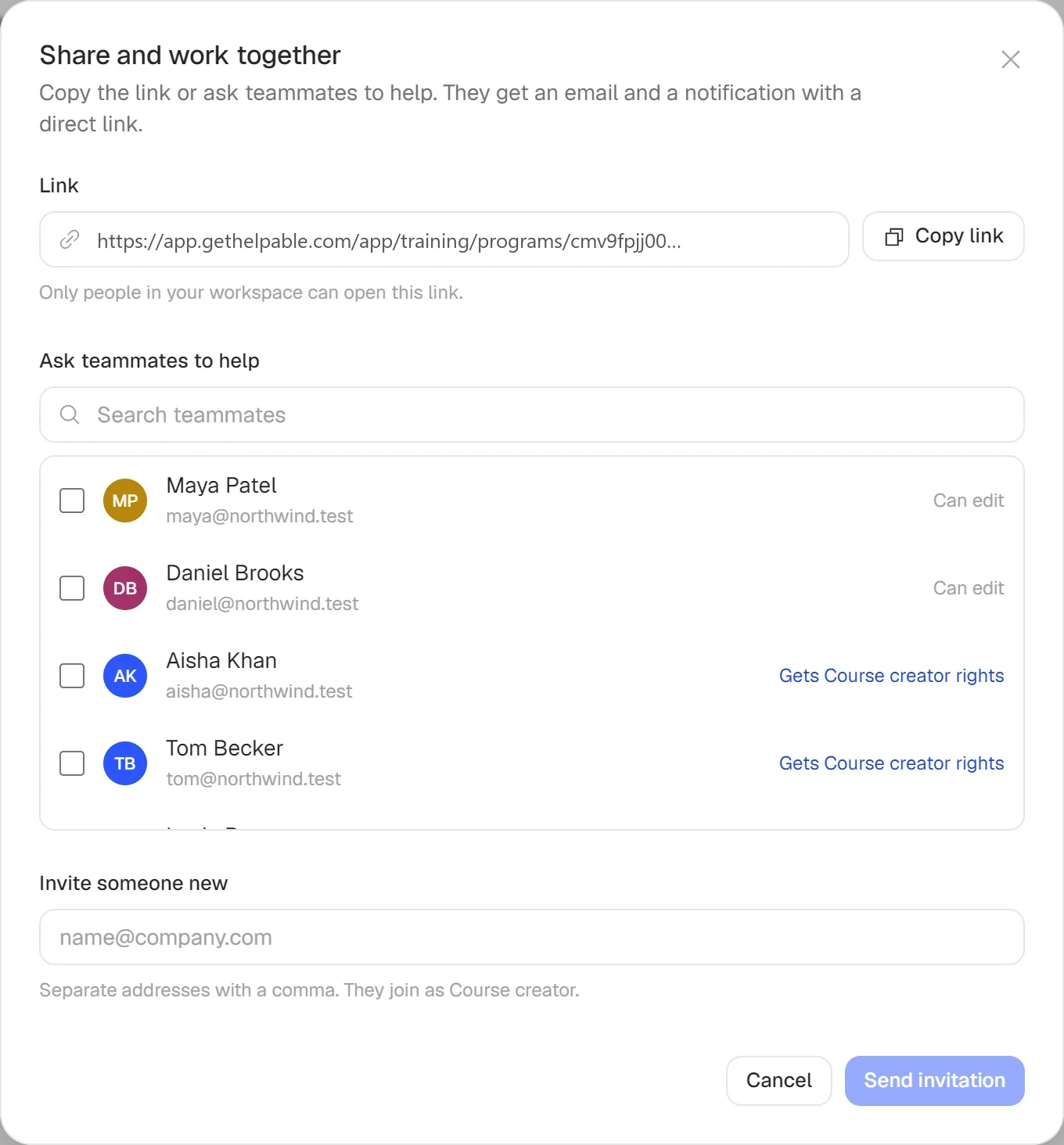
    Assign to a person, a team or every new member, with a due date. People who join that team later get it too.

    Assign it to new people: how it looks in Helpable
  4. Let Helpable do the chasing

    Reminders go out before the due date and when it passes. Managers hear about overdue training.

    Let Helpable do the chasing: how it looks in Helpable
  5. See who is ready

    Progress per person and per team, quiz scores and certificates on one screen.

    See who is ready: how it looks in Helpable
Training with AI

A first version of a training from your own procedures, in minutes

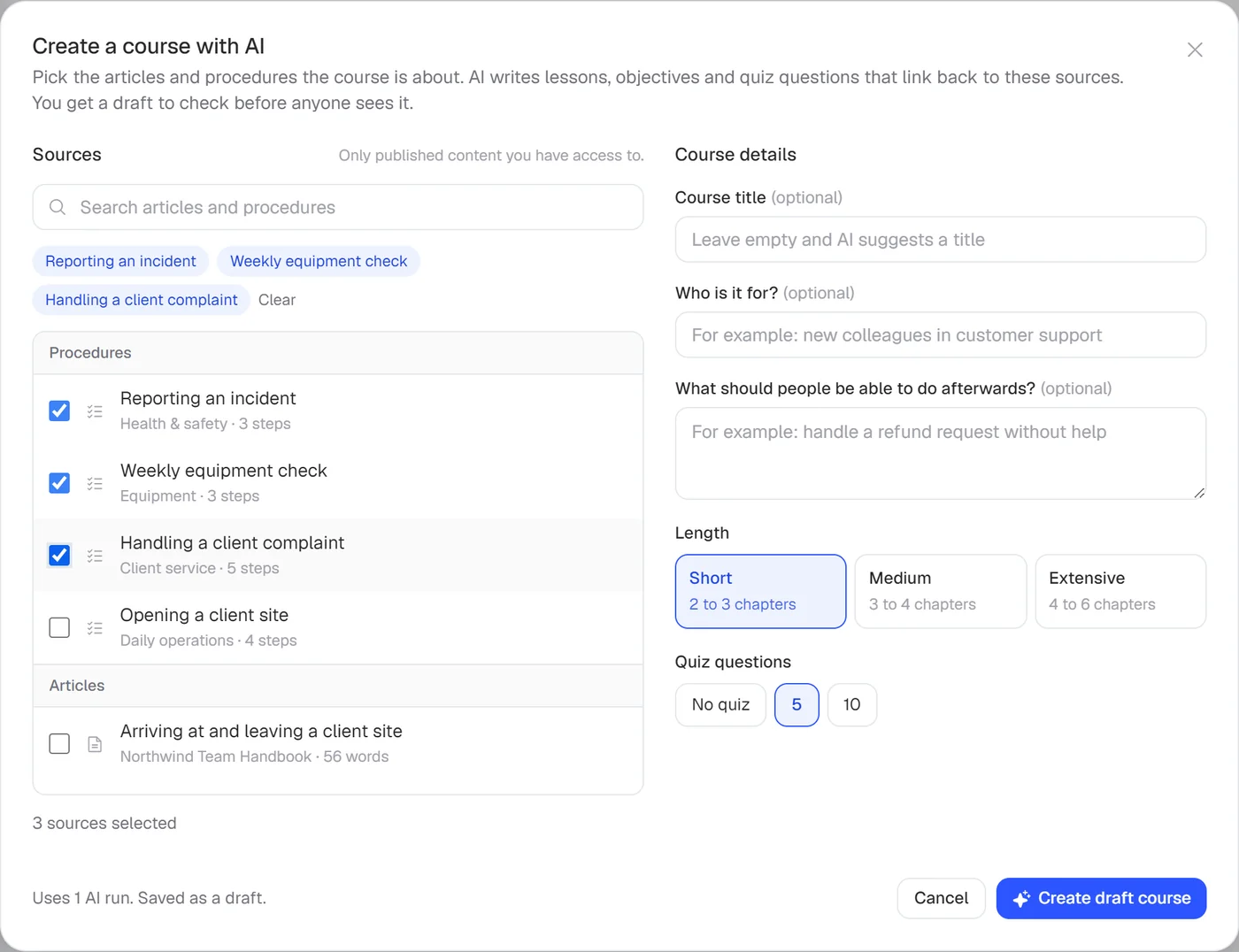
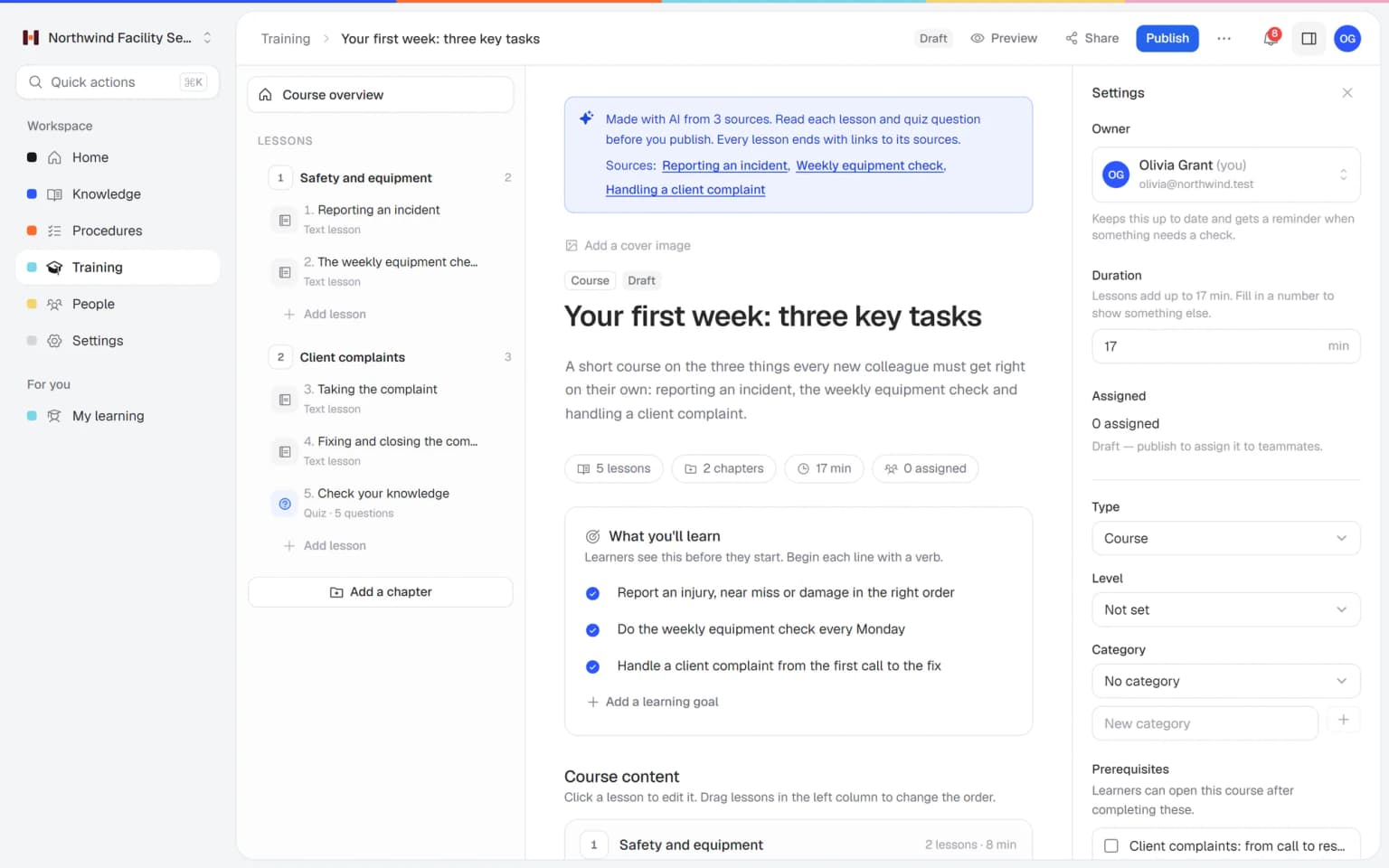
Pick the articles and procedures that matter and AI drafts lessons and quiz questions that link back to their sources. You check it, adjust it and assign it to the people who need it.

  • Built from your own knowledge
  • Every lesson links to its source
  • Quiz questions drafted for you
  • Nothing goes live until you approve it
A training drafted by AI in Helpable, with lessons and quiz questions linked to the source articles

Onboarding that runs while you work

Set it up once. Helpable handles the assigning, the reminders and the follow-up for every new hire.

Start from a proven structure

Pick the onboarding template, add your own procedures and publish. Every new hire gets the same clear path from day one.

  • Six editable templates
  • Lessons link to your current procedures
  • AI drafts lessons and quiz questions

New people get it automatically

Add someone to a team and the onboarding training is theirs, with a due date and reminders. Nobody has to remember.

See who is ready to work alone

Completion and overdue work per team, so you know exactly where to step in.

What you get for onboarding

Everything a new hire needs in their first weeks, in one place.

  • Training templates

    Start from the Employee onboarding or Remote onboarding template and swap the example lessons for your own. Every new hire gets the same first week.

  • Employee training

    Short lessons with text, video and practical tasks that new people take at their own pace. They learn the basics before a senior colleague has to explain them.

  • Procedures

    Link procedures with photos and checklists into the training, so a new person can do a task on their own. They always learn the latest version.

  • Read and acknowledge

    New hires confirm the house rules and policies with one click. You see who did, per version.

  • Quizzes

    End the training with a quiz and a pass mark. You know who is ready to work alone and who needs another explanation.

  • Certificates

    People who pass get a certificate anyone can verify online. Useful when a client asks whether new staff are trained.

  • Progress and reports

    Automatic assignment from Business Max, reminders before and after the due date, and progress per person and team. Managers get a weekly summary email, so nobody has to chase.

  • Knowledge base

    After the first week, new people keep finding answers in the internal knowledge base. Fewer questions land on the colleague next to them.

Who does what

How a small team typically splits the work.

  • OwnerSets up onboarding once

    Picks the onboarding template, adds the company's own procedures and sets a rule so every new member of the team gets it.

  • Team leadWelcomes new people

    Spends the first morning on the actual job, since the basics are in the training, and checks progress before Friday.

  • New employeeLearns at their own pace

    Works through short lessons on a phone or laptop, looks things up in search and confirms the procedures they have read.

  • Office managerKeeps it current

    Publishes a new version when a procedure changes and asks people to confirm it again.

What you can expect to get out of it

Results depend on how much you put in, so we don't promise percentages. These are the changes teams aim for.

  1. Fewer repeat explanations

    The basics are explained once, in the training, for everyone. Supervisors keep their time for the work only they can show.

  2. Every new hire learns the same way

    Same steps, same version, whoever does the onboarding and whichever location they start at.

  3. You know who is ready

    Progress, quiz scores and confirmations tell you who can work on their own and who needs another look.

  4. Onboarding keeps working when people leave

    The way you work is written down in Helpable, so it no longer depends on one experienced colleague.

Pricing

A plan that grows with your team

Try Helpable free for 14 days, no credit card needed. Then pick the plan that fits your team.

Grow when you need to

Add these to Business and up, any time. You only pay for what you use.

  • More people

    Add people one by one as your team grows, for a fixed price per person on every plan.

    $9/month

  • A second help center

    A help center and handbook for another brand, location or client.

    $10/month

  • Only your brand

    Remove “Powered by Helpable” from your help center. Included in Business Max.

    $19/month

  • Cancel any time
  • Data stored in the EU

Questions about onboarding with Helpable

Can't find your answer? We're happy to help.

What does onboarding look like in Helpable?

Onboarding in Helpable is a training you assign to new employees. It holds short lessons, links to your procedures and knowledge base articles, and can end with a quiz. Each new person gets it with a due date, and you follow their progress per person and per team.

Can new employees get onboarding automatically?

Yes. Helpable can assign a training to every new member of the workspace or of a team. People who join later get it too, with the due date counted from the day they were added.

Do I need to write everything from scratch?

No. Helpable includes an Employee onboarding template and a Remote onboarding template with example lessons you change. You can also let AI draft lessons and quiz questions from articles and procedures you already have in Helpable.

Can I see whether a new hire has finished?

Yes. Helpable shows progress per person, the overdue list on the overview, quiz scores and certificates. Training reports can be filtered by training, team and status and exported to CSV.

Does it work on a phone?

Helpable works in the browser on phones, tablets and laptops, so new employees can do their training on the device they have. There is no separate app to install.

Which plan do I need for onboarding?

In Helpable, assigning training with due dates, reminders and progress per person start at Business Plus. From Business Max, new people get their onboarding automatically. The 14-day free trial runs on Business Plus, so you can set up your onboarding before you choose.

What does Helpable cost?

Helpable starts at $29 per month for Business, with 3 team members. Business Plus costs $89 per month with 5 team members, and Business Max costs $179 per month with 9. You can add extra team members, and yearly billing costs about a fifth less.

How much work is it to set up?

That depends on how much you already have written down. In Helpable you start from the onboarding template, link the procedures you already have and let the AI draft lessons, so most of the work is checking and editing.

Can we onboard people in Dutch?

Yes. The Helpable app is available in English and Dutch, and you write your onboarding training in the language your team works in.

Where is our data stored?

Helpable stores your data in the EU. Your procedures, training and progress are only visible to the people you invite to your workspace.

Set up onboarding once and use it for every new hire

Start with the onboarding template, add your own procedures and assign it to the next person who joins.

  • 14 days free
  • No credit card needed
  • Cancel any time