Knowledge base for SaaS companies
Helpable is the knowledge base for SaaS companies that keeps help articles right after every release. AI drafts articles from your docs, website and code on GitHub and proposes an update when the source changes, so customers find the current answer themselves and support, success and sales work from the same text.
- Fewer support tickets
- Live in an afternoon
- See what customers can't find
Where it pinches in a growing software company
A release that makes yesterday's article wrong, tickets about things the help center already covers, customers who get stuck and go quiet: here is how you handle each with Helpable.
From first article to fewer tickets, in four steps
Most software teams start with the ten questions support gets most. After that the help center grows with your product.
- 1Put your help center liveAdd your docs, release notes, website or GitHub repository and the AI writer turns them into draft articles. You check them, pick your logo and color and publish.
- 2Customers find the answer themselvesLink the help center from your app, your onboarding emails and your support replies. New customers follow the getting-started steps, the rest search on their own.
- 3Fill in what is missingSearches that found nothing come in grouped by topic. One click turns a topic into a draft article, so the next customer does find it.
- 4Keep support current with every releaseWhen the code or docs behind an article change, Helpable proposes the update. Schedule it for release day and have support confirm the new procedure.
Everything to let customers help themselves and keep your team current
What support, success and product use when the product changes every week and customers keep asking.
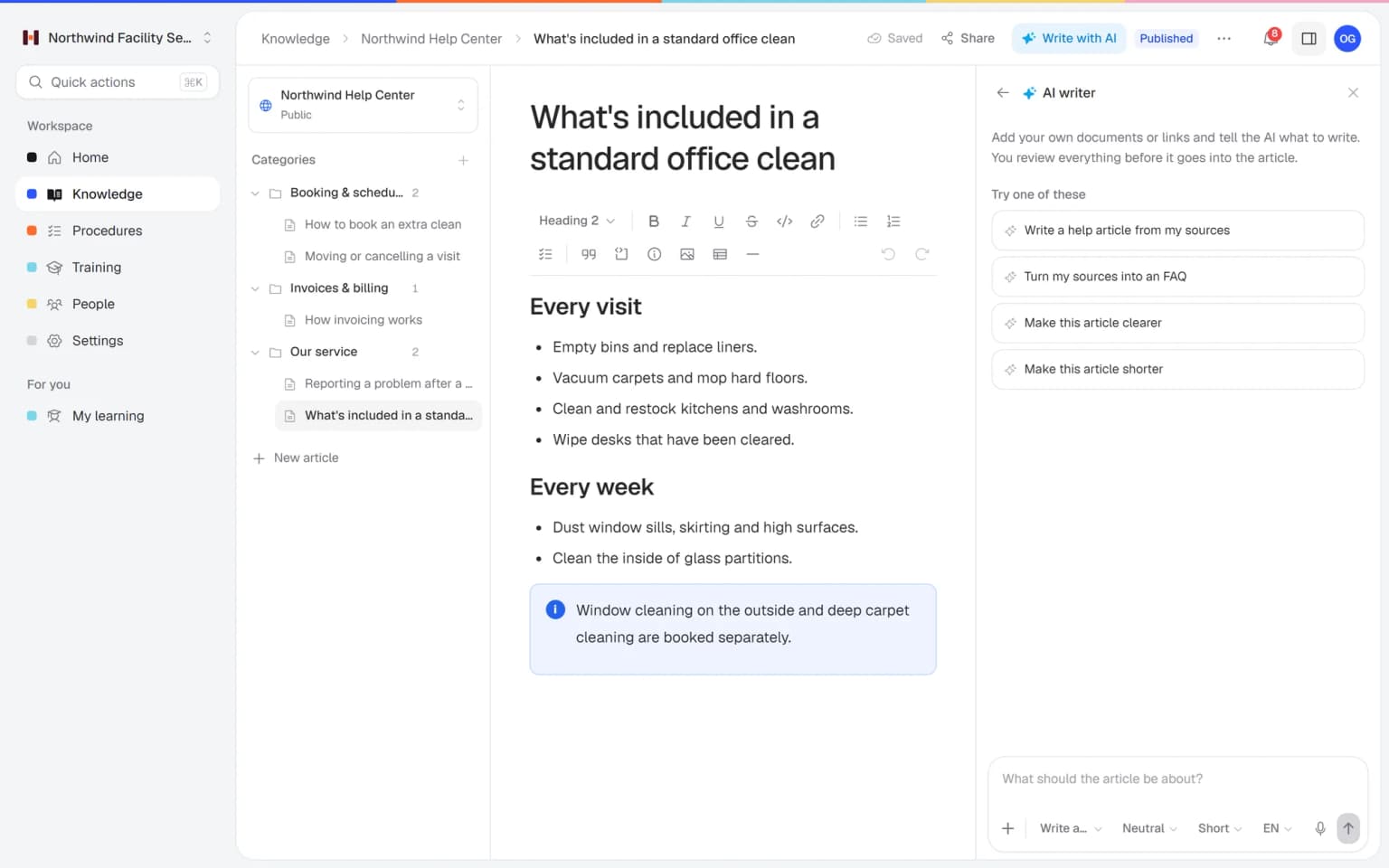
A help article that follows your code, before the release goes live
Add your release notes, docs, website or GitHub repository and the AI writer turns them into a clear article in your own help center. When the source changes, it proposes the update. You read it and publish, and customers get the right answer on release day.
- Made from your docs, website and code
- An FAQ or step-by-step guide in one click
- Shorter, clearer or in another language
- Nothing goes live until you approve it
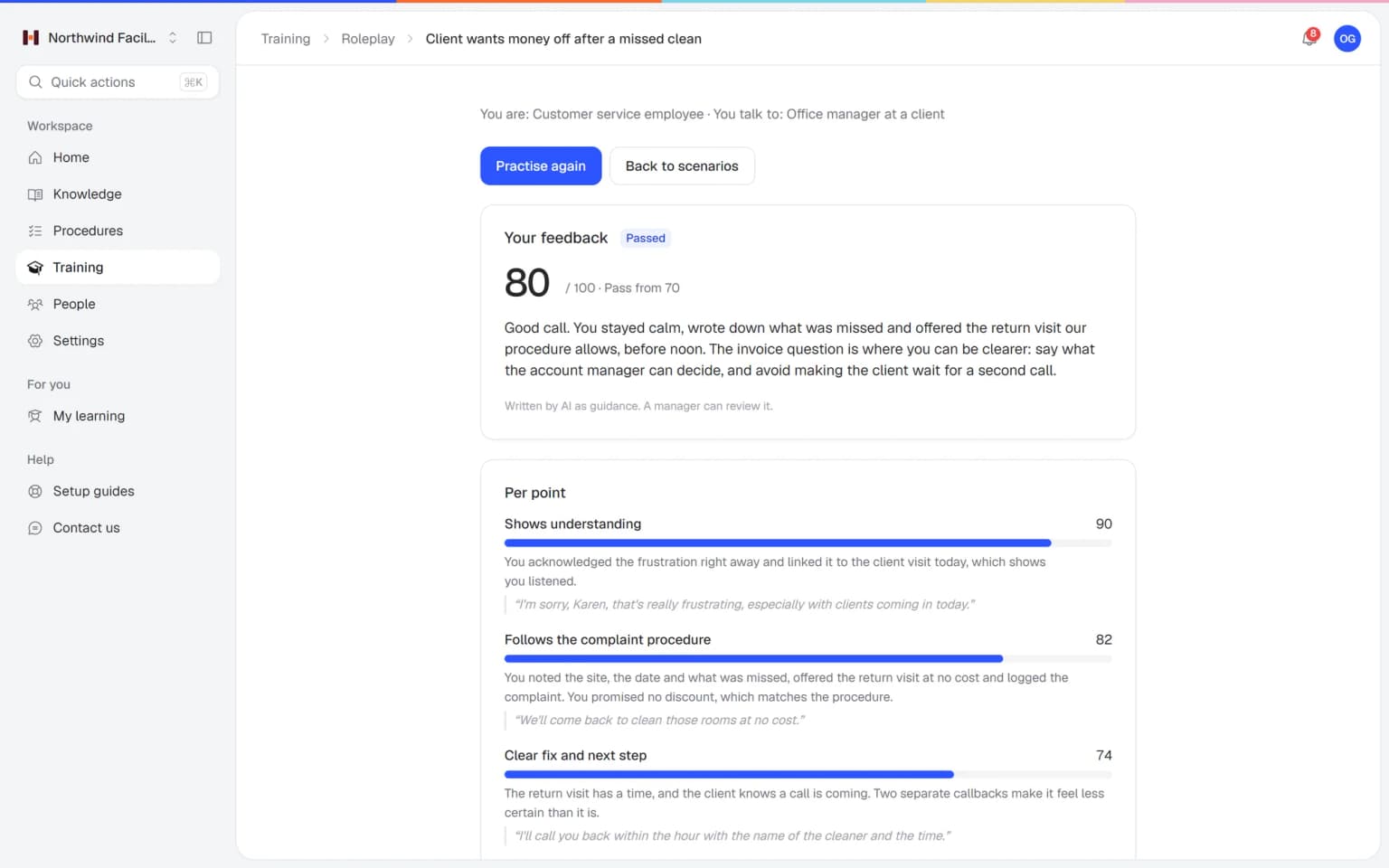
Your support team practices the cancellation call before a real customer calls
A customer wants to cancel, is upset about an invoice or doesn't get a new feature. Your team practices those conversations with an AI that plays the customer, in a scenario you build from your own articles. Every conversation ends with a score and concrete tips.
- Scenarios from your own help articles
- A score and tips after every conversation
- Practice on laptop or phone
- You see who is ready
What else belongs with your help center
After a release, support, success and sales need the same answer the customer reads. These parts keep them in step.
Made for small software teams that move fast
What Helpable takes off your plate, and what it doesn't
An honest list, so you know what to expect.
- Answers team questions from your help center and handbook, with the source
- Shows which help center searches found nothing, grouped by topic
- Lists the articles readers found unhelpful
- Flags help center articles that were not updated in over 180 days
- Asks people to confirm a changed procedure and tracks who did
- Assigns onboarding to every new team member automatically (from Business Max)
- Drafts articles from release notes, files, links, your website and your code on GitHub
- Proposes an update to an article when the source it came from changes
- Your ticketing system, live chat and support inbox
- Technical documentation for your code: that stays with your developer tools
- Connections to Slack or Jira (not available yet)
- Deciding what to build: Helpable shows what customers look for, your team decides
One fixed price, your whole help center included
Try Business Plus free for 14 days. No credit card needed.
Business
Your knowledge base for team and customers, written faster with AI.
- AI answers with the source
- An internal knowledge base and a public help center
- AI writes first versions from your own documents
- Start from what you have: documents, Word files and your website
- Procedures everyone follows, with read confirmations
- Your help center on your own web address
- 250 AI credits per month
Business Plus
Train your team on that knowledge: courses, quizzes and progress per person.
- Everything in Business, plus:
- Training with quizzes, due dates and reminders
- See per person who finished what
- Practice conversations with AI, included
- Video lessons and final tests
- Certificates you can show clients and inspectors
- Results exported in one click
- 3 help centers and 3 internal knowledge bases
- 750 AI credits per month
Business Max
Training that runs by itself, and proof of who really knows what.
- Everything in Business Plus, plus:
- New colleagues get their training automatically
- A fixed onboarding route from day one
- Learning insights: who really studied and who clicked through
- Skills matrix and a training record per person
- Practical work signed off on the floor
- Locations with their own managers
- Refresher training that comes back by itself
- Certificates that expire on time, in your own design
- Your help center fully in your own brand
- 10 help centers and 10 internal knowledge bases
- 1,500 AI credits per month
Questions from SaaS and software companies
Is Helpable a good knowledge base for SaaS companies?
Yes, Helpable is a knowledge base for SaaS and software companies with roughly 5 to 50 people. Helpable gives you a public help center for customers and an internal knowledge base for support, success and sales in one tool, with procedures and training next to them.
Can the help center and the internal knowledge base live in the same tool?
Yes, in Helpable the public help center and the internal knowledge base sit in the same workspace, each with its own categories. Customers see only what you publish in the help center, and Helpable's search and Answers let your team find both.
How does Helpable help reduce support tickets?
Helpable gives customers a help center they can search on their own, and shows which searches found nothing. Helpable groups those searches into content gaps with a priority, and one click turns a gap into a draft article, so the next customer finds the answer.
Can product managers and designers use what customers search for?
Yes, Helpable shows which help center searches found nothing and which articles readers voted unhelpful. Those lists in Helpable point product and design to the screens that confuse customers and the features customers look for.
Does Helpable help prevent churn?
Helpable helps with two things that keep customers: quick answers when they get stuck, and a clear view of what they search for and rate. Helpable shows the searches that found nothing and the articles readers found unhelpful, so you can fix the answer or the product before frustration turns into a cancellation.
How does Helpable keep support up to date with weekly releases?
Helpable lets you publish a new version of a procedure or article with a short summary of what changed. In Helpable you announce the update, ask the support team to confirm and see per person who did, and you can schedule a help center article to go live on release day.
Can Helpable turn release notes into help articles?
Yes, the AI writer in Helpable drafts an article from release notes, a PDF, Word, Markdown or CSV file, a link, your website or your code on GitHub. When that source changes, Helpable proposes an update to the article, and every draft waits until you have checked and published it.
How do we onboard new support, success and sales hires?
Helpable gives each team its own onboarding training with lessons, quizzes, a due date and reminders. In Helpable a learning path puts trainings in a set order, and from Business Max a rule assigns it to everyone who joins a team.
Can Helpable help with security questionnaires from customers?
Helpable gives your approved security answers one home as internal articles with an owner and a version history, so sales and founders reuse the current text. Helpable stores your data in the EU, and roles decide who can edit, publish and see reports.
Does Helpable connect to Intercom, Zendesk, Slack or Jira?
No, Helpable has no connection with helpdesks such as Intercom or Zendesk, and connections to Slack and Jira are not available yet. Helpable sends reminders and updates by email and as notifications in the app, and your team can link to help center articles from any tool.
Can the help center use our own domain and branding?
Yes, Helpable gives the help center your logo, accent color, title and welcome text. On every plan, Helpable runs it on your own domain, and each article gets its own search title and description for search engines.
Is Helpable meant for API or code documentation?
No, Helpable holds the know-how about how customers use your product and how your team works. Keep API reference and code documentation in your developer tools, and use Helpable for the help center and the knowledge your team must follow.
Is Helpable available in Dutch, and where is our data stored?
Helpable works in English and Dutch, and a help center can be in more than one language. Helpable stores your data in the EU, which helps when your own customers ask about GDPR, and roles decide who can edit, publish and see reports.
What does Helpable cost, and which plan does a SaaS company need?
Helpable starts at $29 per month for Business, with 3 team members, one internal knowledge base, one public help center with Insights, read confirmations and a custom domain. Helpable Business Plus at $89 per month adds 5 team members, training with due dates and practice conversations with AI. Business Max adds automatic assignment rules, up to 10 knowledge bases, recurring training and certificate expiry, and you can try Business Plus free for 14 days.
Helpable for software teams, in more detail
Knowledge base for SaaS companies: what support and product teams ask
Founders, support leads and product people at software companies search for these once the product ships every week and customers keep asking the same things. Each answer starts with what Helpable does and then shows how it works in practice.
Knowledge base for SaaS: one place for customers and the team
For a SaaS or software company, Helpable puts the public help center and the internal knowledge base in one tool, so support and success staff answer with the same current text your customers read. That is where things drift in most young software companies: the help article says one thing, a saved reply in the inbox says another, and the newest answer sits in a chat thread from last Tuesday.
In Helpable one search in the app finds help center articles, internal articles, procedures and training lessons together. A success manager on a call types the customer's question, opens the public article and sends the link, knowing it is the version that is live. With Answers, anyone on the team can ask in their own words and get a short reply drawn from both the handbook and the help center, with the source linked. More on the public side in help center software.
How a SaaS help center reduces support tickets and churn
With a public help center in Helpable, customers solve the everyday questions themselves, and what they search for and rate tells your product team what to fix next. Customers of a software product ask all the time: how to invite a colleague, where the export went after the redesign, why an invoice changed. When the answer is one search away, they keep working, and support keeps its time for the hard cases.
Every search in the help center counts. Help center analytics show which searches found nothing, grouped into content gaps with a priority, and readers vote on each article whether it helped. One click turns a gap into a draft article. Those signals matter beyond support. When customers keep searching for a word your product does not use, or keep voting down the article about one settings screen, product managers and designers see where the product itself confuses people. A recurring empty search for something you do not offer yet is a feature request in the customer's own words.
Churn often starts quietly: a customer gets stuck, finds nothing, gives up on a feature and cancels at renewal. Quick answers, and a team that acts on what customers search for and rate, are among the most practical ways to keep them. The help center carries your branding and runs on your own domain on every plan, and each article gets its own search title and description so it shows up in Google too.
Keeping support docs current with weekly releases
In Helpable a release updates the help article, the support procedure and the training in one pass, and you see who on the support team confirmed the change. At a company that ships every week the pattern is familiar: a button moves, the screenshots in five help articles go stale, a support macro still names the old menu, and support hears about it from the first confused customer.
A routine that works: whoever owns the feature updates the article before release day and schedules it to publish with the release. The AI writer can turn the release notes into a first draft that you edit. The procedure behind the macro, such as handling a billing question, gets a new version with a short summary of what changed, and you announce it and ask the support team to confirm. Articles keep a version history, so you can always see what customers were told last month.
For a bigger release, pick the updated articles and procedures and let AI draft a short training with a quiz that links to its sources, so support and success are ready on launch morning. See how procedures with read confirmations work.
Onboarding new support, success and sales hires at a SaaS company
With Helpable, every new support, success or sales hire gets a training for their team, with a due date, reminders and a clear view of what they finished. The first weeks usually lean on one senior colleague who explains the plans, the escalation path to engineering, how to reproduce a bug and which refunds need approval. That is also the person who should be helping customers.
Put those explanations into a learning path: company basics first, then the product tour, then the playbook for the role. Short quizzes check the parts that matter, like which plan includes which feature. From Business Max a rule assigns the path to everyone who joins a team, which helps when you hire three people in one month. New hires can also ask Answers the questions they would rather not ask out loud, and questions it cannot answer land on a list of gaps for the team lead. The page on employee onboarding software shows the setup.
How to answer security questionnaires from larger customers
A software company answers security questionnaires faster when the approved answers live in Helpable as internal articles with an owner, so sales, founders and success reuse the same current text. The first larger customer usually sends a long list: where data is stored, who has access, how incidents are handled, whether staff get security training. When those answers only live in old spreadsheets, every deal starts from scratch and the answers drift apart.
Your data in Helpable is stored in the EU, and roles decide who can edit, publish and see reports. For the training question, the ready-made security awareness template gives you a start, reports show who completed it with a CSV export, and on Business Max the training can repeat every year. Read how Helpable handles security.
Let customers find the answer themselves
Start with the ten questions support gets most. Your help center is live in an afternoon, and from then on you see exactly what customers still miss.
Start free trial- 14 days free
- No credit card needed
- Cancel any time