
Employee handbook software

Employee handbook software people read

Helpable is employee handbook software for rules, policies and practical answers in one place. Helpable keeps your handbook in an internal knowledge base with clear categories, lets people confirm the policies that matter and shows the current version on every phone and laptop.

  • Categories and subpages
  • Read confirmation on policies
  • Works on any phone or laptop
Knowledge base in Helpable labelled Public, with the categories Booking & scheduling, Invoices & billing and Our service, five articles and a search bar

What goes wrong with a handbook in a PDF

Most handbooks are written once, sent around and then slowly go out of date.

  • Nobody can find the answer

    The handbook is a long file in a shared folder. People ask a colleague, and the colleague remembers the old rule.

  • Changes don't reach everyone

    A new leave rule goes out by email. Half the team reads it, and the file in the folder still has last year's text.

  • No record of who read the must-reads

    When a policy really matters, such as safety or privacy, you have no simple way to see who has read the current version.

  • New hires get a stack of reading

    On day one they receive the whole handbook at once, with no order and no check that the key rules landed.

From an old PDF to a handbook people use

Five steps that turn your handbook into something people read and keep reading.

  1. Start from what you have

    Add your current handbook file or a link, and the AI writer drafts an article from it. You check the text and publish.

    Start from what you have: how it looks in Helpable
  2. Give it a clear structure

    Sort pages into categories and nest pages under pages. Schedule a new rule to go live on the day it starts.

    Give it a clear structure: how it looks in Helpable
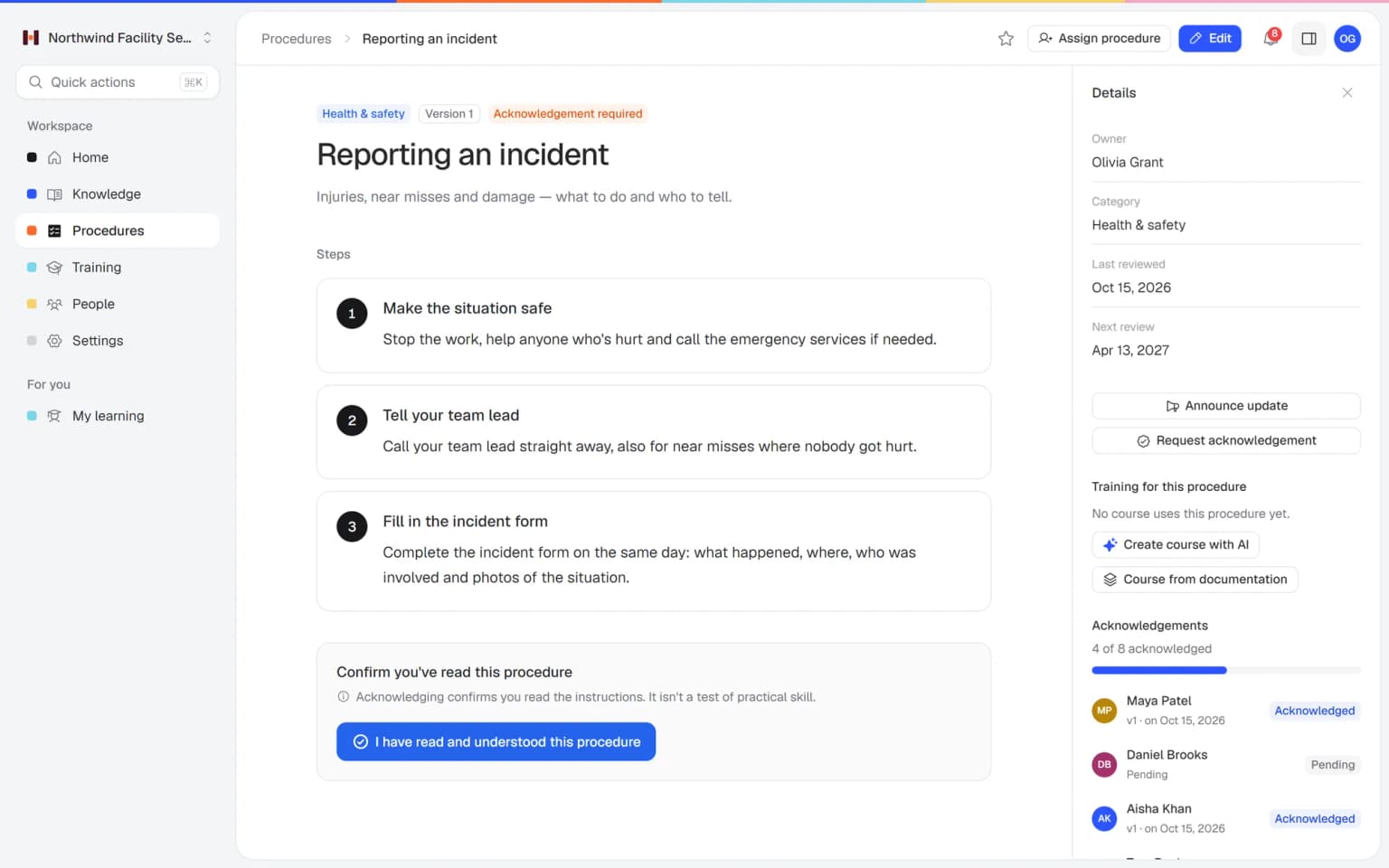
  3. Mark the must-read policies

    Put policies people must know, such as safety or privacy, in a procedure and request a read confirmation.

    Mark the must-read policies: how it looks in Helpable
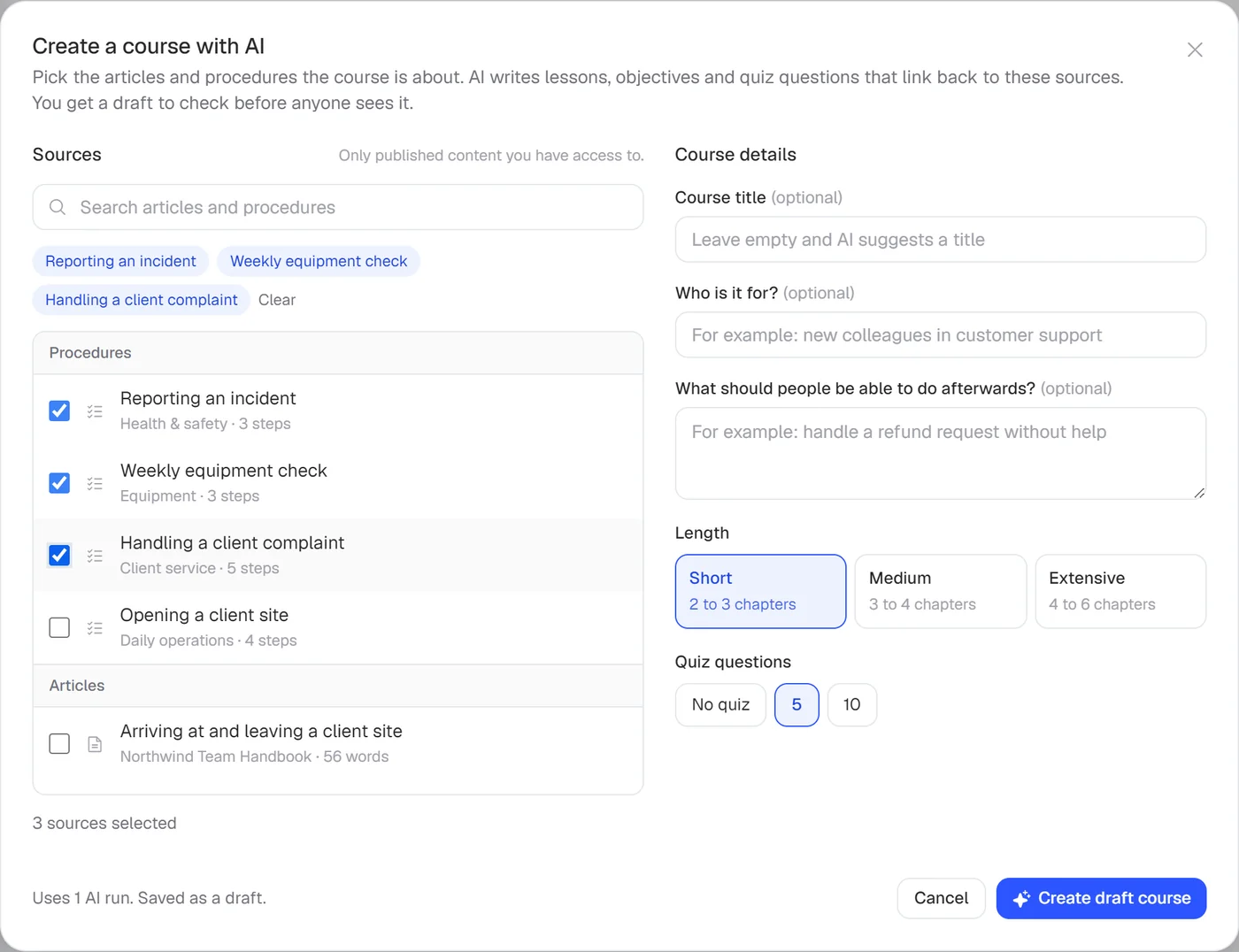
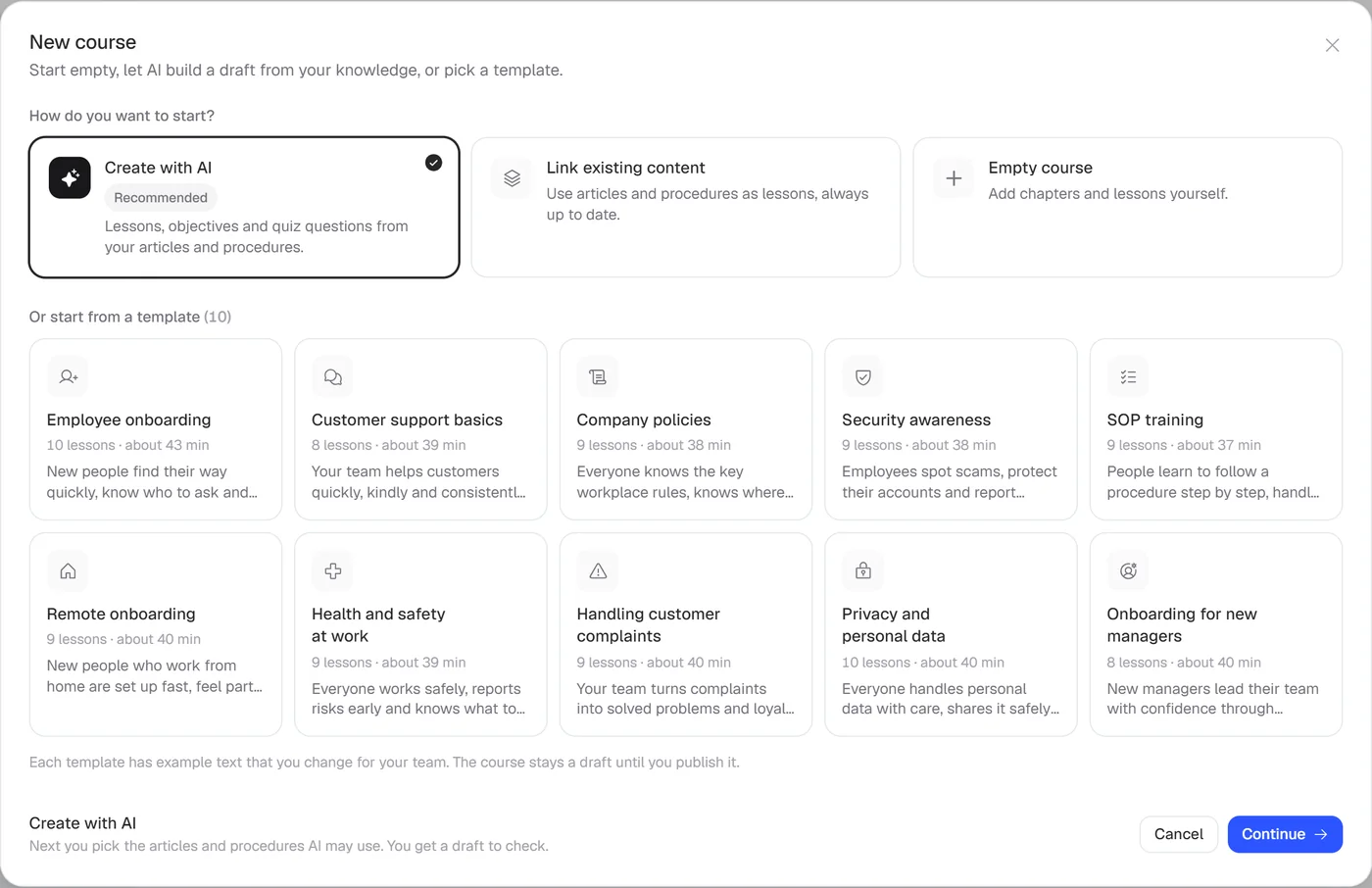
  4. Teach new hires the key rules

    Start from the company policies training template and assign it automatically to every new team member.

    Teach new hires the key rules: how it looks in Helpable
  5. See who is up to date

    Check per person who confirmed which version of a policy and who finished the policies training.

    See who is up to date: how it looks in Helpable

A handbook people open, read and confirm

Clear categories, policies people confirm and one search box, so the right answer is always a few seconds away.

Every rule in a logical place

Group your handbook into categories such as working here, leave and sickness and safety. People click to the page they need and see when it was last updated.

  • Categories and pages under pages
  • Only visible to your own team
  • Version history on every page

Proof the key policies were read

Put a must-read policy in a procedure and ask for a read confirmation. You see who acknowledged the current version, and who is still pending.

One search for every question

Type a word and find the matching article, procedure and training lesson in one list.

What you get for your employee handbook

The parts of Helpable that turn a handbook into a living reference for your team.

  • Knowledge base

    Put the handbook in categories with pages under pages, so people find the leave rule or the dress code in one search. It opens on any phone.

  • Read and acknowledge

    Put must-read policies in a procedure and ask everyone to confirm with one click. You see per person who confirmed which version, so you know whom to remind.

  • Document version control

    Schedule a new rule to go live on the first of the month and keep earlier versions in the history. You can always look back at what a rule said before.

  • Training templates

    Start from the Company policies template on conduct, leave and expenses, adapt it and assign it to new hires. The handbook becomes part of onboarding.

  • AI writer

    Turn the current PDF handbook or a Word file into draft articles you check and publish. The old handbook moves over quickly.

  • Multilingual

    Translate handbook pages with the AI writer for colleagues who read another language best, and check every version first. Everyone understands the same rules.

  • Team roles and permissions

    HR and the office manager write and publish, and everyone else reads. Rules only change through the people responsible for them.

New · Answers

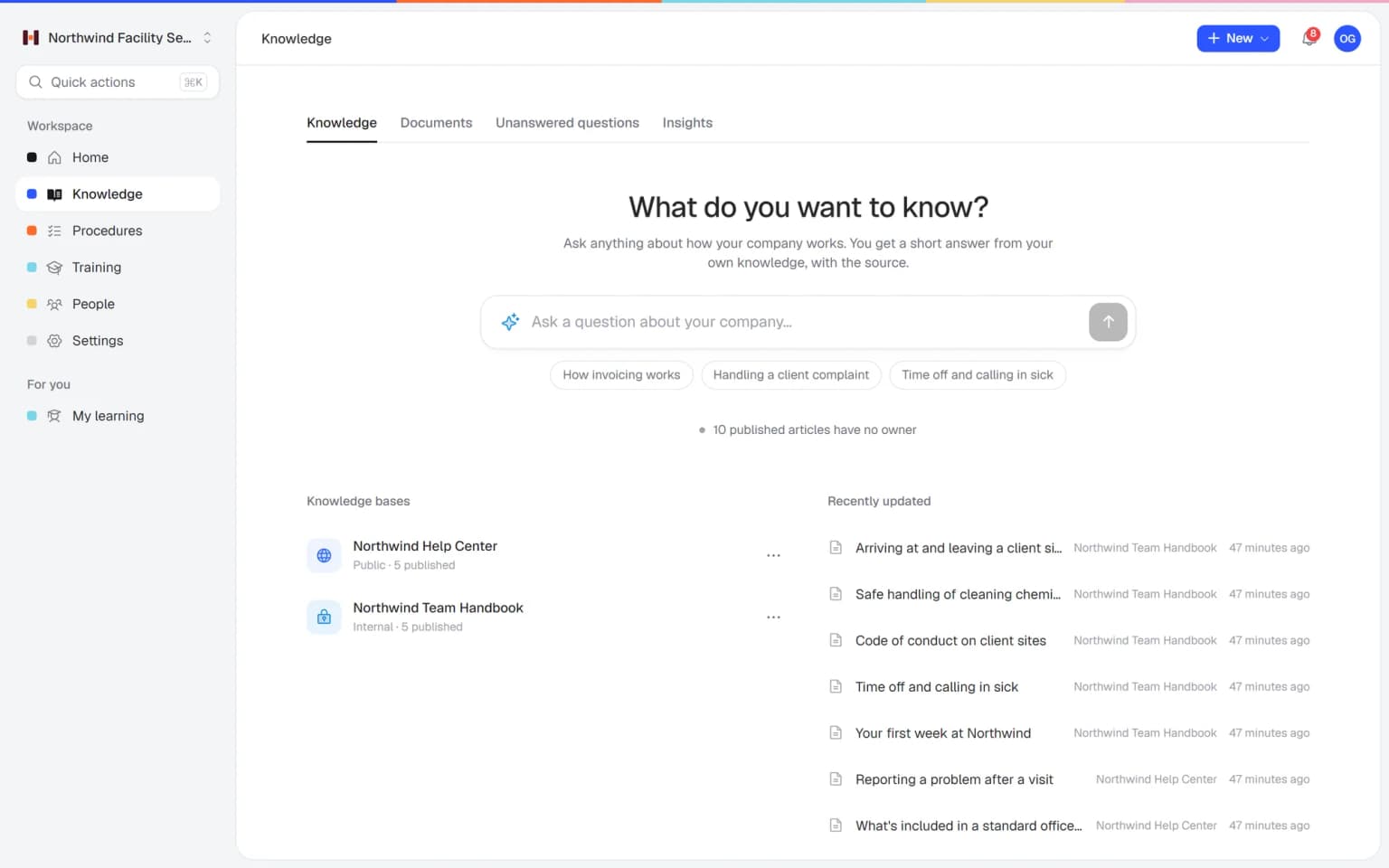
Your team finds the answer on its own in seconds, with the source

Employees ask a question in their own words and get a short answer from your own articles, procedures and documents, with a link to the exact page it came from. You stop being the person everyone asks.

  • Answers come from your own knowledge
  • Every answer shows where it came from
  • Says so plainly when it doesn't know
  • Each person only sees what they may see
  • Works with your existing documents
  • You approve every new article

Start with the documents you already have

Upload your handbook or policies. Helpable makes them searchable right away and suggests articles you check, change and approve. Nothing goes live until you say so.

A gap becomes a to-do

When the answer isn't there, Helpable says so and the question lands on your list of things to write down, with no name attached.

Who it is for

Teams that have outgrown a handbook in a PDF or a shared folder.

  • Teams on location and at client sites

    Cleaning, installation and field staff who rarely see the office and still need the current rules.

    In practice: Cleaners who never visit the office read the new sick-leave rule on their phone and confirm it with one click. You see per person who confirmed, so the team lead knows exactly whom to call.

    See how
  • Shift teams with new and temporary staff

    Hospitality, retail and warehouse teams where someone new starts every month.

    In practice: Every new store employee reads the dress code, break rules and cash rules in week one, as part of their onboarding training. The key rules end with a read confirmation, so the printed folder can go.

    See how
  • Office and client teams

    Agencies, accountancy firms, real estate offices and recruiters with rules on clients, data and time off.

    In practice: A new hire looks up the expense rule on their own and finds the current text, with the date it last changed. The office manager stops answering the same leave question every week.

    See how
  • Startups and software companies

    Fast-growing teams that onboard new engineers, support and sales staff every month and keep changing their policies.

    In practice: The remote work policy changes for the third time this year. You publish the new version with a one-line summary, announce it and see by Friday who has confirmed it.

    See how
  • Care, childcare and education teams

    Teams with a code of conduct and privacy rules that every person has to confirm.

    In practice: Every childcare worker and substitute confirms the code of conduct and the privacy rules before their first day on the group. When someone asks, you show the list per person and per version.

    See how
Made for teams in
Pricing

A plan that grows with your team

Try Helpable free for 14 days, no credit card needed. Then pick the plan that fits your team.

Grow when you need to

Add these to Business and up, any time. You only pay for what you use.

  • More people

    Add people one by one as your team grows, for a fixed price per person on every plan.

    $9/month

  • A second help center

    A help center and handbook for another brand, location or client.

    $10/month

  • Only your brand

    Remove “Powered by Helpable” from your help center. Included in Business Max.

    $19/month

  • Cancel any time
  • Data stored in the EU

Questions about employee handbook software

Can't find your answer? We're happy to help.

Can I build an employee handbook in Helpable?

Yes. In Helpable you write your handbook in an internal knowledge base, with categories, pages under pages, version history and scheduled publishing. Only members of your team can see it.

Can employees confirm they have read a policy?

Yes, through procedures. In Helpable read confirmations are part of procedures: you put a must-read policy in a procedure, request acknowledgement and people confirm with one click. Articles in the knowledge base have no read confirmation.

Does Helpable remind people to confirm a policy?

No. Helpable has no automatic reminders for read confirmations; you see who is still pending and follow up yourself. Automatic reminders do exist for assigned training, before the due date and when it is overdue.

What happens when a policy changes?

In Helpable you edit the page or procedure and publish the new version. Procedures keep every version with a change summary, so you can announce the update and ask people to confirm the new version.

Can I import my current handbook?

Helpable's AI writer drafts an article from a PDF, Word, TXT, Markdown or CSV file, or from a link. You check the draft and publish it. You can also upload the handbook itself as a document; Helpable makes it searchable and suggests articles for you to approve.

Is there a training on company policies?

Yes. Helpable includes a company policies training template with lessons on conduct, leave and expenses. You adapt it, add a quiz if you like and assign it to new hires.

Can people read the handbook on their phone?

Yes. Helpable works in the browser on phones, tablets and laptops. There is no native mobile app to install.

What does Helpable cost?

Helpable starts at $29 per month for Business, with 3 team members, one internal knowledge base and read confirmations. Business Plus is $89 per month and Business Max is $179 per month, with more team members.

Can I try Helpable for free?

Yes. Helpable has a free trial of 14 days on Business Plus, and you don't need a credit card to start.

Where is our handbook data stored?

Helpable stores your data in the EU. The app is available in English and Dutch, so your team can use it in either language.

Give your team a handbook they actually use

Start with the pages people ask about most, mark the policies they must confirm and see who is up to date.

  • 14 days free
  • No credit card needed
  • Cancel any time