Hospitality staff training platform
Helpable is a hospitality staff training platform for restaurants, cafés and hotels: new and seasonal staff are ready for their first shift, and every guest gets the same welcome. The student who starts on Friday at six already knows the table numbers, the register and how to answer an allergen question, and you see who can run a section alone.
- Ready for the first shift
- Hygiene and allergens checked
- Same routine every shift
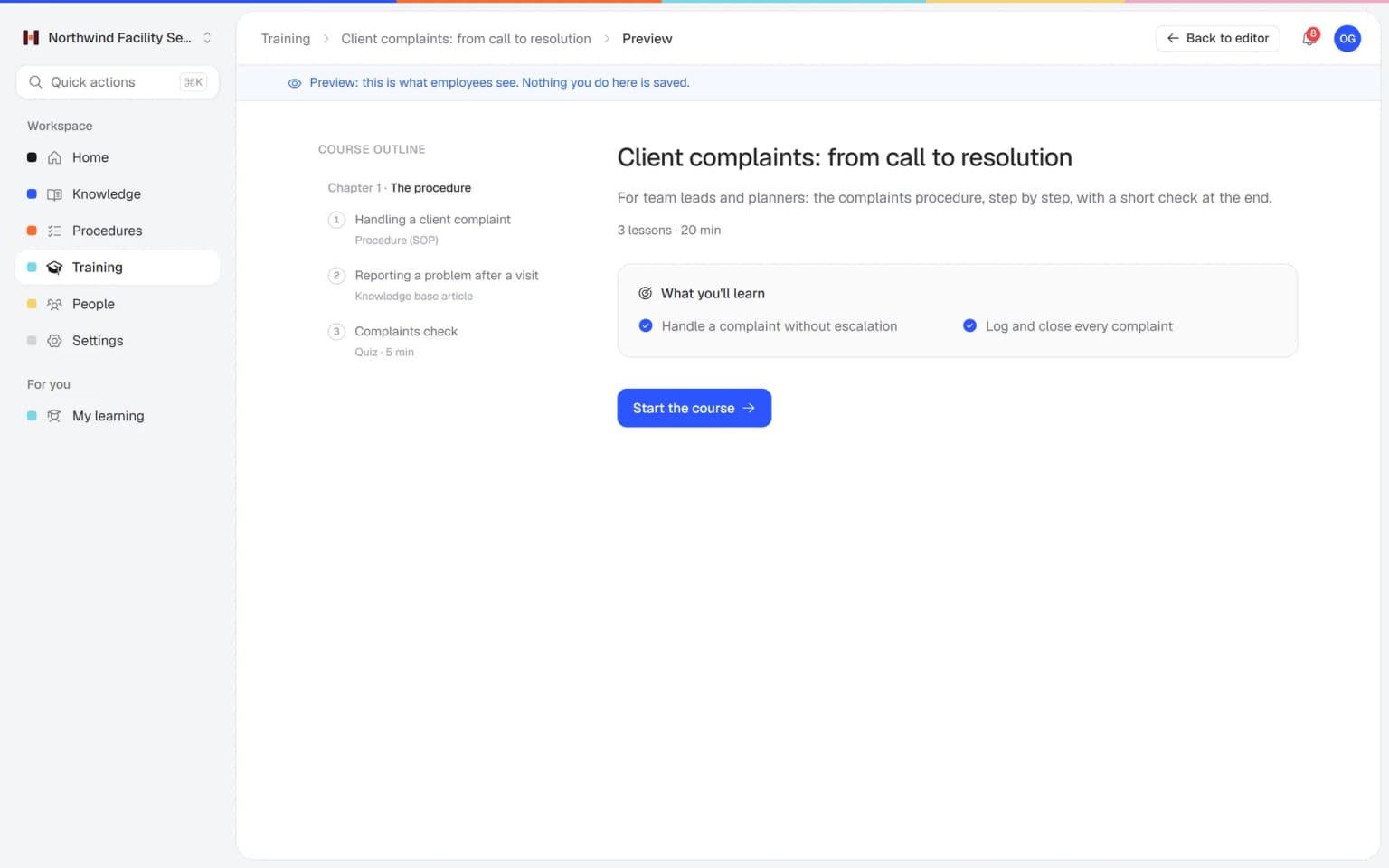
Where it pinches in a business that runs on shifts
Four moments every restaurant, café or hotel knows, and how you solve them with Helpable.
From house rules to a team ready for service
Three steps you set up in a quiet week, before the patio opens.
- 1Every shift opens and closes the same wayWrite opening, closing and hygiene routines as procedures with a checklist, photos and a short video where it helps.
- 2A training ready for new staffStart from the employee onboarding template or let AI build lessons and a quiz from your procedures. Hygiene and allergens become a required part.
- 3Seasonal staff ready before the first shiftAssign the training with a due date and Helpable sends the reminders. On Business Max, new team members get it automatically.
Built for teams that work in shifts
What a manager uses to get kitchen, bar and floor ready for service and keep them current when the menu changes.
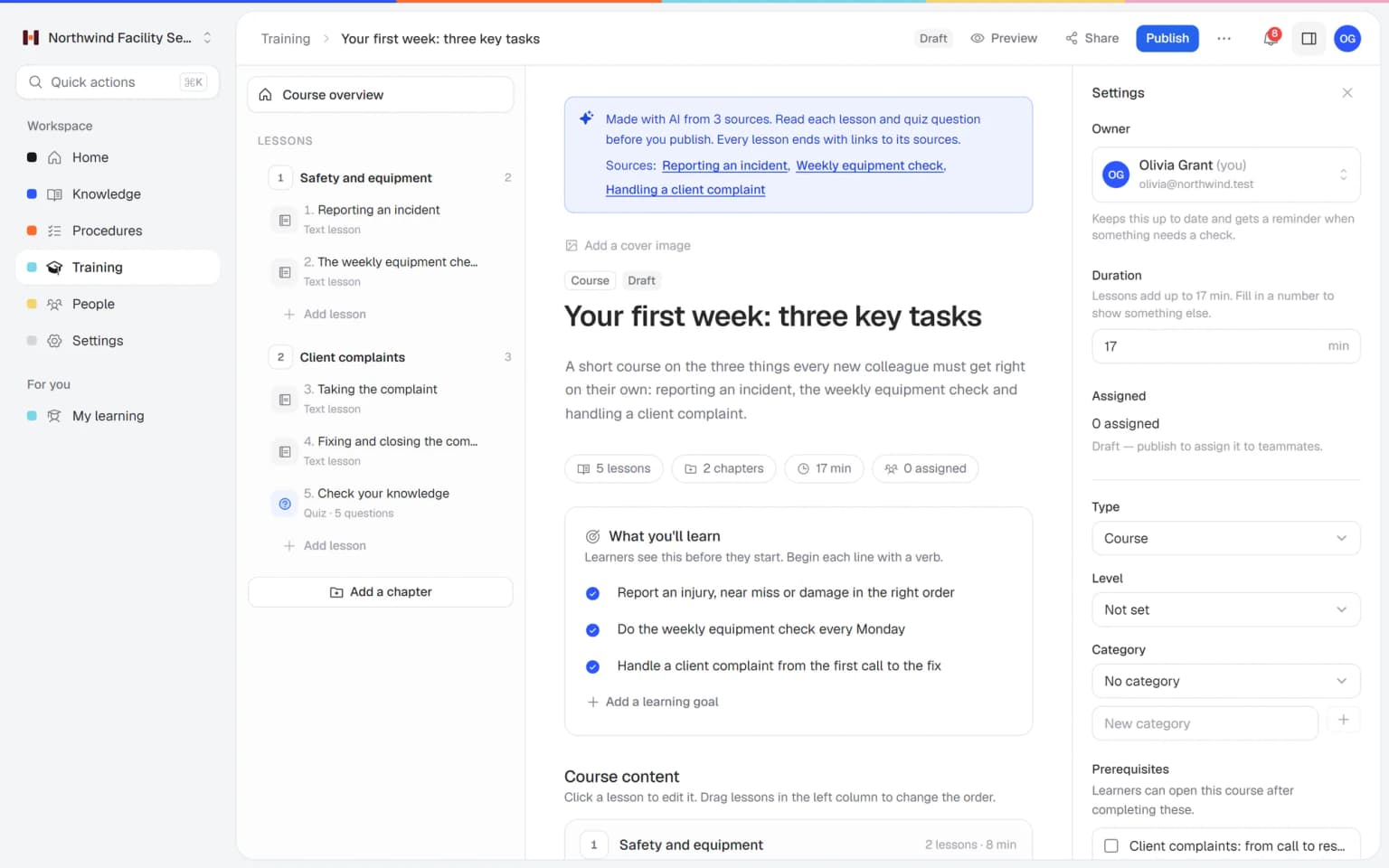
A training for seasonal staff from your own house rules and routines
Pick your house rules, your HACCP procedures and the opening and closing routines, and AI drafts short lessons and quiz questions from them. You read it, adjust it and assign it to floor, bar or kitchen.
- Built from your own procedures
- Quiz questions on hygiene and allergens
- Every lesson links to its source
- Nothing goes live until you approve it
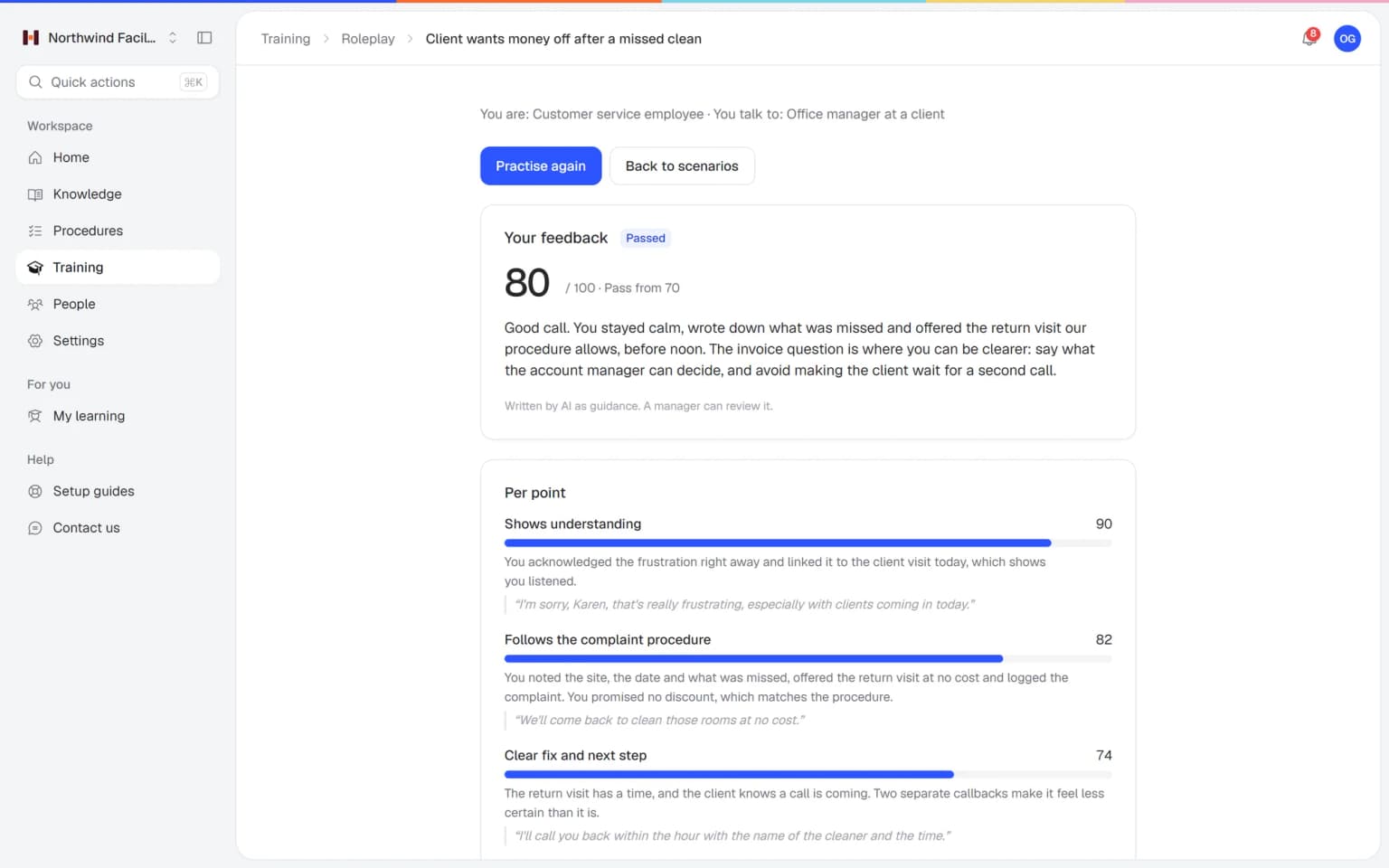
Your floor staff practice the unhappy guest before Friday night
A guest says the dish is cold, waits too long for the check or asks about an allergen you're not sure of. Your team practices those conversations with an AI that plays the guest, in a scenario you build from your own house rules. Every conversation ends with a score and concrete tips.
- Scenarios from your own house rules
- A score and tips after every conversation
- Practice on the phone, at home or before a shift
- You see who is ready
What else belongs with your house rules
So the kitchen, the bar and the floor give a guest the same answer, from the same allergen sheet and house rules.
Made for businesses that run on shifts
One fixed price for kitchen, bar and floor
Try Business Plus free for 14 days. No credit card needed.
Business
Your knowledge base for team and customers, written faster with AI.
- AI answers with the source
- An internal knowledge base and a public help center
- AI writes first versions from your own documents
- Start from what you have: documents, Word files and your website
- Procedures everyone follows, with read confirmations
- Your help center on your own web address
- 250 AI credits per month
Business Plus
Train your team on that knowledge: courses, quizzes and progress per person.
- Everything in Business, plus:
- Training with quizzes, due dates and reminders
- See per person who finished what
- Practice conversations with AI, included
- Video lessons and final tests
- Certificates you can show clients and inspectors
- Results exported in one click
- 3 help centers and 3 internal knowledge bases
- 750 AI credits per month
Business Max
Training that runs by itself, and proof of who really knows what.
- Everything in Business Plus, plus:
- New colleagues get their training automatically
- A fixed onboarding route from day one
- Learning insights: who really studied and who clicked through
- Skills matrix and a training record per person
- Practical work signed off on the floor
- Locations with their own managers
- Refresher training that comes back by itself
- Certificates that expire on time, in your own design
- Your help center fully in your own brand
- 10 help centers and 10 internal knowledge bases
- 1,500 AI credits per month
Questions about hospitality staff training
What is hospitality staff training software?
Hospitality staff training software helps restaurants, cafés and hotels teach their people the house rules, routines and service standards, and shows who learned what. Helpable does this with short training on the phone, step-by-step procedures and quizzes, for teams of 5 to 50 people.
How does Helpable help with seasonal staff?
With Helpable you build your training once and reuse it every season. You assign it with a due date and Helpable sends reminders, so seasonal staff are ready for their first shift. On Business Max, automatic rules give new team members the right training as soon as they join.
Can hospitality staff follow training in Helpable on their phone?
Yes. Helpable works in the browser on a phone, tablet or laptop, so staff can learn at home, on the way to work or before their shift. They continue where they stopped on their "My training" page.
Can we train kitchen, bar and floor staff separately in Helpable?
Yes. In Helpable you make a team for each part of your business and assign each team its own training. On Business Max, new members of a team get that training automatically, and on Business Plus you assign it yourself.
How does Helpable help with hygiene and allergen training?
In Helpable you write your own hygiene and allergen procedures and add them to a required training with a quiz and a pass mark. Helpable shows who passed, and on Business Max it repeats the training every 6, 12 or 24 months. The content comes from you, so check it against the rules that apply to your business.
Can we bring our existing HACCP plan, menu notes and house rules into Helpable?
Yes. Helpable's AI writer drafts an article from your own PDF, Word, TXT, Markdown or CSV files, and you can attach documents to lessons. Routines such as opening, closing and temperature checks become procedures with numbered steps, checklists and photos. You check every draft before your staff see it.
How fast can we get new staff ready before the season starts?
Helpable lets you set up your first training on the day you sign up. Start from the employee onboarding template or let AI draft lessons and a quiz from your procedures, then assign it with a due date before the first shift. New staff follow it on their phone, so the briefing on the floor can stay short.
How do we see who is ready to work a shift on their own?
Helpable shows per employee which training is finished, which routines they confirmed, how they scored and who is overdue. Make a team for kitchen, bar and floor, and you see per section who knows the house rules. Results per team come with Business Max.
What does Helpable cost for a restaurant or hotel, and which plan do we need?
Helpable starts at $29 per month for Business, with 3 people, procedures, read confirmations and a knowledge base. Business Plus ($89) has 5 people and adds training, quizzes, due dates, video lessons and certificates. Choose Business Max ($179) for automatic assignment for each new team member, yearly hygiene refreshers and certificates with an expiry date, and from Business you can add extra people for the busy season.
How is Helpable different from a WhatsApp group with the team?
Helpable keeps one current version of every routine and house rule, asks staff to confirm they read it and shows who finished which training. In a WhatsApp group, a new menu or allergen rule gets lost between shift swaps and other messages, and you can't see who read it.
Is Helpable available in Dutch, and where is our data stored?
Helpable works in English and Dutch, and you write your training and procedures in the language your staff speak. Your data is stored in the EU.
Is there a free trial of Helpable for hospitality businesses?
Yes. Helpable has a free trial of 14 days on Business Plus, and you don't need a credit card to start.
Hospitality staff training: how restaurants, cafés and hotels do it
Owners and managers of restaurants, cafés, hotels and catering companies search for restaurant staff training, hospitality training software or food safety training when a new group starts on a Friday night and the briefing has to happen between orders. These are the questions we hear most, answered for how a service really runs.
Restaurant staff training before the first shift
With Helpable, a new server, bartender or busser learns your house rules, the menu basics and your routines on their own phone before the first shift, so the briefing on the floor stays short. Most hospitality onboarding happens at the worst moment: a student starts on Friday at six, the patio is full, and a colleague explains the register, the table numbers and where the clean glasses go while running food. By Saturday, half of it is gone.
Put that first-week knowledge in one short training: who to report to, the dress code, table numbers and sections, how the POS works and how to split a check, the house style for greeting guests and what to do when a guest complains. Add a short video of how a table is set or how a plate leaves the pass, with a quiz at the end. Assign it with a due date before the first shift, and email reminders go out by themselves. On Business Max, everyone you add to the floor or kitchen team gets it automatically. The page on employee onboarding software shows the setup for any new hire.
HACCP, food safety and allergen training for kitchen staff
In Helpable you turn your own HACCP plan into kitchen procedures and a required training with a quiz, so every cook, dishwasher and student knows the temperature checks, the cleaning schedule and your allergen rules. Each procedure has numbered steps with photos and checklists: fridge and freezer temperatures at opening, core temperature when reheating, labeling with a date when you portion and how to clean the slicer.
Allergens need extra care, because the question comes from the guest at the table and the answer has to be right. Write down how your team handles it: check the allergen sheet, ask the kitchen, never guess and tell the guest honestly when something can't be ruled out. Make the quiz required with a pass mark, and you see who passed before you put someone on the schedule. On Business Max, recurring training brings it back every 6, 12 or 24 months. The record of who passed and when stays in Helpable, while your food safety plan and the health inspector decide what is compliant.
Training seasonal staff and students for the summer
For seasonal and temporary staff, Helpable lets you build the training once and reuse it every spring, so the new group for the patio is up to speed in their first week. Staff turnover in hospitality is high, and the same questions come back every year. Where is the key for the patio furniture? How do we close the kitchen? What do we say when we're fully booked?
Put the basics in one training with lessons in a set order: house rules first, then hygiene, then the POS and your service routine. Students follow it at home on their phone, one lesson at a time. You see per person what is finished and what is still open, and managers get a weekly email with who is behind. When someone comes back the next summer, they confirm the procedures that changed since, and you see who did. If you were looking for hospitality training software, e-learning or an LMS for hospitality, this one is sized for teams of about 5 to 50 people.
Opening and closing checklists for restaurants and bars
Helpable keeps your opening and closing routines as step-by-step procedures, so the morning shift finds the kitchen and bar the way the closing shift should have left them. Every shift lead has their own habits. One switches off the coffee machine, the next forgets the beer lines, and the day starts with a search.
Write each routine once with numbered steps, a checklist and photos: close out the register and count the cash drawer, clean the coffee machine and the taps, empty the fryer, log the fridge temperatures, lock up and set the alarm. Staff open it on their phone behind the bar. When a step changes, you publish a new version with a short summary, announce it and see who confirmed it. Read confirmations come with every plan. Read more about procedures.
Can staff look up answers during a busy service?
Yes, with Answers in Helpable your staff type a question in their own words and get a short answer from your own articles and procedures, with a link to the source. Think of what a new person asks on a Saturday night: is there nut in the risotto, what is the guest wifi password, how late does room service run, what do I do when the dishwasher stops.
Answers only uses what you wrote down, so keep the allergen sheet and menu notes in your knowledge base current. When it doesn't know, it says so, and the question lands on a list for the manager to fill in. That list shows you what your team still asks colleagues. Everything works in English and Dutch, and your data is stored in the EU.
Your team ready for the next season
Start with your house rules and the onboarding template. Next week's new hires can do it on their phone before their first shift.
Start free trial- 14 days free
- No credit card needed
- Cancel any time