Knowledge sharing at work

A knowledge sharing platform for teams

Helpable is a knowledge sharing platform that gives your team one place to look things up, with one search across articles, procedures and training. When answers live in people's heads, chats and old folders, the same few colleagues get interrupted all day.

  • One search for everything
  • AI drafts from your files
  • Owner and review date
Knowledge base in Helpable with categories such as booking, invoices and service, each with its articles

Sounds familiar?

Knowledge is there. It's just in the wrong places, or with the wrong person.

  • Quick question… (the fifth one to the same colleague today)

    Team chat, every day
  • Which folder was the new price list in again?

    Sales assistant
  • Only Mark knows how to do that, and he's on holiday.

    Office manager
  • Is this document still how we do it?

    New colleague, reading a file from two years ago

How do you improve knowledge sharing at work?

Give knowledge one home, make one person responsible for each piece, and make it easy to find. In Helpable you write articles in an internal knowledge base, keep step-by-step procedures with an owner and a review date, and employees find both, plus their training, in one search.

Who this is for

Teams where the same few people answer the same questions every day.

  • Teams on location and at client sites

    Installation, cleaning and field teams who call the office or the owner for every answer.

    In practice: Technicians stop calling the owner for the same error code. They search on their phone or ask in their own words, and get your own instruction with the source.

    See how
  • Teams that grow or work shifts

    Where new colleagues and people on different schedules need the same answers at different times.

    In practice: The evening crew finds the same answers as the day crew: how to handle a complaint, where the spare keys are, what to do when the fridge alarm goes off. Nobody needs to wake the owner.

    See how
  • Office and client teams

    Agencies, accountancy firms and real estate offices where the owner is still where everyone goes for answers.

    In practice: What the senior account manager knows ends up in articles the whole team can search. Questions that got no answer show you what to write next.

    See how
  • Startups and software companies

    Fast-growing teams whose wiki and chat threads got messy, and who want one place where new people find answers.

    In practice: Scattered chat threads and old wiki pages become one knowledge base with categories. New hires search there first, and the founder answers fewer of the same questions.

    See how
  • Care, education and multi-location teams

    Practices, childcare and businesses with several branches that want everyone working from the same answers.

    In practice: Every location works from the same protocols and how-tos. A tip one team found useful becomes an article everyone can find the next day.

    See how
Made for teams in
Illustrative example

One week at a 15-person agency

Nobody hides information on purpose. It just ends up everywhere. This is how a normal week goes, and how it goes with one place for knowledge.

Before

  1. A designer asks in chat how to set up a new client folder. Two people answer, differently.

  2. The account manager searches three drives for the latest proposal template.

  3. The one person who knows the invoicing steps is ill. Invoices wait until she is back.

  4. Someone writes a helpful how-to. The week after, nobody can find it.

With Helpable

  1. The designer searches for client folder and opens the procedure with every step.

  2. The proposal process is an article in the internal knowledge base, with the template linked.

  3. The invoicing procedure has an owner and steps anyone on the team can follow.

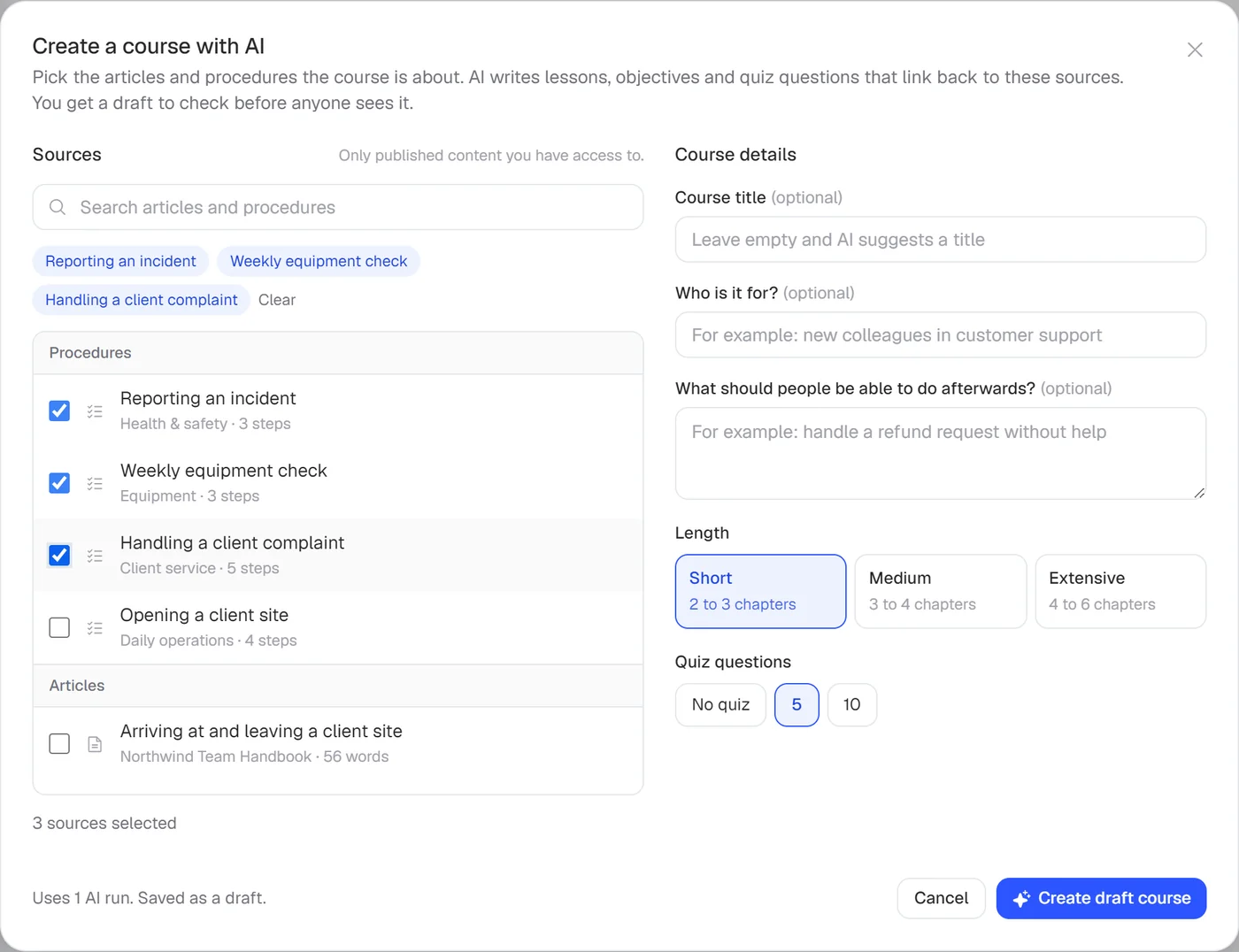
  4. The new how-to goes into the right category. The AI writer turned their notes into a first draft.

How Helpable gets knowledge out of heads

Start small with the questions you hear most. Each step makes the next interruption less likely.

  1. Give knowledge one home

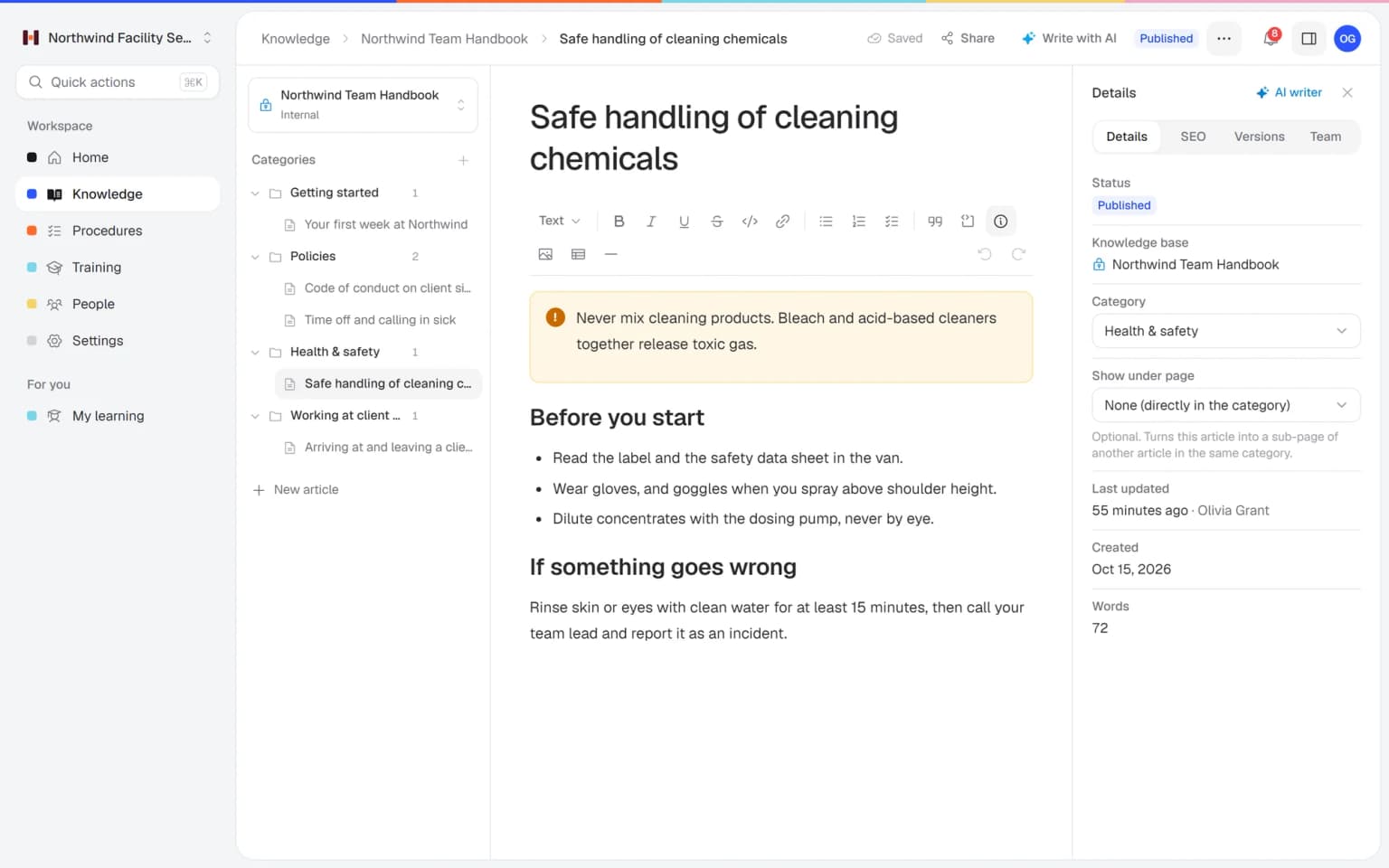
    An internal knowledge base with categories and pages under pages. Only people in your workspace can read it.

    Give knowledge one home: how it looks in Helpable
  2. Turn what you have into articles

    Add a PDF, Word file, notes or a link and the AI writer drafts an article. You check it and publish.

    Turn what you have into articles: how it looks in Helpable
  3. Make the how-to steps clear

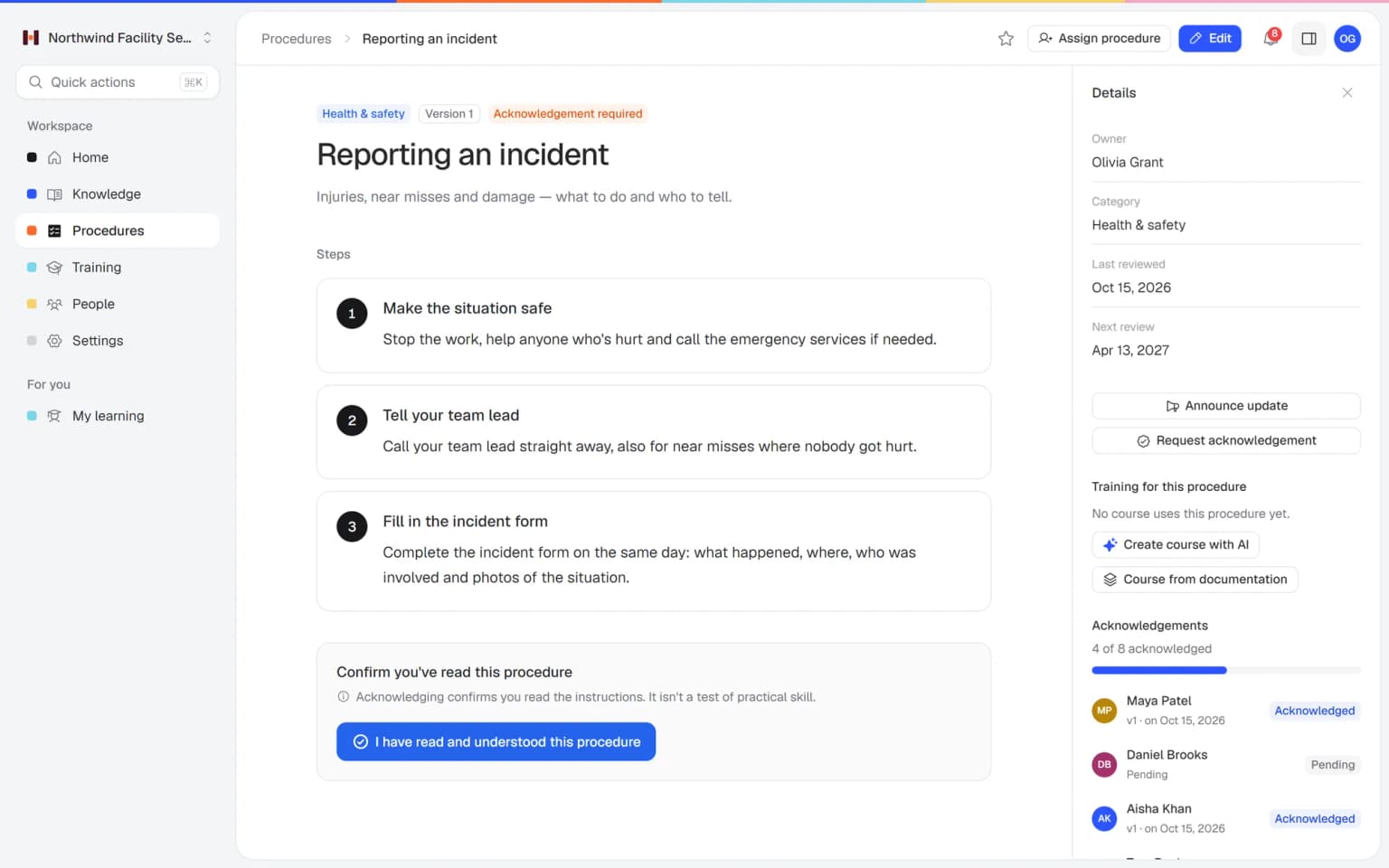
    Tasks that need to go right become numbered procedures with one owner, so people know who to ask.

    Make the how-to steps clear: how it looks in Helpable
  4. Find it in one search

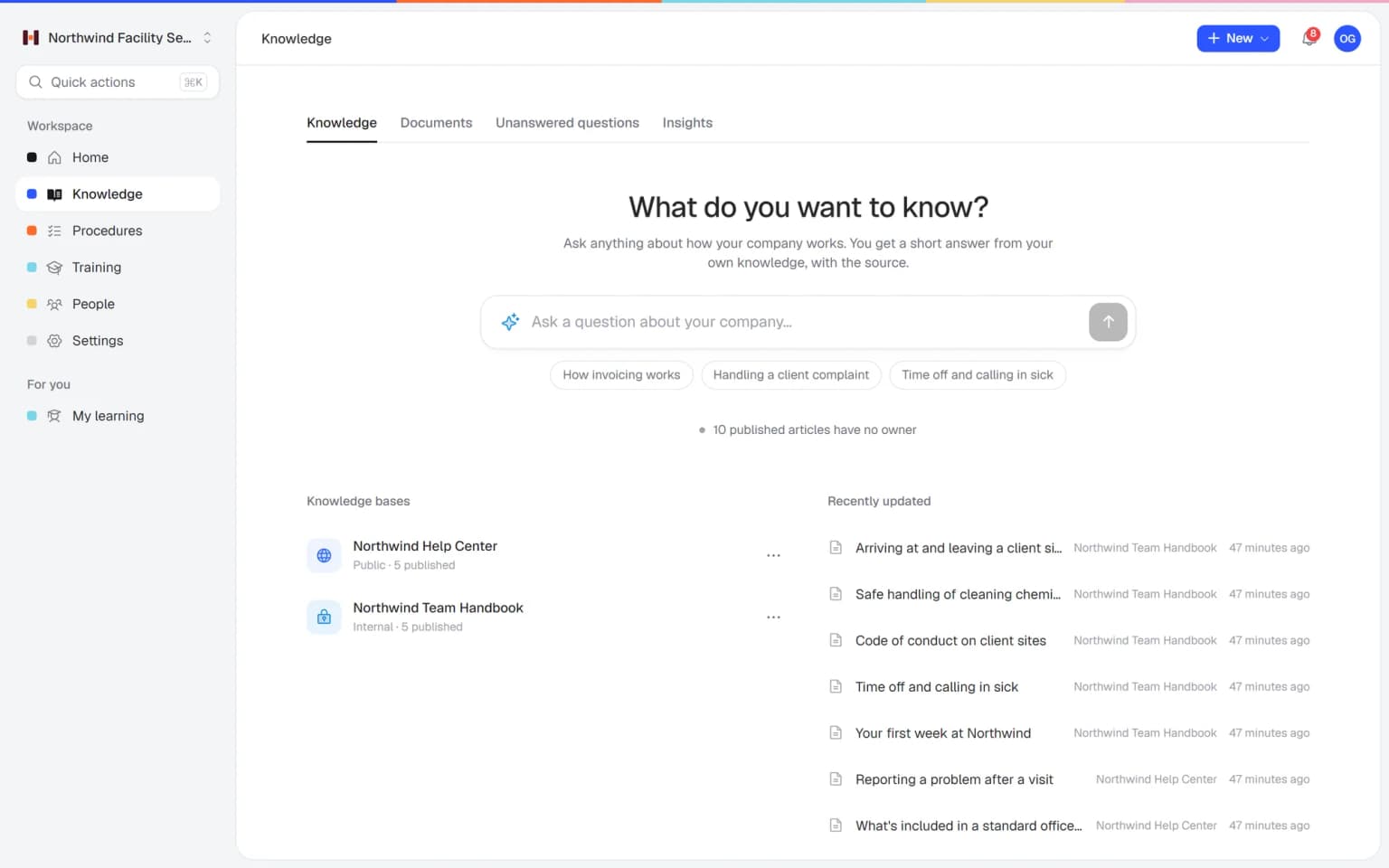
    Employees search once and get matching articles, procedures and training.

    Find it in one search: how it looks in Helpable
  5. Keep it current

    Each procedure shows its next review date. When you publish a change, you can announce it and ask people to confirm.

    Keep it current: how it looks in Helpable
New · Answers

Your team finds the answer on its own in seconds, with the source

Employees ask a question in their own words and get a short answer from your own articles, procedures and documents, with a link to the exact page it came from. You stop being the person everyone asks.

  • Answers come from your own knowledge
  • Every answer shows where it came from
  • Says so plainly when it doesn't know
  • Each person only sees what they may see
  • Works with your existing documents
  • You approve every new article

Start with the documents you already have

Upload your handbook or policies. Helpable makes them searchable right away and suggests articles you check, change and approve. Nothing goes live until you say so.

A gap becomes a to-do

When the answer isn't there, Helpable says so and the question lands on your list of things to write down, with no name attached.

Answers your team can find on its own

Turn what's in people's heads and files into knowledge everyone can search, and keep it current.

Turn your files into articles

Add a PDF, Word file or notes and the AI writer drafts the article. You check it, adjust what you like and publish.

  • Drafts from PDF, Word, TXT, Markdown and CSV
  • You review before anything goes live
  • Writes in English or Dutch

One search for everything

Employees type a few words and find the matching article, procedure or training. Fewer questions land on your desk.

Knowledge that stays up to date

Every procedure has an owner and a next review date, so outdated steps get fixed before they cause mistakes.

What you get for sharing knowledge

The parts of Helpable that help a team find answers on its own.

  • Knowledge base

    Articles in categories, readable only by your workspace, with every change kept. The answers people ask the owner for every day get written down once.

  • Answers for your team

    People ask in plain words and get a short answer from your own content, with the source. Unanswered questions show what to write next.

  • AI writer

    Turn a PDF, Word file or link into a draft article you check and publish. What sits in old folders becomes something people can find.

  • Procedures

    Tasks people keep asking about become procedures with steps, photos and one owner. Anyone on the evening shift can do them.

  • Read and acknowledge

    Ask people to confirm a new version and see per person who read it. Important changes reach the people on every shift.

  • Team roles and permissions

    Invite colleagues to write about what they know best, with roles that decide who may publish. The owner stops being the only writer.

Who does what

Knowledge sharing works when a few people own it and everyone can use it.

  • Founder or ownerWrites down what only they know

    Records how pricing, proposals and key client agreements work, so questions stop landing on their desk.

  • Office managerKeeps the knowledge base tidy

    Sorts articles into categories, assigns owners to procedures and checks what is due for review.

  • Team memberLooks it up first

    Searches Helpable before asking in chat, and suggests a new article when something is missing.

  • New colleagueFinds answers alone

    Reads the internal articles and procedures linked from their onboarding training.

What you can expect to get out of it

No promised percentages. These are the changes teams aim for when knowledge has one home.

  1. Fewer interruptions

    People can find the answer themselves, so experienced colleagues get more hours of focused work.

  2. One answer to each question

    Everyone reads the same article or procedure, so the answer no longer depends on who you ask.

  3. Knowledge stays when people leave

    What someone knows is written down in Helpable before they move on.

  4. Documents people trust

    An owner and a review date on each procedure tell readers it is still how you work.

Pricing

A plan that grows with your team

Try Helpable free for 14 days, no credit card needed. Then pick the plan that fits your team.

Grow when you need to

Add these to Business and up, any time. You only pay for what you use.

  • More people

    Add people one by one as your team grows, for a fixed price per person on every plan.

    $9/month

  • A second help center

    A help center and handbook for another brand, location or client.

    $10/month

  • Only your brand

    Remove “Powered by Helpable” from your help center. Included in Business Max.

    $19/month

  • Cancel any time
  • Data stored in the EU

Questions about knowledge sharing with Helpable

Can't find your answer? We're happy to help.

What is an internal knowledge base in Helpable?

An internal knowledge base in Helpable is a set of articles only people in your workspace can read: how you work, policies, answers to common questions. You organize it in categories and pages under pages, and every change is kept in the version history.

Can employees search procedures and training too?

Yes. Helpable has one search across knowledge base articles, procedures and training, so employees don't need to know where something is stored.

How do I get existing documents into Helpable?

Helpable lets you upload documents such as PDF, Word, TXT, Markdown or CSV files. Helpable makes them searchable right away and suggests article drafts you review and approve. The AI writer also drafts a single article from a file or a link.

How does Helpable keep knowledge up to date?

Helpable gives every procedure an owner, a review interval and a next review date. When you publish a new version you add a short change summary and can ask the people involved to confirm they have read it.

Can we also share answers with customers?

Yes. Besides the internal knowledge base, Helpable can publish a public help center for customers, with its own categories, branding and search.

Does Helpable answer employee questions with AI?

Yes. Helpable answers employee questions in plain words from your own articles, procedures and uploaded documents, with a link to the exact source. When the answer isn't in your knowledge, it says so, and the question shows up for managers as an unanswered question to write down.

What does Helpable cost?

Helpable starts at $29 per month for Business, with 3 team members, an internal knowledge base, a public help center, procedures and read confirmations. Business Plus costs $89 per month and adds 5 team members and assigned training, and Business Max costs $179 per month and adds automatic assignment. Yearly billing costs about a fifth less.

Is there a free trial?

Yes. Helpable has a free trial of 14 days on Business Plus with no credit card needed, so you can add your first articles and procedures before you choose a plan.

Where is our data stored?

Helpable stores your data in the EU. Your internal knowledge base, procedures and training are only visible to the people you invite to your workspace.

How is Helpable different from a shared drive or a wiki?

Helpable puts articles, procedures and training in one place with one search. Each procedure has an owner and a review date, and you can ask people to confirm they have read a new version, which a shared drive or a simple wiki does not do.
Give your team one place to look things up

Start with the five questions you hear most. Write them down once and let search do the rest.

  • 14 days free
  • No credit card needed
  • Cancel any time