Procedure management software
Helpable is procedure management software that keeps one current version of every procedure and shows who read it. Write down how the work is done in clear steps your team can follow on the job. When something changes, people confirm they read the new version, and you see who still has to.
- 14 days free
- No credit card needed
- See who read every update
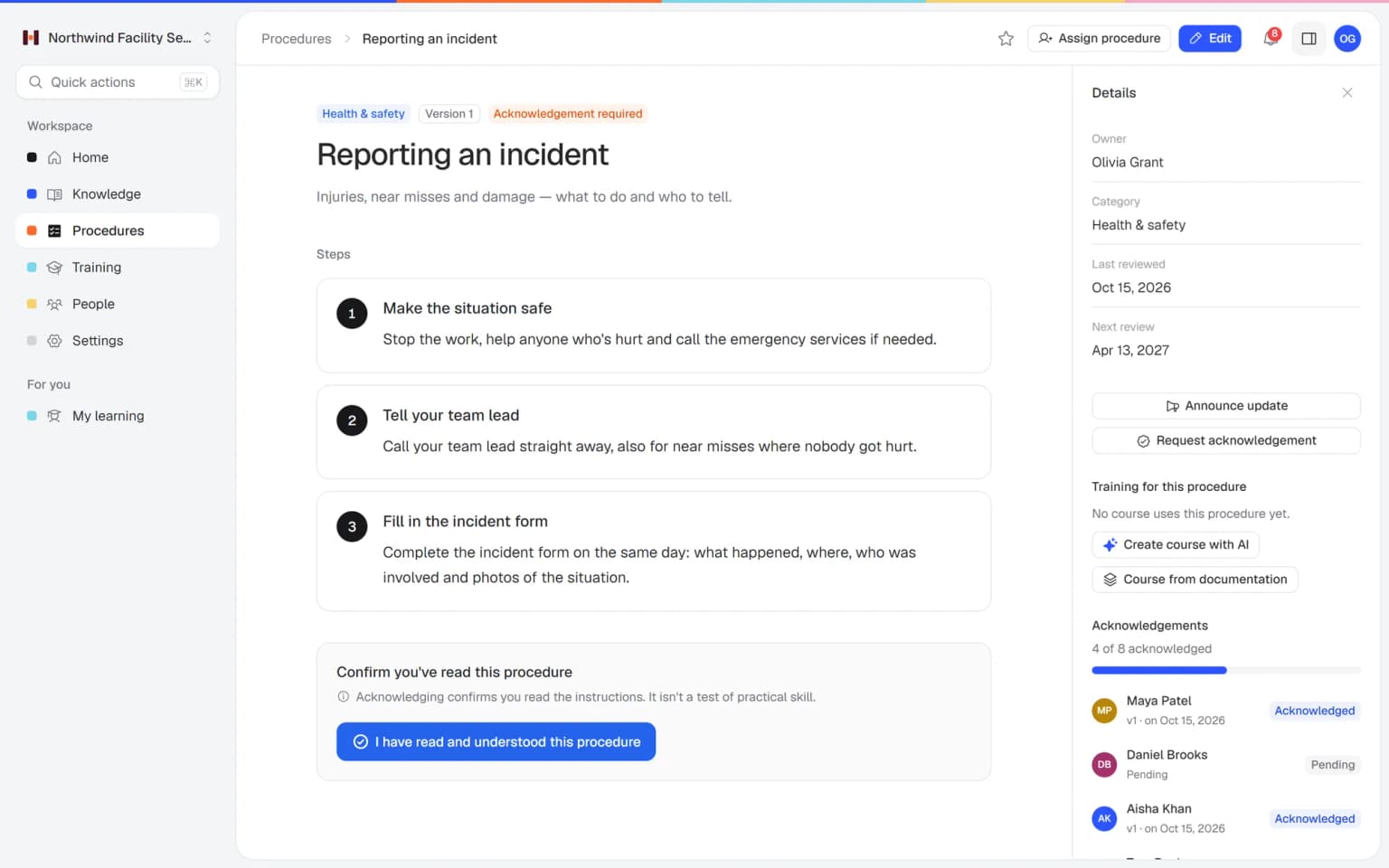
One right way of working, and proof that people know it
Helpable keeps your procedures clear, current and confirmed, so everyone does the work the same way.
The same result every time
Everyone follows the same numbered steps, with checklists and images where they help. The work gets done the same way, whoever is on shift.
Updates that actually land
Announce a change and ask people to confirm the new version. Nobody misses it, and you no longer chase people in the group chat.
Proof of who read what
A per-person overview shows who confirmed which version and who still has to. Handy when a customer or inspector asks how your team is instructed.
New people ready sooner
New colleagues look up the steps on the job and need to ask less. Your experienced people get their time back for their own work.
Know-how stays in the company
Steps that lived in one person's head are written down, with an owner who keeps them current. When someone leaves, the way of working stays.
Calmer audits and inspections
Every version is saved with a change summary and the confirmations that belong to it. When someone asks how your team was instructed, the answer is ready.
Instructions that live in heads and group chats get lost
Most small teams know how the work should be done. Keeping everyone on the same page is the hard part.
The real way of working is in one person's head
When that person is off or leaves, the rest of the team guesses.
With Helpable Write it down once as a numbered procedure with an owner, so anyone can look it up on the job.
Old versions keep circulating
A printed sheet, a PDF in someone's inbox and a message in the group chat all say something different.
With Helpable There is one current version in Helpable, and every change is saved with a short summary of what changed.
You never know if people read the update
You send a message about a change and hope everyone saw it.
With Helpable Ask for a read confirmation per version and see per person who confirmed and who still has to.
Procedures slowly go out of date
Nobody checks them until something goes wrong.
With Helpable Set a review interval. Helpable shows the next review date, so the owner knows when to check the steps again.
From a messy document to confirmed procedures
Three steps. You can write your first procedure today.
Write the steps
Add numbered steps with text, checklists and images. Give the procedure an owner and a category.
Share it with your team
Ask everyone who needs it to confirm they read it. They can read and confirm it on their phone or laptop.
Update and confirm again
Change a step, add a short summary and announce the update. You see who confirmed the new version.

- 14 days free
- No credit card needed
One change to a procedure keeps training and knowledge current
Procedures in Helpable connect to your training and the rest of your knowledge. Update the steps once, and everyone who needs them learns the new way.
Procedures that keep training current
Add a procedure to a training as a lesson, and the lesson always shows the latest version. When you publish a new version, people confirm they read it, and you can ask those who finished the training to redo it.
Employee trainingFrom procedures to a training with AI
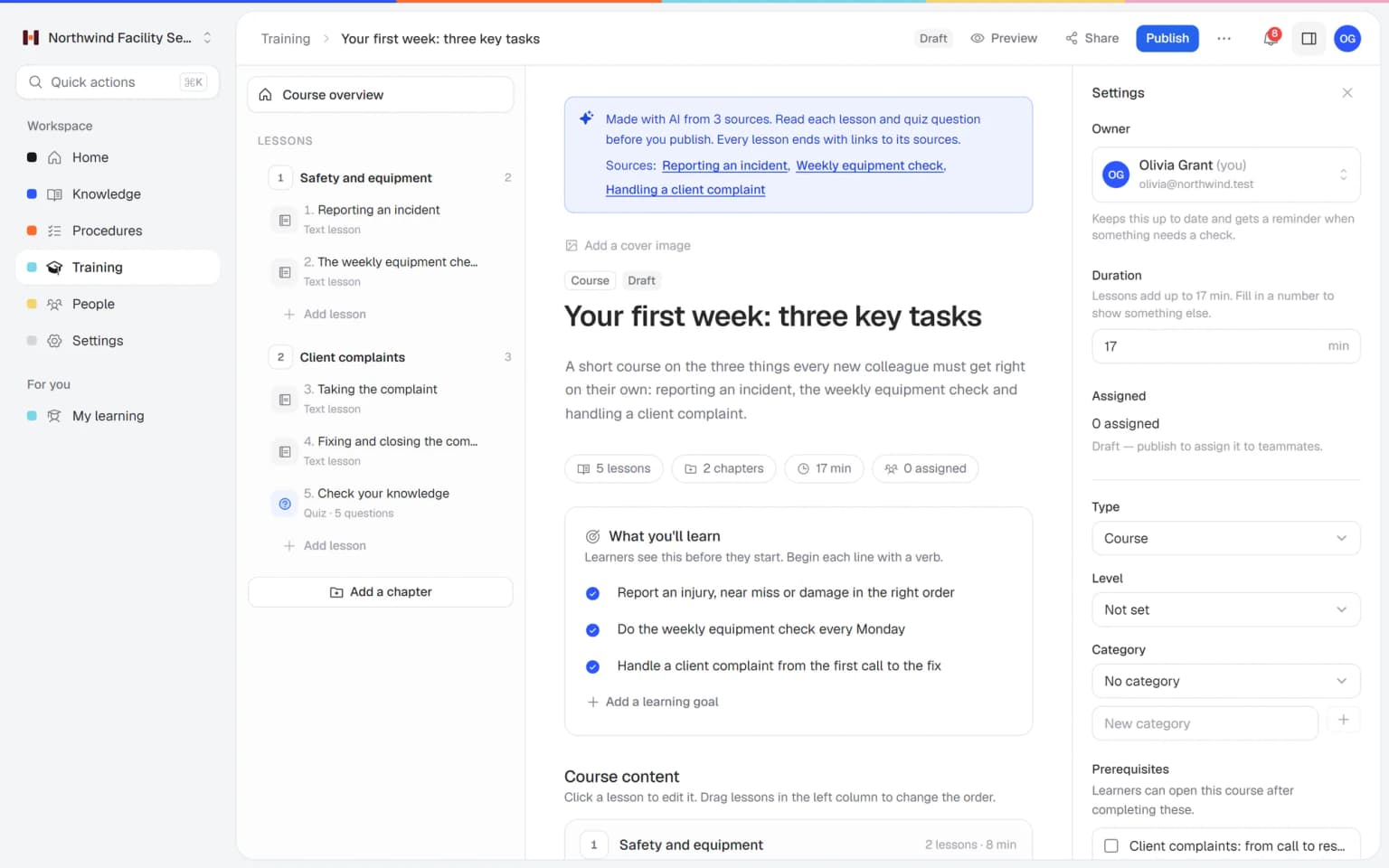
Pick your procedures and articles, say who the training is for, and AI drafts the lessons, learning goals and quiz questions. Each lesson links back to the procedure it came from, so new people are ready for the job sooner.
Training with AIWritten together, found in one search
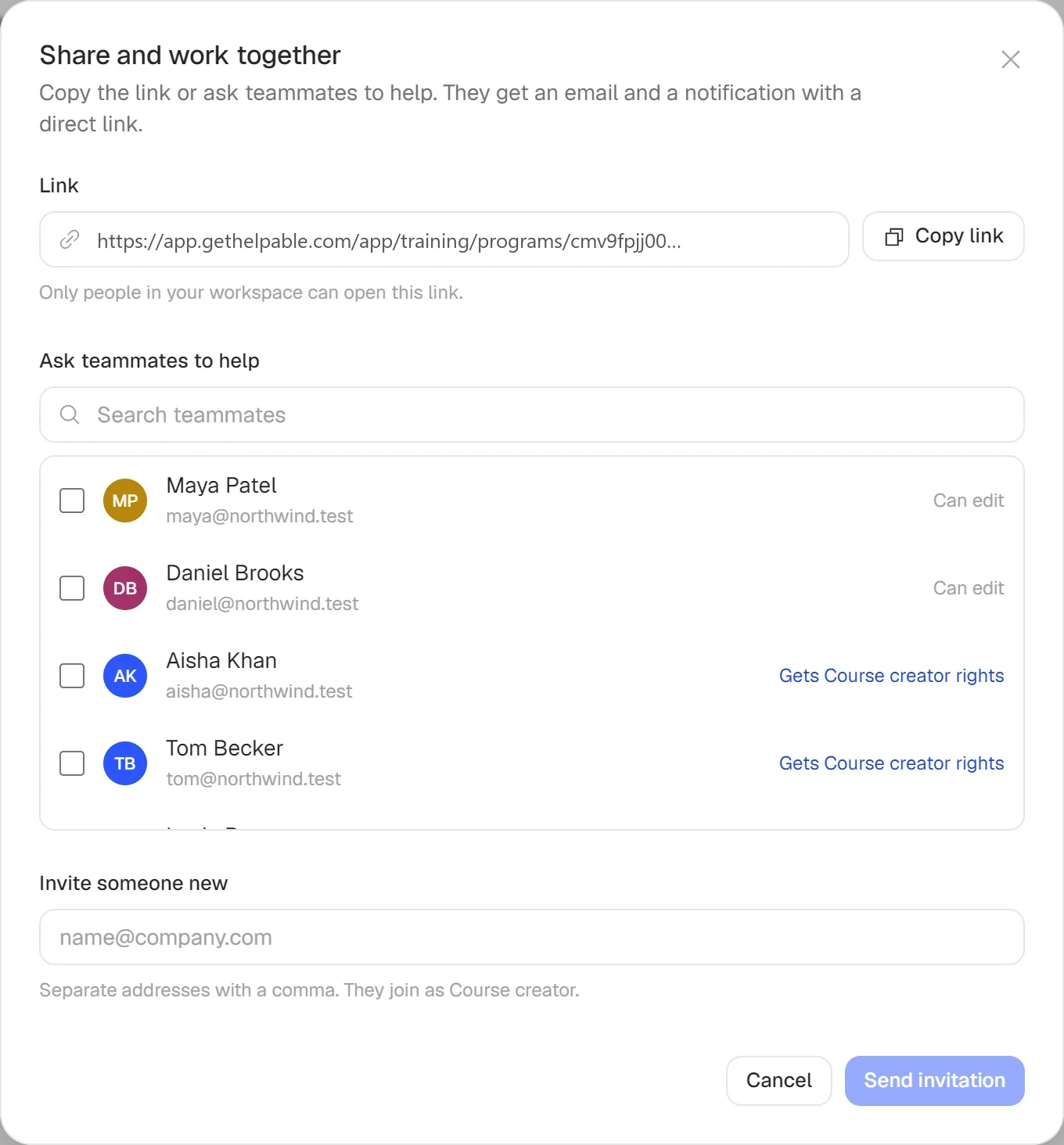
Invite a colleague who knows the work by email to help write a procedure, then share the link with your team. Afterwards people find it with one search across procedures, knowledge and training.
Team and roles
Procedures do more with the rest of Helpable
Procedures are the base. Combined with the other parts of Helpable, the same steps confirm, train and answer questions for you.
- + Read and acknowledgeEvery change reaches every personPublish a new version and request acknowledgement from the people it applies to. The overview shows per person who confirmed the new steps, so you only follow up with the people who are left.
- + Document version controlA record of every version and what changedEach published version is kept with a short change summary, the author and the date. When a customer or inspector asks how your team was instructed last spring, you can show it.
- + Employee trainingTraining that always teaches the current stepsAdd a procedure to a training as a lesson and it always shows the latest version. After a change you can ask the people who finished the training to take it again.
- + QuizzesProof that people understood the stepsPut a short quiz after the procedure lesson, with a pass mark and a limit on attempts. You see who knows the steps, which tells you more than a click on read.
- + Training with AIA first training drafted from your proceduresPick the procedures a new colleague needs and AI drafts chapters, lessons, learning goals and quiz questions. Each lesson links back to the procedure it came from, so you only check and publish.
- + Knowledge baseOne search for the steps and the backgroundKeep the why and the background in knowledge base articles and the how in procedures. One search finds both, together with your training, so people get answers on the job.
Every change recorded, every reader visible
Each time you publish a new version, Helpable saves it with a summary of what changed. Announce the update or request an acknowledgement, and an overview shows per person who confirmed the latest version.
- Proof ready for every audit
- No more chasing in group chats
- One current version, always
All you need to keep procedures clear and current
Procedures in Helpable are made to be used on the job and kept up to date.
Numbered steps
Clear steps with rich text, checklists and images that people can follow while they work.
An owner per procedure
Everyone knows who keeps a procedure up to date and who to ask about it.
Categories
Group procedures by team, location or type of work so people find them fast.
Review dates
Set how often a procedure gets checked and see when the next review is due.
Read confirmations
People confirm each new version, and you see who still has to.
Use them in training
Add a procedure to a training as a lesson, so new people learn the current version.
A first version of a training from your own procedures, in minutes
Pick the articles and procedures that matter and AI drafts lessons and quiz questions that link back to their sources. You check it, adjust it and assign it to the people who need it.
- Built from your own knowledge
- Every lesson links to its source
- Quiz questions drafted for you
- Nothing goes live until you approve it
A plan that grows with your team
Try Helpable free for 14 days, no credit card needed. Then pick the plan that fits your team.
Procedures, read confirmations and version history are part of every plan, from Business up. Business Plus adds training and practice conversations with AI, and Business Max adds automatic assignment rules, recurring training and results per team.
Business
Your knowledge base for team and customers, written faster with AI.
$29/month
Billed monthly
That's $0.95 a day
Start free trial- 3 team members included
- An internal knowledge base and a public help center
- AI writes first versions from your own documents
- Start from what you have: documents, Word files and your website
- Procedures everyone follows, with read confirmations
- Your help center on your own web address
- 250 AI credits per month
- Recommended · your free trial runs on this plan
Business Plus
Train your team on that knowledge: courses, quizzes and progress per person.
$89/month
Billed monthly
That's $2.93 a day
Start free trialEverything in Business, plus:
- 5 team members included
- Training with quizzes, due dates and reminders
- See per person who finished what
- Practice conversations with AI, included
- Video lessons and final tests
- Certificates you can show clients and inspectors
- Results exported in one click
- 3 help centers and 3 internal knowledge bases
- 750 AI credits per month
What's in Business
- 3 team members included
- An internal knowledge base and a public help center
- AI writes first versions from your own documents
- Start from what you have: documents, Word files and your website
- Procedures everyone follows, with read confirmations
- Your help center on your own web address
- 250 AI credits per month
Business Max
Training that runs by itself, and proof of who really knows what.
$179/month
Billed monthly
That's $5.88 a day
Start free trialEverything in Business Plus, plus:
- 9 team members included
- New colleagues get their training automatically
- A fixed onboarding route from day one
- Learning insights: who really studied and who clicked through
- Skills matrix and a training record per person
- Practical work signed off on the floor
- Locations with their own managers
- Refresher training that comes back by itself
- Certificates that expire on time, in your own design
- Your help center fully in your own brand
- 10 help centers and 10 internal knowledge bases
- 1,500 AI credits per month
What's in Business Plus
- 5 team members included
- Training with quizzes, due dates and reminders
- See per person who finished what
- Practice conversations with AI, included
- AI writes first versions from your own documents
- Start from what you have: documents, Word files and your website
- Procedures everyone follows, with read confirmations
- Video lessons and final tests
- Certificates you can show clients and inspectors
- Results exported in one click
- Your help center on your own web address
- 3 help centers and 3 internal knowledge bases
- 750 AI credits per month
Grow when you need to
Add these to Business and up, any time. You only pay for what you use.
- More people
Add people one by one as your team grows, for a fixed price per person on every plan.
$9/month
- A second help center
A help center and handbook for another brand, location or client.
$10/month
- Only your brand
Remove “Powered by Helpable” from your help center. Included in Business Max.
$19/month
- Cancel any time
- Data stored in the EU
Questions about procedure management and read confirmation
Can't find your answer? We're happy to help.
What is a procedure with read confirmation?
A procedure with read confirmation is a step-by-step instruction that employees confirm they have read. In Helpable, every new version of a procedure can ask for a fresh confirmation, so you always know who has seen the latest way of working.
How does Helpable show who read a procedure?
Helpable keeps a per-person overview for each version of a procedure. You see who confirmed it and who still has to, and you can send a request to the people who are left.
What happens when I change a procedure in Helpable?
When you change a procedure in Helpable, you publish a new version with a short summary of what changed. You can announce the update to your team and ask them to confirm the new version.
How do we keep procedures in Helpable up to date?
Each procedure in Helpable has an owner and a review interval. Helpable shows the next review date, so the owner knows when it is time to check the steps again.
Can employees read procedures on their phone?
Yes. Procedures in Helpable work in the browser on a phone, tablet or laptop, so employees can follow the steps where the work happens. One search finds procedures, knowledge base articles and training.
Which Helpable plans include read confirmations?
Read confirmations for procedures are part of every Helpable plan. Helpable has a free trial of 14 days on Business Plus, and no credit card is needed.
Read more
Read more about this
- 7 best SOP software for small businessesHelpable, SweetProcess, Trainual, Waybook, Whale, Scribe and Process Street side by side.Read the article
- How to organize a knowledge base: 3 methodsThree ways to structure a knowledge base, common mistakes and how to name categories.Read the article
- How to write knowledge base articles: 8 rulesConcrete writing rules with good and bad examples, plus a copy-paste template.Read the article
Procedure management with Helpable, explained
What procedure management is, how it works in Helpable step by step, which teams use it and how Helpable compares with other procedure tools.
What is procedure management software?
Helpable is procedure management software for teams of 5 to 50 people who want one right way of working that everyone can find. A procedure is a short set of numbered steps for a task that has to go the same way every time: opening a location, cleaning a bathroom, handling a refund or installing a device. Procedure management is everything around those steps. You write them down, keep them current, share every change and know who read it.
In Helpable each procedure has numbered steps with rich text, checklists and images, an owner and a category. A review interval sets how often the owner checks the steps, and Helpable shows the next review date. For the wider topic, read our pages on SOP software and work instruction software.
How to manage procedures in four steps
Helpable keeps procedure management to four steps you can start today. First, write the steps. If you face an empty page, start from one of the free templates or let the SOP generator draft a first version. Give the procedure an owner, so everyone knows who keeps it current.
Second, share it with the people who need it and request a read confirmation. They open the procedure on a phone, tablet or laptop and confirm with one click. Third, when the work changes, edit the steps, publish a new version with a one-line change summary and announce the update. Fourth, check the per-person overview to see who confirmed the new version and who still has to. Every older version stays on record.
Procedures, training and knowledge in one tool
Helpable puts procedures, training and a knowledge base in one place, so a change in one spot reaches the rest. Add a procedure to a training as a lesson and the lesson always shows the current version. After a change you can ask the people who finished the training to redo it, and a quiz with a pass mark shows whether the new steps landed.
With training with AI you pick your procedures and articles and get a draft training with lessons, learning goals and quiz questions, each lesson linked to its source. One search covers procedures, knowledge base articles and training, so people find the answer while they work.
Procedure management for small teams in every sector
Helpable fits any team where different people have to do the same task the same way. Teams on location, such as cleaning and facility services, hospitality, installation and maintenance and home care, use procedures for safety, hygiene and quality steps they follow on the job.
Teams in stores and webshops, such as retail and ecommerce, write down opening, returns and packing steps. Office and remote teams, such as customer service, agencies and SaaS companies, keep support, client and release processes in one place. Childcare centers, practices, logistics firms and other service companies can use it the same way. If your goal is one way of working across shifts and locations, read about process standardization.
An alternative to SweetProcess, Whale or Trainual
Helpable is a good fit when you want procedures, training and a knowledge base in one tool, with read confirmations and version history on every plan and training from Business Plus. SweetProcess focuses on documenting procedures, processes and policies, with process maps and change proposals that managers approve. Whale calls itself an SOP platform, with training flows and read assignments with a deadline. Trainual combines SOPs, checklists, training paths and tests.
What Helpable brings for small teams: the app is in English and Dutch, your data is stored in the EU and the 14-day free trial needs no credit card. Compare the details on our pages about a SweetProcess alternative, a Whale alternative and a Trainual alternative.
What does procedure management cost in Helpable?
Helpable includes procedures, read confirmations and version history on every plan, so the smallest plan already gives you the full procedure toolkit. The plans differ in the number of team members, automatic assignment rules, reporting and the number of knowledge bases. See every plan on the pricing page and start with a 14-day free trial, with procedures and read confirmations included.
Get everyone working the latest way, starting today
Write your first procedure and ask your team to confirm it.
- 14 days free
- No credit card needed
- Cancel any time