Short answer: For a small business of 5 to 50 people that wants SOPs people actually follow, Helpable is our pick: step-by-step procedures with photos, read acknowledgements per version, and training with quizzes in one tool, from $29 a month with a free trial. If your processes are mostly clicks in software, Scribe or Tango make guides fastest. If you need checklists that run the same way every time, look at Process Street.
Writing an SOP is the easy part. The hard part is getting a new hire to read it, making sure everyone sees the new version when it changes, and knowing who still does it the old way. That's the difference between an SOP library and SOP software.
We compared nine tools that small businesses search for most. Prices come from each vendor's own pricing page, checked on October 17, 2026. If you're specifically leaving Trainual, see our Trainual alternatives.
The best SOP software at a glance
| Tool | Best for | Price (checked Oct 17, 2026) | Free plan or trial | Shows who read it | Training and quizzes |
|---|---|---|---|---|---|
| Helpable | SOPs, knowledge base and training for teams of 5–50 | $29/mo for 3 people, $9/extra person | 14-day trial | Yes, per version | Yes |
| SweetProcess | A procedure and policy library | $99/mo for up to 10 people | 14-day trial | Yes | Basic |
| Waybook | Handbook plus SOPs for ~20 people | $99/mo billed yearly for 20 members | 7-day trial | Yes | Yes |
| Trainual | Role-based training for 25–1,000 people | Not public; $1,000 setup fee | Demo only | Yes | Yes |
| Scribe | Screen guides from your clicks | Free; Pro Team $23/seat/mo yearly, 5-seat min. | Free plan | No | No |
| Tango | Screen guides in the browser | Free; Pro Team $15/user/mo yearly | Free plan | No | No |
| Whale | SOPs and training flows with screen recording | Free; Scale $249/mo billed yearly | Free plan | Yes | Yes |
| Process Street | Checklists and workflows that run on repeat | Not public | 14-day trial | Per checklist run | Not its focus |
| Notion | A do-it-yourself wiki | Free; Business $20/member/mo yearly | Free plan | No | No |
"Shows who read it" means the tool records which person read or acknowledged an SOP, so you can follow up.
How we picked
We looked at what a small business needs from SOP software, in this order:
- Easy to write and update. Steps, photos, and a way to start from documents you already have.
- People actually read it. Assigning SOPs, read confirmations, and a record of who read which version.
- People learn it. Training and quizzes for the procedures that matter most.
- A price you can see. Public pricing and a way to try it before talking to sales.
- Works where the work happens. On a phone, on site, in a shift, without training on the tool itself.
1. Helpable
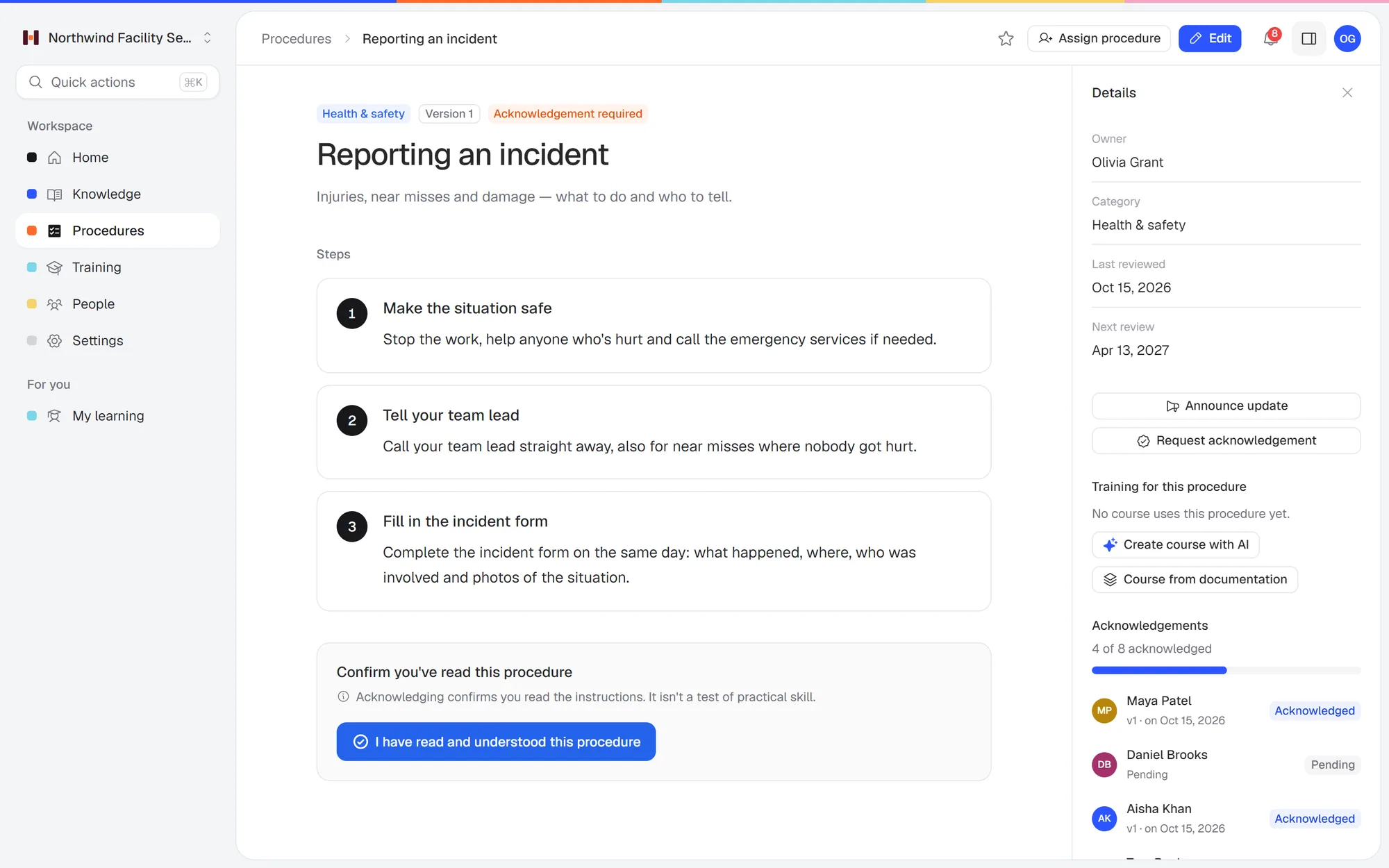 An SOP in Helpable: numbered steps, a version, and who has acknowledged it.
Best for: small teams that want SOPs, a knowledge base and training in one place, with proof of who read and learned what.
Helpable is training software for teams of 5 to 50 people, with your knowledge base and procedures in the same tool. You write an SOP as steps with photos, or upload a Word or PDF file and let the AI draft it for you to review. When an SOP changes, you ask the team to acknowledge the new version and see who hasn't yet. For the procedures that really matter, you turn them into a short training with a quiz and assign it with a due date.
On every plan:
- Step-by-step procedures with photos and read acknowledgements per version
- An internal knowledge base and a public help center
- Training with lessons and quizzes, assigned with due dates and reminders
- Progress per person
- AI that drafts procedures and trainings from your own documents, and AI search with a link to the source
Price: Business $29 a month for 3 people, Business Plus $89 for 5, Business Max $179 for 9, each with extra people added one at a time. Business Plus adds video, final tests, certificates and automatic assignment for new hires. Business Max adds recurring training, results per team, locations and skills sign-off on the floor. 14-day free trial, no credit card. See plans.
Not the right fit if: you need screen recording, SCORM, a native app or HR/payroll integrations. Helpable runs in the browser on any phone, tablet or laptop.
2. SweetProcess
Best for: a structured library of procedures, processes and policies on one flat plan.
Price (checked Oct 17, 2026): $99 a month for up to 10 people billed monthly ($82.50 billed yearly), plus $5 per extra person. Separate pricing for teams under 10 on request. 14-day free trial, no credit card (sweetprocess.com).
Pick SweetProcess if:
- You have 10 people or more and want every feature on one flat plan. At 10 people it's $99 a month; at 25 it's $174. Helpable Business is $92 and $227 at those sizes.
- Your SOPs are mostly processes you run as tasks (with approvals), more than things you teach.
Pick Helpable instead if:
- You're under 10 people. SweetProcess's base price assumes 10 people, so a 5-person team pays $99 unless it gets the small-team offer. Helpable is $47 a month for 5.
- You want the training and the SOP to be the same thing. In Helpable you turn an SOP into a short training with a quiz, assign it with a due date, and when the SOP changes, people confirm the new version. The record of who knows what stays in one place.
- Customers ask the same questions as your team. Every Helpable plan includes a public help center next to the internal knowledge base, so one answer serves both.
More detail: Helpable vs SweetProcess.
3. Waybook
Best for: teams of about 20 that want a handbook and SOPs with learning paths and tests.
Price (checked Oct 17, 2026): Core $99 a month billed yearly ($119 monthly) for 20 members, plus $5 ($6) per extra member. Pro $198 billed yearly ($238 monthly) adds approvals, review dates and SSO. 7-day free trial (waybook.com/pricing).
Pick Waybook if:
- You have around 20 people. Core includes 20 members, so at that size it's $119 a month ($99 billed yearly). Helpable Business is $182 for 20 people.
- You run your company on EOS, or you want a native mobile app and SSO (SSO is on Waybook Pro).
Pick Helpable instead if:
- You're smaller than about 10 people. Waybook's price assumes 20 members, so a 6-person team pays for 14 empty seats. Helpable is $56 a month for 6 and adds people one at a time.
- You also serve customers. Helpable includes a public help center on every plan, so the answers you write for your team can also answer customers.
- You want people to practice the job. On Business Plus, staff practice customer and sales conversations with an AI character and get feedback. On Business Max, a manager signs off practical skills on the floor.
- You want more time to try it. Helpable's free trial is 14 days; Waybook's is 7.
More detail: Helpable vs Waybook.
4. Trainual
Best for: companies of 25 to 1,000 employees that want role-based training (Trainual's own description).
Price (checked Oct 17, 2026): not public; book a demo. Last listed at $249–$399 a month for 10 seats, billed yearly, plus a required $1,000 implementation fee. No free trial (trainual.com/pricing). Full breakdown: Trainual pricing.
Pick Trainual if:
- You have 25 people or more and want a guided setup. The $1,000 fee covers 4 to 6 weeks with a specialist who helps move your content, set up the account and plan the rollout.
- You need built-in screen recording, a native mobile app, or HRIS and payroll integrations such as Gusto and BambooHR. Helpable has none of those.
Pick Helpable instead if:
- You're under 25 people. Trainual says it suits companies with 25 to 1,000 employees. Its last listed price was $249 a month for 10 seats billed yearly, plus the $1,000 setup fee. Helpable Business is $92 a month for 10, with no setup fee.
- You want to try it before you talk to sales. Trainual has no public price and no free trial. Helpable's prices are on the pricing page, and the free trial runs 14 days with no credit card.
- You want video and learning paths without a top plan. On Trainual, video upload and training paths start on Pro, last listed at $319 a month for 10 seats billed yearly. Helpable Business Plus includes video lessons and learning paths for $129 a month for 10.
More detail: Helpable vs Trainual.
5. Scribe
Best for: turning clicks in software into how-to guides, fast.
Price (checked Oct 17, 2026): free Basic plan. Pro Team $23 a seat billed yearly ($29 monthly), from 5 seats. Pro Personal $25 billed yearly ($35 monthly) (scribe.com/pricing).
Pick Scribe if:
- Most of your processes are clicks in software (CRM, booking system, accounting) and you want guides made in seconds. Helpable has no screen capture.
- You only need guides people can look up, without proof that they learned them. The free plan covers a lot.
Pick Helpable instead if:
- You need to know who learned what. Scribe makes guides; it doesn't assign them, quiz people or track who finished. Helpable does all three on every plan.
- Your work happens off the screen. Screen capture doesn't work for a kitchen, a job site or a cleaning route. Steps with photos do.
- Your team is more than a few people. Scribe Pro Team is $23 a seat billed yearly, so 10 people pay $230 a month. Helpable Business is $92 for 10, with training and a knowledge base included.
Many teams use both: capture a software process in Scribe, then paste the steps into a Helpable procedure and train on it. We go deeper in Trainual vs Scribe.
6. Tango
Best for: browser-based how-to guides for small teams.
Price (checked Oct 17, 2026): free for up to 5 workflows and 10 users. Pro is $22 a user billed yearly ($30 monthly) for 1–2 users; Pro Team is $15 billed yearly ($20 monthly) from 3 users (tango.ai/pricing).
Pick Tango if:
- Your SOPs are mostly clicks in web apps and you want guides made while you work. Helpable has no screen capture.
- You're a team of 3 or 4. Pro Team is $15 a user billed yearly ($20 monthly) from 3 users, so 3 people pay $45 a month billed yearly ($60 monthly). Helpable Business is $29 a month for 3 people. If 5 workflows are enough, Tango's free plan covers up to 10 users.
Pick Helpable instead if:
- You need to know who read and learned each SOP. Tango makes guides; it doesn't assign them as training or track who completed them. Helpable assigns SOPs and trainings with due dates, quizzes people, and records who acknowledged each version.
- You've outgrown 5 workflows and have about 10 people. Tango Pro Team for 10 people is $150 a month billed yearly ($200 monthly). Helpable Business is $92 for 10, with training and a knowledge base included.
- Your work happens off the screen. Screen capture doesn't work for a kitchen, a job site or a cleaning route. Steps with photos do.
7. Whale
Best for: teams where a few people write SOPs and many people read them, with screen recording built in.
Price (checked Oct 17, 2026): free for 1 creator and up to 10 members. Scale $249 a month billed yearly ($399 monthly) for 3 creators; readers are free (usewhale.io/pricing).
Pick Whale if:
- A few people write and many people read. Whale charges per creator and readers are free, so with 3 writers and 40 readers you pay $249 a month billed yearly ($399 monthly). Helpable charges per person: $369 for 40 people on Business Plus.
- Most of your processes happen on a screen and you want to record them as you work.
Pick Helpable instead if:
- You're under about 25 people. The first paid Whale plan is $249 a month billed yearly; Helpable Business Plus is $169 for 15 people, with video, quizzes and certificates included.
- You train on more than a handful of topics. Whale's free plan holds 1 training flow and 1 quiz, and Scale holds 5 flows and 15 quizzes; unlimited starts at $499 a month. Helpable has no limit on trainings or quizzes on any plan.
- Your work happens off the screen. Cleaning routes, kitchens and job sites are easier to teach with short steps and photos than with screen recordings.
More detail: Helpable vs Whale.
8. Process Street
Best for: running the same checklist the same way every time: client intake, audits, onboarding checklists.
Price (checked Oct 17, 2026): not public; contact sales. The Startup plan is capped at 5 users. 14-day free trial (process.st/pricing).
Pick Process Street if:
- You need a checklist that runs as a separate copy each time (every new client, every audit), with approvals, form fields and automations to other apps.
- Your problem is that steps get skipped, more than that people don't know them.
Pick Helpable instead if:
- Your problem is that people don't know how things are done. Process Street is built to run processes; Helpable is built to teach them, with trainings, quizzes and progress per person.
- You want to see the price before a sales call. Process Street doesn't publish prices. Helpable's are on the pricing page, with a 14-day free trial.
- You need a knowledge base too. Helpable includes an internal knowledge base and a public help center with AI search.
9. Notion
Best for: teams that already use Notion and want to build their own SOP pages.
Price (checked Oct 17, 2026): free plan; Plus $10 a member billed yearly ($12 monthly); Business $20 billed yearly ($24 monthly) with AI (notion.com/pricing).
Pick Notion if:
- Your team already works in Notion for projects and notes, and the SOPs are a few more pages there.
- You want free-form databases and are happy to design and maintain the structure yourself.
Pick Helpable instead if:
- You need proof that people read and learned it. Notion has no read confirmations, assigned trainings, quizzes or progress per person. Helpable has all of them on every plan.
- Nobody has time to build the structure. In Helpable the structure is there: knowledge base, procedures, trainings. You upload your existing documents and the AI drafts the SOPs.
- You want AI answers on every plan. Notion's full AI is on Business at $20 a member per month billed yearly ($200 for 10 people). Helpable's AI search and writer are on every plan; Business is $92 for 10 people.
More detail: Helpable vs Notion.
What a team of 10 or 25 pays
| Tool | Team of 10 | Team of 25 |
|---|---|---|
| Helpable Business | $92/mo | $227/mo |
| Helpable Business Plus | $129/mo | $249/mo |
| SweetProcess | $99/mo | $174/mo |
| Waybook Core | $119/mo ($99 yearly) | $149/mo ($124 yearly) |
| Trainual Core (last listed) | $249/mo yearly + $1,000 setup | $294/mo yearly + $1,000 setup |
| Scribe Pro Team | $290/mo ($230 yearly) | $725/mo ($575 yearly) |
| Tango Pro Team | $200/mo ($150 yearly) | $500/mo ($375 yearly) |
| Whale Scale | $399/mo ($249 yearly) | $399/mo ($249 yearly) |
| Notion Business | $240/mo ($200 yearly) | $600/mo ($500 yearly) |
Monthly billing unless noted, checked Oct 17, 2026. Process Street doesn't publish prices.
Free SOP software
If you're starting with no budget, these have free plans (checked Oct 17, 2026): Scribe (unlimited browser guides), Tango (5 workflows), Whale (1 creator, 10 members), Notion (a simple wiki) and Connecteam (free for up to 10 users, with courses and a knowledge base). Free plans rarely show you who read an SOP, which is usually the reason people move to a paid tool.
A free option that works for a long time: a shared folder of Google Docs with one owner per SOP. It breaks down when you need to know who read the latest version.
How to choose SOP software for your business
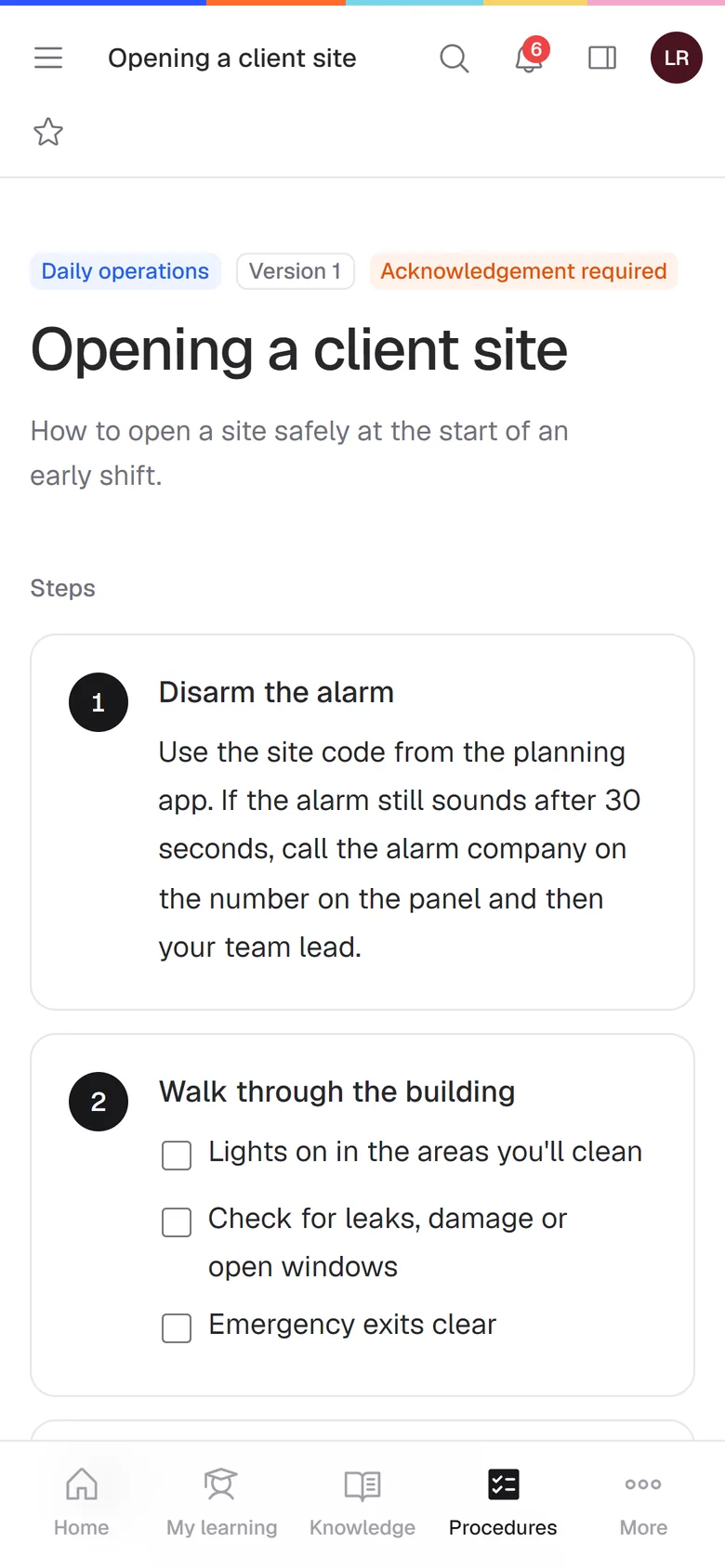 SOP steps on a phone, where most frontline work happens.
- Where does the work happen? Office and software work suits screen guides. Kitchens, job sites, cleaning routes and shops suit short steps with photos that people read on their phone.
- Do you need proof? For safety, food handling or client rules, you want read acknowledgements and a record of who learned what.
- Who writes the SOPs? If one owner writes everything, AI drafting from existing documents saves the most time.
- How fast are you growing? Per-seat pricing ($15–$29 per person) gets expensive quickly. Plans with a base and a low price per extra person stay predictable.
Say you run an HVAC company with 8 technicians. You need about 20 SOPs (safety checks, job closeout, how to log parts), every new tech trained in week one, and a record that everyone saw the updated lockout procedure. That's an SOP tool with training and read confirmations, used on a phone. Read more about SOP software for small teams.
FAQ
What is the best SOP software for a small business?
For teams of 5 to 50 that want SOPs, training and proof of who read what in one tool, Helpable. For quick screen guides, Scribe or Tango. For checklists that run on repeat, Process Street. For a procedure library on one flat plan, SweetProcess.
Is there free SOP software?
Yes. Scribe, Tango, Whale and Notion have free plans, and Connecteam is free for up to 10 users (checked Oct 17, 2026). Most free plans don't track who read each SOP.
What's the difference between SOP software and a knowledge base?
A knowledge base holds answers people look up. SOP software holds step-by-step procedures and, at its best, makes sure people read and learn them. Helpable does both in one tool.
How much does SOP software cost?
From free (Scribe, Tango, Notion) to $99–$400 a month for a team of 10 on dedicated tools (checked Oct 17, 2026). Helpable is $92 a month for 10 people on Business.
Can I turn my existing Word or PDF procedures into SOPs?
In Helpable, yes. Upload PDF, Word, text, Markdown or CSV files and the AI drafts procedures and articles from them for you to review.
Does SOP software work on a phone?
Most do in some form. Helpable runs in the phone browser with no app to install. Trainual and TalentLMS have native apps.
Start with your three most important SOPs
Pick the three procedures that cause the most mistakes, put them in Helpable and assign them to your team. Start a free 14-day trial, no credit card needed, or compare plans.