Know who is ready
Completion, overdue work, scores, pass rate and certificates per course, team and person, ready to export.
- Filter by training, team and status
- CSV export
- Certificates with expiry dates
Get SOPs, training and onboarding in one place, plus practice conversations with AI, in English or Dutch. Waybook and Helpable both serve growing teams; they differ in AI, languages, where data lives and how training is checked. Here is an honest comparison to help you choose.

Both put SOPs, training and onboarding in one place. Helpable adds practice: your team rehearses real conversations with an AI customer and gets feedback.
Illustration with a fictional demo company. The Waybook side is a simple sketch of an SOP, drawn by Helpable.
Waybook's column is based on its own website and help center. Plans differ; check their site for what is in each plan.
| Waybook and Helpable side by side | Helpable | Waybook |
|---|---|---|
| Procedures (SOPs)Steps people can follow on the job cut mistakes; Helpable gives every procedure an owner and a review date, so it stays current. | Numbered steps with images and checklists, owner, review date, versions | SOPs with AI-assisted templates |
| Training and quizzesA quiz shows who understood the work; Helpable builds training on the same procedures people use, so lessons follow the current version. | Lessons, quizzes with six question types, certificates from Business Plus (expiry on Business Max) | Role-based training paths and tests |
| AI writingWriting is what stalls most handbooks; Helpable's AI turns the files you already have into drafts you check. | Drafts articles from your files and builds training from your content | AI content writer and AI test creation |
| AI answers to employee questionsAn answer with its source is one people can trust and check; Helpable answers only from your own content and says so when it doesn't know. | Yes: answers from your own articles, procedures and documents, with the source | Yes (Waybook AI Ask) |
| Read confirmationsWaybook and Helpable both track read confirmations; Helpable asks again on each new version and shows who is pending. | Per version, with an overview of who confirmed and who is pending | Read acknowledgement tracking |
| Checklists and tasksA checklist keeps people on track during the work; in Helpable it sits inside the procedure step it belongs to. | Checklists inside procedure steps; no recurring task lists | Checklists and flow charts |
| IntegrationsImporting what you have saves days of copy and paste; Helpable reads Notion pages, websites and GitHub and checks them for changes every day. | Imports from Notion, websites and GitHub; email and in-app notifications | Integrations and imports listed on all plans |
| MobileField and shift staff look things up on a phone; Helpable works in the phone's browser, so there is nothing to install. | Works in the phone's browser; no app | Mobile app |
| Interface languagesWaybook's help center (2024) lists an English interface; Helpable's app is in English and Dutch, so a Dutch-speaking team reads every screen in its own language. | English and Dutch | English (content in any language) |
| Where data is storedWaybook does not state where its data is hosted; Helpable keeps data in the EU on every plan. | EU | Region not stated |
Based on public information from waybook.com and help.waybook.com, checked on October 14, 2026. Features change; check Waybook's site before you decide.
Pick Waybook if you need a native mobile app and integrations on every Waybook plan, or role-based training paths with approval steps, and an English interface suits your team.
Pick Helpable over Waybook if your team works in Dutch or wants data in the EU, or if people need to practice conversations with AI feedback next to SOPs, quizzes and certificates.
Use Waybook and Helpable side by side only during a trial: both cover SOPs and training, so try Helpable on your own content and then pick one.
Waybook describes itself as a way to get "your business on the same page": one place for SOPs, a searchable knowledge base, role-based training paths and tests, aimed at growing teams.
It offers AI writing, AI test creation and AI answers from your own content, read acknowledgements, checklists, flow charts and org charts, plus a mobile app and integrations. Review dates, approvals and full version history are on its higher plan.
Common reasons we hear, which may or may not apply to you.
Waybook's help center says its interface is in English (article from 2024). Helpable's app is available in English and Dutch.
Helpable stores data in the EU. Waybook's security page names its hosting provider but not the region.
Helpable can publish a public help center next to the internal knowledge base.
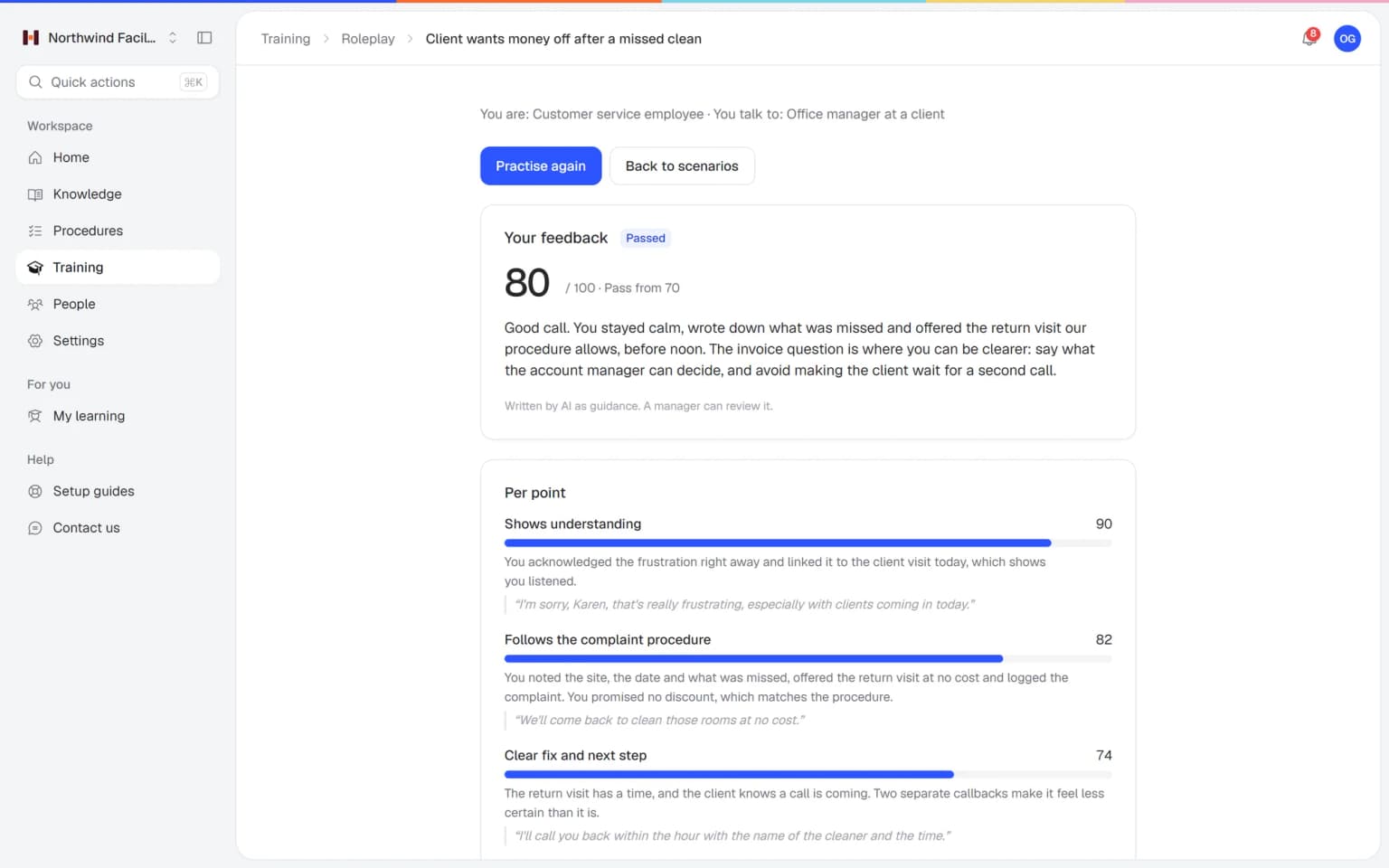
Employees talk with an AI that plays a customer, colleague or manager, in a scenario you build from your own procedures. After each conversation they get a score and concrete tips, and you see who is ready.
See at a glance who finished, who passed and who still needs a nudge.
Completion, overdue work, scores, pass rate and certificates per course, team and person, ready to export.
Ask people to confirm a procedure and see exactly who confirmed which version.
Six question types with feedback after each answer, so people learn why the right answer is right.
Everything you need to write down how the work is done, train people on it and see who is ready.
Numbered steps with images and checklists, an owner, a review date and a version history with a short change summary.
Request a confirmation and see per person who read which version and when, and who is still pending.
Six question types, a pass mark and attempts, and certificates with an optional expiry date that anyone can verify.
Assign training to people, teams or everyone with a due date. Reminders go out before the due date and when it is overdue.
An internal knowledge base for the team and a public help center for customers, with one search across everything.
The app is available in English and Dutch, and your data is stored in the EU.
Try Helpable free for 14 days, no credit card needed. Then pick the plan that fits your team.
Your knowledge base for team and customers, written faster with AI.
$29/month
Billed monthly
That's $0.95 a day
Start free trialTrain your team on that knowledge: courses, quizzes and progress per person.
$89/month
Billed monthly
That's $2.93 a day
Start free trialEverything in Business, plus:
Training that runs by itself, and proof of who really knows what.
$179/month
Billed monthly
That's $5.88 a day
Start free trialEverything in Business Plus, plus:
Add these to Business and up, any time. You only pay for what you use.
Add people one by one as your team grows, for a fixed price per person on every plan.
$9/month
A help center and handbook for another brand, location or client.
$10/month
Remove “Powered by Helpable” from your help center. Included in Business Max.
$19/month
You can have your most-used knowledge and a first training in Helpable on the same day. Waybook keeps working for as long as you want it to.
Upload the files you have (Word, PDF, Markdown, text or CSV), import a public website or connect Notion under Settings › Integrations. Each one becomes a searchable document. Copy the text of each Waybook SOP into a document, or export what Waybook allows on your plan.
AI turns each document into a draft article or procedure. You read it, fix what is off, give it an owner and a review date, and publish. Nothing goes live by itself.
Pick the articles and procedures a new colleague needs and say who it is for. AI drafts lessons and quiz questions that link back to them. You check and publish.
Invite people by email, put them in teams and assign training and procedures with a due date. Ask for read confirmations; reminders go out by email.
Try Helpable free for 14 days on Business Plus, no credit card. Keep Waybook running until you see the team use Helpable, then decide.
We bring in your documents, write your first procedures and build your first training for you. You pay once, next to your plan, and we confirm the scope before we start.
Helpable is made for teams of about 5 to 50 where a few people keep the know-how and the rest need to learn it, in almost any sector.
Cleaners, installers and field staff who open a procedure on their phone at the job.
In practice: A facility team follows the cleaning procedure on site from a phone, while the English-speaking colleague on the same team uses the app in English.
See howHospitality and retail teams that onboard new and temporary staff again and again.
In practice: A restaurant gives every new server the same onboarding training with a due date, and the manager sees who still has to finish it before Friday.
See howTeams that must show everyone read the latest protocol and passed the refresher.
In practice: A care team shows the inspector a report of who confirmed the new protocol and who holds a certificate, exported to CSV in a minute.
See howCustomer service and office teams that answer the same questions every day.
In practice: Support agents find the refund rule in the internal knowledge base, and customers read the public version of the same answer in the help center.
See howCompanies in the Netherlands and Belgium that want the whole app in Dutch, with English for colleagues who prefer it.
In practice: A company in Belgium runs the whole app in Dutch, and the two English-speaking colleagues switch it to English for themselves.
Helpable is a good Waybook alternative for teams that want procedures, a knowledge base and training with quizzes and certificates in one place, in English or Dutch, with data stored in the EU. If you need a native mobile app or integrations today, Waybook covers that and Helpable does not yet.
Helpable has no automatic import from Waybook. You can paste procedures into Helpable, or add exported PDF and Word files to the AI writer, which drafts an article you check and publish.
Yes. Helpable lets you request a read confirmation on a procedure and shows per person who confirmed which version and when, and who is still pending.
Yes. Helpable answers employee questions in plain words from your articles, procedures and uploaded documents, with a link to the exact source, and says so when the answer isn't there. Waybook offers a similar feature called Waybook AI Ask.
Yes. Helpable's app is available in English and Dutch, and you can write your content in either language.
Helpable starts at $29 per month for Business, with 3 team members, and Business Plus ($89) and Business Max ($179) add more people and training features. Waybook prices per seat in tiers and shows its price for 20 seats; check its pricing page and compare both for your team size.
Yes. Helpable has a free trial of 14 days on Business Plus, and you don't need a credit card. Waybook offers a 7-day trial, and neither tool has a free plan.
Helpable stores your data in the EU. Waybook's security page names its hosting provider, but not the region.
Yes. Helpable works in the browser on a phone, tablet or laptop, so people can open a procedure or a lesson on site. There is no native app yet.
Setting up Helpable starts with inviting your team by email and adding the procedures people use most. Templates and the AI writer give you a first draft, so most of the work is checking and adjusting your own content.
Waybook and Helpable both bring SOPs, training and onboarding together, so people searching for a Waybook alternative usually compare the details. These are the questions that decide it for most teams of 5 to 50.
For a team in the Netherlands or Belgium, Helpable is a Waybook alternative with the whole app in Dutch and English, so each person works in the language they prefer. Waybook's help center says its interface is in English (an article from 2024), and content can be written in any language.
That matters most on the work floor. A new cleaner or warehouse worker goes through the onboarding training with buttons and messages in Dutch, while an English-speaking colleague on the same team uses the app in English. Your data is stored in the EU; Waybook's security page names its hosting provider and leaves the region unstated. Read more about onboarding software in Helpable.
In Helpable you see per training, team and person who finished, who passed the quiz and who holds a certificate, and you can export it all to CSV.
Both tools have role-based training and tests, and Waybook tracks read acknowledgements too. Helpable adds certificates as a PDF with a public page where anyone can check them, which helps when a client or auditor asks for proof. Think of a care team where the new hygiene protocol has to be read and the refresher passed before the next inspection: the team lead opens the report, filters on overdue and sees exactly who still needs a nudge. See certificates and employee training software.
With Helpable the internal knowledge base and a public help center for customers live in the same tool, so an answer you write once can serve both.
An installation company, for example, keeps its internal steps for a service call in the team handbook and publishes the customer version of the same answer, such as how to reset the thermostat, in the help center. Both tools answer employee questions from your own content with AI. Waybook calls it Waybook AI Ask; in Helpable the answer comes in plain words with a link to the source, and it says so when it does not know. Read more about the knowledge base.
Switching to Helpable goes step by step: copy the text of each SOP, or export what Waybook allows on your plan, and start with the procedures people use every week.
There is no direct Waybook connection, so a simple order is three rounds. First the ten procedures that come up daily, pasted in as numbered steps with an owner and a review date. Then the handbook pages, which the AI writer can draft from exported PDF or Word files for you to check. Last the training: pick the new procedures and articles, let AI draft lessons and a quiz, and assign it with a due date. Waybook offers a 7-day trial and Helpable a 14-day trial, so you can run both side by side for a while. The page on SOP software shows how procedures work.
Waybook is the better choice if you need a native mobile app, rely on integrations or imports from Google Docs, Notion or Dropbox, or want approvals, org charts and flow charts in the same tool.
Helpable works in the phone's browser and has no native app and no integrations today. Pick Helpable when Dutch, data stored in the EU, certificates anyone can verify or a public help center weigh more for your team.
Put one procedure and one training into Helpable and compare it with what you have today.