The LMS for small business
Everything you expect from a learning management system, sized for a team of 5 to 50. You set it up yourself in an afternoon, your people find their way in minutes, and you always know who learned what.
- 14 days free
- No credit card needed
- Data stored in the EU

The power of an LMS, the ease of a simple tool
Small companies need the same results as large ones, with far less time to manage software.
Up and running in an afternoon
Start from a template or your own documents and publish your first training the same day. You need no IT department or training manager.
Easy for every employee
People open a link in their browser, see what to do and continue where they stopped, on a laptop, tablet or phone.
Everything in one place
Training, step-by-step procedures and your knowledge base live together, so you keep one tool up to date.
Most LMS tools are built for companies much bigger than yours
These are the reasons small teams give up on training software, or never start.
Too much to set up
Large systems ask for weeks of configuration before anyone learns a thing.
With Helpable Pick a template or let AI draft a training from your own procedures, and publish it today.
Employees can't find their way
A cluttered screen means people log in once and never come back.
With Helpable Employees see one page with what to learn, their due dates and their certificates.
Training and daily work drift apart
The training says one thing, the instructions on the floor say another.
With Helpable Lessons link to your procedures and knowledge base, so training always shows the current version.
Reports nobody reads
Pages of data, and you still can't tell who is ready.
With Helpable Clear reports per training, team and employee, with completion, overdue training and scores.
From sign-up to a trained team in three steps
You can do all of it yourself. No setup project needed.
Create your first training
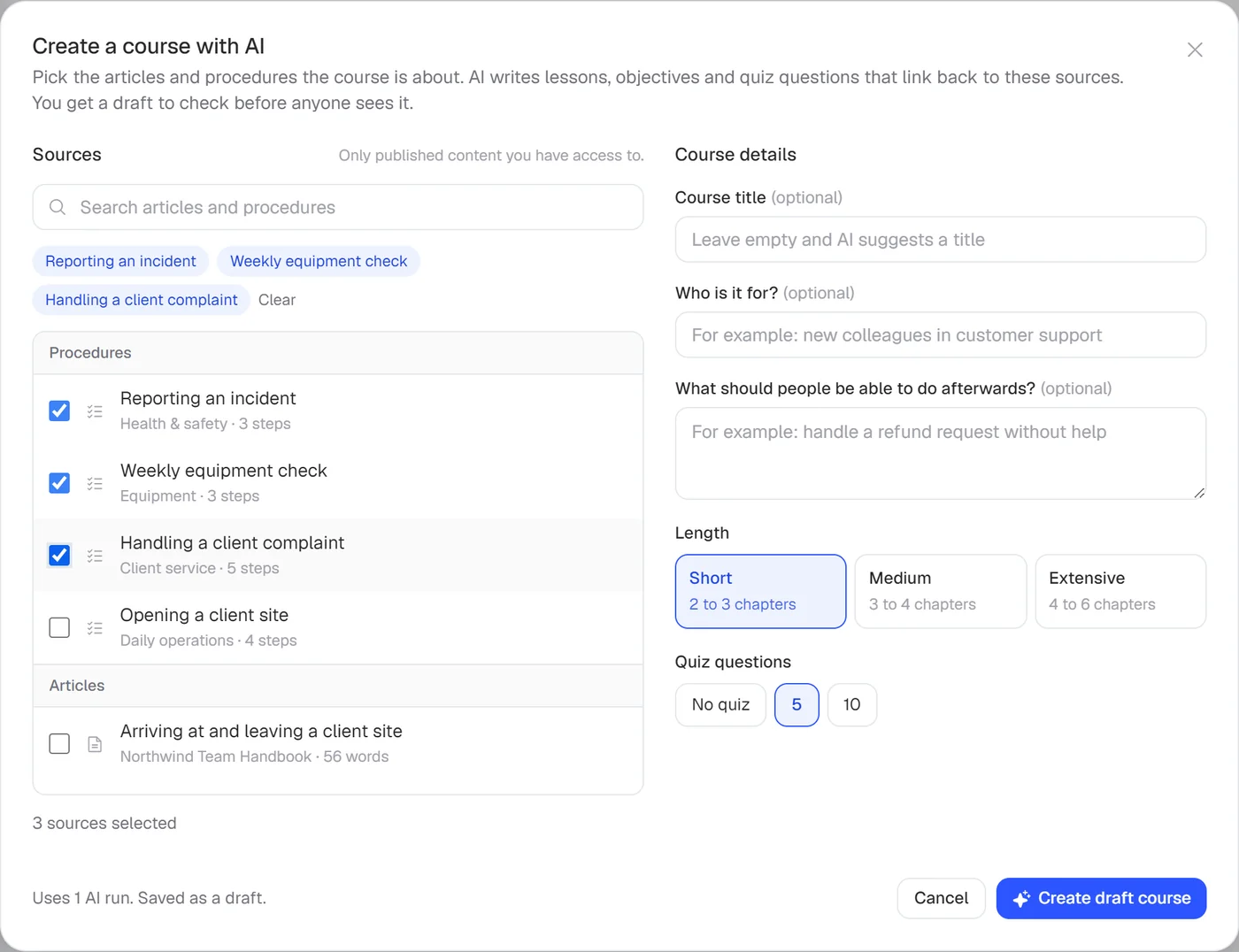
Choose one of six templates or let AI build a draft from the articles and procedures you pick.
Invite your team
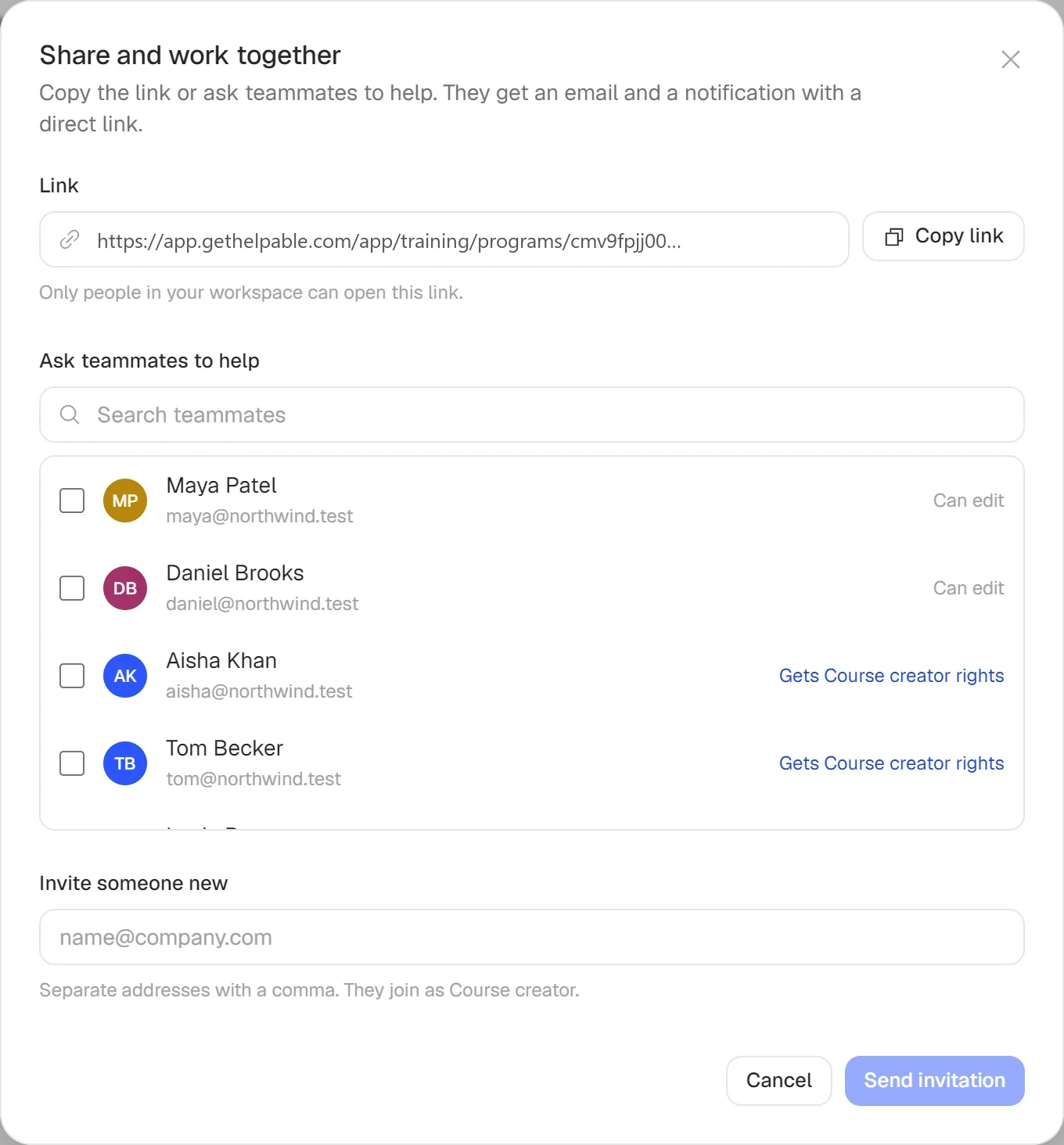
Invite people by email, give colleagues a role and let them help write training.
Assign and follow up
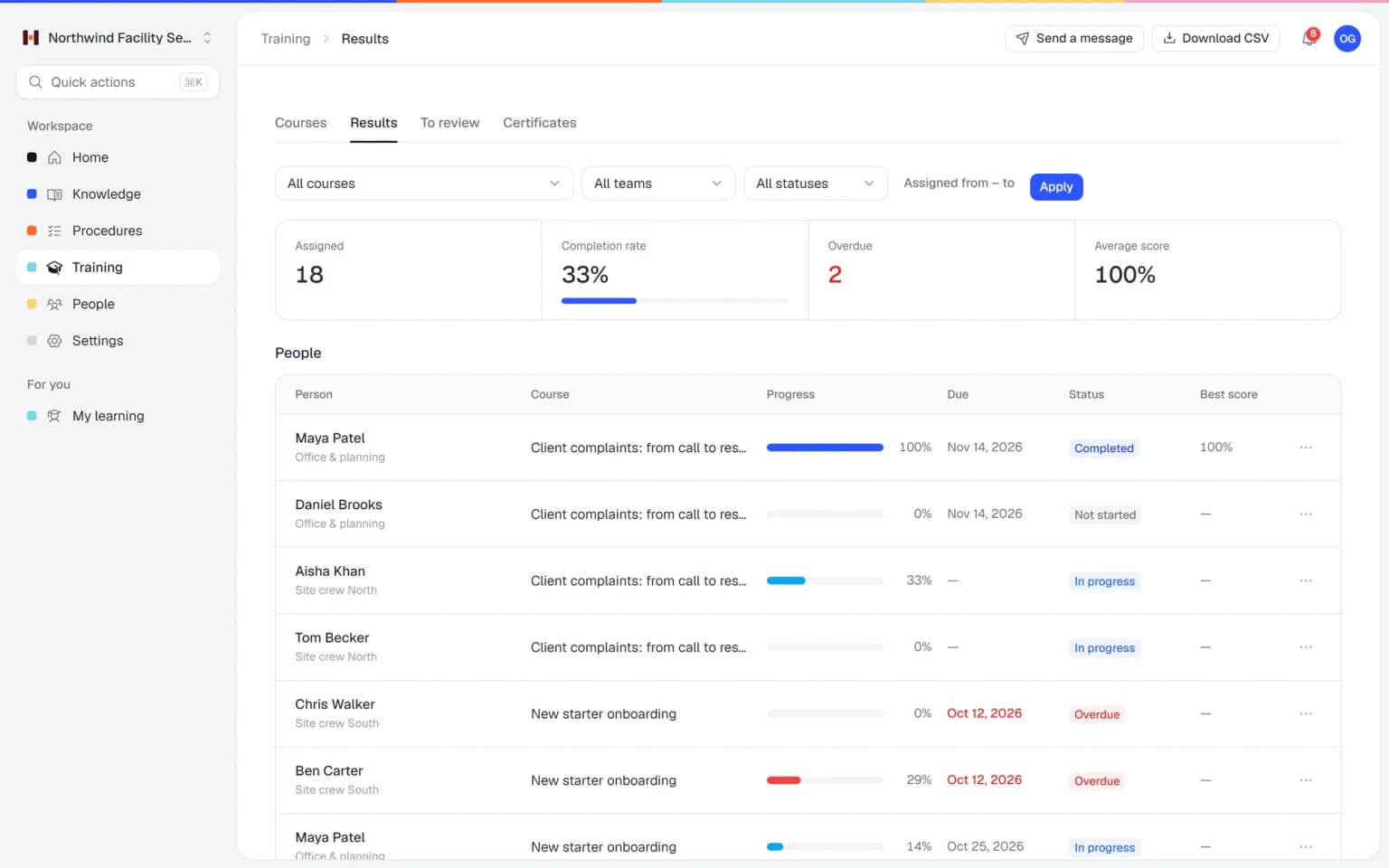
Assign training to people or teams with a due date. Helpable sends reminders and keeps the score.
- 14 days free
- No credit card needed
Build training together with your team
Your best people know the work. Invite them by email to help write training, articles or procedures, and give everyone the right role, from owner to course creator to member.
- Five roles, clear tasks
- Invite up to 50 people at once
- Members see only published work
Every LMS feature a small business needs
The parts that matter, and nothing that gets in your way.
Employee training
Training with chapters: lessons with text, video, documents, practical tasks and linked procedures. Everything a small team needs to teach the job.
Quizzes
Six question types, a pass mark, attempt limits and question banks. You test understanding the way a larger LMS does.
Certificates
PDF certificates with a public check code, and an expiry date on Business Max. You can show who is trained when a client asks.
Recurring training
Repeat a training every 6, 12 or 24 months on Business Max, so yearly training starts by itself. Nobody keeps a calendar of refreshers.
Progress and reports
Completion, overdue training, average score and pass rate in one view, with CSV export. Reminders do the chasing before and after the due date.
Training templates
Ready-made templates for onboarding, company policies, customer service basics and security awareness that you adapt. You start with real content on day one.
Training with AI
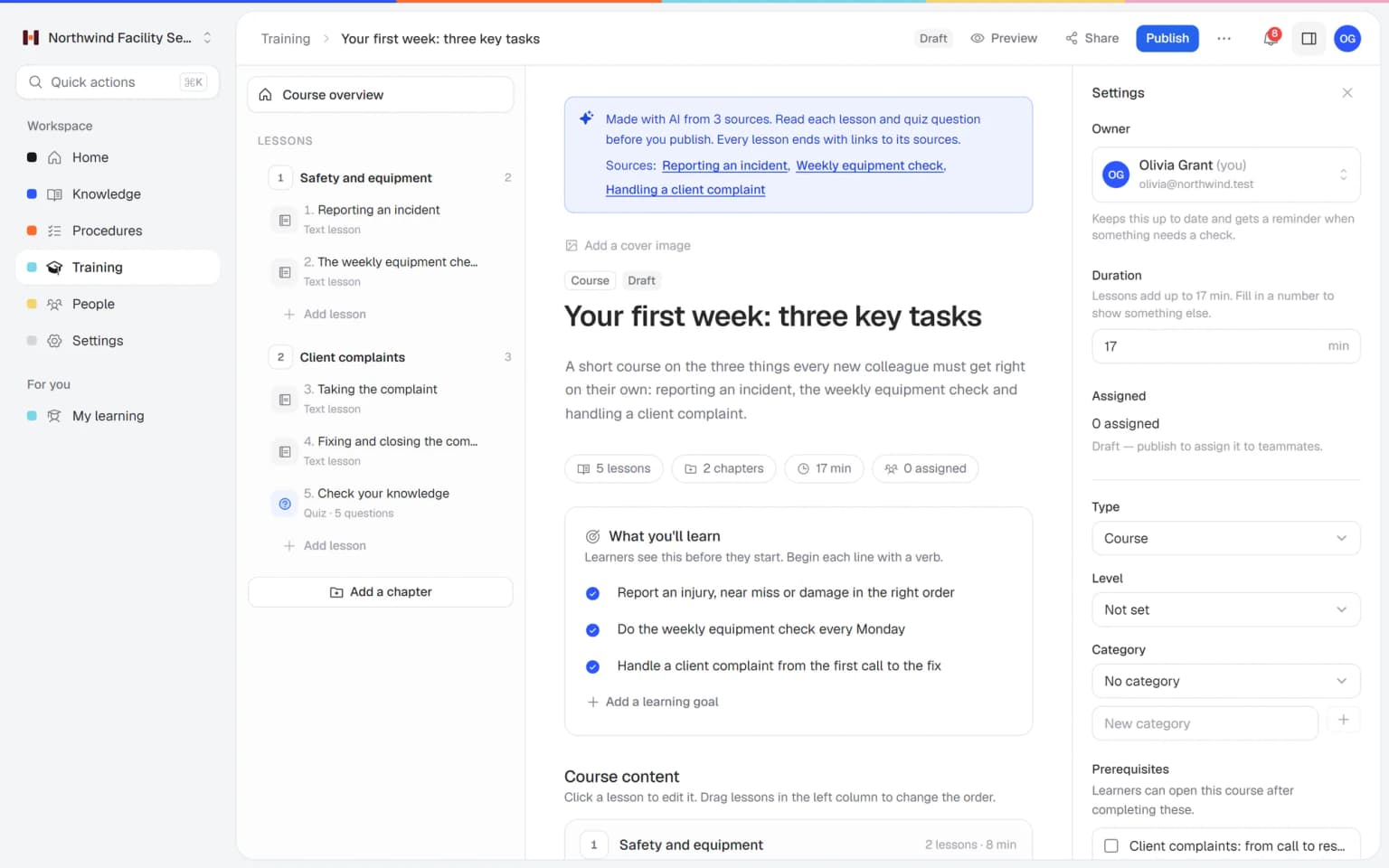
AI drafts a training from your own procedures and articles, with lessons and a quiz. You check the draft and publish.
A first version of a training from your own procedures, in minutes
Pick the articles and procedures that matter and AI drafts lessons and quiz questions that link back to their sources. You check it, adjust it and assign it to the people who need it.
- Built from your own knowledge
- Every lesson links to its source
- Quiz questions drafted for you
- Nothing goes live until you approve it
A plan that grows with your team
Try Helpable free for 14 days, no credit card needed. Then pick the plan that fits your team.
Business
Your knowledge base for team and customers, written faster with AI.
$29/month
Billed monthly
That's $0.95 a day
Start free trial- 3 team members included
- An internal knowledge base and a public help center
- AI writes first versions from your own documents
- Start from what you have: documents, Word files and your website
- Procedures everyone follows, with read confirmations
- Your help center on your own web address
- 250 AI credits per month
- Recommended · your free trial runs on this plan
Business Plus
Train your team on that knowledge: courses, quizzes and progress per person.
$89/month
Billed monthly
That's $2.93 a day
Start free trialEverything in Business, plus:
- 5 team members included
- Training with quizzes, due dates and reminders
- See per person who finished what
- Practice conversations with AI, included
- Video lessons and final tests
- Certificates you can show clients and inspectors
- Results exported in one click
- 3 help centers and 3 internal knowledge bases
- 750 AI credits per month
What's in Business
- 3 team members included
- An internal knowledge base and a public help center
- AI writes first versions from your own documents
- Start from what you have: documents, Word files and your website
- Procedures everyone follows, with read confirmations
- Your help center on your own web address
- 250 AI credits per month
Business Max
Training that runs by itself, and proof of who really knows what.
$179/month
Billed monthly
That's $5.88 a day
Start free trialEverything in Business Plus, plus:
- 9 team members included
- New colleagues get their training automatically
- A fixed onboarding route from day one
- Learning insights: who really studied and who clicked through
- Skills matrix and a training record per person
- Practical work signed off on the floor
- Locations with their own managers
- Refresher training that comes back by itself
- Certificates that expire on time, in your own design
- Your help center fully in your own brand
- 10 help centers and 10 internal knowledge bases
- 1,500 AI credits per month
What's in Business Plus
- 5 team members included
- Training with quizzes, due dates and reminders
- See per person who finished what
- Practice conversations with AI, included
- AI writes first versions from your own documents
- Start from what you have: documents, Word files and your website
- Procedures everyone follows, with read confirmations
- Video lessons and final tests
- Certificates you can show clients and inspectors
- Results exported in one click
- Your help center on your own web address
- 3 help centers and 3 internal knowledge bases
- 750 AI credits per month
Grow when you need to
Add these to Business and up, any time. You only pay for what you use.
- More people
Add people one by one as your team grows, for a fixed price per person on every plan.
$9/month
- A second help center
A help center and handbook for another brand, location or client.
$10/month
- Only your brand
Remove “Powered by Helpable” from your help center. Included in Business Max.
$19/month
- Cancel any time
- Data stored in the EU
What is an LMS for small business?
An LMS for small business is a learning management system that lets a small company create training, assign it to employees and track their progress. Helpable is an LMS for teams of 5 to 50 people that also holds your procedures and knowledge base.
Do I need technical knowledge to use Helpable as an LMS?
No. Helpable works in the browser and you set it up yourself. You start from a template or let AI draft a training from your own documents, and you can preview it as an employee before you publish.
Which plans does Helpable have?
Helpable has three plans: Business, Business Plus and Business Max. Business is the knowledge base with read confirmations. Business Plus adds unlimited training, quizzes, assigning with due dates, progress per person, video lessons, final assessments, certificates and practice conversations with AI, and automatic assignment, learning paths, results per team, recurring training and custom certificate templates are in Business Max.
Can Helpable import SCORM courses?
Helpable does not import SCORM files. You build training in Helpable from your own lessons, videos, documents, procedures and articles, or let AI draft one from your knowledge base.
Where does Helpable store our data?
Helpable stores your data in the EU. The app is available in English and Dutch, and the public help center can be multilingual.
Is there a free trial of Helpable?
Yes. Helpable has a free trial of 14 days on Business Plus, and no credit card is needed to start.
Read more
Try an LMS made for small business
Set up your first training today and invite your team.
- 14 days free
- No credit card needed
- Cancel any time