Ready-made employee training templates
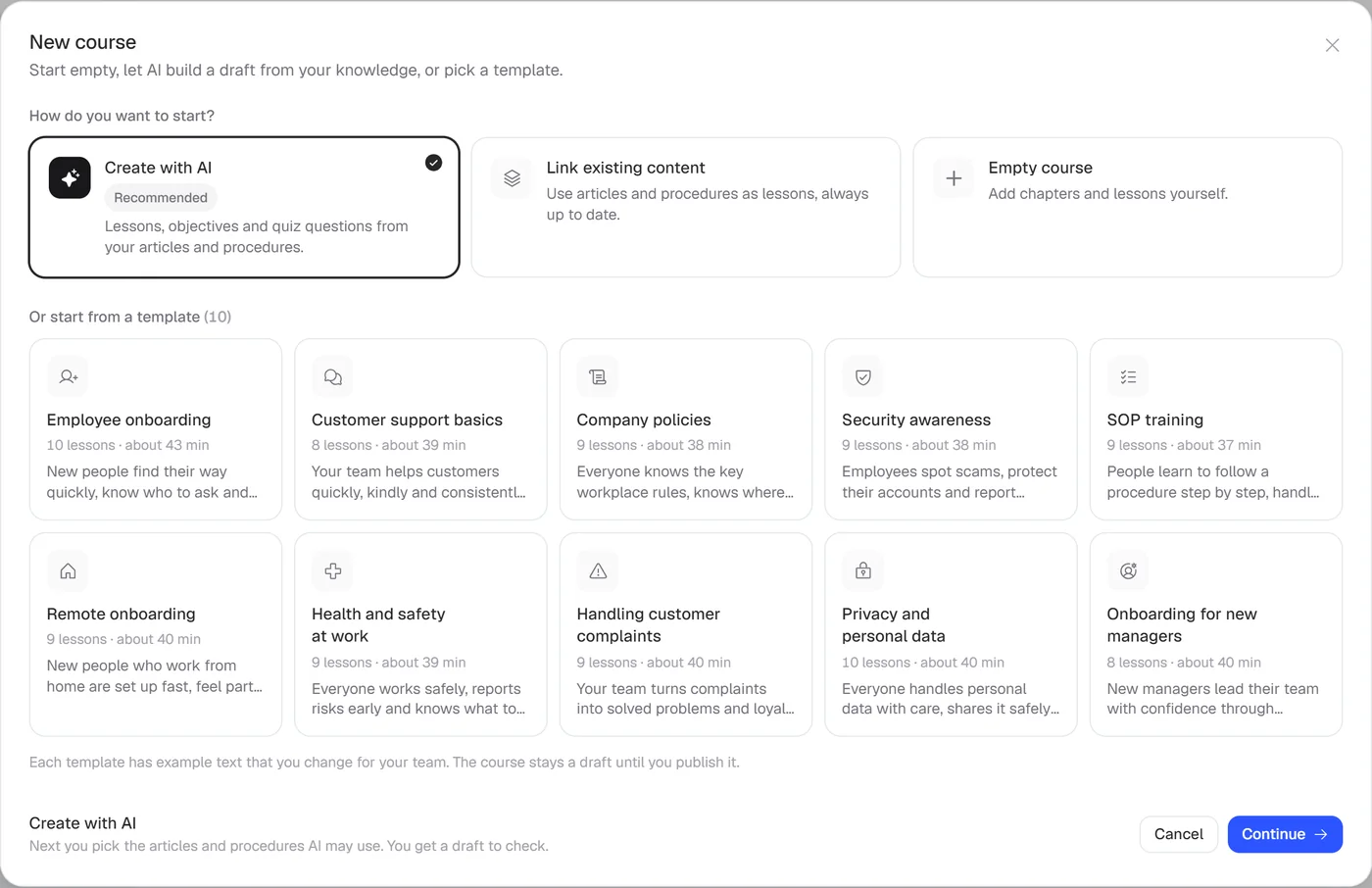
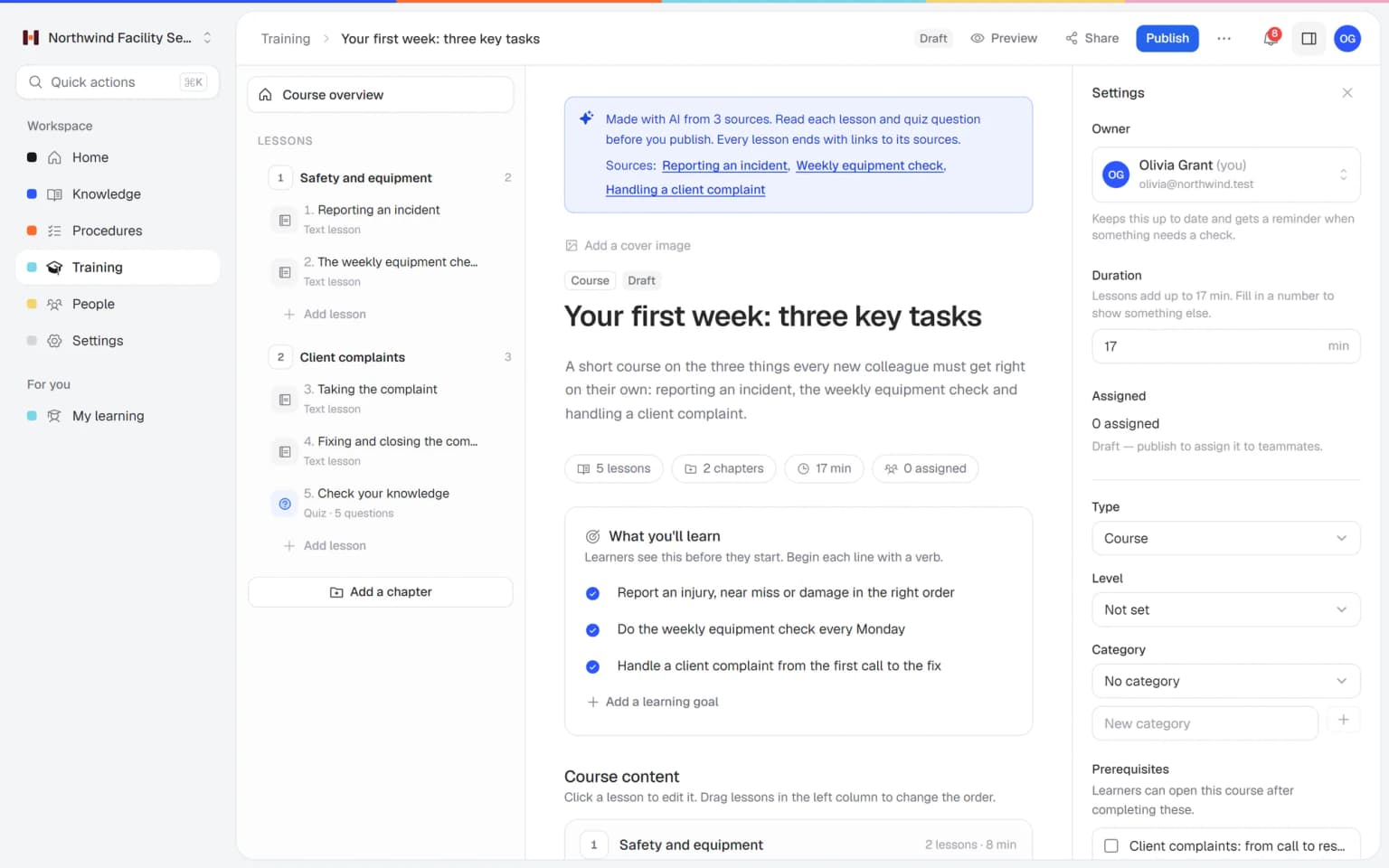
Helpable gives you employee training templates you edit in minutes. Pick one and you get a complete draft training with chapters, lessons, a quiz and learning goals. Replace the sample text with how your team works, and your training is ready to share.
- 14 days free
- No credit card needed
- Six templates in EN and NL
A good training, with less writing
Templates in Helpable take care of the structure, so you only add what is specific to your company.
Skip the blank page
Every template comes with chapters, lessons, a quiz and learning goals. You can start editing right away.
A clear structure
The templates follow the same pattern: learn it, practice it, check it and confirm it. Your training is easy to follow for every employee.
Yours to change
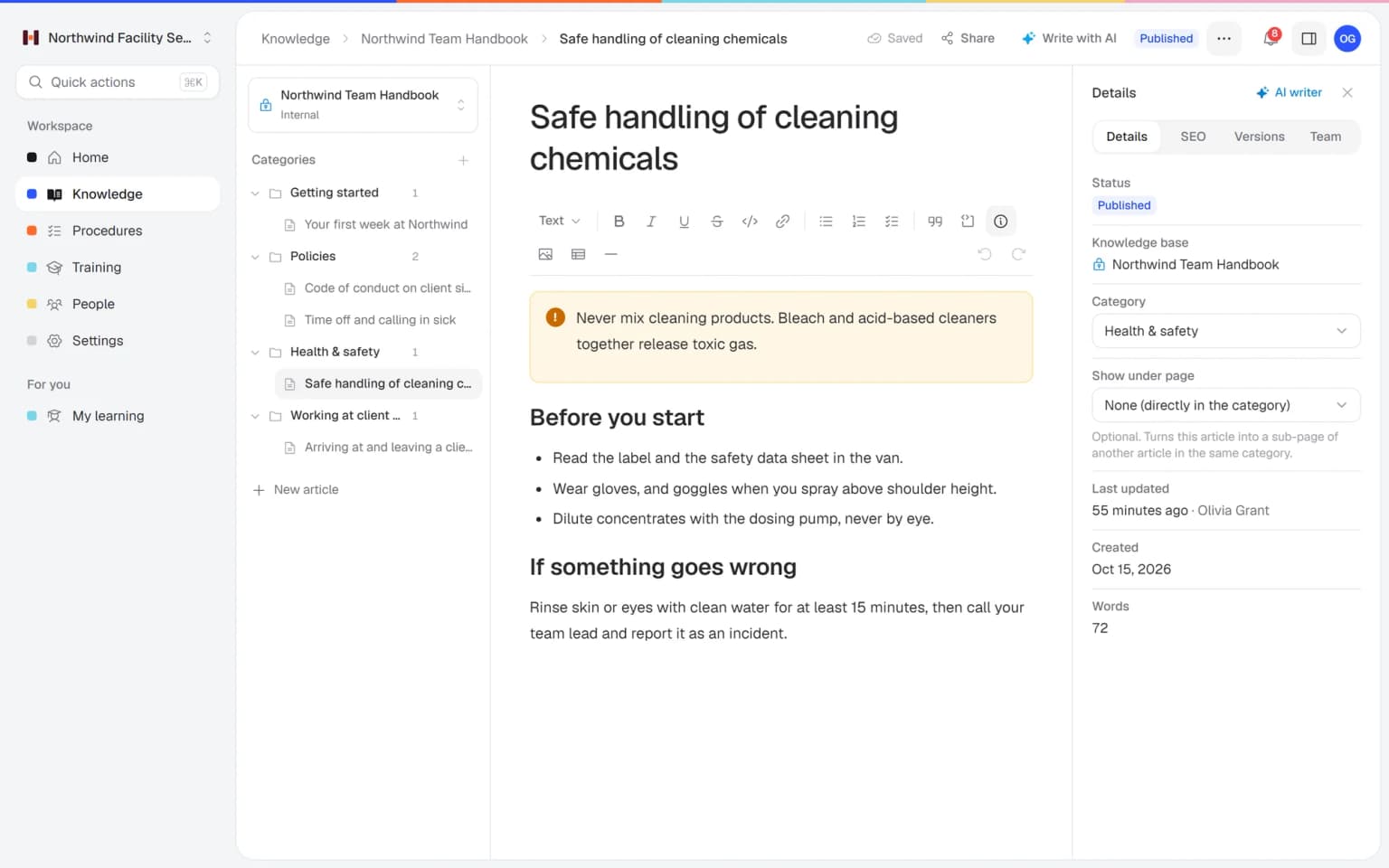
A template becomes an ordinary draft. Rename chapters, add lessons, link your own procedures and remove what you don't need.
New hires settle in sooner
Start from the onboarding template and every new employee gets the same clear first steps. They know what to do and who to ask from day one.
Rules everyone has confirmed
Templates include a confirmation that the employee read and understood it. For company policies and security, you know who has confirmed.
Your first training this week
You fill in a proven outline with your own way of working. That takes far less time than planning a training from scratch.
Building training from scratch keeps getting postponed
Most owners know their team needs training. Getting started is where it stalls.
You don't know where to begin
A blank page and a long list of things people should know.
With Helpable Pick the template closest to your goal. The chapters and lessons show you what to fill in.
Training gets too long
You try to cover everything, and nobody finishes it.
With Helpable Templates keep lessons short and end with a quick quiz, so people actually get to the end.
Sample text ends up in front of employees
You copy an example from somewhere and forget to change part of it.
With Helpable Every sample lesson in a Helpable template starts with a clear note, so you see right away what still needs your own content.
Every training looks different
Each manager builds training their own way, which confuses employees.
With Helpable Templates give every training the same clear shape: lessons, and where it fits a practical task, a quiz and a confirmation.
From template to finished training
Three steps. Your first training can be ready today.
Pick a template
Choose employee onboarding, remote onboarding, customer service basics, company policies, security awareness or SOP training.
Make it yours
Replace the sample text with how your team works. Add your own procedures, videos and documents as lessons.
Publish and assign
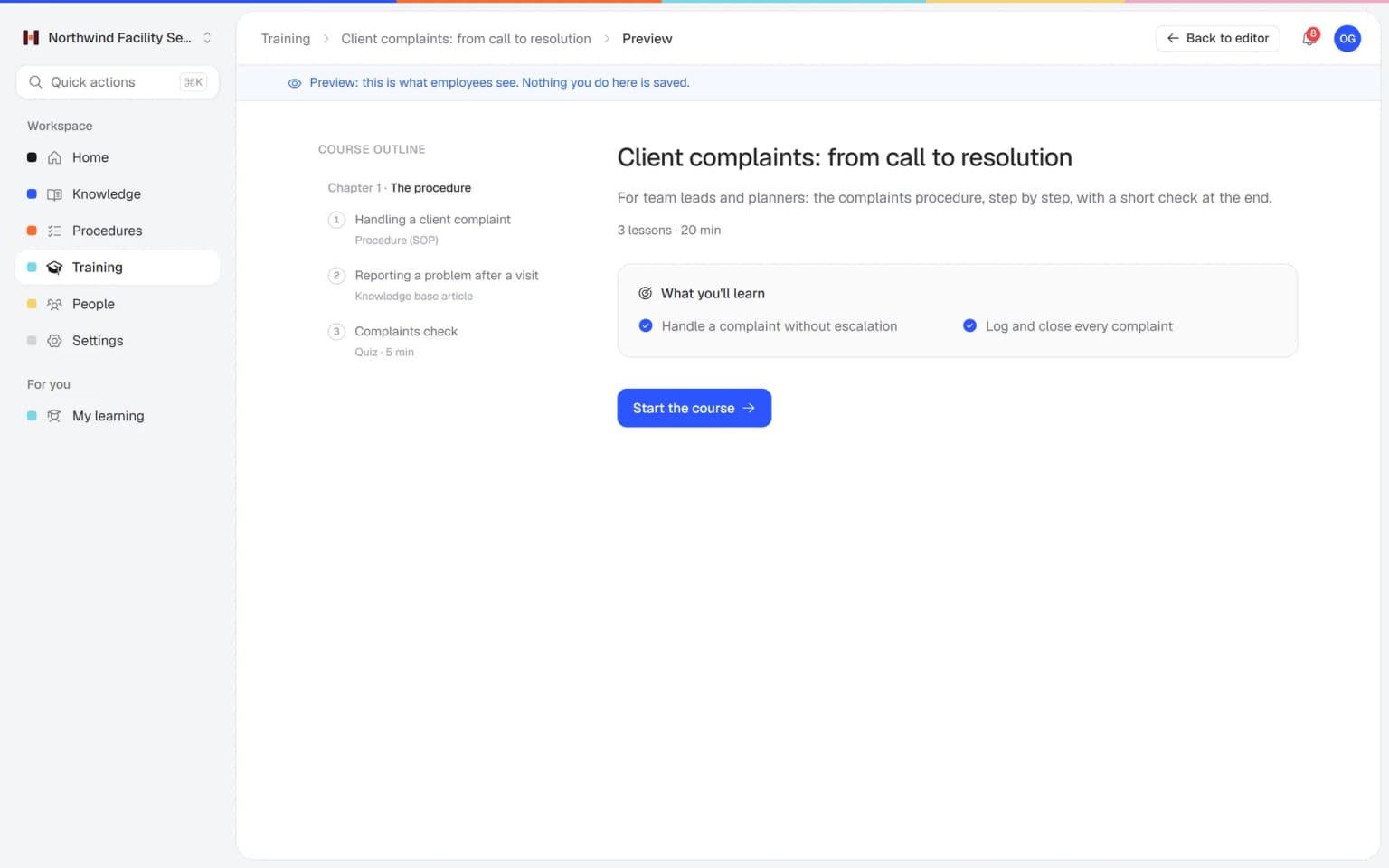
Preview it as an employee, publish it and assign it to the people who need it.
- 14 days free
- No credit card needed
From template to a training everyone finishes on time
A template gives you the shape. Your procedures, assigning and certificates make sure it gets done.
Your procedures inside the template
Start from the SOP training template and add your own procedures as lessons. The training always shows their latest version, and a new procedure version asks people to confirm they read it.
ProceduresAssigned once, followed up for you
Assign the training to people, teams or everyone with a due date. Reminders go out before and after the due date, and managers get a notice when someone is overdue.
Progress and reportsProof for every finished training
Keep the quiz from the template and make it required. People who pass get a certificate with a code anyone can check, which keeps audits calm.
Certificates
Templates get you started, the rest of Helpable gets it done
A training template in Helpable gives you a ready structure. Combined with your procedures, AI and reports, it becomes training people finish.
- + ProceduresYour own procedures inside the SOP templateStart from the SOP training template and add your procedures as lessons. The training always shows their latest version, and people confirm each new one.
- + Training with AIA template, or a draft from your own knowledgeWhen no template fits, AI drafts a training from your articles and procedures. Both routes end in an ordinary draft you edit and publish.
- + QuizzesA quiz is already in placeEvery template comes with a quiz. Adjust the questions to your way of working, set a pass mark and make it required.
- + Progress and reportsAssigned once, followed up for youAssign the finished training with a due date. Reminders go out before and after it, and reports show who is done and who is late.
- + Read and acknowledgePolicies people have confirmedThe company policies and security awareness templates end with a confirmation. You see per person who read and understood the rules.
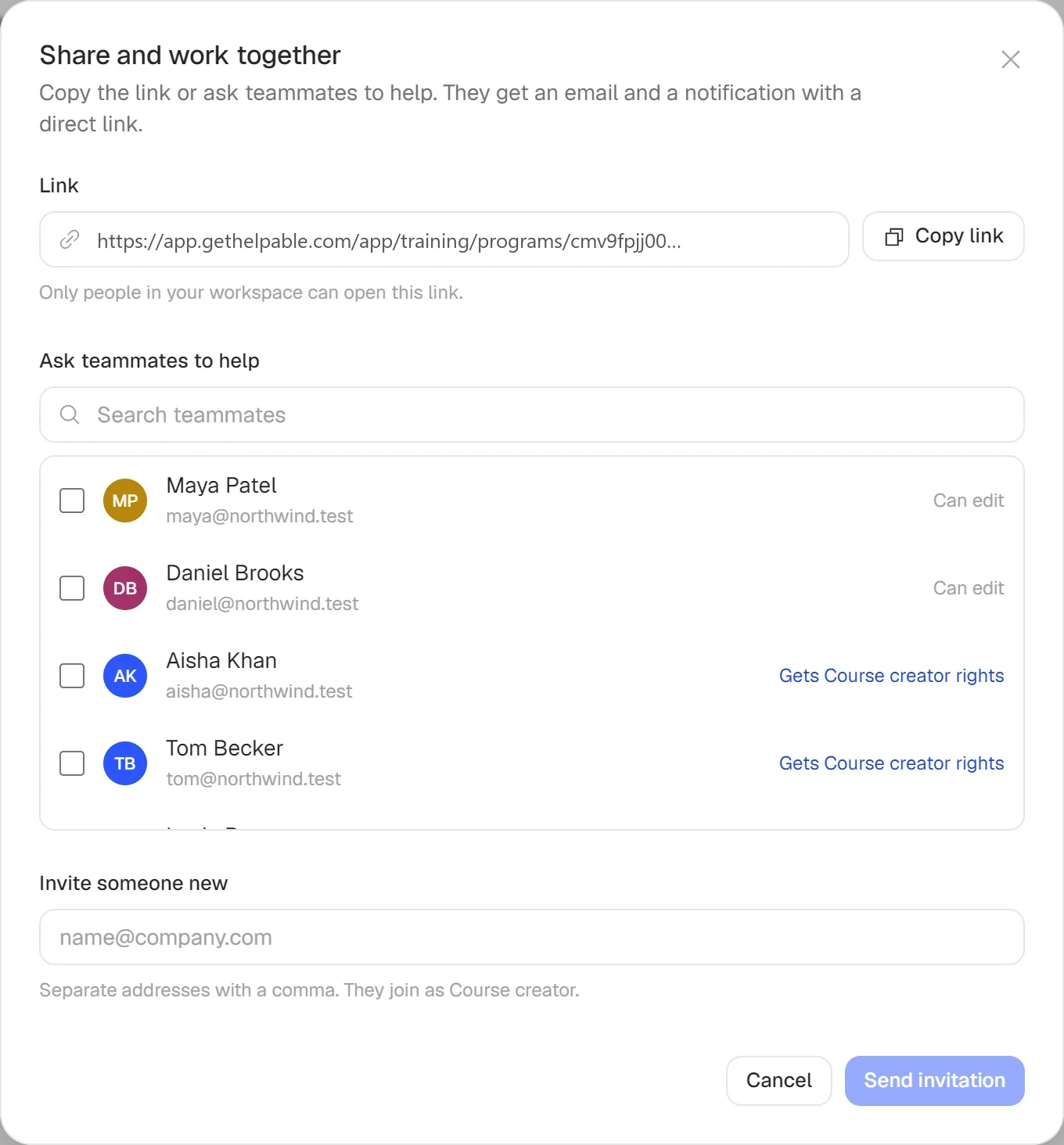
- + Team and rolesBuild the training togetherInvite teammates by email to help fill in the template. A course creator builds the lessons, and a training manager assigns them to the team.
Ready-made training for the topics every team needs
The templates cover what most small teams need first: welcoming new colleagues, onboarding people who work from home, helping customers, explaining company policies, working safely online and learning a procedure step by step.
- Quiz and learning goals included
- Preview it as an employee first
- Sample text is clearly marked
What's inside each template
Each template is a complete training you can use as a base.
Chapters and lessons
Short lessons with example text, grouped into clear chapters.
Learning goals
A short list of what employees will be able to do when they finish.
A quiz
Example questions to check understanding, which you can change or extend.
Tasks and confirmations
Practical tasks to do on the job and a confirmation that the employee read and understood it.
Room for your procedures
Link your own procedures and knowledge base articles as lessons.
Ready to assign today
Change what you need, publish it and assign it to new people the same day.
A first version of a training from your own procedures, in minutes
Pick the articles and procedures that matter and AI drafts lessons and quiz questions that link back to their sources. You check it, adjust it and assign it to the people who need it.
- Built from your own knowledge
- Every lesson links to its source
- Quiz questions drafted for you
- Nothing goes live until you approve it
A plan that grows with your team
Try Helpable free for 14 days, no credit card needed. Then pick the plan that fits your team.
All six training templates come with Business Plus and up, together with training, quizzes, assigning with due dates and certificates. Business Max adds rules that assign training to new members automatically.
Business
Your knowledge base for team and customers, written faster with AI.
$29/month
Billed monthly
That's $0.95 a day
Start free trial- 3 team members included
- An internal knowledge base and a public help center
- AI writes first versions from your own documents
- Start from what you have: documents, Word files and your website
- Procedures everyone follows, with read confirmations
- Your help center on your own web address
- 250 AI credits per month
- Recommended · your free trial runs on this plan
Business Plus
Train your team on that knowledge: courses, quizzes and progress per person.
$89/month
Billed monthly
That's $2.93 a day
Start free trialEverything in Business, plus:
- 5 team members included
- Training with quizzes, due dates and reminders
- See per person who finished what
- Practice conversations with AI, included
- Video lessons and final tests
- Certificates you can show clients and inspectors
- Results exported in one click
- 3 help centers and 3 internal knowledge bases
- 750 AI credits per month
What's in Business
- 3 team members included
- An internal knowledge base and a public help center
- AI writes first versions from your own documents
- Start from what you have: documents, Word files and your website
- Procedures everyone follows, with read confirmations
- Your help center on your own web address
- 250 AI credits per month
Business Max
Training that runs by itself, and proof of who really knows what.
$179/month
Billed monthly
That's $5.88 a day
Start free trialEverything in Business Plus, plus:
- 9 team members included
- New colleagues get their training automatically
- A fixed onboarding route from day one
- Learning insights: who really studied and who clicked through
- Skills matrix and a training record per person
- Practical work signed off on the floor
- Locations with their own managers
- Refresher training that comes back by itself
- Certificates that expire on time, in your own design
- Your help center fully in your own brand
- 10 help centers and 10 internal knowledge bases
- 1,500 AI credits per month
What's in Business Plus
- 5 team members included
- Training with quizzes, due dates and reminders
- See per person who finished what
- Practice conversations with AI, included
- AI writes first versions from your own documents
- Start from what you have: documents, Word files and your website
- Procedures everyone follows, with read confirmations
- Video lessons and final tests
- Certificates you can show clients and inspectors
- Results exported in one click
- Your help center on your own web address
- 3 help centers and 3 internal knowledge bases
- 750 AI credits per month
Grow when you need to
Add these to Business and up, any time. You only pay for what you use.
- More people
Add people one by one as your team grows, for a fixed price per person on every plan.
$9/month
- A second help center
A help center and handbook for another brand, location or client.
$10/month
- Only your brand
Remove “Powered by Helpable” from your help center. Included in Business Max.
$19/month
- Cancel any time
- Data stored in the EU
What are training templates?
Training templates are ready-made trainings you use as a starting point. Helpable has six training templates with chapters, lessons, a quiz and learning goals, which you adapt to how your team works.
Which training templates does Helpable offer?
Helpable offers six training templates: employee onboarding, remote onboarding, customer service basics, company policies, security awareness and SOP training. Each one is available in English and Dutch.
Can I change a Helpable training template?
Yes. A Helpable training template becomes an ordinary draft training as soon as you pick it. You can rename, add, move or delete chapters, lessons and quiz questions.
Will employees see the sample text from a template?
Sample lessons in Helpable templates start with a clear note that the text is an example. That way you see what to replace with your own content before you publish.
Can I combine a template with my own procedures?
Yes. In a training made from a Helpable template you can add your own procedures, knowledge base articles, videos and documents as lessons. When a linked procedure changes, the training shows the new version.
What if none of the training templates fit?
Helpable can also build a draft training with AI from your own articles and procedures, or you can start with an empty training. Helpable has a free trial of 14 days on Business Plus.
Read more
Read more about this
- 9 best onboarding software for small businessHR tools for paperwork and training tools for learning the job, compared for small teams.Read the article
- Internal knowledge base: when you need oneWhat goes in an internal knowledge base, how to secure access and which tools fit.Read the article
- Roleplay training for employees: a practical guideHow to let employees practice customer, sales and team conversations before they happen for real, and how to score it.Read the article
Employee training templates for small teams: start from a proven outline
What the training templates in Helpable contain, how to turn one into your own training, how they work with your procedures and quizzes, and how Helpable compares to other tools.
What are training templates?
Helpable training templates are ready-made trainings with chapters, lessons, a quiz and learning goals. You pick one and get a complete draft that you fill with how your team works. The sample text in each lesson starts with a clear note, so you see what still needs your own content.
There are six templates, in English and Dutch: employee onboarding, remote onboarding, customer service basics, company policies, security awareness and SOP training. They follow the same pattern: learn it, practice it, check it and confirm it.
How to turn a template into your own training
Helpable turns a template into an ordinary draft the moment you pick it. Rename chapters, replace the sample text, add lessons and remove what you don't need.
Add your own videos, documents and procedures as lessons. Adjust the quiz to your way of working. Preview the training as an employee, publish it and assign it to people, teams or everyone with a due date. Helpable sends reminders before the due date and when someone is late. If none of the templates fit, training with AI drafts a training from your own articles and procedures.
Templates with procedures, quizzes and reports
Helpable connects each template to the rest of your training, so the structure gets real content and real follow-up. The SOP training template works best with your own procedures linked as lessons, because the training always shows their latest version.
The built-in quiz checks understanding, and a certificate follows when someone finishes. Progress and reports show who finished, how they scored and who is late. The policies and security templates end with a confirmation, so you know who has read the rules.
Training templates for every kind of team
Helpable templates cover what most small teams need first, whatever their sector. Teams where new people start often, in hospitality, retail and cleaning and facility services, start with employee onboarding.
Customer service teams start with customer service basics. Teams working from home use remote onboarding. Office teams at agencies and SaaS companies use company policies and security awareness, and field teams in installation and maintenance turn their procedures into SOP training. Browse more ready-made material on the templates page.
An alternative to Trainual or Waybook templates
Helpable is worth comparing when you look for a tool with ready-made training and room for your own procedures. Trainual offers AI drafts, SOPs, training paths and a course library. Waybook offers SOPs with AI templates, role-based training paths and quizzes.
Helpable gives you six training templates, AI drafts from your own knowledge, procedures and a knowledge base in one tool, with read confirmations on every plan and quizzes from Business Plus. The app is in English and Dutch, data is stored in the EU, and the 14-day free trial needs no credit card. Compare the details on the Trainual alternative and Waybook alternative pages.
Which plan includes training templates?
Helpable includes all six training templates in Business Plus and Business Max. Training, quizzes, assigning with due dates and certificates come with those plans too.
Business Max adds rules that assign a training to new members and teams automatically, which suits the onboarding templates, and recurring training for yearly refreshers such as security awareness. See all plans on the pricing page, or read about employee onboarding software.
Start your first training from a template today
Pick a template, add your own content and share it with your team.
- 14 days free
- No credit card needed
- Cancel any time