SOP software

SOP software for small business

Helpable is SOP software for small businesses with 5 to 50 people. Write each standard operating procedure as numbered steps people follow on their phone, give it an owner and a review date, ask the team to confirm every new version and turn your procedures into training with a quiz. When a client or auditor asks, you can show who read what.

  • Steps people follow on site
  • Confirmed per version
  • Owners and review dates
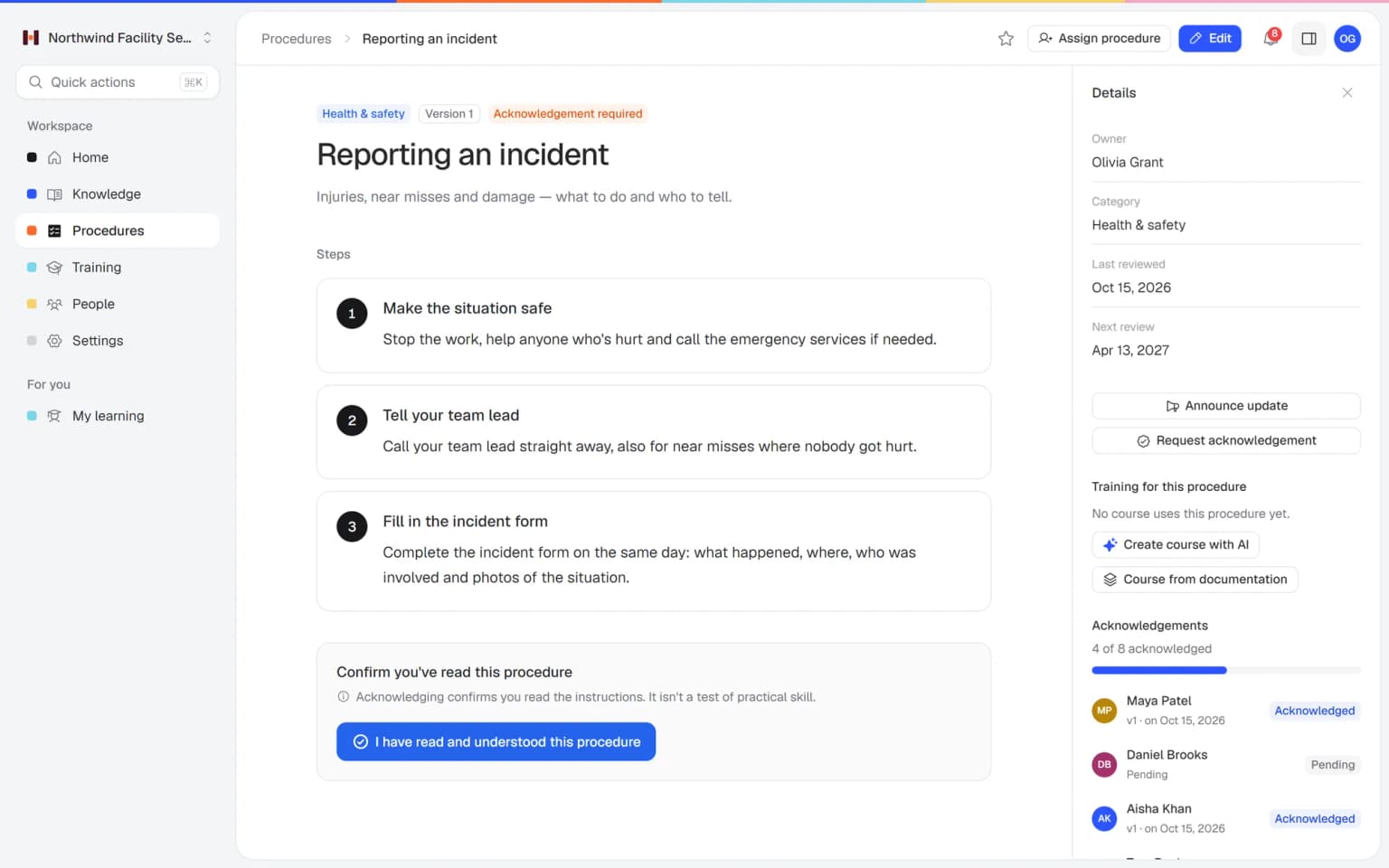
SOP Reporting an incident in Helpable with numbered steps, an owner, the next review date and 4 of 8 people acknowledged

Why SOPs in binders and shared drives stop working

Most small businesses have procedures somewhere. They fall apart when the work changes or a new person starts.

  • Nobody knows which version is current

    Final_v3 and final_v4 sit side by side, and old printouts stay on the wall long after a change.

  • SOPs quietly go out of date

    Nobody owns the review, so the written steps drift away from how the work is really done.

  • New people learn by watching

    Training depends on who happens to be on shift, so every new hire picks up a slightly different way.

  • No proof when someone asks

    A client, insurer or auditor asks who was trained on a procedure, and you start digging through emails.

From a written SOP to a team that works the same way

Procedures in Helpable connect to training, confirmations and reports, so one SOP does several jobs.

  1. Write the SOP once

    Numbered steps with text, photos and checklists. Give the procedure an owner, a category and a review interval, then publish it.

    Write the SOP once: how it looks in Helpable
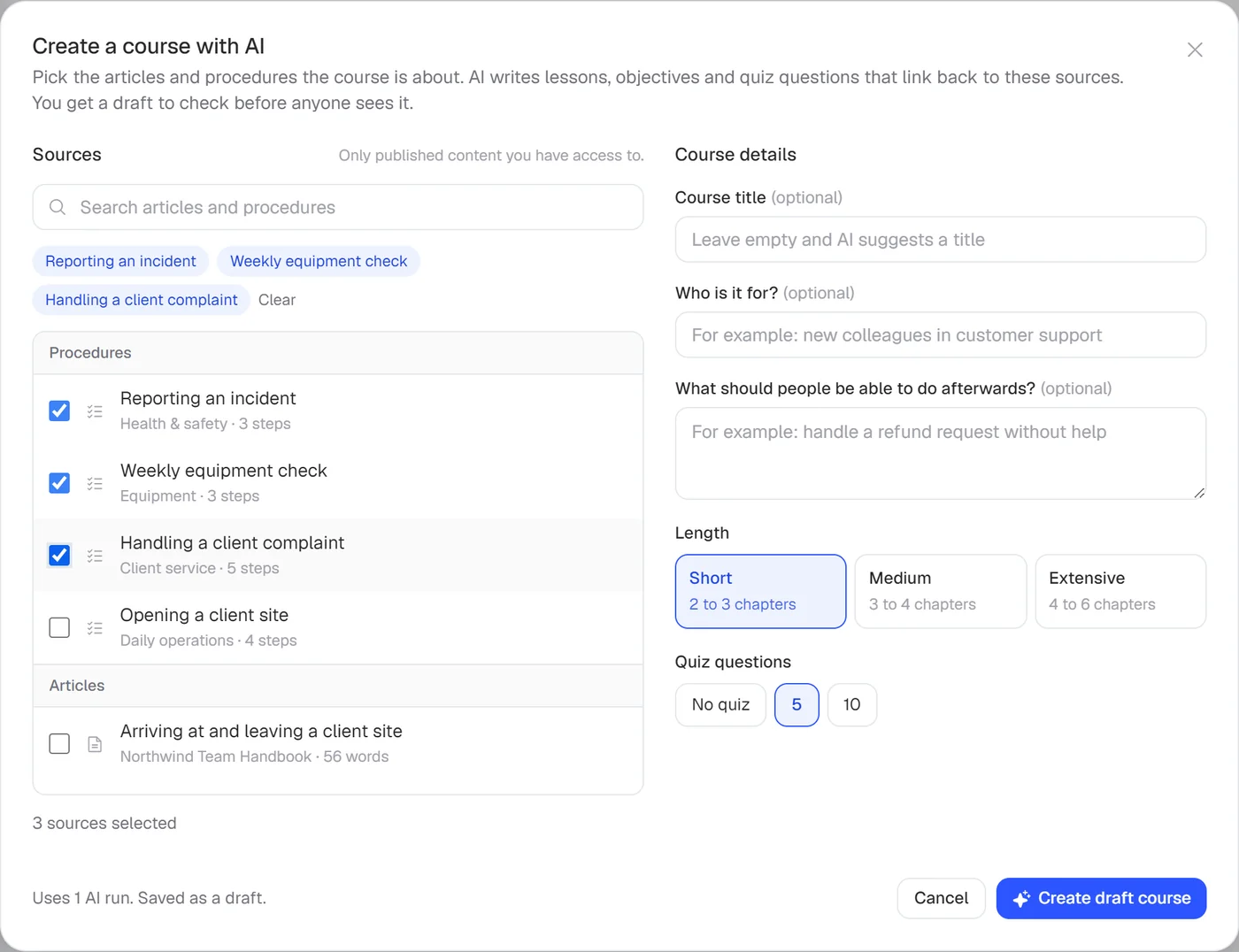
  2. Turn it into training

    Add the procedure as a lesson, or let AI draft a training from your SOPs with lessons that link back to them. You check it and add a quiz.

    Turn it into training: how it looks in Helpable
  3. Ask people to confirm

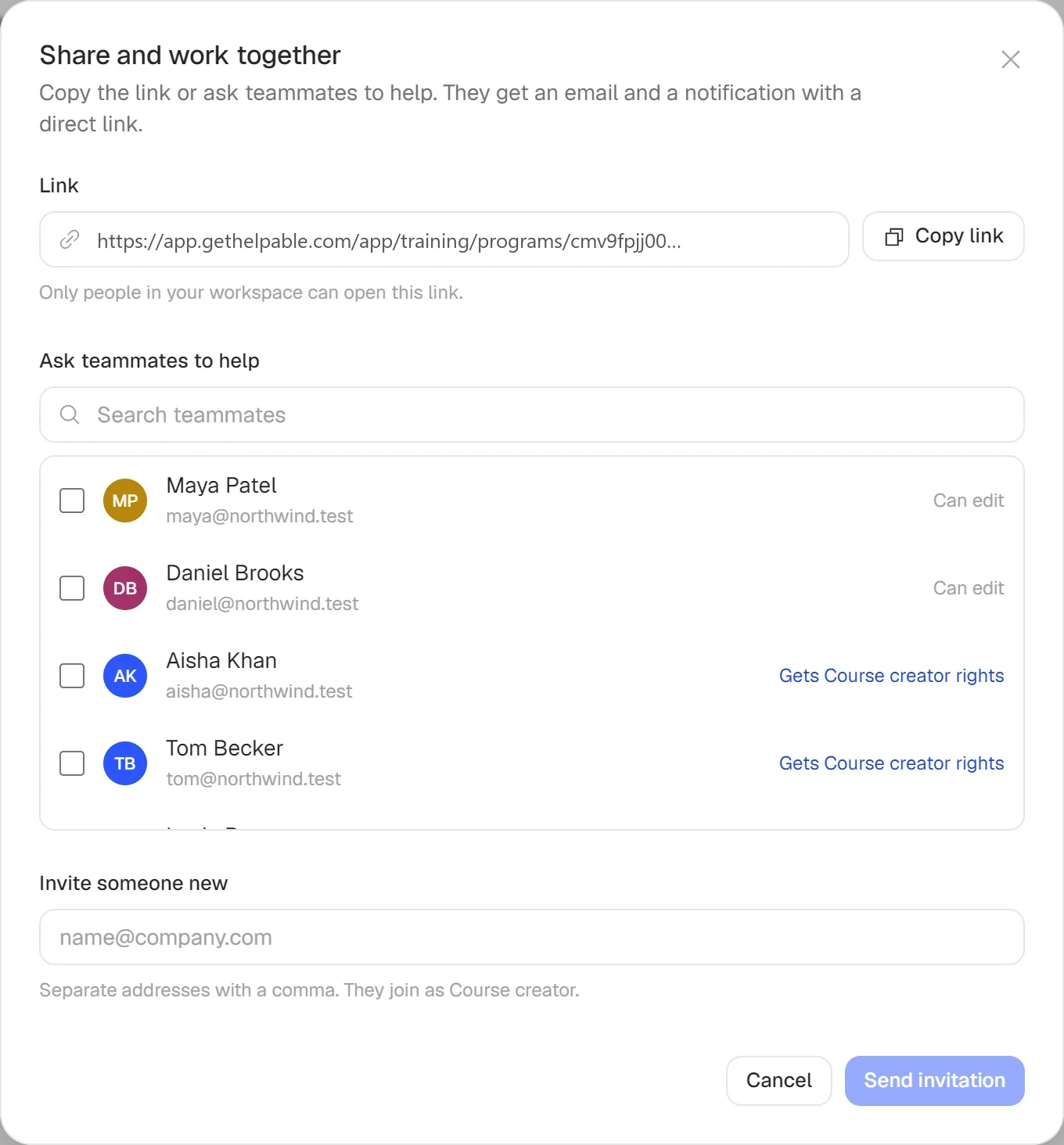
    Request a read confirmation. People confirm with one click and you see who confirmed which version.

    Ask people to confirm: how it looks in Helpable
  4. Share every change

    Publish a new version with a change summary, announce it to everyone assigned and ask them to confirm again.

    Share every change: how it looks in Helpable
  5. Show who is up to date

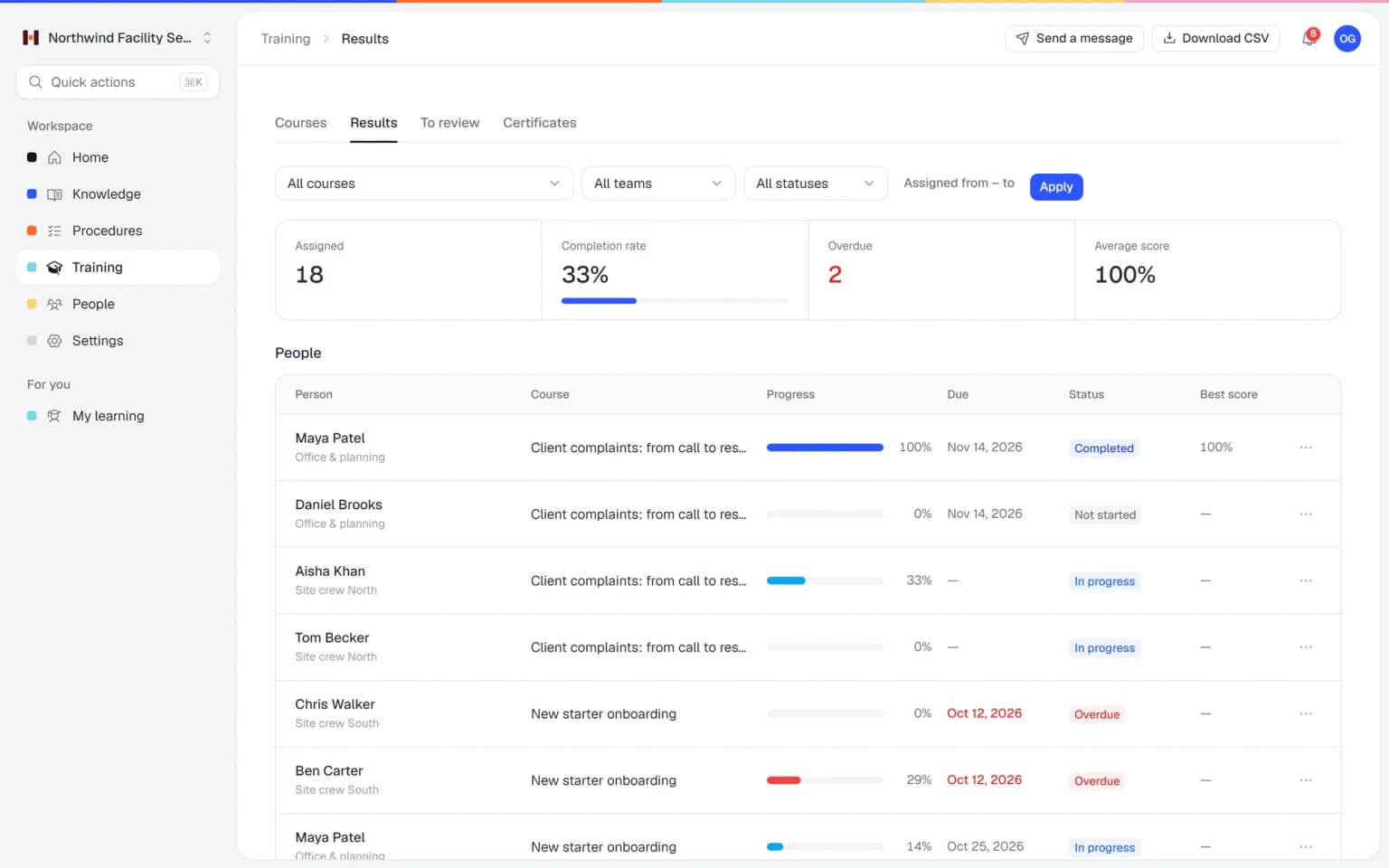
    Confirmations per version, training results and certificates per person give you a clear record for clients and audits.

    Show who is up to date: how it looks in Helpable

Procedures people follow, and records you can show

Clear steps on any screen, a version history for every change and a confirmation from every person.

Steps people follow on site

Numbered steps with a short explanation, photos and a checklist inside the step. People open the SOP on their phone and work through it while they do the job.

  • Photos and checklists inside steps
  • Owner, category and review date
  • Opens in the browser on a phone

Every change becomes a version

Publish a new version with a short summary of what changed, announce it to everyone assigned and ask them to confirm again. Earlier versions stay in the history.

Proof of who read it

See per person who confirmed which version and when. You only follow up with the people still pending.

What you get for your SOPs

The parts of Helpable that keep procedures clear, current and followed.

  • Procedures

    Short steps in the order of the work, with text, photos and a checklist inside each step. Each SOP has an owner and the next review date in view.

  • Read and acknowledge

    People confirm an SOP with one click, and you see per person who confirmed which version. Follow-up goes only to the people still pending.

  • Document version control

    Every published change becomes a version with a short summary. When something goes wrong, you can see which version applied at the time.

  • Quizzes

    Add a quiz to the training behind an SOP to check understanding. A confirmation shows someone read it, and a passed quiz shows they understood it.

  • Training with AI

    AI drafts a training from your SOPs, with lessons that link to the steps. New people learn the SOPs before their first shift.

  • Progress and reports

    Training progress per team and person, with CSV export. You see quickly which team or location still works the old way.

  • Team roles and permissions

    Group people into teams, for example per location, and assign SOPs per team. Everyone gets the procedures that apply to their work.

New · Answers

Your team finds the answer on its own in seconds, with the source

Employees ask a question in their own words and get a short answer from your own articles, procedures and documents, with a link to the exact page it came from. You stop being the person everyone asks.

  • Answers come from your own knowledge
  • Every answer shows where it came from
  • Says so plainly when it doesn't know
  • Each person only sees what they may see
  • Works with your existing documents
  • You approve every new article

Start with the documents you already have

Upload your handbook or policies. Helpable makes them searchable right away and suggests articles you check, change and approve. Nothing goes live until you say so.

A gap becomes a to-do

When the answer isn't there, Helpable says so and the question lands on your list of things to write down, with no name attached.

Who it is for

Small businesses where the same work is done by several people, in almost any sector.

  • Teams on location and at client sites

    Cleaning, installation, maintenance and home services crews who need the right steps for each site and each job.

    In practice: Each installation type gets its own SOP with safety steps, photos and a checklist before handover. Technicians open it on site, and the owner sees the next review date at a glance.

    See how
  • Shift teams with new and temporary staff

    Hospitality, retail, warehouse and logistics teams who open, close, pick and serve the same way on every shift.

    In practice: Opening, closing and food safety SOPs are the same on every shift. New and temporary staff confirm them in their first week, and the manager sees who is still pending.

    See how
  • Office and client teams

    Agencies, accountancy firms, real estate offices and recruiters who want client work done the same way by everyone.

    In practice: Client onboarding, monthly reporting and offboarding each have one SOP the whole team follows. When a step changes, you announce the new version and everyone confirms it.

    See how
  • Care, childcare and education teams

    Teams with protocols that must be followed and a record of who read the latest version.

    In practice: Every childcare worker and substitute confirms the SOP for a pickup by an unknown adult. After a change, the overview shows who has read the new version and who still has to.

    See how
  • Fast-growing teams

    Startups and software companies where processes change often and new people join every month.

    In practice: The incident SOP changes after every post-mortem. Each version keeps a summary of what changed, and on-call engineers confirm the new one before their next shift.

    See how
  • Franchises and multiple locations

    Businesses that want the same way of working at every location, with one current version for all.

    In practice: Every store follows the same returns SOP, with each store set up as its own team. Confirmations per person show which store still has people pending.

    See how
Made for teams in
Pricing

A plan that grows with your team

Try Helpable free for 14 days, no credit card needed. Then pick the plan that fits your team.

Grow when you need to

Add these to Business and up, any time. You only pay for what you use.

  • More people

    Add people one by one as your team grows, for a fixed price per person on every plan.

    $9/month

  • A second help center

    A help center and handbook for another brand, location or client.

    $10/month

  • Only your brand

    Remove “Powered by Helpable” from your help center. Included in Business Max.

    $19/month

  • Cancel any time
  • Data stored in the EU

Questions about SOP software

Can't find your answer? We're happy to help.

What is SOP software?

SOP software is a tool for writing, sharing and keeping up to date the step-by-step procedures for work your team repeats. Helpable is SOP software for small businesses: each procedure has numbered steps, an owner, a review date and a version history, linked to read confirmations and training.

Is Helpable a good fit for a small business?

Yes. Helpable is built for teams of about 5 to 50 people, from cleaning and hospitality to agencies, accountancy and software companies. It is quick to set up and you pay per plan, with extra team members as an add-on.

Can people follow SOPs on their phone?

Yes. Helpable works in the browser on phones, tablets and laptops, so people follow the steps on site and tick off the checklist inside a step. There is no separate app to install.

How do I know who read the latest version?

In Helpable you ask for a read confirmation on a procedure. People confirm with one click, and the overview shows per person which version they confirmed, when, and who is still pending. Read confirmations are part of every plan.

Does Helpable have SOP templates?

Helpable has no library of ready-made SOP templates; your own way of working is the best template. When you set up a workspace, Helpable can add a few sample procedures for your type of business as drafts to edit, and there are ready-made training templates, including one that teaches people how to work with procedures.

How do I keep SOPs up to date?

In Helpable every procedure has an owner and a review interval, and the overview shows the next review date. When something changes, the owner publishes a new version with a short summary, and the history keeps every earlier version.

Can I turn an SOP into training?

Yes. In Helpable you add a procedure as a lesson in a training, or let AI draft a training from the procedures you pick, with lessons that link back to them. Add a quiz with a pass mark, assign it with a due date and see who passed.

Does Helpable help with audits and client checks?

Helpable gives you clear records: who confirmed which version of a procedure and when, training results per person and certificates, and from Business Plus a CSV export. Certificates with an expiry date come with Business Max. Helpable has no formal approval workflows or electronic signatures, so check what your standard asks for.

What is the difference with work instruction software?

Helpable covers both. This page is about managing all your SOPs across the business, with owners, reviews and proof; the work instruction page is about the steps people follow during the job itself.

What does Helpable cost?

Helpable starts at $29 per month for Business, with 3 team members, procedures with version history, read confirmations and the AI writer. Business Plus at $89 per month gives you 5 members, training with quizzes and assigning with due dates.

Can I try Helpable for free?

Yes. Helpable has a free trial of 14 days on Business Plus, and you don't need a credit card to start.

Which languages and where is my data stored?

Helpable is available in English and Dutch, and your data is stored in the EU. You write your SOPs in the language your team works in.
Put your first SOP in Helpable today

Start with the task that goes wrong most often. Write the steps, give it an owner and a review date, ask your team to confirm and see who is up to date.

  • 14 days free
  • No credit card needed
  • Cancel any time