The answer in one search
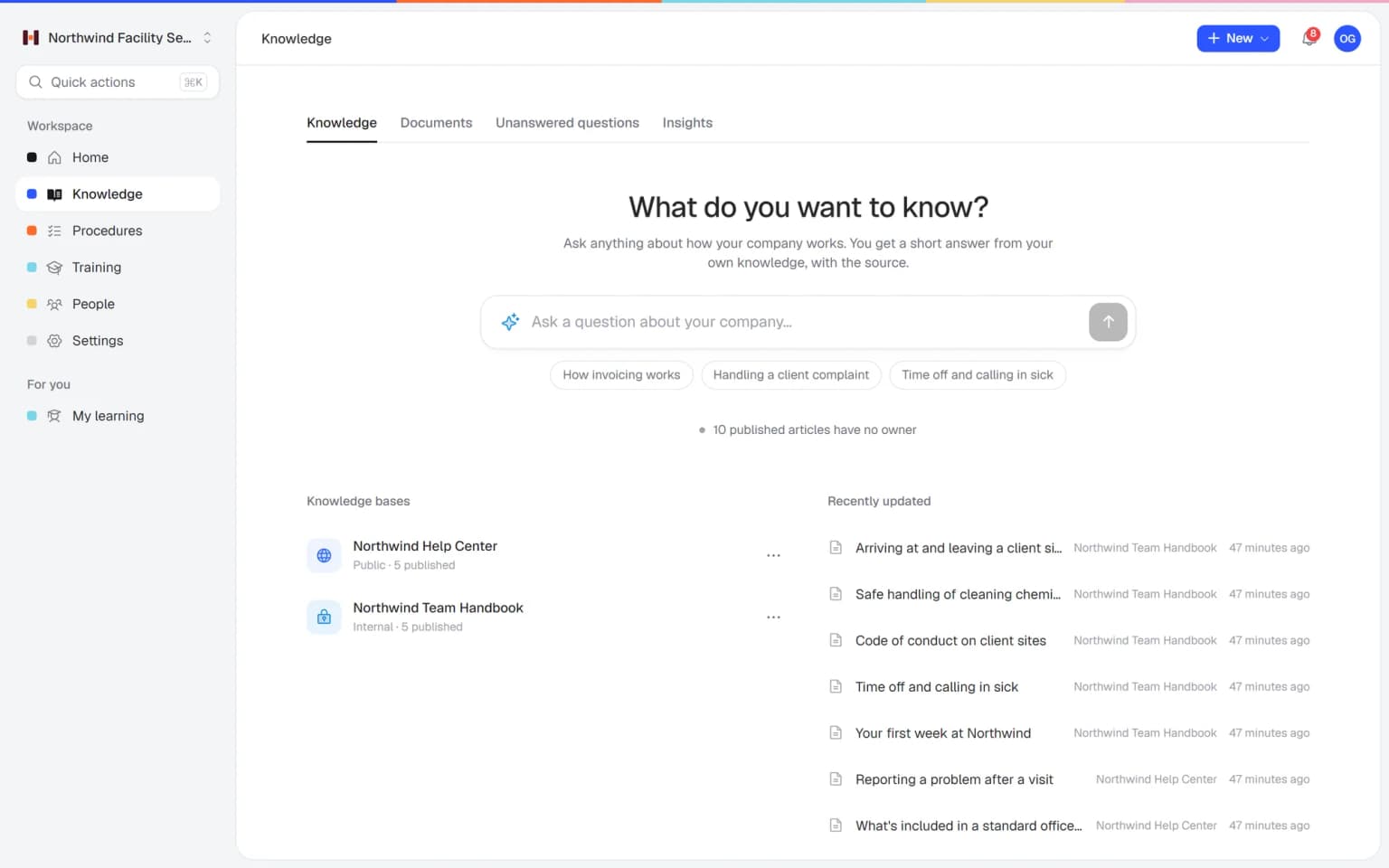
Type a word and Helpable shows the matching procedure, article and training lesson in one list, with where each one lives.
- Articles, procedures and training
- Search from any page
- Works on phone and laptop
Helpable is company wiki software that keeps company knowledge easy to find and trust. Helpable gives your wiki a clear structure, puts an owner and a review date on every procedure, keeps the history of each page and finds articles, procedures and training in one search.
Most wikis start tidy. Then the team grows, everyone adds pages and nobody cleans up.
Anyone can write a page, so nobody feels responsible for keeping it right. Old pages stay around and look just as official as new ones.
Someone can't find the existing page and writes a new one. Now there are three versions, and people pick the wrong one.
A search returns dozens of pages, meeting notes and drafts. People give up and ask a colleague in chat.
New hires get a link to the wiki and are told to read up. Nobody checks what they learned or which pages they saw.
Five steps from scattered pages to a wiki people rely on.
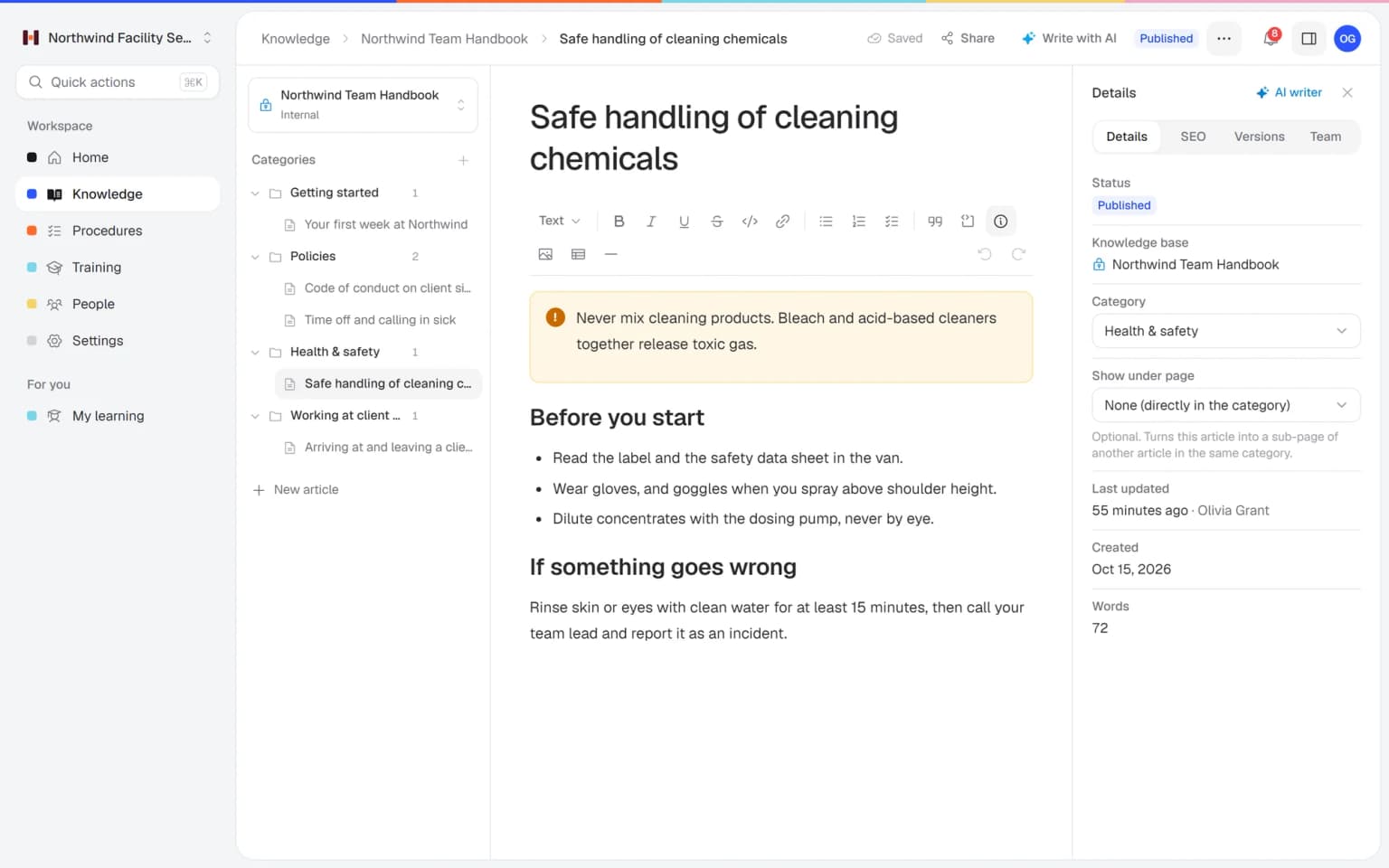
Create an internal knowledge base with categories and pages under pages. Keep a public help center for customers next to it.
Add a PDF, Word file or link and the AI writer drafts an article from it. You check the text and publish.
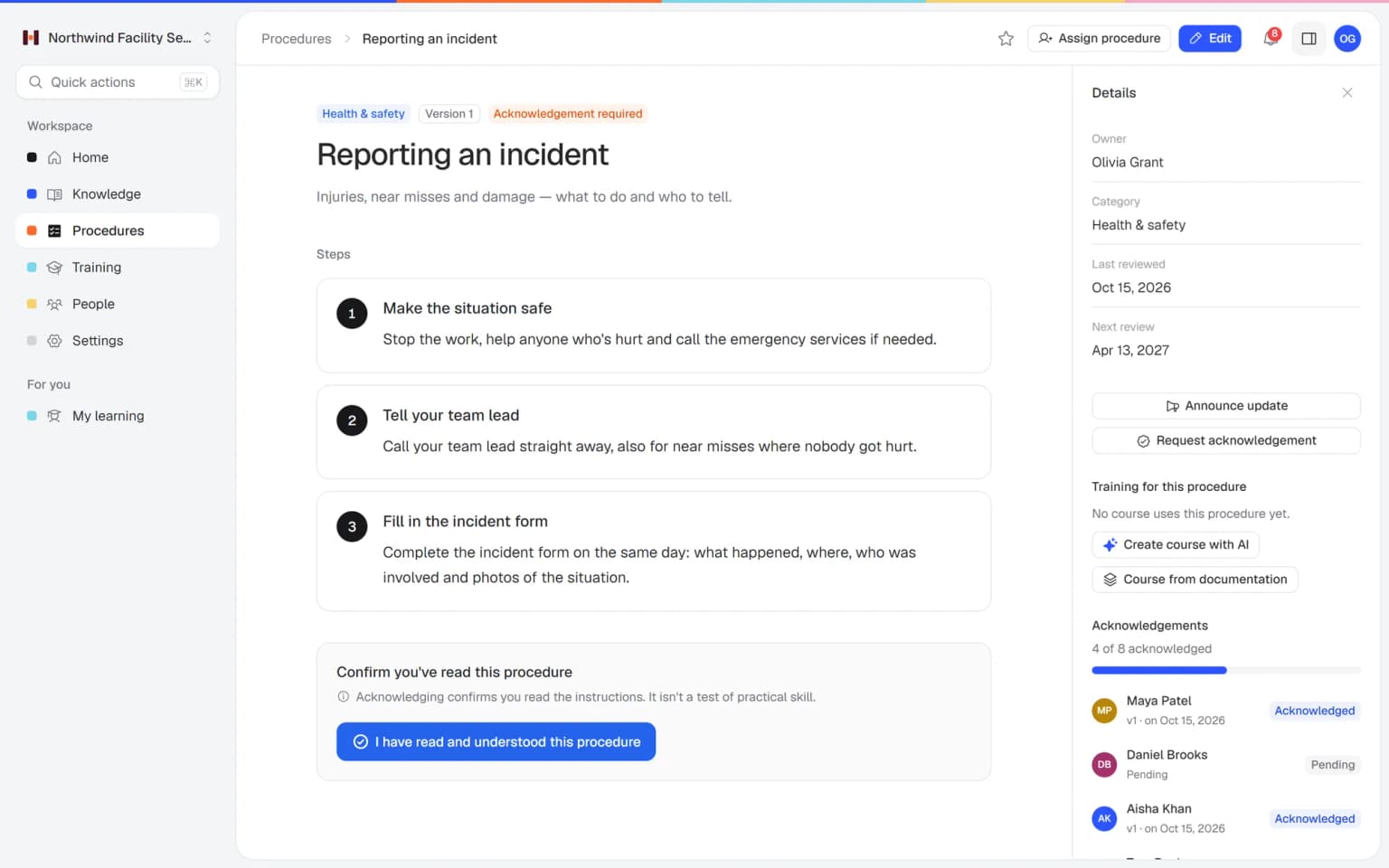
Write how-to knowledge as procedures with numbered steps, one owner and a review interval, so someone keeps them right.
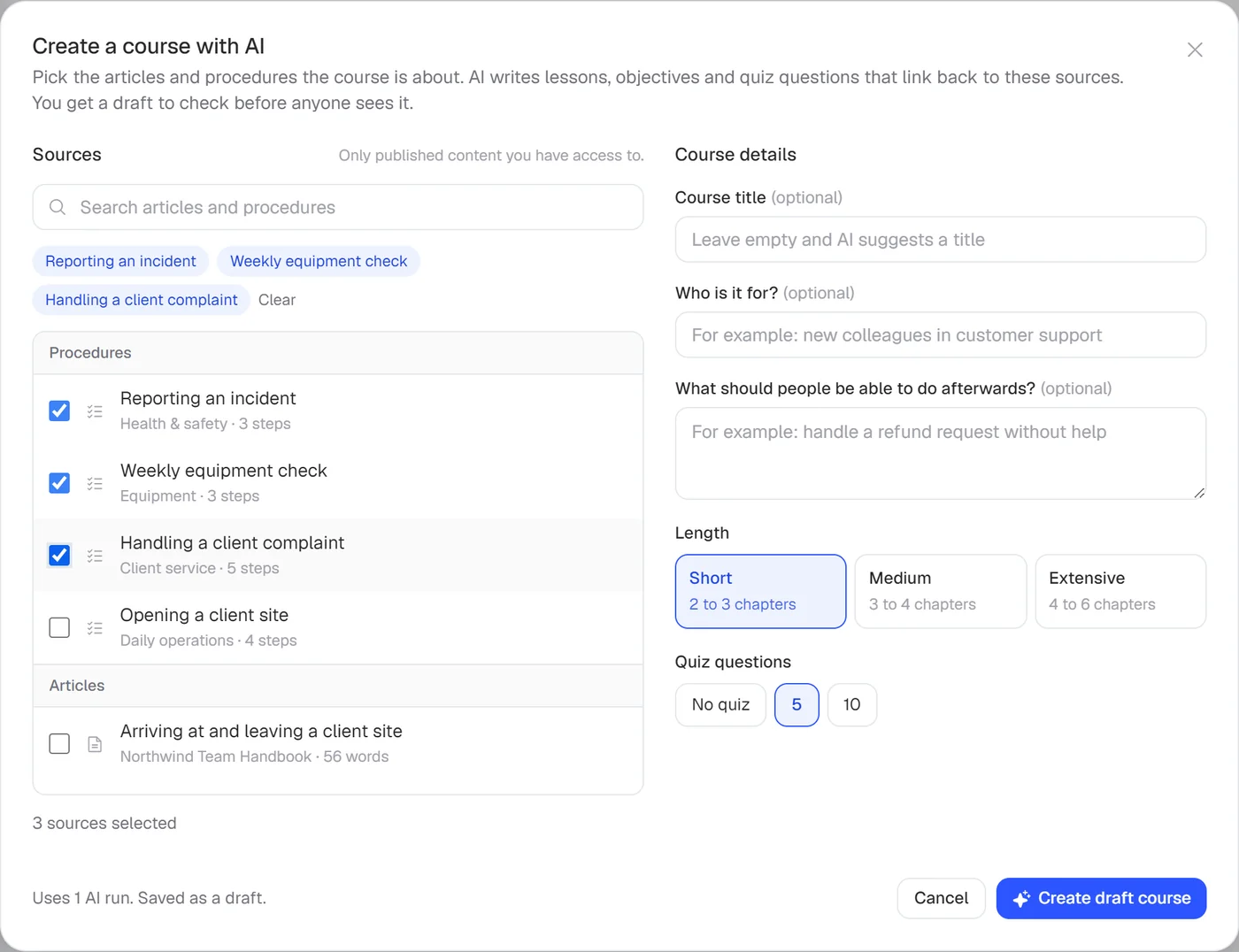
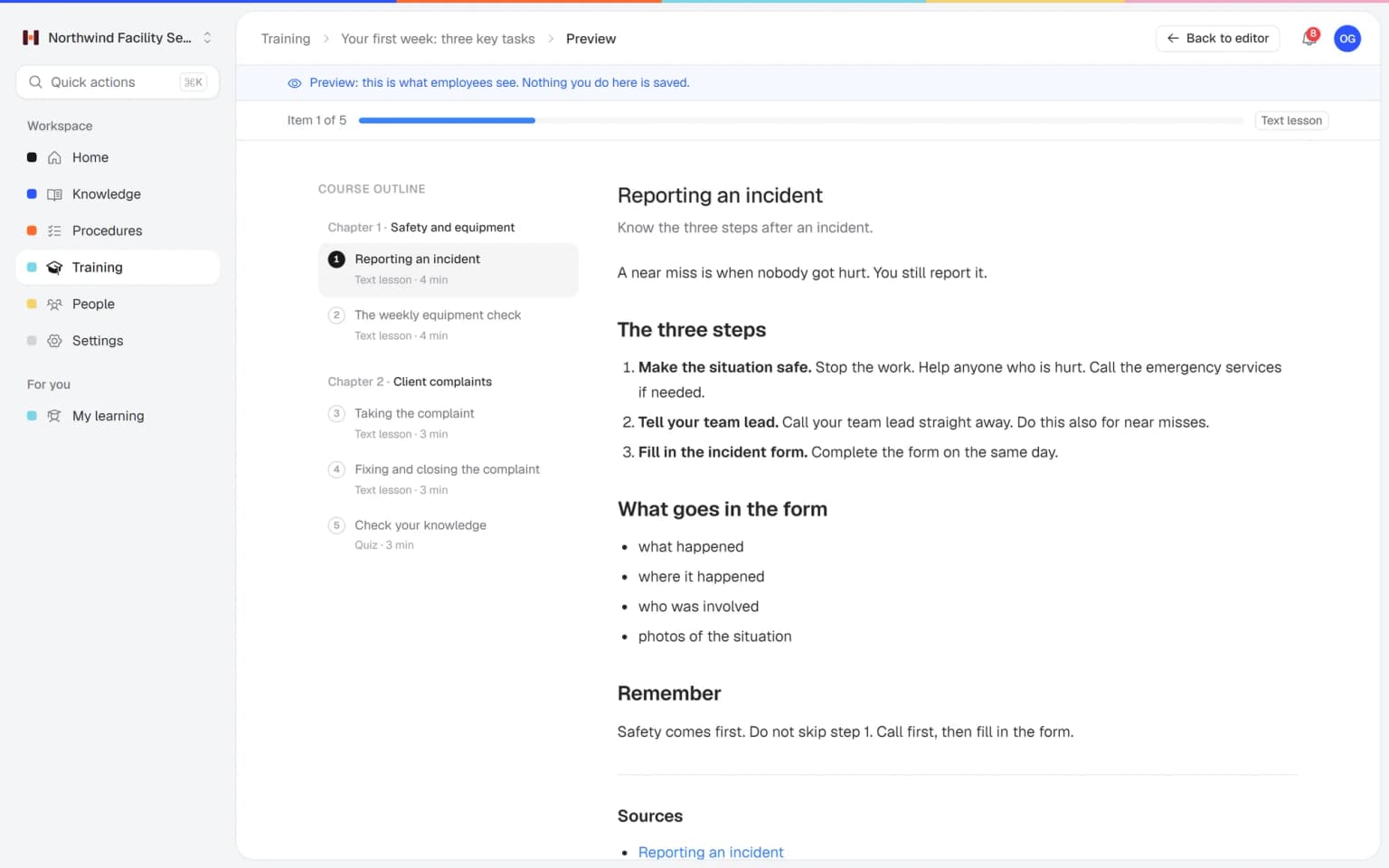
Link articles and procedures as lessons, or let AI draft a training from the ones you pick, with a quiz to check it landed.
Publish a new version with a change summary, announce the update and ask for a read confirmation on the procedure.

Find the answer in one search, see what changed and know which pages are due for a check.
Type a word and Helpable shows the matching procedure, article and training lesson in one list, with where each one lives.
Every published version of a procedure has a short summary and the name of who published it. Restore an older version in one click.
Each procedure has an owner and a next review date. The list shows which ones are due soon, so stale steps get checked in time.
The parts of Helpable that keep company knowledge organized and current.
Group pages by topic and nest pages under pages, so the wiki keeps a clear shape as it grows. One search finds articles, procedures and training together.
Colleagues write a page in a few minutes, with headings, checklists, tables and images. Changes stay in a draft until you publish, so half-done edits confuse nobody.
Turn the pages people must follow into procedures with numbered steps, one owner and a review date. The owner sees when a page is due for a check.
View and restore earlier versions of an article, and procedures keep a change summary per version. When someone asks what changed, the answer is in the history.
Give a few people the right to edit and publish, and everyone else reads. The wiki stays tidy because changes go through the people who own the topic.
For the pages that really matter, ask people to confirm they read the current version. You see per person who confirmed and who is still pending.
Employees ask a question in their own words and get a short answer from your own articles, procedures and documents, with a link to the exact page it came from. You stop being the person everyone asks.
Upload your handbook or policies. Helpable makes them searchable right away and suggests articles you check, change and approve. Nothing goes live until you say so.
When the answer isn't there, Helpable says so and the question lands on your list of things to write down, with no name attached.
Teams whose wiki grew faster than anyone could keep up with.
Cleaning, installation and field service teams who open the wiki on their phone, far from the office.
In practice: Each client site has one page with contacts, access rules and house rules, kept current by its owner. The cleaner on the evening shift opens it on their phone at the door.
See howHospitality, retail and warehouse teams where new people look things up between shifts.
In practice: New bar staff search for the closing checklist and find one current version, with last season's copies long gone. Procedures get an owner and a review date, so old pages stop piling up.
See howAgencies, accountancy firms and real estate offices with client processes and house rules in one place.
In practice: Every client project starts from the same kickoff page, and the account lead who owns it updates it after a process change. The version history shows what changed and when.
See howTeams whose wiki became a maze of old pages and want a tidy base for onboarding, support procedures and the handbook.
In practice: Support finds the current refund rule in one search across articles, procedures and training. Clear pages with an owner take over from the half-finished docs that people who moved on left behind.
See howPractices, childcare, schools and businesses with several branches that need one current set of pages.
In practice: Every location works from the same protocol page, and each team confirms the new version after a change. The overview shows per person who has read it.
See howTry Helpable free for 14 days, no credit card needed. Then pick the plan that fits your team.
Your knowledge base for team and customers, written faster with AI.
$29/month
Billed monthly
That's $0.95 a day
Start free trialTrain your team on that knowledge: courses, quizzes and progress per person.
$89/month
Billed monthly
That's $2.93 a day
Start free trialEverything in Business, plus:
Training that runs by itself, and proof of who really knows what.
$179/month
Billed monthly
That's $5.88 a day
Start free trialEverything in Business Plus, plus:
Add these to Business and up, any time. You only pay for what you use.
Add people one by one as your team grows, for a fixed price per person on every plan.
$9/month
A help center and handbook for another brand, location or client.
$10/month
Remove “Powered by Helpable” from your help center. Included in Business Max.
$19/month
Yes. Helpable gives you an internal knowledge base with categories, pages under pages, version history and scheduled publishing, plus procedures and training. Only members of your team can see the internal pages.
Helpable puts an owner and a review interval on every procedure, and shows the next review date so you know which ones need a check. Articles keep a version history, so you can see what changed and restore an older version.
A general wiki is very flexible: any page, any layout, good for notes and specs. Helpable is more structured and adds procedures with owners, training with quizzes and read confirmations, so you also see who learned and confirmed the current way of working.
Not yet. Helpable has no integrations with Slack, Jira, GitHub or Linear today. Many software teams keep technical docs in their developer tools and use Helpable for onboarding, support procedures and the handbook.
Helpable's AI writer drafts an article from a PDF, Word, TXT, Markdown or CSV file, or from a link. You check the draft and publish it. You can also upload exported pages and documents; Helpable makes them searchable and suggests articles for you to approve.
Yes, on procedures. In Helpable you request acknowledgement on a procedure and see per person who confirmed which version. Articles have no read confirmation, and there are no automatic reminders for confirmations.
Yes. Every Helpable plan includes a public help center for customers, with its own categories, branding and search, next to your internal knowledge base. A custom domain is included on every plan too.
Helpable starts at $29 per month for Business, with 3 team members, one internal knowledge base and one public help center. Business Plus is $89 per month and Business Max is $179 per month with up to 10 knowledge bases.
Yes. Helpable has a free trial of 14 days on Business Plus, and you don't need a credit card to start.
Helpable works in the browser on phones, tablets and laptops; there is no native mobile app. Your data is stored in the EU, and the app is available in English and Dutch.
Start with the pages people use most, give each process an owner and see your wiki stay current as you grow.