Employee onboarding software
New colleagues know what to learn from their first day and find their way on their own. You hand over less, repeat less and see exactly when someone is ready to work alone.
- 14 days free
- No credit card needed
- Onboarding templates included
New hires who feel welcome and get to work sooner
A good first month decides whether someone stays and how fast they become a full member of the team.
A clear plan from day one
Every new hire sees what to learn, in what order and by when. Nobody waits around for someone to have time for them.
Your team keeps its focus
The basics are explained once, in the training. Your experienced people only step in for the questions that are left.
Proof that the basics are covered
New colleagues confirm they read your house rules and pass a short quiz. You know they have the knowledge they need.
Onboarding by hand depends on who happens to be around
These are the moments where a new hire's first weeks go wrong in many small companies.
The first day starts with waiting
The new person sits next to someone busy and picks up bits and pieces.
With Helpable On day one the onboarding training is ready in My training, so the new colleague can get going right away.
Important things get forgotten
Safety rules or house rules only come up when something goes wrong.
With Helpable Put everything that matters in one onboarding training and ask people to confirm they read it.
You have to remember to start it
With every new hire you set things up again and send the same documents.
With Helpable An automatic rule gives new members and teams the right training, with a due date.
You don't know when someone is ready
It is a guess when a new colleague can work alone.
With Helpable Progress and quiz scores per person show who finished onboarding and who needs a hand.
Set up onboarding once and use it for every new hire
Three steps. After that, every new colleague gets the same start.
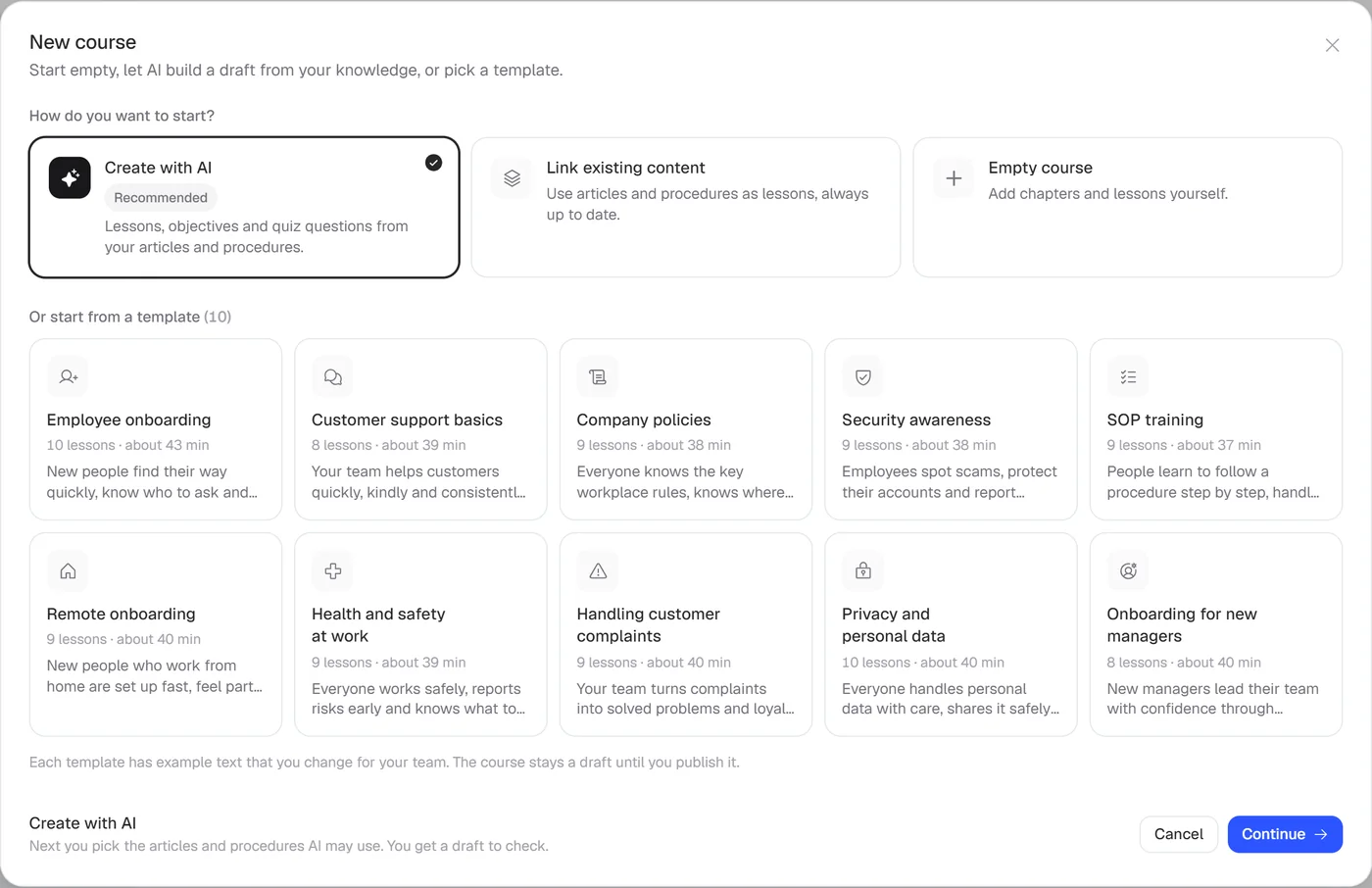
Start from a template
Pick the employee onboarding or remote onboarding template, or let AI build one from your own handbook.
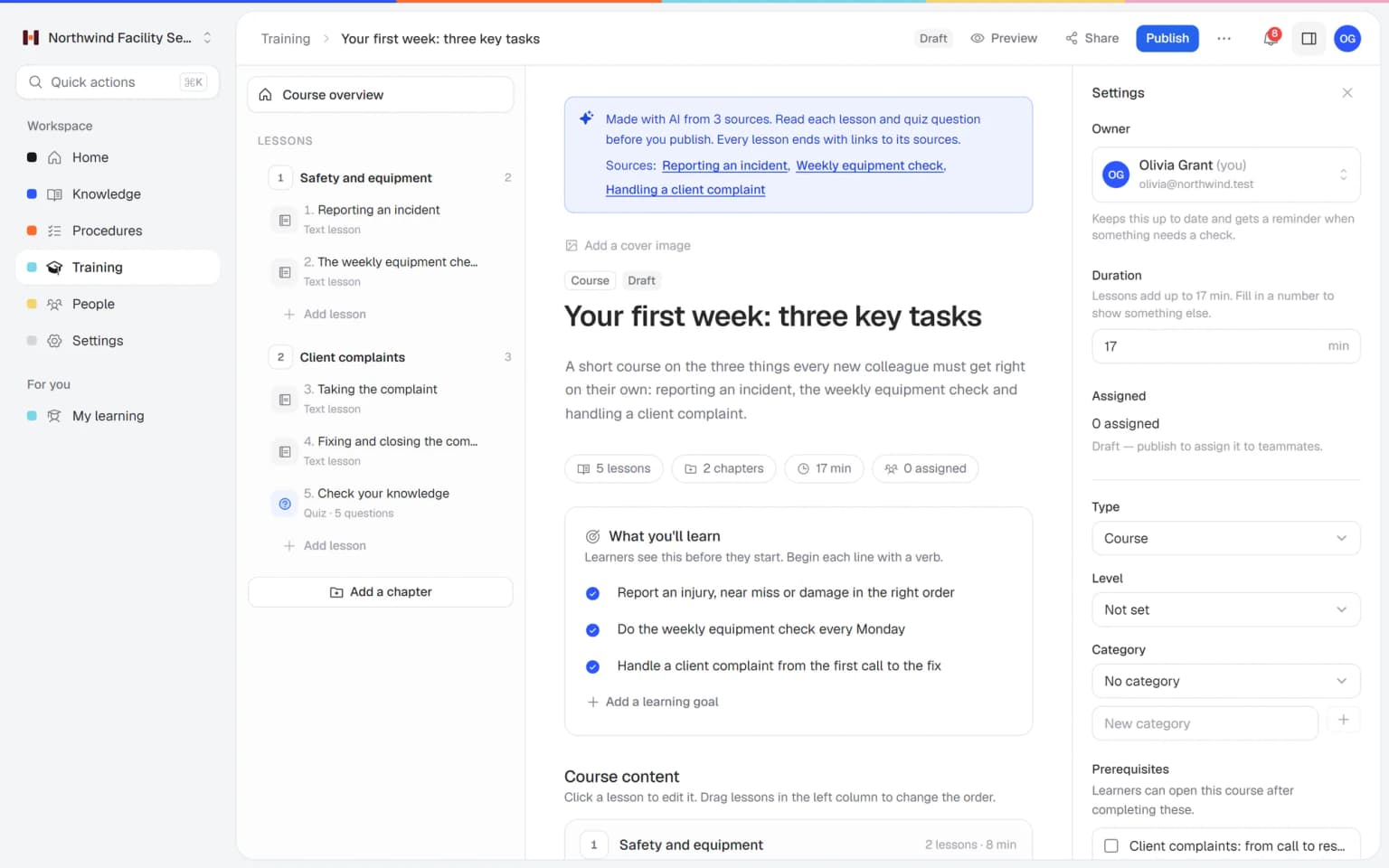
Add your own way of working
Link your procedures and house rules, add a welcome video and a short quiz.
Let it run by itself
New members get the training automatically. Helpable reminds them and shows you when they are done.

- 14 days free
- No credit card needed
See everyone in onboarding at a glance
The overview shows who is in onboarding right now, how far they got and what needs your attention. You step in where someone falls behind, and leave the rest to the training.
- Weekly summary by email
- Overdue notices for managers
- Works on every phone
All you need for a smooth first month
Onboarding, procedures and your company knowledge in one place.
Training templates
Ready-made Employee onboarding and Remote onboarding templates that you adjust to your company. Every new hire gets the same good start.
Employee training
Short lessons with text, video and practical tasks that new people do at their own pace. They learn the basics on day one, on their phone.
Progress and reports
From Business Max, rules assign onboarding to every new team member automatically. Reminders go out before the due date, and managers hear when training is overdue.
Read and acknowledge
New hires confirm they read your house rules and policies, and you see who did. The signed paper forms in a drawer can go.
Procedures
Link your step-by-step procedures into the training, so new people learn the latest version. When a step changes, onboarding follows.
Quizzes
A short quiz at the end of a chapter shows who is ready to work alone. You see the results per person.
Knowledge base
After onboarding, people keep finding answers in your internal knowledge base. Fewer questions land on the busiest colleague.
A first version of a training from your own procedures, in minutes
Pick the articles and procedures that matter and AI drafts lessons and quiz questions that link back to their sources. You check it, adjust it and assign it to the people who need it.
- Built from your own knowledge
- Every lesson links to its source
- Quiz questions drafted for you
- Nothing goes live until you approve it
A plan that grows with your team
Try Helpable free for 14 days, no credit card needed. Then pick the plan that fits your team.
Business
Your knowledge base for team and customers, written faster with AI.
$29/month
Billed monthly
That's $0.95 a day
Start free trial- 3 team members included
- An internal knowledge base and a public help center
- AI writes first versions from your own documents
- Start from what you have: documents, Word files and your website
- Procedures everyone follows, with read confirmations
- Your help center on your own web address
- 250 AI credits per month
- Recommended · your free trial runs on this plan
Business Plus
Train your team on that knowledge: courses, quizzes and progress per person.
$89/month
Billed monthly
That's $2.93 a day
Start free trialEverything in Business, plus:
- 5 team members included
- Training with quizzes, due dates and reminders
- See per person who finished what
- Practice conversations with AI, included
- Video lessons and final tests
- Certificates you can show clients and inspectors
- Results exported in one click
- 3 help centers and 3 internal knowledge bases
- 750 AI credits per month
What's in Business
- 3 team members included
- An internal knowledge base and a public help center
- AI writes first versions from your own documents
- Start from what you have: documents, Word files and your website
- Procedures everyone follows, with read confirmations
- Your help center on your own web address
- 250 AI credits per month
Business Max
Training that runs by itself, and proof of who really knows what.
$179/month
Billed monthly
That's $5.88 a day
Start free trialEverything in Business Plus, plus:
- 9 team members included
- New colleagues get their training automatically
- A fixed onboarding route from day one
- Learning insights: who really studied and who clicked through
- Skills matrix and a training record per person
- Practical work signed off on the floor
- Locations with their own managers
- Refresher training that comes back by itself
- Certificates that expire on time, in your own design
- Your help center fully in your own brand
- 10 help centers and 10 internal knowledge bases
- 1,500 AI credits per month
What's in Business Plus
- 5 team members included
- Training with quizzes, due dates and reminders
- See per person who finished what
- Practice conversations with AI, included
- AI writes first versions from your own documents
- Start from what you have: documents, Word files and your website
- Procedures everyone follows, with read confirmations
- Video lessons and final tests
- Certificates you can show clients and inspectors
- Results exported in one click
- Your help center on your own web address
- 3 help centers and 3 internal knowledge bases
- 750 AI credits per month
Grow when you need to
Add these to Business and up, any time. You only pay for what you use.
- More people
Add people one by one as your team grows, for a fixed price per person on every plan.
$9/month
- A second help center
A help center and handbook for another brand, location or client.
$10/month
- Only your brand
Remove “Powered by Helpable” from your help center. Included in Business Max.
$19/month
- Cancel any time
- Data stored in the EU
What is employee onboarding software?
Employee onboarding software helps you welcome new colleagues and teach them how your company works in a planned way. Helpable is employee onboarding software for teams of 5 to 50 people that combines onboarding training, procedures and an internal knowledge base.
Does Helpable have an onboarding template?
Yes. Helpable includes ready-made templates for employee onboarding and remote onboarding. You can change every chapter and lesson, or let AI build an onboarding training from your own articles and procedures.
Can Helpable assign onboarding to new employees automatically?
Yes. In Helpable you set a rule once, and new members or teams get the onboarding training with a due date. Automatic assignment is part of Business Max; on Business Plus you assign training yourself.
Can new hires confirm they read our house rules?
Yes. Helpable lets you add an acknowledgement to a lesson and ask for a read confirmation on procedures, so you see per person who confirmed the latest version.
Can new employees do their onboarding from home?
Yes. Helpable works in the browser on a laptop, tablet or phone, and there is a separate template for remote onboarding.
Is there a free trial of Helpable?
Yes. Helpable has a free trial of 14 days on Business Plus, and no credit card is needed to start.
Read more
Give your next new hire a better first day
Start from the onboarding template and make it your own.
- 14 days free
- No credit card needed
- Cancel any time