Read confirmations per version
Ask people to confirm a procedure and see exactly who confirmed which version, and who still needs to.
- Re-confirm after each change
- Reminders by email
- Per-person overview
Know who read the latest version of every procedure and train new people on it, in one tool. Notion is a flexible workspace for docs, wikis and projects; Helpable is built for procedures, read confirmations and training. Here is an honest comparison.
A wiki page tells people what to do. Helpable also tells you who read the latest version, and asks the rest to confirm.
Illustration with a fictional demo company. The Notion side is a simple sketch of a wiki page, drawn by Helpable.
Notion's column is based on its own website and help center. Plans differ; check their site for what is in each plan.
| Notion and Helpable side by side | Helpable | Notion |
|---|---|---|
| Procedures (SOPs)Steps people can follow on the job cut mistakes; Helpable gives every procedure an owner and a review date, so it stays current. | Numbered steps with images and checklists, owner, review date, versions | Free-form pages and templates |
| Knowledge baseOne place for answers means fewer repeated questions; Helpable keeps the team handbook and the customer help center in one tool. | Internal knowledge base and a public help center | Wiki pages in a flexible workspace; page verification on Business |
| Training and quizzesNotion has no built-in quizzes, so onboarding checks live somewhere else; Helpable puts the quiz on top of the same page people read. | Lessons, quizzes with six question types, certificates from Business Plus (expiry on Business Max) | No built-in quizzes or certificates found |
| AI answers to employee questionsAn answer with its source is one people can trust and check; Helpable answers only from your own content and says so when it doesn't know. | Yes: answers from your own articles, procedures and documents, with the source | Yes (Notion AI, with citations; full AI on Business) |
| Read confirmationsThis is the gap teams feel most in a Notion wiki: Notion shows who edited a page, and Helpable shows who confirmed each version. | Per version, with an overview of who confirmed and who is pending | Not found on Notion's site |
| IntegrationsImporting what you have saves days of copy and paste; Helpable reads Notion pages, websites and GitHub and checks them for changes every day. | Imports from Notion, websites and GitHub; email and in-app notifications | Many integrations; Enterprise Search across connected apps |
| MobileField and shift staff look things up on a phone; Helpable works in the phone's browser, so there is nothing to install. | Works in the phone's browser; no app | Mobile app |
| Interface languagesPeople learn faster in their own language; Helpable's app is in English and Dutch. | English and Dutch | Several languages, including Dutch |
| Where data is storedNotion offers an EU data region on Enterprise; Helpable keeps data in the EU on every plan, which helps in a client's security check. | EU | EU data region on Enterprise |
| Free trialA trial on your own content tells you more than a demo; Helpable gives you 14 days on Business Plus, no credit card. | 14 days on Business Plus, no credit card | Free plan; AI as a trial on Free and Plus |
Based on public information from notion.com (product, pricing and help pages), checked on October 15, 2026. Features change; check Notion's site before you decide.
Pick Notion if you want one flexible workspace for docs, projects and databases across the whole company, want to start on a free plan, or need a native mobile app and SSO.
Pick Helpable over Notion if your wiki has to carry procedures and onboarding: Helpable shows who confirmed each version and keeps your data in the EU on every plan, and from Business Plus it turns pages into training with a quiz.
Use Notion and Helpable together if Notion runs your projects and notes: Helpable holds the handbook, procedures and training everyone must know, and imports the Notion pages you share with it.
Notion calls its docs "the next gen of notes & docs". Teams use one workspace for wikis, notes, projects and databases, with templates, comments and suggested edits.
Notion AI answers questions from your workspace and connected apps with citations. On its Business plan you also get page verification, so a page shows a verified badge when it is up to date, and SAML SSO. Notion has a free plan, a mobile app and a Dutch interface. An EU data region is available on its Enterprise plan.
Common reasons we hear from teams that use Notion as their company wiki. They may or may not apply to you.
Notion shows who edited a page. Teams that need proof that each person read the latest version of a procedure look for read confirmations per version.
Notion has no quizzes or certificates. Teams end up with the wiki in one tool and onboarding checklists and tests somewhere else.
A blank workspace needs someone to design it. Some teams want fixed building blocks for procedures, articles and training.
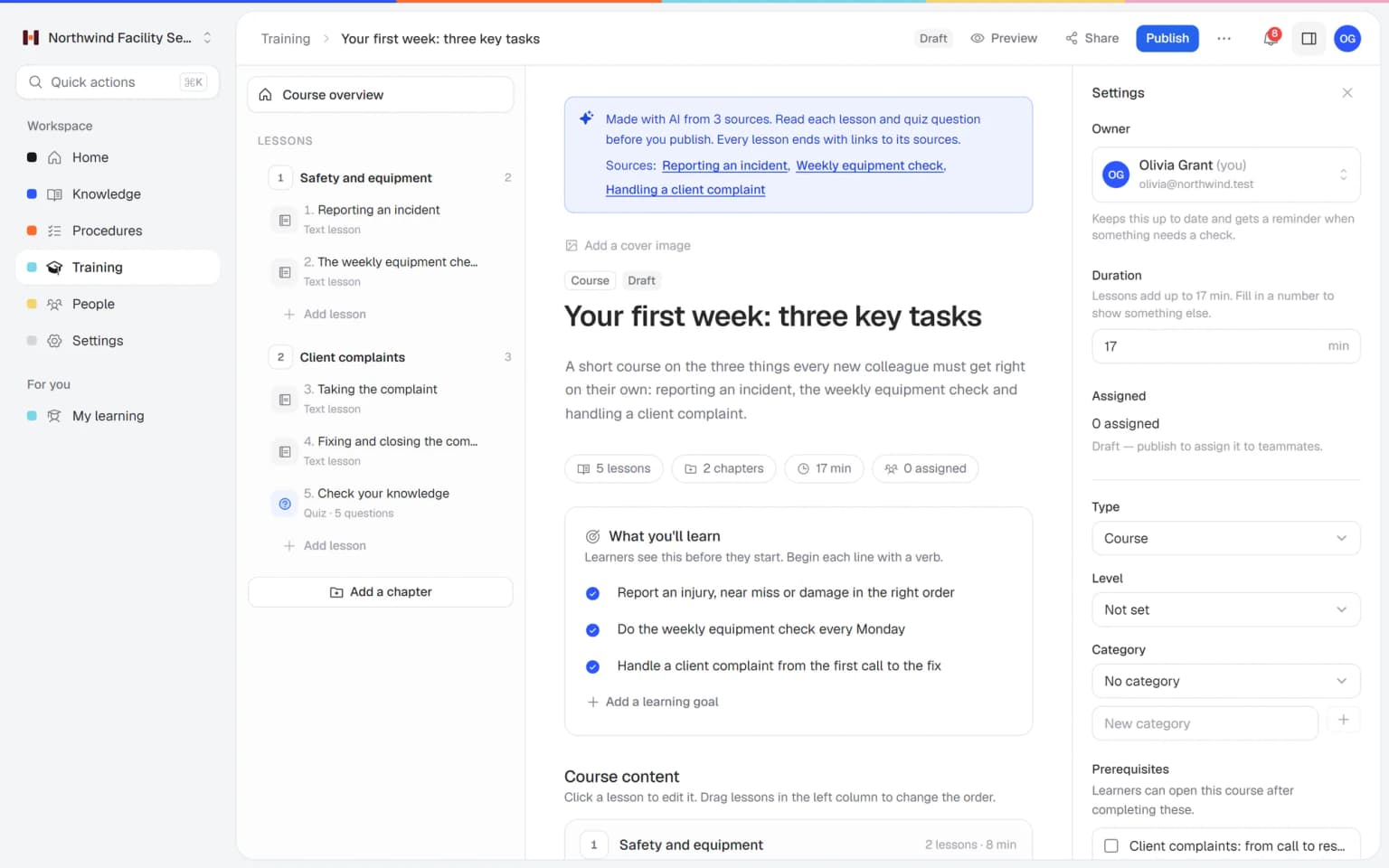
Pick the articles and procedures that matter and AI drafts lessons and quiz questions that link back to their sources. You check it, adjust it and assign it to the people who need it.
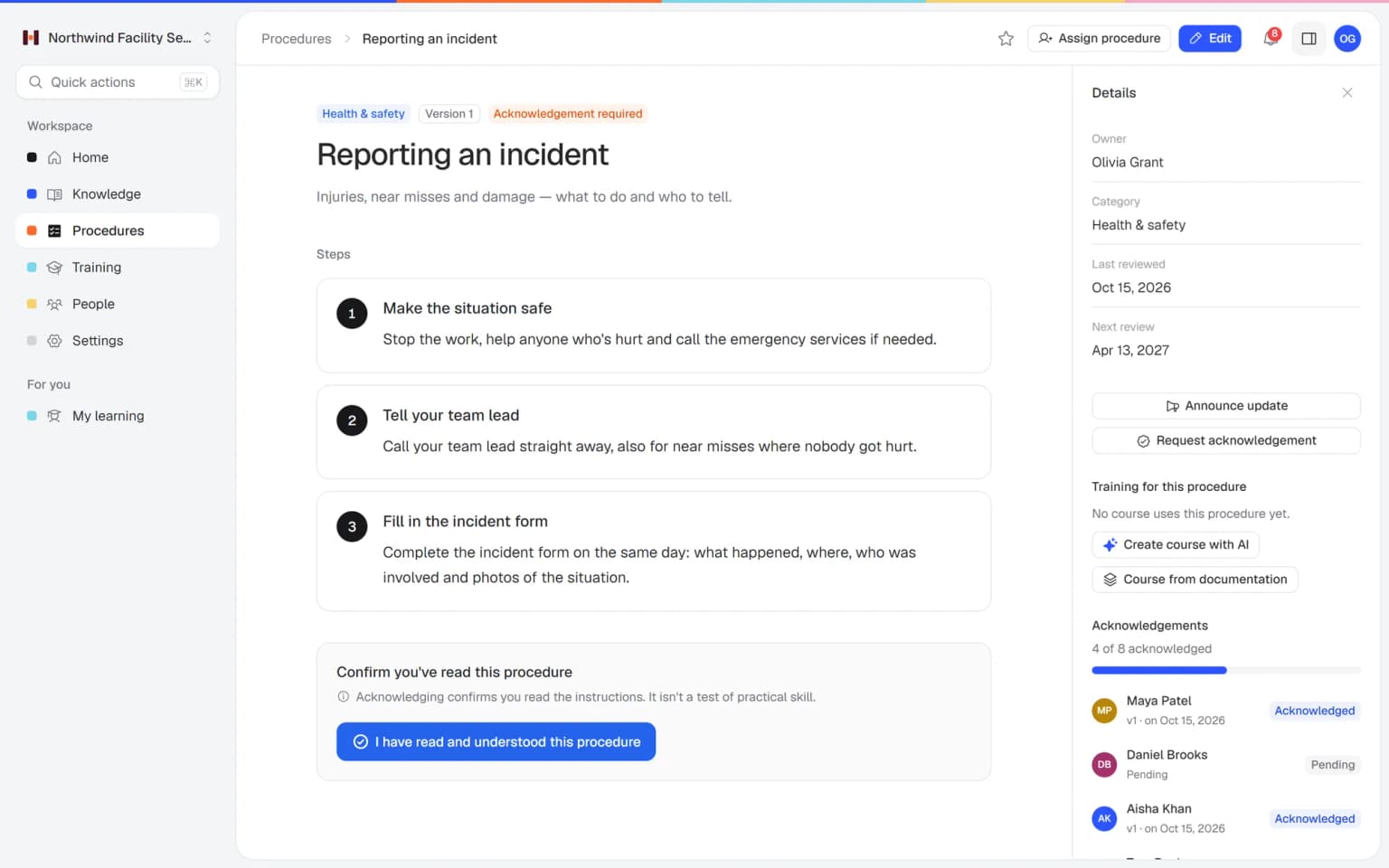
Write the procedure once, ask people to confirm it and see who is up to date.
Ask people to confirm a procedure and see exactly who confirmed which version, and who still needs to.
Each published version keeps a short summary of what changed, so people see the difference at a glance.
Pick published articles and procedures and let AI draft lessons and a quiz that link back to them. You check it before it goes live.
Fixed building blocks for know-how, so the wiki stays tidy and people actually learn it.
Numbered steps with images and checklists, an owner, a review date and a version history with a short change summary.
Ask people to confirm and see who read which version and when. Announce an update and everyone assigned gets asked again.
Articles in categories with search for the team, and a public help center on your own domain for customers.
AI drafts lessons and a quiz from your published articles and procedures, with links to the sources. You review before publishing.
Employees ask in their own words and get a short answer from your content, with a link to where it says so.
The app is available in English and Dutch, and your data is stored in the EU.
Try Helpable free for 14 days, no credit card needed. Then pick the plan that fits your team.
Your knowledge base for team and customers, written faster with AI.
$29/month
Billed monthly
That's $0.95 a day
Start free trialTrain your team on that knowledge: courses, quizzes and progress per person.
$89/month
Billed monthly
That's $2.93 a day
Start free trialEverything in Business, plus:
Training that runs by itself, and proof of who really knows what.
$179/month
Billed monthly
That's $5.88 a day
Start free trialEverything in Business Plus, plus:
Add these to Business and up, any time. You only pay for what you use.
Add people one by one as your team grows, for a fixed price per person on every plan.
$9/month
A help center and handbook for another brand, location or client.
$10/month
Remove “Powered by Helpable” from your help center. Included in Business Max.
$19/month
You can have your most-used knowledge and a first training in Helpable on the same day. Notion keeps working for as long as you want it to.
Connect Notion under Settings › Integrations and share the pages you want with Helpable. Each page becomes a searchable document, and Helpable checks it for changes every day.
AI turns each document into a draft article or procedure. You read it, fix what is off, give it an owner and a review date, and publish. Nothing goes live by itself.
Pick the articles and procedures a new colleague needs and say who it is for. AI drafts lessons and quiz questions that link back to them. You check and publish.
Invite people by email, put them in teams and assign training and procedures with a due date. Ask for read confirmations; reminders go out by email.
Try Helpable free for 14 days on Business Plus, no credit card. Keep Notion running until you see the team use Helpable, then decide.
We bring in your documents, write your first procedures and build your first training for you. You pay once, next to your plan, and we confirm the scope before we start.
Teams of about 5 to 50 people where a few people hold the know-how and the rest need to learn it.
Installers, cleaners and field staff who open a procedure on their phone at a client site.
In practice: A cleaning crew at a new client follows the same numbered steps with photos on their phones, and the supervisor sees who confirmed the client-specific instructions.
See howHospitality, retail and care teams that train new and temporary staff again and again.
In practice: A shop trains Saturday staff on the till and returns in short lessons, so a new student worker is ready after one evening and a quiz.
See howAgencies, accountancy, real estate and recruitment teams that want one way of working, written down.
In practice: An agency turns its scattered Notion pages on client onboarding into one procedure with an owner, and every new project starts with the same steps.
See howStartups and software companies that outgrow a loose wiki and need onboarding that sticks.
In practice: A startup moves its handbook out of a loose wiki, and each new hire finishes the same onboarding training with a quiz before their first customer call.
See howSupport, sales and service teams that need the same answer every time, plus a public help center for customers.
In practice: A service desk gives the same answer about delivery times every time, because the article has one current version and every agent confirmed the latest change.
See howHelpable is a good Notion alternative when you use Notion mainly as a company wiki and also need procedures, read confirmations and training in one place. If you use Notion for projects, databases and notes across the company, Notion covers far more ground and Helpable does not try to replace that.
Yes. Many teams can keep Notion for projects and notes and use Helpable for the procedures, handbook and training that everyone must know. Helpable then becomes the place where you check who read what.
Helpable imports Notion pages directly. Connect Notion under Settings › Integrations and share the pages you want; each one becomes a searchable document, and AI drafts articles and procedures from them for you to check. Start with the pages people use every week.
Yes. Helpable lets you ask for a read confirmation on a procedure and shows per person who confirmed which version and when. After a change you can ask everyone to confirm again. Read confirmations are part of every plan.
Yes. Helpable answers questions in plain words from your own articles, procedures and documents, with a link to the source, and says so when it doesn't know. Questions it can't answer show up as a list of gaps to write down.
Helpable has no free plan. You get a free trial of 14 days on Business Plus, and you don't need a credit card.
Helpable starts at $29 per month for Business, with 3 team members, an internal knowledge base, a public help center, read confirmations and the AI writer. Business Plus ($89) adds training with quizzes, assignments and progress per person, 5 team members and 750 AI credits a month, and Business Max ($179) adds automatic assignment, more knowledge bases and recurring training.
Helpable stores your data in the EU on every plan. Notion offers an EU data region on its Enterprise plan.
Yes. Helpable works in the browser on a phone, tablet or laptop, so people can open a procedure or lesson on site. There is no native app yet.
Yes. Helpable's app is available in English and Dutch, and you can write your content in either language.
Many small teams build their company wiki in Notion because it is flexible and quick to start. These are the questions they search once that wiki has to carry procedures, onboarding and training.
For teams that use Notion mainly as a company wiki, Helpable is a Notion alternative built for procedures people follow: numbered steps with images and checklists, one owner, a review date and a version history. Notion gives you a blank workspace with pages, databases and templates. That works well for projects and notes, and it asks someone to design how a procedure should look.
In a team of twenty, that design work tends to land on one enthusiastic person. They build a neat template, a few colleagues follow it, others start their own page, and after a year the opening checklist for the shop exists in a database, in a toggle list and as a pasted PDF. In Helpable every procedure has the same shape, so a new colleague knows where the steps are and who owns them. See how SOP software works in Helpable.
Notion shows who edited a page, and Helpable adds what we did not find on Notion's site: a read confirmation per version, with an overview of who confirmed and who is still pending.
This is often the reason a team searches for a Notion alternative. A manager changes the cash handling procedure, posts a message asking everyone to read the new version, and two weeks later a mistake shows that half the team never opened it. In Helpable you publish the change with a short summary, everyone assigned is asked to confirm again, and reminders go out by email. More on read and acknowledge.
Notion has no built-in quizzes or certificates, so teams that onboard in Notion usually keep tests and checklists in another tool; in Helpable the training sits on top of the same articles and procedures.
A typical Notion onboarding is a page with a checklist of links. Whether the new person understood the returns policy only shows when a customer complains. With Helpable you pick the pages that matter in the first weeks, let AI draft lessons and quiz questions that link back to them, check the draft and assign it with a due date. You see scores per person, and a certificate when someone passes. For the full picture, see employee training software.
Both give answers with sources: Notion AI answers from your workspace and connected apps with citations, with full AI on its Business plan, and Helpable answers from your articles, procedures and documents with a link to the source.
The difference shows when the answer isn't there. Helpable says so, and the question lands on a list of gaps that tells you what to write down next. People only get answers from content they are allowed to see, so the shift lead and the new temp each see what fits their role.
Moving from Notion to Helpable works best page by page, starting with the procedures new hires ask about most in their first weeks.
Connect Notion under Settings › Integrations and share those pages with Helpable; each page becomes a searchable document, Helpable checks it for changes every day, and AI turns it into article and procedure drafts you check. Many teams keep Notion for projects, notes and databases and use Helpable for the handbook, procedures and training everyone must know. Notion stays the better fit when you need one flexible workspace for the whole company, a free plan to start, a native mobile app or SSO. Comparing more tools? See the Confluence alternative.
With Helpable your data is stored in the EU on every plan, and Notion offers an EU data region on its Enterprise plan.
For a team of 5 to 50 people that is often the first question in a larger client's security questionnaire. The app is available in English and Dutch and works in the browser on a phone, at a client site or behind a counter; there is no native app yet. Notion also has a Dutch interface and a mobile app, so this point mostly comes down to where the data lives. Read more about internal knowledge base software.
Move one Notion page and one onboarding checklist into Helpable and compare it with what you have today.