Short answer: If you use Scribe to document processes so new people can learn them, Helpable is our pick for teams of 5 to 50: SOPs, a knowledge base and training with quizzes in one tool, with proof of who read and learned what, from $29 a month. It doesn't record your screen. If you only want a cheaper screen recorder, look at Tango or Dubble. For a one-time price, look at Folge.
Scribe records your clicks and turns them into a step-by-step guide with screenshots. People look for an alternative for three common reasons:
- Team pricing adds up. Scribe's Pro Team plan is $23 a seat per month billed yearly ($29 monthly), from 5 seats (checked Oct 17, 2026, scribe.com/pricing).
- The free plan is browser-only. Desktop capture needs a paid plan. Scribe's FAQ says the desktop app "is a Pro and Enterprise feature".
- A guide isn't training. Scribe has no assignments, quizzes or completion tracking, so you can't see who read the guide or learned the process.
Below are eight tools for those three problems. Prices come from each vendor's own pricing page, checked on October 17, 2026.
Scribe alternatives at a glance
| Tool | Built for | Price (checked Oct 17, 2026) | Free plan or trial | Records your screen | Assigns and tracks training |
|---|---|---|---|---|---|
| Helpable | SOPs, knowledge base and training for teams of 5–50 | $29/mo for 3 people, $9 per extra person | 14-day free trial | No | Yes |
| Tango | Click-by-click workflow guides | Pro $15/user/mo yearly for 3+ users ($20 monthly) | Free (5 shared workflows) | Yes | Not its focus |
| Dubble | Step-by-step guides from screen capture | Pro $18/mo yearly for 3 creators ($24 monthly) | Free plan, 14-day Pro trial | Yes | Not its focus |
| Guidde | AI-made how-to videos | Pro $19/creator/mo yearly ($29 monthly) | Free (25 videos), 7-day trial | Yes | Not its focus |
| Folge | Desktop guide maker for Mac and Windows | $89 one-time (Personal) | Free (5 guides) | Yes | Not its focus |
| iorad | Interactive software tutorials | Individual $200/mo, 1 creator | Free plan | Yes | Not its focus |
| Whale | SOPs and training with a screen recorder | Scale $249/mo yearly ($399 monthly), 3 creators | Free (1 creator, 10 members) | Yes | Yes |
| Trainual | Role-based training, 25–1,000 employees | Not public; $1,000 setup fee | Demo only | Yes | Yes |
Scribe itself (checked Oct 17, 2026): Basic is free for browser capture. Pro Personal is $25 a month billed yearly ($35 monthly) for one person. Pro Team is $23 a seat billed yearly ($29 monthly), from 5 seats. Enterprise is a custom price.
1. Helpable
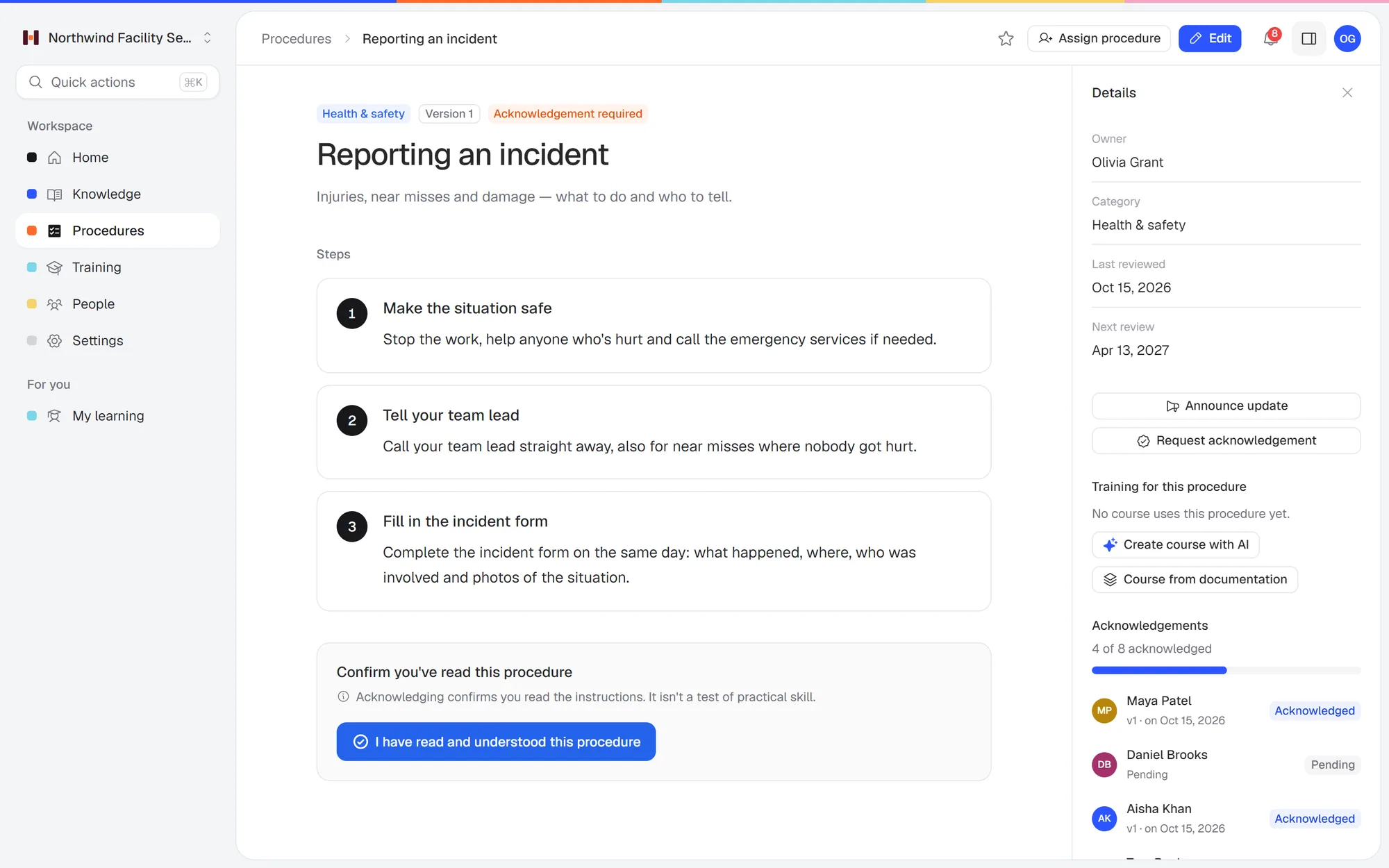 A procedure in Helpable: numbered steps with photos, a version number, and who has read and acknowledged it.
Built for: small teams that write down how work gets done so new people can learn it, and want to see who actually did.
Helpable is training software for teams of 5 to 50 people, with your SOPs and knowledge base in the same tool. You write a procedure as numbered steps with photos, or upload a document you already have (PDF, Word, text, Markdown or CSV) and let the AI draft it. Then you turn the procedures that matter into a short training with a quiz, assign it with a due date, and see who finished. When a procedure changes, people confirm they read the new version.
What you get on every plan
- Step-by-step procedures with photos, and read acknowledgements per version
- Training with lessons and quizzes, assigned with due dates and reminders
- Progress per person
- An internal knowledge base and a public help center for customers
- AI that drafts articles and trainings from your own documents, and AI search that answers questions from your content with a link to the source
Plans: Business is $29 a month for 3 people. Business Plus is $89 a month for 5 people and adds video lessons, final tests, certificates, automatic assignment for new hires and learning paths. Business Max is $179 a month for 9 people and adds recurring training, results per team and locations with their own managers. You add people one at a time. The free trial runs 14 days and needs no credit card.
Pick it if: your guides exist so people learn the job, and you want to know who read them, who passed the quiz and who still has to.
Not the right fit if: your processes are mostly clicks in software and you want guides made by recording your screen. Helpable has no screen recorder. You can still paste screenshots into a step, or keep a recorder for capture and put the result in Helpable for training.
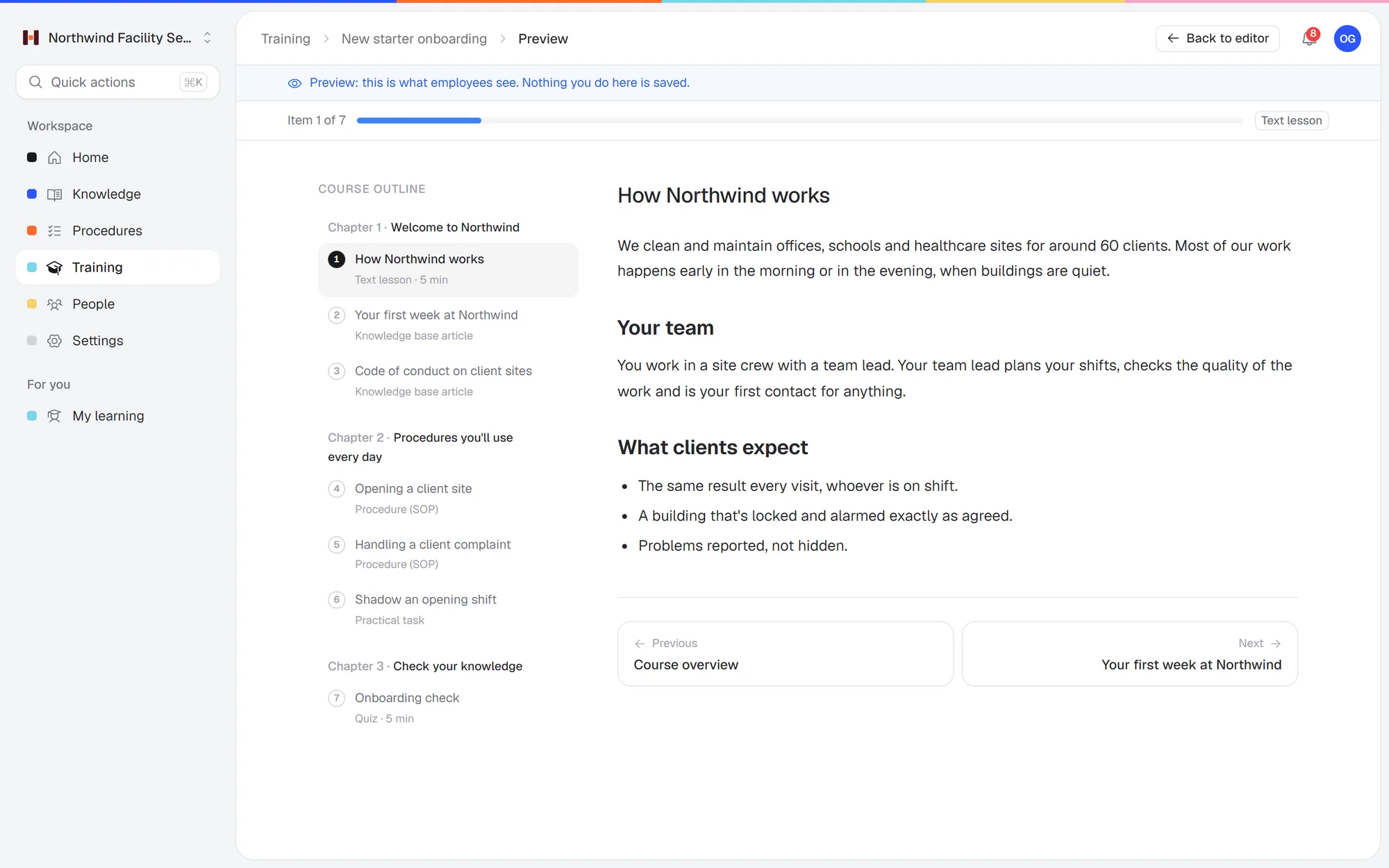 An onboarding training built from existing procedures and articles, ending with a short quiz.
2. Tango
Built for: capturing workflows in the browser and sharing them as step-by-step guides.
Price (checked Oct 17, 2026): a free plan with 5 shared workflows, browser capture and up to 10 users per workspace. Pro is $22 a user per month billed yearly ($30 monthly) for 1–2 users, and $15 billed yearly ($20 monthly) per user for 3 or more. Pro adds desktop capture and export to PDF, Markdown and HTML. Enterprise is a custom price (tango.ai/pricing).
Pick Tango if:
- Your processes are mostly clicks in browser software and you want guides made by recording them. Helpable has no screen recorder.
- Three or more people make guides and you want a low per-user price: $15 a user per month billed yearly ($20 monthly), less than Scribe's $23.
- You only need a few guides: the free plan covers 5 shared workflows and up to 10 users.
Pick Helpable instead if:
- You need to know who learned the process. Tango is built for capturing and sharing guides. Helpable turns a procedure into a training with a quiz, assigns it with a due date and shows who finished.
- Your work happens away from a screen. A cleaning, kitchen or install job can't be screen-captured. Helpable procedures are numbered steps with photos that people open on their phone.
- Procedures change and people must confirm. Helpable asks for a read acknowledgement per version, so you see who read the new one.
3. Dubble
Built for: turning screen capture into step-by-step guides.
Price (checked Oct 17, 2026): a free plan with unlimited guides and unlimited private viewers. Pro is $18 a month billed yearly ($24 monthly) and includes 3 creators, plus $6 ($8 monthly) per extra creator. 14-day free trial of Pro. Enterprise is a custom price (dubble.so/pricing).
Pick Dubble if:
- Budget is the main reason you're leaving Scribe: the free plan has unlimited guides, and Pro is $18 a month billed yearly for 3 creators.
- A few people make screen guides and everyone else just looks them up.
Pick Helpable instead if:
- You need training on top of guides. Dubble is built for making documentation. Helpable assigns procedures as training with a quiz and a due date, and shows progress per person on every plan.
- You want guides and the company handbook in one place. Helpable keeps procedures, a knowledge base and AI search together, so a new hire can ask a question in plain words and get the answer with a link to the source.
4. Guidde
Built for: how-to videos made with AI from a screen recording, for customers and teams.
Price (checked Oct 17, 2026): a free plan for up to 25 how-to videos with web capture. Pro is $19 a creator per month billed yearly ($29 monthly). Business is $39 billed yearly ($59 monthly) for up to 5 creators and adds desktop capture. Viewers are free. 7-day free trial of Business, no credit card (guidde.com/pricing).
Pick Guidde if:
- Your team learns better from short narrated videos than from written steps.
- You make how-to videos for customers as well as staff. Viewers are free.
- You want to start free: the free plan covers up to 25 videos with web capture.
Pick Helpable instead if:
- People follow the steps while they work. A Helpable procedure is a list of numbered steps with photos that someone reads at their own pace on a phone. When one step changes, you edit that step.
- You want one price for the whole team. Guidde charges per creator, and desktop capture starts on Business at $39 a creator billed yearly. Helpable charges per team member, and everyone can be assigned training: $92 a month for 10 people on Business.
- You need training with a quiz and a due date. Helpable assigns it, sends reminders and shows who passed.
5. Folge
Built for: making step-by-step guides on your Mac or Windows computer, stored locally.
Price (checked Oct 17, 2026): no subscription. A free version with 5 guides and PDF export. Personal is $89 one-time for one platform (Mac or Windows). Business is $155 per seat, one-time, for both platforms. 7-day money-back guarantee on paid licenses, no trial (folge.me).
Pick Folge if:
- You'd rather pay once: $89 for one platform, or $155 a seat for Business on Mac and Windows.
- Your guides must stay on your own computer.
Pick Helpable instead if:
- Your team needs the procedures wherever they are. Folge is a desktop app. Helpable runs in any browser on phone, tablet or laptop, with search across every procedure.
- You need to assign and track. In Helpable you assign a procedure as training, add a quiz and see who finished. With Folge, sharing and tracking happen in another tool.
6. iorad
Built for: interactive tutorials that walk a person through any software step by step.
Price (checked Oct 17, 2026): Individual is $200 a month for 1 creator. Team is $500 a month with 1 seat included, plus $50 a month per extra seat. Enterprise is quoted, for 20+ creators. A free plan is listed in the FAQ. All paid plans include unlimited learners (iorad.com/pricing).
Pick iorad if:
- You train people on software and want them to click through a live, interactive walkthrough.
- You want unlimited learners on every paid plan.
Pick Helpable instead if:
- You're a small team on a budget. iorad's first paid plan is $200 a month for one creator. Helpable Business is $92 a month for a team of 10.
- Much of your work isn't in software. Helpable procedures use steps with photos, so they work for on-site and hands-on jobs as well as screen work.
- You want a handbook and training in the same tool. Helpable adds a knowledge base, read acknowledgements and quizzes to your procedures.
7. Whale
Built for: documenting procedures, policies and company knowledge, and training people on them, with a screen recorder built in.
Price (checked Oct 17, 2026): a free plan for 1 creator and up to 10 members. Scale is $249 a month billed yearly ($399 monthly) for 3 creators, plus $29 ($39 monthly) per extra creator. Advance is $499 billed yearly ($799 monthly) for 5 creators (usewhale.io/pricing).
Pick Whale if:
- You want a screen recorder and training in one tool. Helpable has no screen recorder.
- A few people write and many people read: Scale covers 3 creators, and readers aren't charged per seat.
- You're 10 people or fewer and the free plan (1 creator, up to 10 members) is enough.
Pick Helpable instead if:
- You've outgrown the free plan but Scale is too big a step. Scale is $249 a month billed yearly ($399 monthly). Helpable Business is $92 a month for 10 people, billed monthly.
- You want a help center for customers too. Every Helpable plan includes a public help center next to the internal knowledge base.
- People must confirm each new version. Helpable records read acknowledgements per version, with who confirmed and when.
More detail: Helpable vs Whale.
8. Trainual
Built for: turning SOPs and policies into role-based training. Screen recording is included on every plan.
Price (checked Oct 17, 2026): not public. You book a demo. The pricing page lists a one-time $1,000 implementation fee and says Trainual "is best suited for companies with 25 - 1000 employees". No free trial (trainual.com/pricing).
Pick Trainual if:
- You have 25 people or more and want screen recording, assigned training and e-signatures in one tool.
- You need HR and payroll integrations, SCORM storage (from Pro) or a native mobile app. Helpable has none of those.
Pick Helpable instead if:
- You want to see the price and try it first. Trainual shows no price, has no free trial and charges a required $1,000 setup fee. Helpable lists every price, has a 14-day free trial without a credit card and no setup fee.
- You're under 25 people. Trainual says it's best suited for 25 to 1,000 employees. Helpable is built for teams of 5 to 50 and adds people one at a time, so a team of 10 pays $92 a month on Business.
Full breakdown: Trainual pricing. We compare the two head to head in Trainual vs Scribe.
What 3 guide makers pay per month
Most screen-guide tools charge per creator, so here's the monthly price for 3 people who make guides (checked Oct 17, 2026). "Yearly" is the monthly rate when you pay for a year.
| Tool | 3 creators, billed monthly | 3 creators, billed yearly |
|---|---|---|
| Scribe Pro Team (5-seat minimum) | $145 | $115 |
| Tango Pro | $60 | $45 |
| Dubble Pro | $24 | $18 |
| Guidde Pro | $87 | $57 |
| iorad Team | $600 | Not listed |
| Whale Scale | $399 | $249 |
| Folge Business | $465 once | $465 once |
Helpable works differently: everyone on the team has a seat, because everyone gets assigned training and their progress is tracked. A team of 10 on Business pays $92 a month. On Business Plus, with video lessons and certificates, it's $129.
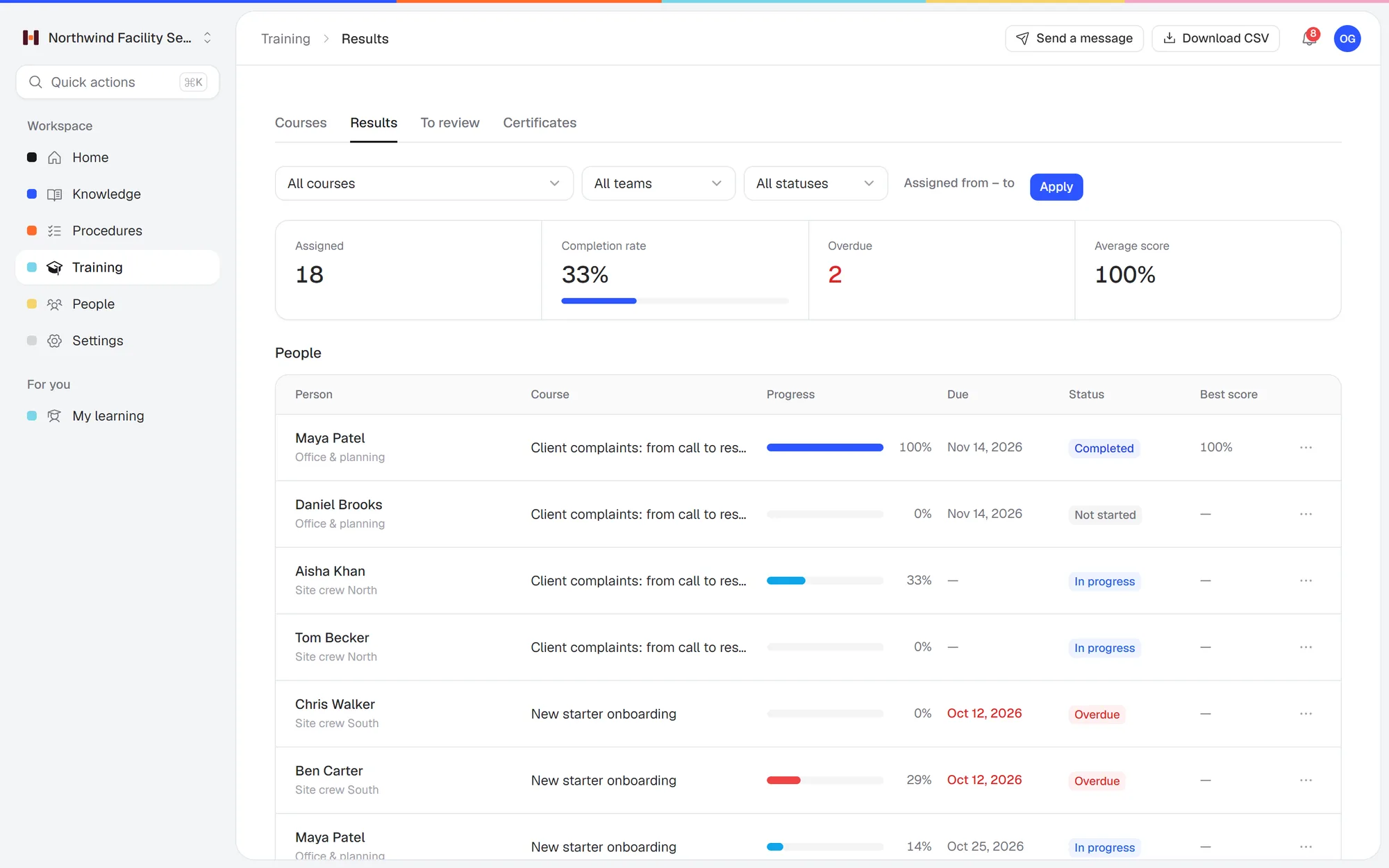 Training results per person in Helpable: who finished, who's overdue, and their scores.
Free Scribe alternatives
If you want a free screen-guide tool (checked Oct 17, 2026):
- Dubble: unlimited guides and unlimited private viewers on the free plan.
- Tango: free for 5 shared workflows and up to 10 users.
- Guidde: free for up to 25 how-to videos.
- Folge: free for 5 guides, on your own computer.
- Whale: free for 1 creator and up to 10 members.
- Scribe Basic: still free for browser capture.
Helpable has no free plan. You get a 14-day free trial, and after that you pay per month with no setup fee.
Is there a Microsoft alternative to Scribe?
Windows has long had Steps Recorder, which saves the clicks you make with a screenshot of each one. Microsoft now lists it as deprecated: it "is no longer being updated and will be removed in a future release of Windows", and Windows 11 shows a deprecation banner when you open it. Microsoft suggests Snipping Tool, Xbox Game Bar or Clipchamp instead (checked Oct 17, 2026, learn.microsoft.com). None of these turn clicks into a written guide the way Scribe does.
How to choose
- Is the guide for looking things up, or for learning the job? For look-ups, a screen-guide tool is enough. For learning the job, you need assignments, quizzes and progress per person.
- Where does the work happen? Work in software suits screen capture. Work on the floor, on site or with customers suits short procedures with photos that people open on their phone.
- Who makes the content, and who reads it? Per-creator pricing suits a few writers and many readers. If you need to track every reader, you need a tool where each person has a seat.
Say a property management company with 14 people documents how to log a maintenance request in its software and how to do a move-out inspection on site. The first fits a screen guide. The second needs steps with photos, and the company wants every new hire trained on both. That's the job Helpable is built for. See SOP software for small teams or compare the plans.
FAQ
What is the best Scribe alternative?
It depends on why you use Scribe. To make screen guides for less, look at Tango or Dubble. For a one-time price, Folge. If your guides are there to train people and you want to track who learned what, Helpable puts SOPs, training with quizzes and progress per person in one tool.
Is there a free alternative to Scribe?
Yes. Dubble has a free plan with unlimited guides, Tango is free for 5 shared workflows, Guidde is free for 25 videos and Folge is free for 5 guides (checked Oct 17, 2026). Scribe's own Basic plan is also free for browser capture.
How much does Scribe cost for a team?
Scribe Pro Team is $23 a seat per month billed yearly, or $29 monthly, with a 5-seat minimum (checked Oct 17, 2026). That's at least $115 a month on yearly billing.
Which Scribe alternative works on the desktop?
Folge is a desktop app for Mac and Windows. Tango Pro, Guidde Business and Scribe Pro also capture desktop apps. On the free plans, most tools capture the browser only.
Does Helpable record screens like Scribe?
No. Helpable builds procedures from steps and photos, or drafts them with AI from your existing documents. Its job is training people on those procedures and showing who learned them.
Can I use Scribe and Helpable together?
Yes. Make the screen guide in Scribe, paste its steps and screenshots into a Helpable procedure, and add that procedure to a training with a quiz. Helpable has no direct Scribe integration.
Try it with your own procedures
Put three of your real procedures in Helpable, turn one into a short training and assign it to a new hire. Start a free 14-day trial (no credit card), or see the plans first.