Agency SOP software
Helpable is agency SOP software: your kick-off steps, launch checks and client agreements in one place, with training and read confirmations next to them. Every client gets the same review rounds and go-live checks, and a freelancer who joins for six weeks works your way before the first client deadline.
- Same quality for every client
- Freelancers productive sooner
- See who read each change
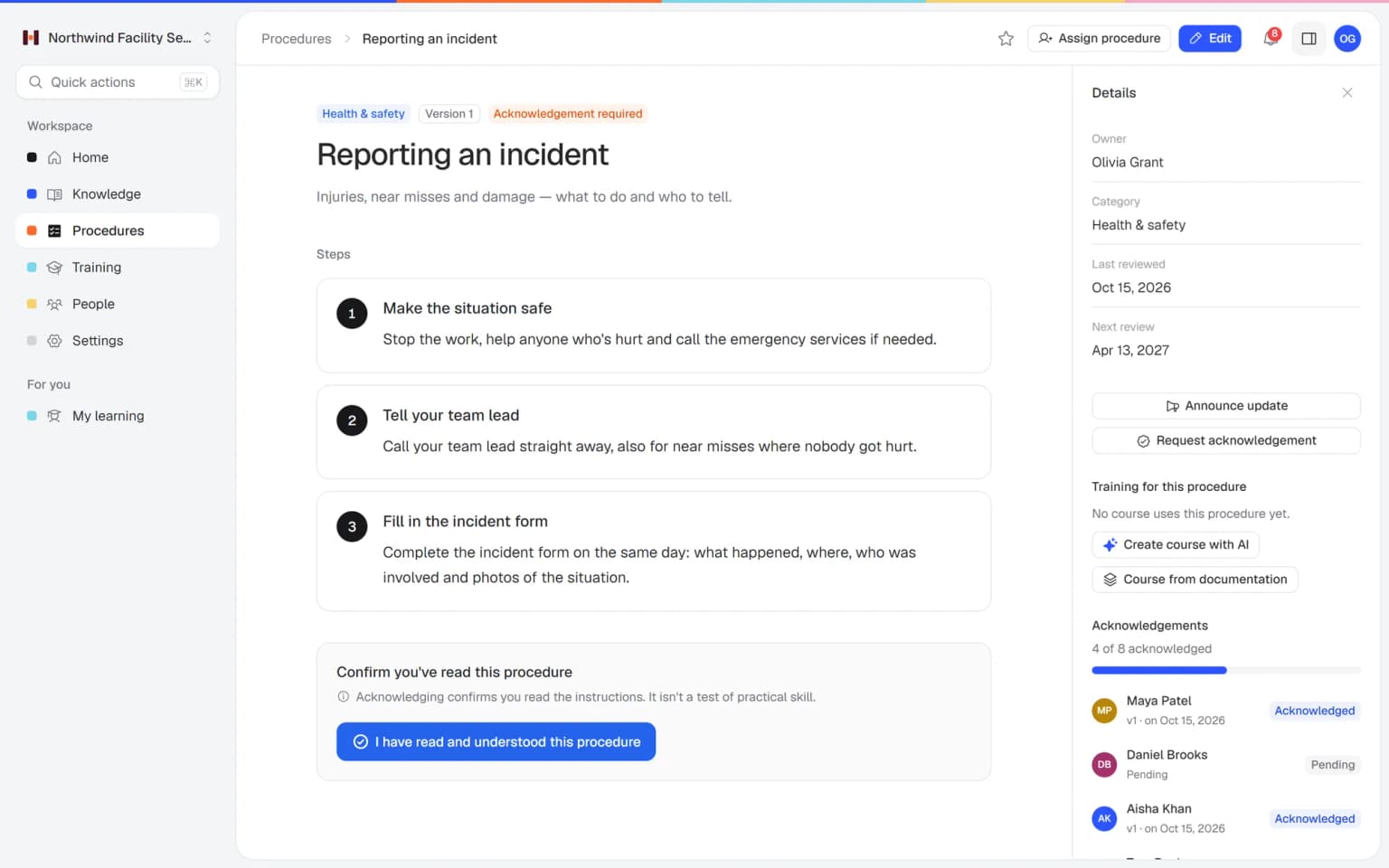
Where it pinches in a growing agency
Four moments from an agency week, from kick-off to account handover, and how Helpable handles them.
From senior know-how to one way of working, in four steps
Most agencies set this up in a few sessions, starting with the processes that cause the most rework.
- 1Get senior know-how written downAdd proposal guides, launch checklists and client notes, and the AI writer turns them into draft articles. Client agreements get a category per client.
- 2Run every project the same wayKick-off, review rounds, launch and handover become procedures with numbered steps, checklists and one owner each.
- 3Get freelancers productive soonerLet AI draft an onboarding training from those procedures and assign it with a due date before the first client deadline.
- 4Every change reaches the whole teamPublish a new version with a short summary and ask the team to confirm. You see per person who read it.
Everything to keep client work consistent while the team changes
The parts agencies lean on when a new client starts, a site goes live or a freelancer joins. Click through to see how each one works.
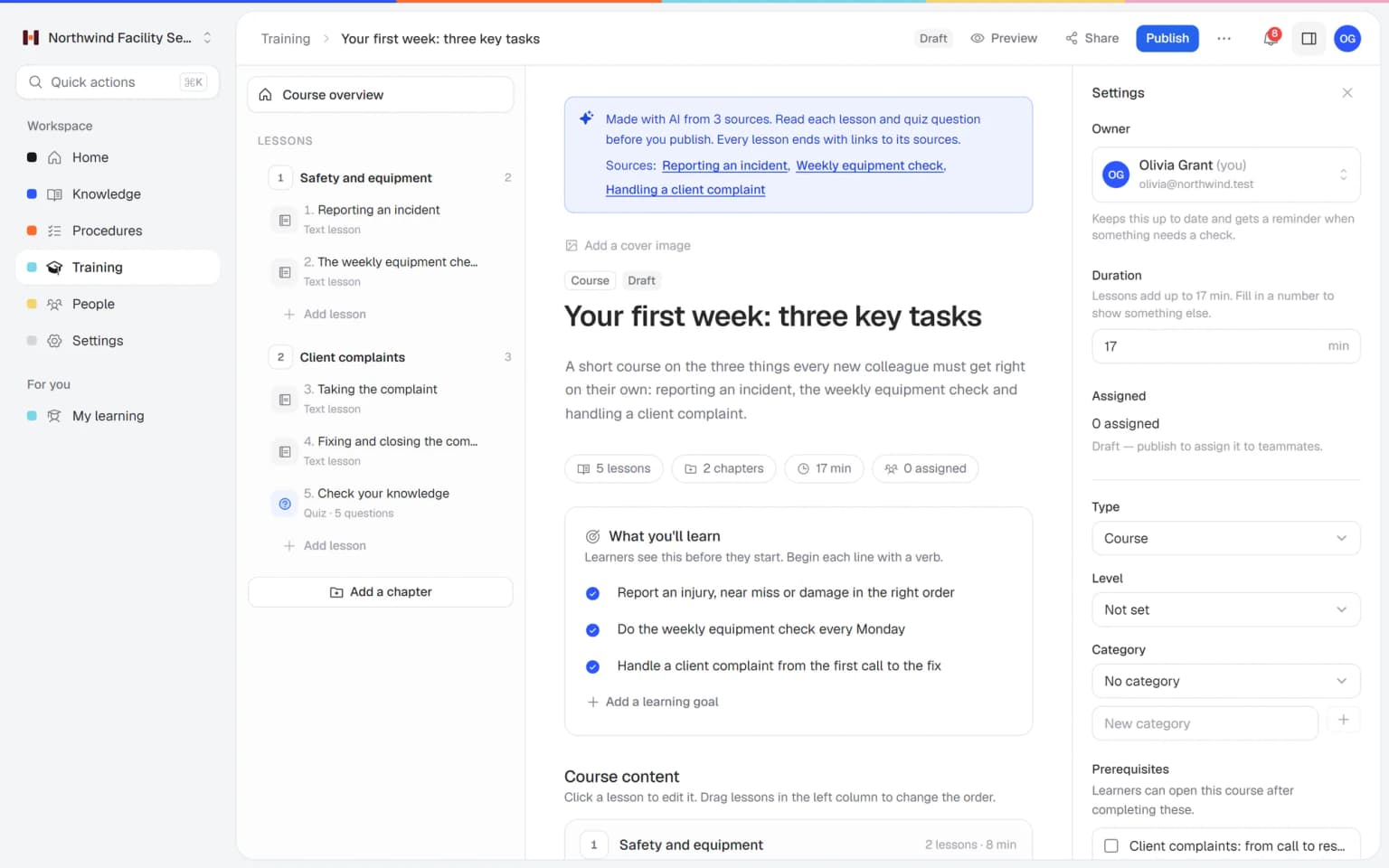
An onboarding training from your own procedures, ready for the next freelancer
Pick your procedures for kick-off, review rounds and launch, and AI turns them into a training with lessons and quiz questions. Every lesson lists its sources, so you see right away whether it matches how you work.
- Made from the procedures you pick
- Quiz questions on the rules that matter
- Sources listed under every lesson
- You edit and publish
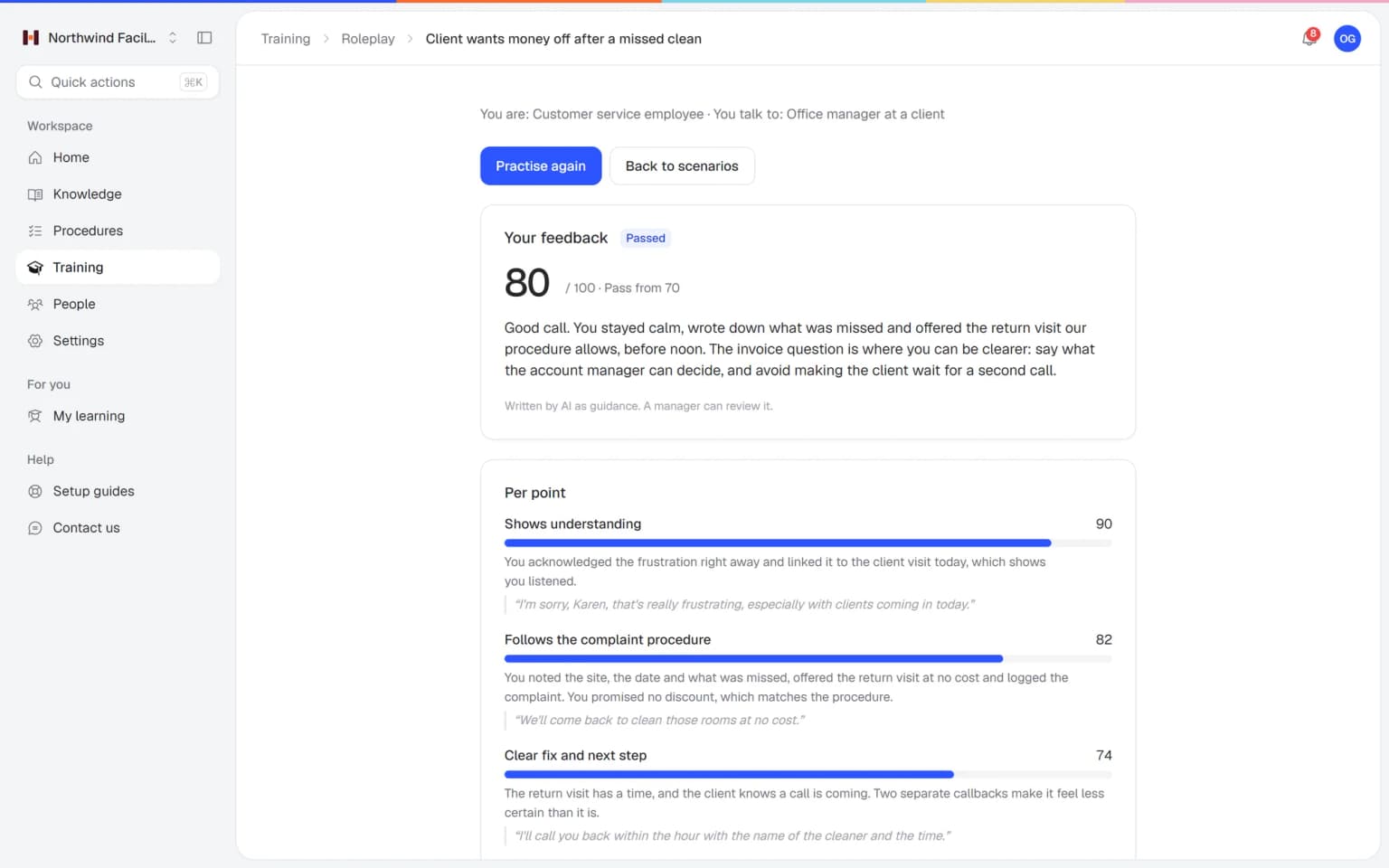
Your account managers practice the hard client conversation before it happens
A client asks for extra work inside the agreed scope, is upset about a missed deadline or is unsure about renewing. Your team practices those conversations with an AI that plays the client, in a scenario you build from your own agreements. Every conversation ends with a score and concrete tips.
- Scenarios from your own client agreements
- A score and tips after every conversation
- Practice on laptop or phone
- You see who is ready
What else belongs with your procedures
Account managers, makers and freelancers work from the same client agreements and launch checks. These parts keep them current.
Made for agencies that grow and keep their quality
What Helpable takes off your plate, and what it doesn't
An honest list of what Helpable handles for an agency, and what stays in your project tool, time tracking and client portal.
- Assigns onboarding to every new team member automatically (from Business Max)
- Sends reminders before and after a due date
- Tells managers when training is overdue
- Asks people to confirm a changed procedure and tracks who did
- Drafts lessons and quiz questions from your own procedures
- Drafts knowledge base articles from your files and links
- Knowing how your agency works best: you bring the know-how
- Project planning and time tracking
- Client portals and file sharing
- Connections to Slack or your project tool (not available yet)
One fixed price for your whole agency
Try Business Plus free for 14 days. No credit card needed.
Business
Your knowledge base for team and customers, written faster with AI.
- AI answers with the source
- An internal knowledge base and a public help center
- AI writes first versions from your own documents
- Start from what you have: documents, Word files and your website
- Procedures everyone follows, with read confirmations
- Your help center on your own web address
- 250 AI credits per month
Business Plus
Train your team on that knowledge: courses, quizzes and progress per person.
- Everything in Business, plus:
- Training with quizzes, due dates and reminders
- See per person who finished what
- Practice conversations with AI, included
- Video lessons and final tests
- Certificates you can show clients and inspectors
- Results exported in one click
- 3 help centers and 3 internal knowledge bases
- 750 AI credits per month
Business Max
Training that runs by itself, and proof of who really knows what.
- Everything in Business Plus, plus:
- New colleagues get their training automatically
- A fixed onboarding route from day one
- Learning insights: who really studied and who clicked through
- Skills matrix and a training record per person
- Practical work signed off on the floor
- Locations with their own managers
- Refresher training that comes back by itself
- Certificates that expire on time, in your own design
- Your help center fully in your own brand
- 10 help centers and 10 internal knowledge bases
- 1,500 AI credits per month
Questions from agencies
Is Helpable suitable for a small agency?
Yes, Helpable is built for teams of roughly 5 to 50 people, which fits most marketing, design and web agencies. A small agency can start in Helpable with a handful of procedures for kick-off and launch, an internal knowledge base for client agreements and one onboarding training.
How fast can we start with Helpable?
You can start with Helpable on the day you sign up, with a free trial of 14 days on Business Plus. In Helpable you begin from a ready-made template, such as employee onboarding or SOP training, or let AI draft a training from procedures you already wrote. Most of the work is writing down your kick-off and launch steps once.
Can Helpable use our existing docs and processes?
Yes, Helpable takes PDF, Word, text, Markdown and CSV files and links, and the AI writer turns them into draft articles you check. From published articles and procedures, Helpable's AI then drafts a training with lessons, learning goals and quiz questions that link to their sources. You edit it and publish it.
Can freelancers use Helpable?
Yes, in Helpable you invite freelancers by email as members, assign the training and procedures they need and remove them when the project ends. Helpable counts each person as a team member, and extra team members can be added to your plan.
Can we keep separate knowledge per client?
Helpable lets you organize the internal knowledge base in categories, for example one per client. In Helpable everyone in the workspace who can read internal knowledge can open those categories, so keep confidential client files in your own file storage.
Does Helpable work on a phone or at a client's office?
Yes, Helpable works in the browser on phones, tablets and laptops, so a designer can check the launch list at a client's office. Helpable has no native app to install: people open a link and log in.
How do we see who is up to speed?
Helpable shows per person which training they finished, their quiz scores, which procedure version they confirmed and what is overdue. Helpable sends reminders before and after a due date and tells managers when training is overdue. Business Plus adds a CSV export, and Business Max adds results per team.
Can our clients see anything in Helpable?
Helpable keeps your internal knowledge base, procedures and training visible to your own team only. Clients see only what you publish in a public help center in Helpable, with your own branding, categories and search.
Does Helpable connect to Slack, Asana or our project tool?
Not yet, Helpable has no connection with Slack, Asana or other project tools at the moment. Helpable sends reminders and updates by email and as notifications in the app.
Is Helpable available in Dutch, and where is our data stored?
Helpable works in English and Dutch, and a public help center can be in more than one language. Helpable stores your data in the EU, and roles decide who sees what: owner, admin, training manager, course creator and member.
What does Helpable cost, and which plan does an agency need?
Helpable starts at $29 per month for Business, with 3 team members, a knowledge base, procedures, read confirmations and a custom domain for your help center. Helpable Business Plus at $89 per month gives you 5 team members and adds training, quizzes, assigning with due dates, certificates and practice conversations with AI. Business Max assigns onboarding to new people automatically and adds recurring training, certificate expiry and up to 10 knowledge bases, and you can try Business Plus free for 14 days.
How is Helpable different from a wiki or a shared drive?
Helpable gives every procedure one owner, a review date, a version history and a record of who confirmed it. On top of that, Helpable adds training, quizzes and reminders, so new people learn the process and you see who did. A wiki or drive stays handy for notes and files, and the steps people must follow go into Helpable.
Agency SOP software, onboarding and handovers: what agencies ask
Agency owners and operations leads search for these once the team outgrows a shared drive and quality starts to depend on who happens to work on an account. Each answer starts with what Helpable does, then how it works in a normal agency week.
Agency SOP software for repeatable client delivery
Helpable is agency SOP software that turns each service you sell into a repeatable procedure, so an SEO audit, a campaign launch or a website go-live is delivered the same way for every client. Most agencies know their best way of working, but it lives with two or three seniors, and a junior who joins in March learns it by making the mistakes the seniors made years ago.
Each procedure has numbered steps with screenshots and checklists, one owner and a review date, so the campaign setup checklist stays current when an ad platform changes its screens again. When an account lead improves a step, they publish a new version with a short note on what changed, everyone assigned gets the update, and you see per person who confirmed it. The page on SOP software shows the details.
Client onboarding process for agencies
With Helpable an agency writes its client onboarding process down once and runs it the same way for every new account, from the signed proposal to the first report. The first weeks with a new client set the tone, and they go wrong in small ways: access to the ad account arrives late, nobody asked for the brand files, the client expects weekly updates while the team planned monthly ones.
The procedure covers the kick-off call, requesting access to ad accounts, analytics and the CMS, collecting brand assets, agreeing the reporting rhythm and who on the client side signs off. Client-specific agreements go into the internal knowledge base with a category per client: tone of voice, approval contacts, what is in scope. Keep confidential files in your own storage, since everyone with access to internal knowledge can open those categories. A web agency can also publish a public help center for its clients, for example on editing pages in the site it built, in its own branding.
How to onboard freelancers at an agency
In Helpable freelancers get a short onboarding training on your tools, file naming, feedback rounds and who approves what, assigned with a due date that falls before their first client deadline. A freelancer who joins for a six-week project should be productive on day two, and the senior designer should keep their morning for client work.
Invite them by email, assign the training and the procedures for their part of the work, and remove them when the project ends. From Business Max, learning paths set several trainings in order, such as agency basics first and the launch process second, and new people are enrolled automatically. A short quiz shows whether the key rules landed. Read more about employee onboarding.
Agency knowledge base: client handovers when someone leaves
With Helpable an account handover follows a fixed procedure, and the client's knowledge stays in the agency's knowledge base when an account manager moves on. Handovers are where agencies lose clients: the new contact asks questions the client answered a year ago, a promised discount is forgotten, the reporting format changes by accident.
The handover procedure lists what to pass on: open tasks, running campaigns, agreements on scope and rates, contacts and their preferences. Because the client page already holds those agreements, the new account manager reads it, asks Answers whatever is unclear and gets a reply with the source. The same works when a website moves from the build team to maintenance.
Agency process documentation: the same quality on every account
For process documentation at an agency, Helpable combines procedures, read confirmations and short trainings, so every client gets the checks your best people would do. Put the launch checks for forms, tracking, redirects and page speed in one procedure, and the review rules for copy and design in another.
When a mistake slips through, add the step that would have caught it, publish a new version and ask the team to confirm. Let AI draft a short training with quiz questions from those procedures, with each lesson linked to its source, and see in the reports who passed. Questions Answers cannot answer go onto a list of gaps, which tells the owner which agency knowledge to write down next. More in process standardization.
The same quality for every client, whoever runs the project
Start with your kick-off and launch steps. Add a freelancer onboarding the same week and see who is up to speed.
Start free trial- 14 days free
- No credit card needed
- Cancel any time