Knowledge base for startups
Helpable is a knowledge base for startups that takes the repeat questions off the founders. The answers you give in chat every week become a handbook new hires search themselves, every hire gets the same first week, and each process has one owner while the team doubles.
- Founders answer fewer questions
- A first week that runs itself
- Every process has an owner
Where it pinches in a fast-growing startup
Once the team passes ten people, the same questions in chat, a different first week for every hire and processes nobody owns start to hurt. Here is how you handle each with Helpable.
From founder's head to a handbook the team uses, in four steps
A small team builds this step by step, starting with what new hires ask most.
- 1Your handbook in an afternoonAdd your website, docs, slide decks or links and the AI writer turns the answers in the founders' heads into draft articles. You check them and publish.
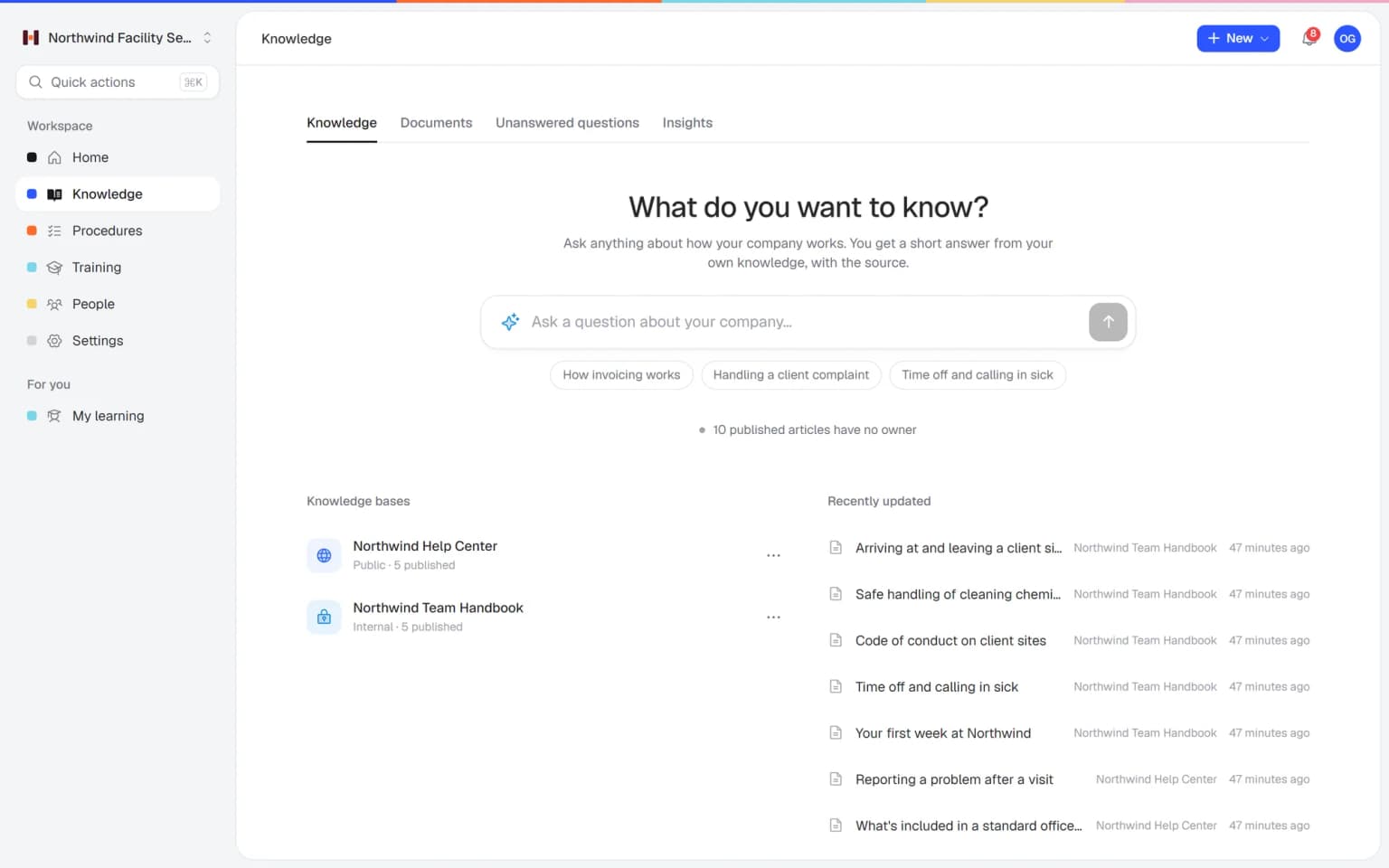
- 2New hires find the answer themselvesThey search the handbook or ask Answers in their own words and get a short reply with the source. The founders' chat stays quiet.
- 3A first week that runs itselfAssign the onboarding with a due date and reminders, and from Business Max a rule for everyone who joins later.
- 4Every change reaches everyonePublish a new version of a policy or procedure with a short summary and ask the team to confirm. You see per person who did.
Everything to let a growing team find its own answers
What a startup uses when new people join every month and the founders are busy with customers and investors.
New hires ask Answers, and your chat stays quiet
A new hire asks in their own words how expenses work or who decides on purchases. Answers replies with a short answer from your own handbook, with the source linked. Questions it cannot answer yet go onto a list, so you know what to write down first.
- Answers from your own knowledge
- With a link to the source
- Open questions on a list of gaps
- Works on laptop and phone

Your first sales hires practice the sales call before they call a customer
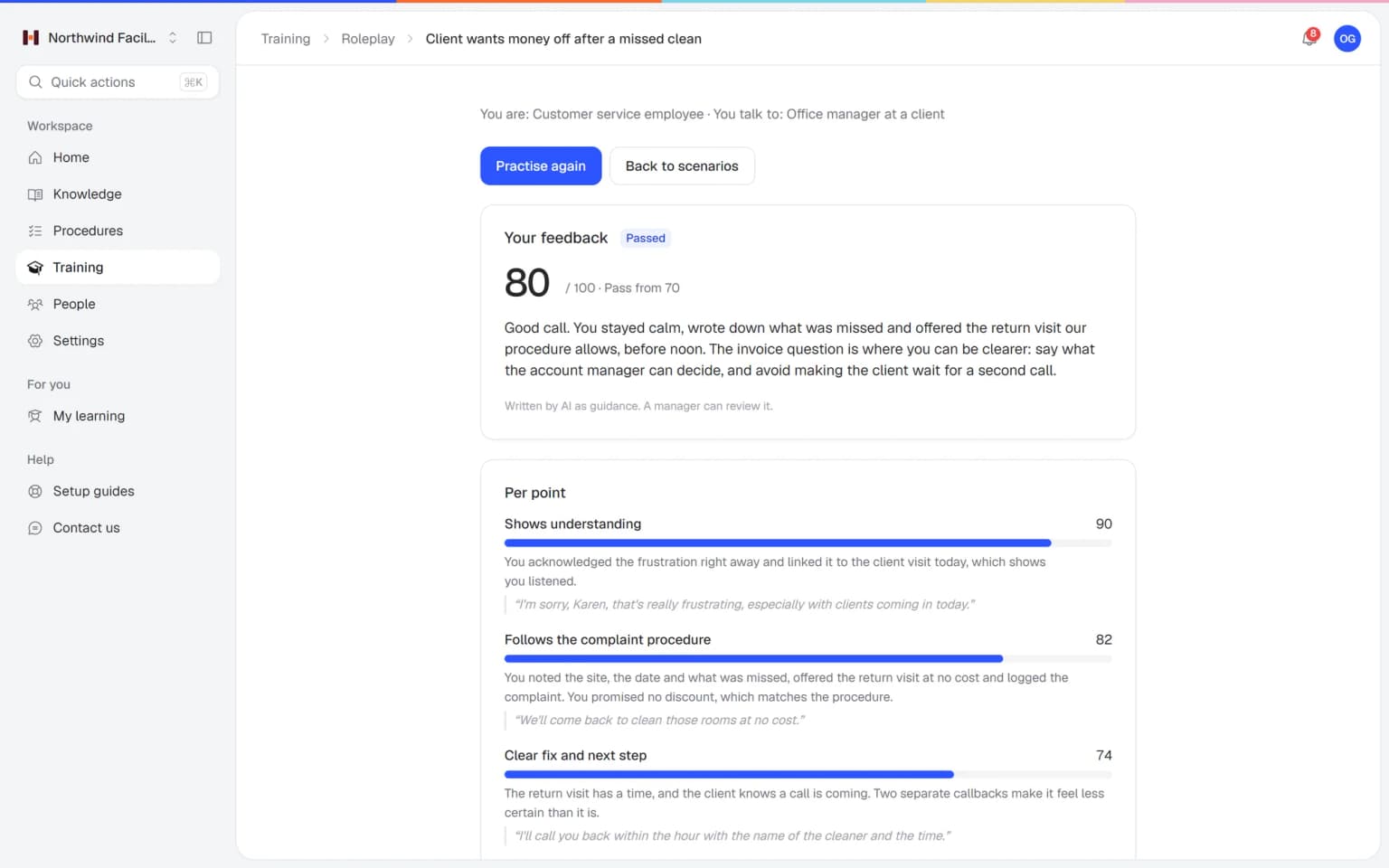
A prospect hesitates about the price, compares you with a bigger player or asks how you handle data. Your team practices those conversations with an AI that plays the customer, in a scenario you build from your own articles. Every conversation ends with a score and concrete tips.
- Scenarios from your own pitch and articles
- A score and tips after every conversation
- Practice on laptop or phone
- You see who is ready
What else belongs with your handbook
When someone new starts every month, these parts make sure they learn what the founders used to explain over lunch.
Made for young companies that grow fast
What Helpable takes off your plate, and what it doesn't
An honest list, so you know what to expect.
- Answers employee questions from your own knowledge, with the source
- Assigns onboarding to every new team member automatically (from Business Max)
- Sends reminders before and after a due date
- Tells managers when training is overdue
- Asks people to confirm a changed procedure and tracks who did
- Reminds the owner when a procedure is due for review
- Drafts articles and training from your own documents
- Payroll, contracts and HR records: those stay in your HR and payroll tools
- Project planning and task management
- Connections to Slack (not available yet)
- Knowing how your company works: you bring the know-how, Helpable gives it a home
One fixed price, your whole handbook included
Try Business Plus free for 14 days. No credit card needed.
Business
Your knowledge base for team and customers, written faster with AI.
- AI answers with the source
- An internal knowledge base and a public help center
- AI writes first versions from your own documents
- Start from what you have: documents, Word files and your website
- Procedures everyone follows, with read confirmations
- Your help center on your own web address
- 250 AI credits per month
Business Plus
Train your team on that knowledge: courses, quizzes and progress per person.
- Everything in Business, plus:
- Training with quizzes, due dates and reminders
- See per person who finished what
- Practice conversations with AI, included
- Video lessons and final tests
- Certificates you can show clients and inspectors
- Results exported in one click
- 3 help centers and 3 internal knowledge bases
- 750 AI credits per month
Business Max
Training that runs by itself, and proof of who really knows what.
- Everything in Business Plus, plus:
- New colleagues get their training automatically
- A fixed onboarding route from day one
- Learning insights: who really studied and who clicked through
- Skills matrix and a training record per person
- Practical work signed off on the floor
- Locations with their own managers
- Refresher training that comes back by itself
- Certificates that expire on time, in your own design
- Your help center fully in your own brand
- 10 help centers and 10 internal knowledge bases
- 1,500 AI credits per month
Questions from startups
Is Helpable a good knowledge base for startups?
Yes, Helpable is a knowledge base for startups and young companies with roughly 5 to 50 people. Helpable gives you an internal handbook, procedures, onboarding and training in one place, so new hires learn how things work from day one.
When should a startup start a knowledge base?
A good moment to start with Helpable is when the founders answer the same question for the third time, which usually happens once new people join every month. Starting small in Helpable works: a handful of articles on tools, leave and expenses and one onboarding training already take many questions off the founders.
How fast can we start with Helpable?
You can start with Helpable on the day you sign up, with a free trial of 14 days on Business Plus. Helpable has ready-made templates for employee onboarding, remote onboarding and company policies, so a first week for new hires can be in place before your next start date.
Can Helpable build onboarding from our existing docs?
Yes, the AI writer in Helpable drafts articles from files such as PDF, Word, Markdown or CSV, or from links. Helpable's AI can then draft a training from the articles and procedures you pick, with each lesson linking to its sources.
How do we onboard several new hires at once?
Helpable lets you assign the onboarding to a team or several people at once, with one due date and reminders. From Business Max a rule in Helpable enrolls every new person the day their account is created, which helps when hiring speeds up after a funding round.
What should go into a startup's employee handbook?
A startup handbook in Helpable works best when it starts with what new people ask in their first weeks: tools and access, who decides what, leave and expenses, and how you work with customers. In Helpable each topic becomes an article with an owner and a version history, so the handbook grows with the company.
How do we document processes as a startup?
Helpable turns each process into numbered steps with checklists, images and one owner, plus a review date so it stays current. In Helpable you start with the processes that hurt most when they go wrong, such as customer onboarding, invoicing or what to do when something breaks.
Can Helpable help with investor or security questions?
Helpable keeps your policies with a version history and shows per person who confirmed them, which gives you a clear record when investors or a large customer ask how the team handles data. Helpable stores your data in the EU and has a ready-made security awareness training template.
Does Helpable work on a phone and for remote teams?
Yes, Helpable works in the browser on phones, tablets and laptops, so remote hires can learn from wherever they work. Helpable has no native app to install, and a ready-made template for remote onboarding helps you start.
Does Helpable connect to Slack or our HR tool?
Not yet for Slack, and Helpable has no connection with HR or payroll tools. Helpable sends reminders and updates by email and as notifications in the app.
Is Helpable available in Dutch, and where is our data stored?
Helpable works in English and Dutch, so a team with Dutch and international colleagues can each use their own language. Helpable stores your data in the EU, and roles decide who can edit, publish and see reports.
What does Helpable cost, and which plan does a startup need?
Helpable starts at $29 per month for Business, with 3 team members, one internal knowledge base, one public help center, read confirmations and a custom domain. Helpable Business Plus at $89 per month adds 5 team members, training with due dates and practice conversations with AI. Business Max adds automatic assignment rules, up to 10 knowledge bases, recurring training and certificate expiry, and you can try Business Plus free for 14 days.
How is Helpable different from Notion or a wiki?
Helpable gives every article and procedure an owner and a version history, procedures get a review date, and read confirmations show who saw a change. Helpable also adds training, quizzes and reminders, so onboarding lives next to your knowledge. A wiki stays handy for notes and planning, and the knowledge people must follow goes into Helpable.
Helpable for startups, in more detail
Knowledge base for startups: what founders search for
Founders and the first operations hire start searching when the team doubles and every new person asks the same questions. These are the common searches, answered for a young company.
Knowledge base for startups: one handbook for a growing team
For a startup, Helpable is a knowledge base that holds the handbook, the policies and the answers founders keep repeating, so the next new hire finds them on their own. In the first year that knowledge lives in a founder's head and a few chat threads; once the team passes ten people, the same five questions take up hours every week.
In Helpable articles sit in categories with a version history, and one search finds articles, procedures and training lessons together. With Answers anyone can ask in their own words, such as how to book a work trip, and get a short answer from your own knowledge with a link to the source. Questions it cannot answer go onto a list of gaps, which shows the founders what to write down next. More in employee handbook software.
Startup onboarding software for a fast-growing team
With Helpable a startup gives every new hire the same first weeks: an onboarding training with lessons, a short quiz and a due date, assigned on the day they join, from Business Plus, and automatically from Business Max. After a funding round hiring speeds up, and the founder who used to take every new person to lunch and explain everything has no time left for it.
Start from the ready-made employee onboarding or remote onboarding template and fill in your own tools, people and rules. From Business Max, learning paths set several trainings in a fixed order, for example company basics first and the team's own way of working second. Reminders go out before the due date, and you see per person who finished. The page on employee onboarding shows the setup step by step.
How to document processes as a startup
In Helpable a startup documents processes as numbered steps with checklists, images and one owner each, starting with the ones that hurt most when they go wrong. For most young companies that means customer onboarding, invoicing, purchasing, expenses and what to do when something breaks.
Processes in a startup change often, so each procedure gets a review date that reminds the owner to check it. When a step changes, you publish a new version with a short summary and ask the people involved to confirm it, and you see per person who did. Drafts in docs and slide decks can go into Documents, where Helpable makes them searchable and suggests article drafts. More on process documentation software.
What to put in a startup employee handbook
A startup handbook in Helpable works best when it starts with what new people ask in their first weeks: tools and access, who decides what, leave and expenses, and how you work with customers. Write each topic as a short article with an owner, so it is clear who keeps it current as the company grows.
Rules people must know, like the expense rules or the data policy, go into procedures with read confirmations, so after a change you see who read the new version. A free employee handbook template helps you pick the first topics.
Investor and security questions for a growing startup
When investors or a first large customer ask how the team handles data and processes, Helpable gives you policies with a version history and a record of who confirmed them. Due diligence and security questionnaires tend to arrive at the busiest moment, and the answers end up rewritten every time.
Keep the approved answers as internal articles with an owner, so founders and sales reuse the same text. The ready-made security awareness template gives new hires a first training on handling data, reports show who completed it, and on Business Max it repeats every year. Your data in Helpable is stored in the EU, and roles decide who can edit, publish and see reports.
Notion or a real knowledge base for a scale-up?
A scale-up that has outgrown a wiki where anyone edits anything and nobody knows which page is current gets owners, versions and read confirmations in Helpable. Each article and procedure has an owner and a version history, roles decide who can edit and publish, and read confirmations show who saw a change.
A wiki stays handy for notes and planning. Use Helpable for the knowledge people must follow and be trained on.
Fewer questions for the founders, starting this week
Start with the five questions you answer most. Add an onboarding for your next hire and see who is up to date.
Start free trial- 14 days free
- No credit card needed
- Cancel any time