
Short answer: If you use Confluence as the place where your team's know-how lives, and nobody works in Jira, Helpable is our pick for teams of 5 to 50: a knowledge base, SOPs and training with quizzes in one tool that's quick to set up, from $29 a month. If you just want the cheapest hosted wiki, look at Outline. If you want free and self-hosted, look at BookStack or Wiki.js.
Confluence is Atlassian's team workspace: pages in spaces, live docs, whiteboards and databases, with Rovo AI and a deep link to Jira. It's free for up to 10 users. Standard is $7.15 a user per month billed monthly for a 10-user team, or $720 a year for 1–10 users. Premium is $14.10 a user per month ($1,400 a year for 1–10 users). Prices per user drop as the team grows, and there's a 7-day free trial of the paid plans (checked Oct 17, 2026, atlassian.com).
Small teams outside software development usually start looking for one of these reasons: the 11th user ends the free plan, spaces get messy without someone to keep order, nobody uses Jira, or the wiki holds procedures but can't check that people learned them. Below are ten alternatives, plus free and self-hosted options. Prices come from each vendor's own pricing page, checked on October 17, 2026. For a one-on-one look, see Helpable vs Confluence.
Confluence alternatives at a glance
| Tool | Built for | Price (checked Oct 17, 2026) | Free plan or trial | Training and read confirmations |
|---|---|---|---|---|
| Helpable | Knowledge base, SOPs and training for teams of 5–50 | $29/mo for 3 people, $9 per extra person | 14-day free trial | Yes |
| Notion | Docs, wiki and projects in one workspace | Plus $10/member/mo yearly ($12 monthly) | Free plan | No |
| Slite | AI knowledge base for teams | Basic $10/user/mo billed yearly | 14-day trial | No |
| Nuclino | Lightweight team wiki | Starter $6/user/mo yearly ($8 monthly) | Free (50 items) | No |
| Tettra | Knowledge base that answers questions in Slack | $8/user/mo yearly ($10 monthly), 10-user minimum | 30-day trial | No |
| Outline | Team wiki, hosted or self-hosted | $10/mo for 1–10 members, $79/mo for 11–100 | 30-day trial | No |
| ClickUp | Projects and tasks with docs | Unlimited $7/user/mo yearly ($10 monthly) | Free plan | No |
| Microsoft 365 (SharePoint) | Office apps, email and intranet | Business Basic $7/user/mo, paid yearly | 1-month trial | No |
| Google Workspace (Sites) | Email, docs and simple internal sites | Starter $7/user/mo yearly ($8.40 flexible) | 14-day trial | No |
| Guru | Enterprise AI knowledge | Not public | Not listed | No |
Training and read confirmations means you can assign content with a quiz and see who finished, or ask people to confirm they read the latest version. Confluence doesn't have these built in.
1. Helpable
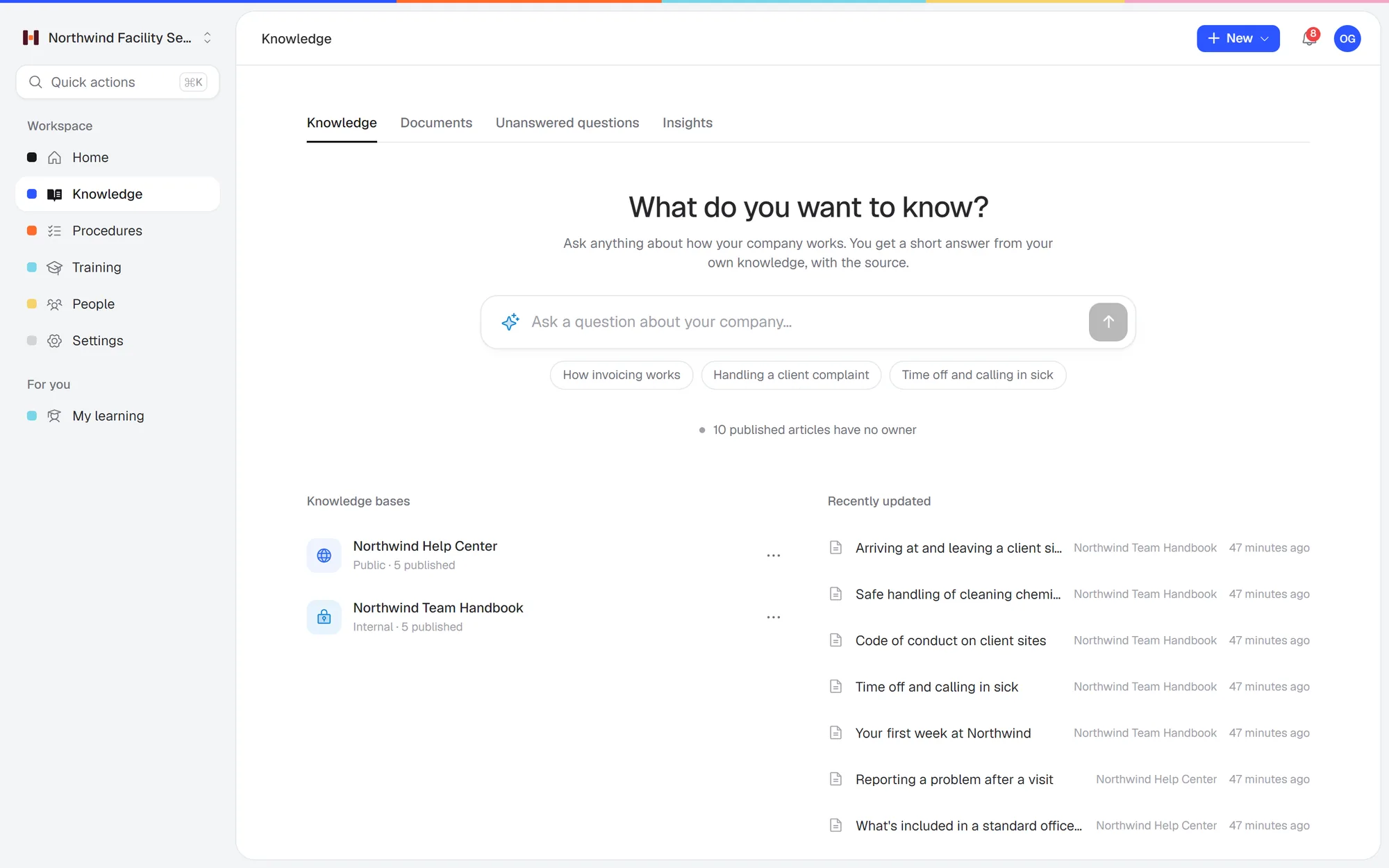 Ask a question in plain words and get a short answer from your own handbook, with the source.
Built for: small teams outside software development that want one simple place for how the work gets done, and want to know people actually learned it.
Helpable is training software for teams of 5 to 50 people, with your knowledge base and SOPs in the same tool. You write articles and step-by-step procedures, or upload documents you already have (PDF, Word, text, Markdown or CSV) and let the AI draft them. Each procedure has an owner, a version and a review date. When it changes, people confirm they read the new version. The important ones become a short training with a quiz, assigned with a due date. There are no spaces, page trees or Marketplace apps to configure, so the owner or an office manager can set it up in an afternoon.
What you get on every plan
- An internal knowledge base and a public help center for customers
- Step-by-step procedures with photos, and read acknowledgements per version
- Training with lessons and quizzes, assigned with due dates and reminders, and progress per person
- AI search that answers questions from your own content with a link to the source, and only from content that person may see
- Works in any browser on phone, tablet or laptop, with data stored in the EU
Plans: Business is $29 a month for 3 people. Business Plus is $89 a month for 5 people and adds video lessons, final tests, certificates, automatic assignment for new hires and learning paths. Business Max is $179 a month for 9 people and adds recurring training, results per team and locations with their own managers. You add people one at a time. The free trial runs 14 days and needs no credit card.
Pick it if: your wiki is really a company handbook and a set of procedures, and you want new people trained on it with proof of who knows what.
Not the right fit if: your team plans its work in Jira, you need whiteboards and databases, you want a free plan, or you need to host the software yourself. Helpable has no Jira connection, no free plan and is cloud-only.
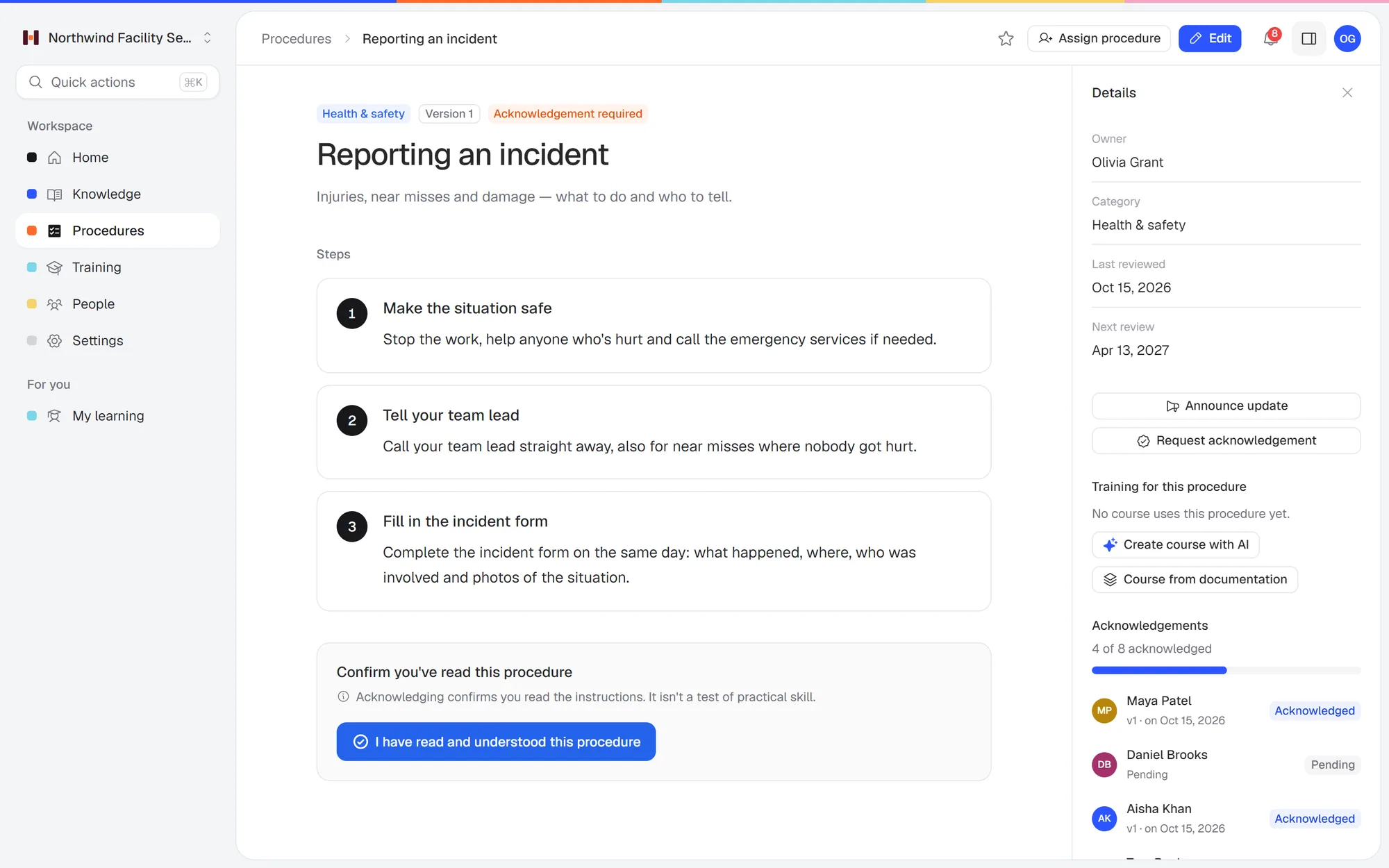 A procedure in Helpable: clear steps, a version number and who has read and acknowledged it.
2. Notion
Built for: docs, wikis and projects in one flexible workspace.
Price (checked Oct 17, 2026): a free plan for individuals, limited once 2 or more members join. Plus is $10 a member per month billed yearly ($12 monthly). Business is $20 billed yearly ($24 monthly) and is the first plan with full Notion AI. Enterprise is a custom price (notion.com/pricing).
Pick Notion if:
- Your team already works in Notion for projects and docs, and you want one flexible workspace.
- You want a free plan, or Plus at $10 a member billed yearly: $100 a month for 10 people, less than Helpable Business at $92.
Pick Helpable instead if:
- You want a fixed structure. In Notion every team designs its own wiki, and it drifts. Helpable gives you knowledge bases, categories and procedures with an owner and a review date, so the handbook stays in order.
- You need to know who read it. Notion has no read confirmations, quizzes or assigned training. Helpable has all three on every plan.
- You want AI answers without paying for AI per member. Full Notion AI starts on Business at $20 a member billed yearly: $200 a month for 10 people. Helpable includes AI search and AI credits on every plan, and Business is $92 a month for 10.
More detail: Helpable vs Notion and our list of Notion alternatives for a company wiki.
3. Slite
Built for: a knowledge base for teams, with AI that answers questions from your docs.
Price (checked Oct 17, 2026): Basic is $10 a user per month billed yearly, with 30 AI edits and 30 AI questions per user a month. Pro is $20 billed yearly and adds more AI credits and the Slite agent. Enterprise is a custom price. 14-day free trial, no credit card, no free plan (slite.com/pricing).
Pick Slite if:
- You want a tidy docs tool with AI answers from the first plan, at $10 a user billed yearly ($100 a month for 10 people).
- Your team mostly needs to look things up and doesn't need Jira or databases.
Pick Helpable instead if:
- You need to train people on the docs. Slite is built as a knowledge base. Helpable turns any article or procedure into a short training with a quiz, assigns it with a due date and shows progress per person.
- You want a help center for customers too. Helpable includes a public help center next to the internal knowledge base.
- You want to pay month to month. Slite's pricing page shows yearly prices only. Helpable bills monthly, and yearly saves about 20%.
4. Nuclino
Built for: a simple team wiki, which Nuclino calls "your team's collective brain".
Price (checked Oct 17, 2026): a free plan with 50 items. Starter is $6 a user per month billed yearly ($8 monthly). Business is $10 billed yearly ($12 monthly) and is the only plan with the AI assistant. Guests and read-only members count as users. 14-day free trial (nuclino.com/pricing).
Pick Nuclino if:
- Price per person matters most: Starter is $6 a user billed yearly, so $60 a month for 10 people.
- The free plan's 50 items are enough to get started.
Pick Helpable instead if:
- You need proof people read and learned it. Helpable asks for read acknowledgements per version and assigns training with quizzes. Nuclino is a wiki.
- You want AI on every plan. Nuclino's AI assistant is only on Business ($10 a user billed yearly). Helpable includes AI search and an AI writer on every plan.
- Your procedures are hands-on. Helpable procedures are numbered steps with photos that people open on their phone.
5. Tettra
Built for: a knowledge base that answers repeat questions in Slack, with experts who verify pages.
Price (checked Oct 17, 2026): Scaling is $8 a user per month billed yearly ($10 monthly), with a 10-user minimum. Enterprise is a custom price. 30-day free trial; no free plan (tettra.com/pricing).
Pick Tettra if:
- Your team works in Slack and the same questions keep coming up there. Helpable has no Slack app today.
- You have 10 people or more and want experts to verify pages on a schedule.
Pick Helpable instead if:
- You're fewer than 10 people. Tettra's 10-user minimum means at least $80 a month billed yearly ($100 monthly). Helpable Business is $47 a month for 5 people.
- You need training and read confirmations. Helpable assigns procedures as training with a quiz and records who confirmed each version.
More detail: Helpable vs Tettra.
6. Outline
Built for: a team knowledge base and wiki, in the cloud or on your own server.
Price (checked Oct 17, 2026): the cloud version has a flat price per team size: $10 a month for 1–10 members, $79 for 11–100 and $249 for 101–200. Self-hosted, a Community Edition is free with limited features and no support, and Business is $4 a user per month billed yearly with a 10-user minimum. 30-day free trial (getoutline.com/pricing).
Pick Outline if:
- Price is your main reason for leaving Confluence: $10 a month for up to 10 members, $79 for 11 to 100. That's less than Helpable at any team size.
- You want the option to host it yourself later.
Pick Helpable instead if:
- The wiki is your training material. Helpable turns pages into a short training with a quiz, assigns it and shows who finished.
- Procedures need an owner, a version and a review date. Helpable asks people to confirm each new version, so you know who's up to date.
- You want a help center for customers too. Helpable includes one on every plan.
7. ClickUp
Built for: project and task management, with docs and wikis alongside.
Price (checked Oct 17, 2026): a free plan with unlimited members and 60 MB of storage. Unlimited is $7 a user per month billed yearly ($10 monthly). Business is $12 billed yearly ($19 monthly). AI is a paid add-on per user. No trial; a money-back guarantee instead (clickup.com/pricing).
Pick ClickUp if:
- You want to move projects, tasks and docs into one tool, and possibly leave Jira too.
- The free plan, or Unlimited at $7 a user billed yearly, fits your budget.
Pick Helpable instead if:
- You only need the knowledge and training part. In ClickUp, docs are one part of a project management app, and AI is a paid add-on per user. Helpable is built for knowledge and training, with AI included on every plan.
- You need training with quizzes and progress per person. Helpable assigns procedures as training with a due date and shows who finished.
8. Microsoft 365 (SharePoint and Loop)
Built for: Office apps, email, Teams and SharePoint sites for documents and intranets.
Price (checked Oct 17, 2026): Business Basic is $7 a user per month, paid yearly, and includes SharePoint and Copilot Chat but not Loop. Business Standard with Copilot is $23.50 a user per month, paid yearly, and adds Loop and the desktop Office apps. Up to 300 users. One-month free trial (microsoft.com).
Pick Microsoft 365 if:
- You already pay for it: SharePoint comes with Business Basic at $7 a user per month, paid yearly.
- You need email, Office and Teams anyway, for up to 300 users.
Pick Helpable instead if:
- Nobody has time to build an intranet. SharePoint is built for files and sites, so turning it into a handbook takes setup. Helpable starts with a ready structure: knowledge bases, categories, articles and procedures.
- You need to know who read the policy. Helpable records read acknowledgements per version and assigns training with quizzes.
- People ask questions in plain words. Helpable's AI search answers from your own content with the source, on every plan. Copilot in SharePoint needs a Copilot license; the Copilot Business add-on is $21 a user per month ($18 until Dec 31, 2026).
We go deeper in SharePoint alternatives for small business.
9. Google Workspace (Google Sites)
Built for: email, Docs, Drive and Meet, with Google Sites for simple internal pages.
Price (checked Oct 17, 2026): Business Starter is $7 a user per month with a 1-year commitment ($8.40 flexible). Business Standard is $14 ($16.80 flexible). Google Sites is included on every plan. Up to 300 users. 14-day free trial (workspace.google.com/pricing).
Pick Google Workspace if:
- Your team is on Google already. Sites is included in every plan.
- A few linked pages and Docs are enough.
Pick Helpable instead if:
- Pages need an owner and a review date. In Sites, keeping pages current is up to you. Helpable reminds the owner when a procedure is due for a check.
- You need to know who read the policy. Helpable records read acknowledgements per version and assigns training with quizzes.
- People ask questions in plain words. Helpable's AI search answers from your own content with a link to the source, on every plan. In Workspace, Gemini in Docs and Drive starts on Business Standard at $14 a user billed yearly.
More detail: Helpable vs Google Drive.
10. Guru
Built for: enterprise AI knowledge, with answers inside Slack, Teams and the browser.
Price (checked Oct 17, 2026): not public. The pricing page says the price is "tailored to your organization's scale" and lists no plans, minimums or trial (getguru.com/pricing).
Pick Guru if:
- You're a larger company that wants verified answers inside Slack, Teams and the browser.
- You need enterprise security paperwork such as SOC 2 Type 2.
Pick Helpable instead if:
- You want a public price and a trial. Guru lists no price, plans or trial. Helpable lists every price and has a 14-day free trial.
- You're 5 to 50 people. Helpable is built for that size and adds people one at a time.
- You need training. Helpable assigns procedures with quizzes and due dates and shows progress per person.
More detail: Helpable vs Guru.
What a team of 10 or 25 pays
Monthly prices, checked October 17, 2026. "Yearly" is the monthly rate when you pay for a year.
| Tool | Team of 10 | Team of 25 |
|---|---|---|
| Helpable Business | $92/mo | $227/mo |
| Helpable Business Plus (video, certificates, auto-assign) | $129/mo | $249/mo |
| Confluence Standard | $71.50/mo ($60 yearly) | Depends on team size; use Atlassian's calculator |
| Confluence Free | $0 | Not available (10-user limit) |
| Notion Plus | $120/mo ($100 yearly) | $300/mo ($250 yearly) |
| Slite Basic | $100/mo billed yearly | $250/mo billed yearly |
| Nuclino Starter | $80/mo ($60 yearly) | $200/mo ($150 yearly) |
| Tettra Scaling | $100/mo ($80 yearly) | $250/mo ($200 yearly) |
| Outline (cloud) | $10/mo | $79/mo |
| ClickUp Unlimited | $100/mo ($70 yearly) | $250/mo ($175 yearly) |
| Microsoft 365 Business Basic | $70/mo, paid yearly | $175/mo, paid yearly |
| Google Workspace Starter | $84/mo ($70 yearly) | $210/mo ($175 yearly) |
Helpable costs more than a plain wiki because training, quizzes, read confirmations and progress per person are included. If you only need pages and search, a wiki-only tool is cheaper.
Free, open-source and self-hosted Confluence alternatives
Free hosted plans (checked Oct 17, 2026): Confluence itself is free for up to 10 users. Notion, Nuclino (50 items) and ClickUp have free plans with limits.
Open source and self-hosted: these are free to download and run on your own server. You handle hosting, updates, backups and security yourself, which is a real job without an IT department.
- BookStack: a free, MIT-licensed wiki organized as shelves, books and pages. Self-hosted only; the vendor doesn't offer hosting (bookstackapp.com).
- Wiki.js: free and open source under AGPL-v3. Self-host it or use a one-click DigitalOcean install (js.wiki).
- XWiki: open source under the LGPL license, with a free self-hosted Community version and paid plans (xwiki.org).
- Outline: a free self-hosted Community Edition with limited features and no support, or a paid self-hosted Business license.
If "on premise" is a must because of a contract or regulation, these are your options. If it's mainly about cost, a hosted tool is usually cheaper once you count the hours someone spends running the server.
How to choose
- Does your team work in Jira? If yes, Confluence's Jira link is hard to replace. ClickUp puts tasks and docs in one tool, if you want to move both.
- Is the wiki for looking things up, or for learning the job? For look-ups, a wiki is enough. If new people need to learn procedures and you need to know they did, you need training and read confirmations.
- Who will keep it running? Without an IT person, skip self-hosting and pick a tool your office manager can set up.
Say a dental practice group with 25 people keeps its front-desk scripts, sterilization procedures and HR policies in Confluence. Nobody uses Jira, and the practice manager can't tell who has read the updated infection-control procedure. That's the job Helpable is built for. See company wiki software or compare the plans.
FAQ
What is the best Confluence alternative for a small team?
For teams of 5 to 50 outside software development, Helpable puts a knowledge base, SOPs and training in one tool with a public price. For the cheapest hosted wiki, Outline costs $10 a month for up to 10 members. Notion fits teams that want docs and projects in one flexible workspace.
Is there a free alternative to Confluence?
Yes. Notion, Nuclino and ClickUp have free plans with limits, and BookStack, Wiki.js and XWiki are free open-source wikis you host yourself. Confluence itself is also free for up to 10 users (checked Oct 17, 2026).
What is the best open-source Confluence alternative?
BookStack and Wiki.js are both free and open source, and XWiki has a free Community version. All three need your own server and someone to maintain it.
Is there a Microsoft alternative to Confluence?
SharePoint, included in Microsoft 365 Business Basic at $7 a user per month paid yearly, is Microsoft's tool for internal sites and documents. Loop comes with Business Standard. Both take setup to work as a team handbook.
How much does Confluence cost for 10 users?
Confluence is free for up to 10 users. Standard is $7.15 a user per month billed monthly at 10 users, or $720 a year for 1–10 users. Premium is $14.10 a user per month, or $1,400 a year (checked Oct 17, 2026).
Can I move my Confluence pages to Helpable?
Yes. Export your pages from Confluence or copy the text into documents, then upload them to Helpable as PDF, Word, text or Markdown. The AI turns them into draft articles for you to review. There's no one-click Confluence import.
Try it with your own pages
Upload ten of your most-read Confluence pages, turn one procedure into a short training, and assign it to your newest hire. Start a free 14-day trial of Helpable (no credit card), or compare the plans first.

