Short answer: If you use SharePoint as a team wiki or intranet and nobody can find anything, Helpable is our pick for teams of 5 to 50: a searchable knowledge base, step-by-step procedures, read confirmations and training in one tool, from $29 a month. If you only need a simpler wiki, Notion, Confluence or Slab work. If you mainly use SharePoint to store files, Google Drive, Dropbox or Box are the direct swap.
SharePoint is included in every Microsoft 365 Business plan, so many small businesses end up with it without choosing it. It does a lot: document libraries, team sites, versioning, permissions. The complaints from small teams are usually the same:
- It needs someone to set it up. Sites, libraries and permissions work best with an admin, and most 15-person companies don't have one.
- Search misses things. SharePoint only shows what each person has permission to see, so a broken permission makes a document "disappear".
- Folders sprawl. Without a structure, a team site turns into a file share with extra steps.
- The wiki goes stale. Pages get written once and nobody knows if they're still true.
- No proof anyone read it. There's no built-in "read and confirm", quiz or training assignment on a SharePoint page.
That last one is what pushes many teams to look elsewhere: they want procedures people actually read and learn. The tools below are picked for that job. Prices come from each vendor's pricing page, checked on October 17, 2026.
SharePoint alternatives at a glance
| Tool | Built for | Price (checked Oct 17, 2026) | Free plan or trial | Read confirmations | Training and quizzes |
|---|---|---|---|---|---|
| Helpable | Knowledge base, SOPs and training for teams of 5–50 | $29/mo for 3 people, $9/extra person | 14-day trial | Yes, per version | Yes |
| Notion | Flexible docs and wiki | Plus $10/member/mo yearly; Business $20 | Free plan | No | No |
| Confluence | Team wiki tied to Jira | Free up to 10 users; Standard $7.15/user/mo | Free plan | Via add-ons | Via add-ons |
| Google Sites (Google Workspace) | Simple intranet pages | Included in Workspace Business plans | 14-day Workspace trial | No | No |
| Slab | Clean internal wiki | Free up to 10 users; Startup $6.67/user/mo yearly | Free plan | No | No |
| Nuclino | Lightweight team wiki | Starter $6/user/mo yearly ($8 monthly) | Free plan (50 items) | No | No |
| Slite | AI-first internal knowledge base | Basic $10/user/mo yearly | 14-day trial | No | No |
| Helpjuice | Knowledge base and customer help center | $249/mo for 30 users | 14-day trial | No | No |
For comparison, SharePoint itself (checked Oct 17, 2026): included in Microsoft 365 Business Basic at $7 a user per month on an annual subscription ($8.40 monthly), Business Standard at $14 ($16.80) and Business Premium at $22 ($26.40), for up to 300 users (microsoft.com).
1. Helpable
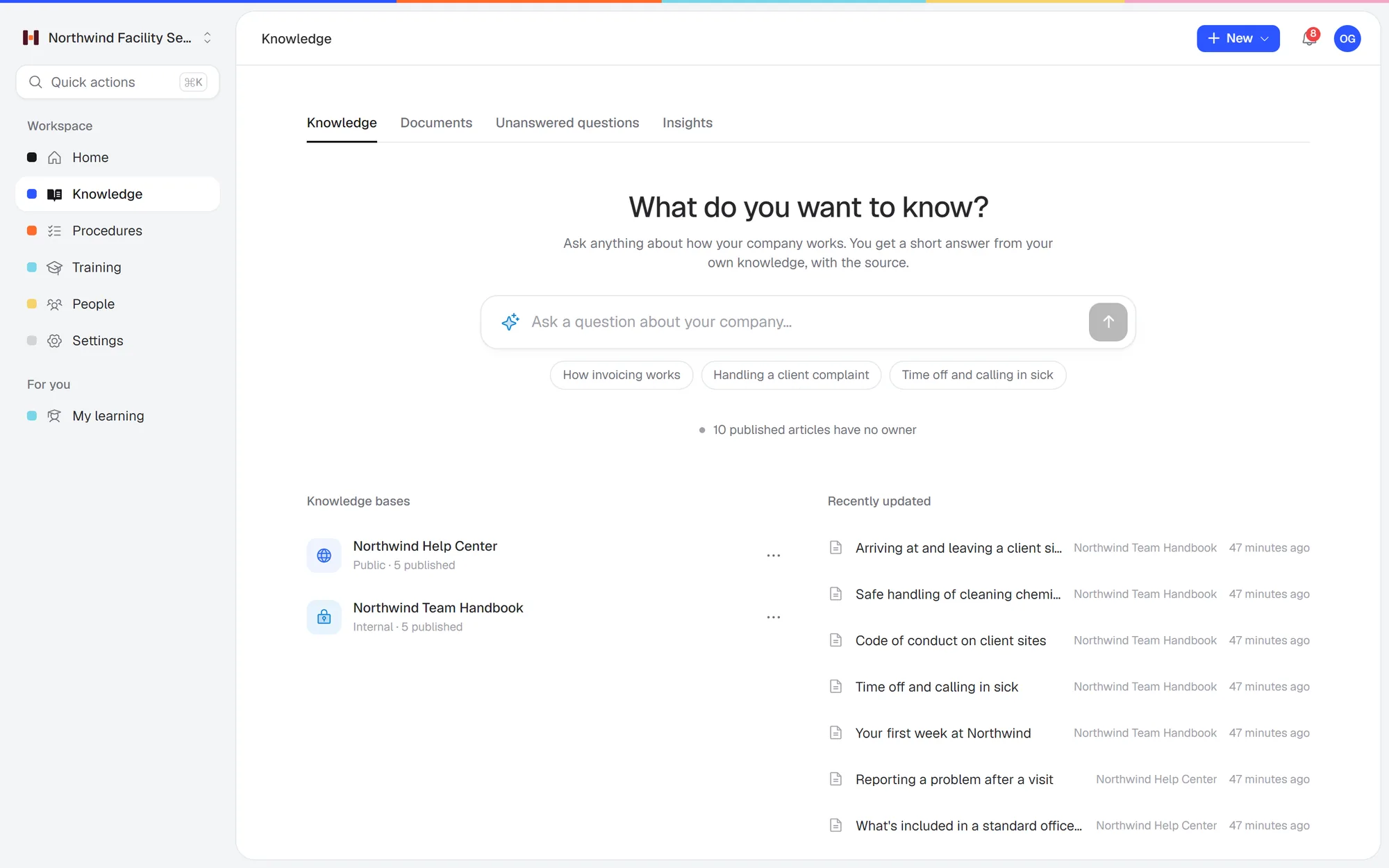 Ask a question in plain words and get a short answer from your own handbook, with the source.
Built for: small teams that want their knowledge, procedures and training in one place, and want to know the team has read and learned what matters.
Helpable is training software for teams of 5 to 50 people, with your knowledge base and procedures in the same tool. Where SharePoint stores documents, Helpable turns them into something your team uses: articles people find with plain-language search, procedures with steps and photos, and short trainings with quizzes.
What changes compared to SharePoint:
- Finding things: ask a question in plain words and get a short answer from your own content, with a link to the exact source. Unanswered questions show you what's missing.
- Proof: ask people to acknowledge a procedure and see who has, per version. No Power Automate flow needed.
- Training: turn procedures into a training with a quiz, assign it with a due date, and see progress per person.
- Setup: no sites, libraries or permission groups to design. Upload your existing Word and PDF files and the AI drafts articles for you to review.
- Customers too: every plan includes a public help center.
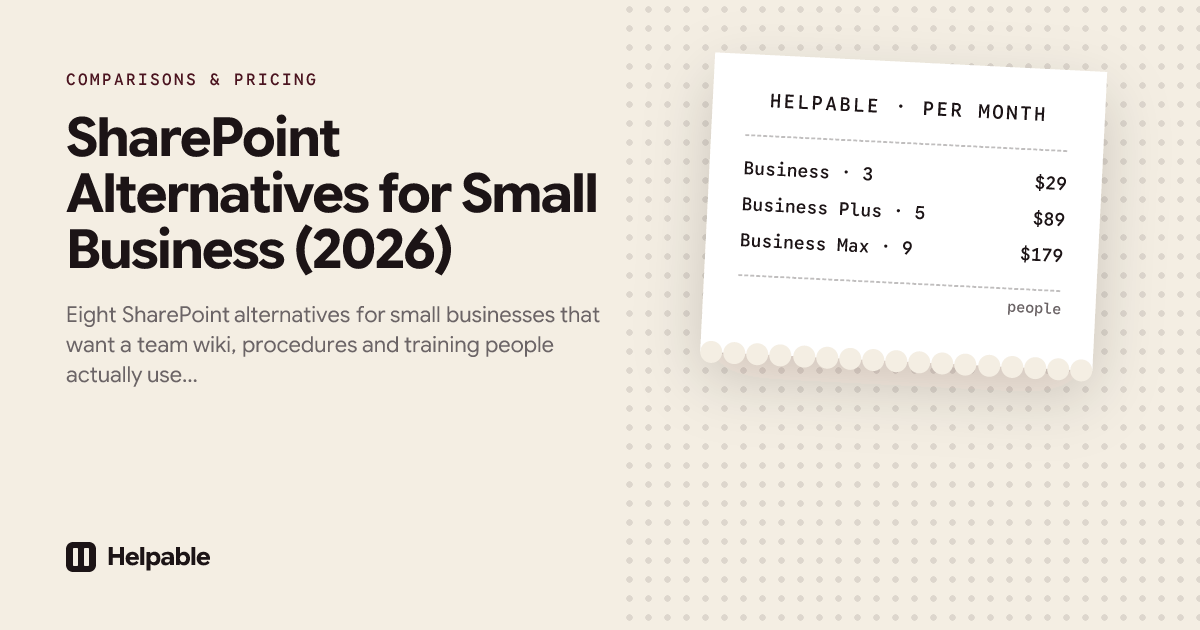
Plans: Business $29 a month for 3 people. Business Plus $89 for 5 people adds video lessons, certificates, automatic assignment for new hires and your own domain for the help center. Business Max $179 for 9 people adds recurring training, results per team and locations with their own managers. 14-day free trial, no credit card. See plans.
For a wider comparison of wikis and help centers, see the best knowledge base software for small business.
Not the right fit if: you need file storage with co-editing in Word and Excel (keep SharePoint or OneDrive for that), a Microsoft Teams integration (still planned) or a native mobile app. Helpable runs in any phone browser.
2. Notion
Built for: docs, wikis and databases you shape yourself.
Price (checked Oct 17, 2026): free plan. Plus $10 a member per month billed yearly ($12 monthly). Business $20 billed yearly ($24 monthly), with Notion AI (notion.com/pricing).
Pick Notion if:
- Your team already works in Notion for projects and notes, and the wiki can be one more set of pages there.
- You want flexible databases and are happy to design and maintain the structure yourself.
- You need a plain wiki at a low price per person. Plus is $12 a member monthly ($10 yearly), so 10 people pay $120 a month ($100 yearly). Helpable Business is $92 for 10.
Pick Helpable instead if:
- You need to know who read it. Notion has the same gap as SharePoint: no read confirmations, quizzes or assigned training. Helpable records who acknowledged each version of a procedure on every plan, and you see who hasn't yet.
- Nobody has time to build a structure again. Notion is a blank canvas, much like a new SharePoint site. In Helpable the structure is in place: knowledge base, procedures, trainings. Upload your Word and PDF files from SharePoint and the AI drafts the articles. The files themselves can stay in SharePoint or OneDrive.
- You want AI answers on every plan. Notion's full AI is on Business at $24 a member monthly ($20 yearly), so 10 people pay $240 a month ($200 yearly). Helpable's AI search, with a link to the source, is on every plan; Business is $92 for 10.
More detail: Helpable vs Notion.
3. Confluence
Built for: a team wiki in spaces and pages, closely tied to Jira.
Price (checked Oct 17, 2026): free for up to 10 users and 2 GB. Standard $7.15 a user per month at 10 users on monthly billing, or $720 a year for 1–10 users (atlassian.com).
Pick Confluence if:
- Your team plans its work in Jira. Confluence's link to Jira is hard to replace, and Helpable has no Jira connection.
- You need a free wiki for up to 10 people. The free plan includes 10 users and 2 GB of storage.
Pick Helpable instead if:
- You need to know who read it. In Confluence, read confirmations and quizzes come from paid Marketplace apps, much like the Power Automate flows and add-ons SharePoint needs. Helpable has read acknowledgements per version, quizzes and progress per person on every plan.
- Your team doesn't work in Jira. Confluence is built for software and project teams, and its spaces and page trees need someone to keep them in order. That's the same setup work that makes SharePoint heavy for a small team. Helpable comes with the structure in place: knowledge base, procedures and trainings.
- Customers need answers too. Every Helpable plan includes a public help center next to the internal knowledge base.
More detail: Helpable vs Confluence.
4. Google Sites (with Google Workspace)
Built for: simple drag-and-drop intranet pages inside Google Workspace.
Price (checked Oct 17, 2026): included in the Google Workspace Business plans, alongside Drive, Docs and Gmail. 14-day free trial (workspace.google.com).
Pick Google Sites if:
- You're moving away from Microsoft altogether. Google Workspace replaces both SharePoint and OneDrive for your files, and Sites comes with it.
- You already pay for Google Workspace and need a few simple pages that link to your Docs.
- You want pages you can share inside the company or publish to the web.
Pick Helpable instead if:
- You need to know who read it. Sites has no read confirmations or assignments. Helpable records who acknowledged each version of a procedure, and you see who hasn't yet.
- You want quizzes tied to the content. Google Forms quizzes are a separate app. In Helpable a training is built from your own procedures and articles, ends with a quiz, and shows progress per person.
- People need to find answers fast. Sites is a page builder, so search and keeping pages current are up to you. Helpable's AI search answers a question from your own content with a link to the source.
Your files can stay in Drive. Helpable's Google Drive integration is still planned, so for now you download the documents that matter and upload them. More detail: Helpable vs Google Drive.
5. Slab
Built for: a clean internal wiki with search across connected tools.
Price (checked Oct 17, 2026): free for up to 10 users. Startup $6.67 a user per month billed yearly ($8 monthly). Business $12.50 billed yearly ($15 monthly) with AI answers (slab.com/pricing).
Pick Slab if:
- You need a free internal wiki for up to 10 people.
- You only need a wiki and want a low price per person as you grow. Startup is $8 a user monthly ($6.67 yearly), so 25 people pay $200 a month ($167 yearly). Helpable Business is $227 for 25.
- You want search that also looks in the other tools you connect.
Pick Helpable instead if:
- People need to learn the procedures. Slab has no read confirmations or training. In Helpable you ask people to acknowledge a procedure, assign a training with a quiz and a due date, and see who finished.
- Customers need answers too. Slab has no public help center; guests only see the topics they belong to. Every Helpable plan includes one.
- You want AI answers on your first plan. Slab's AI answers start on Business at $15 a user monthly ($12.50 yearly), so 10 people pay $150 a month ($125 yearly). Helpable's AI search is on every plan; Business is $92 for 10.
6. Nuclino
Built for: a fast, lightweight team wiki.
Price (checked Oct 17, 2026): free up to 50 items. Starter $6 a user per month billed yearly ($8 monthly). Business $10 yearly ($12 monthly) with AI (nuclino.com/pricing).
Pick Nuclino if:
- You want a simple, low-cost wiki. Starter is $8 a user monthly ($6 yearly), so 10 people pay $80 a month ($60 yearly). Helpable Business is $92 for 10.
- You want to try it free first. The free plan holds 50 items, enough to test with a handful of pages.
Pick Helpable instead if:
- You need to know who read it. Nuclino has no read confirmations or training, the same gap you have in SharePoint. In Helpable people confirm each new version of a procedure, and you assign trainings with quizzes and see progress per person.
- You want AI on every plan. Nuclino's AI is only on Business at $12 a user monthly ($10 yearly), so 10 people pay $120 a month ($100 yearly). Helpable's AI writer and AI search are on every plan; Business is $92 for 10.
- Customers need a help center. Nuclino can publish pages as a website. Every Helpable plan includes a public help center next to the internal knowledge base.
7. Slite
Built for: an internal knowledge base with AI answers.
Price (checked Oct 17, 2026): Basic $10 a user per month billed yearly, with 30 AI questions per seat a month. Pro $20. 14-day free trial (slite.com/pricing).
Pick Slite if:
- You want AI answers from the first paid plan. Basic includes 30 AI questions per seat a month.
- You publish some docs for the public and want them found in Google. Slite indexes public docs for search engines and gives AI answers on them.
Pick Helpable instead if:
- You need to know who read it. Slite has no read confirmations or training. Helpable records who acknowledged each version of a procedure, and lets you assign trainings with quizzes and due dates.
- Your SharePoint holds procedures. Helpable has step-by-step procedures with photos, and turns them into a short training with a quiz. Upload the Word and PDF files and the AI drafts them for you to review.
- You want your own domain on the help center. Slite's custom domain for public docs is on Pro at $20 a user billed yearly, so 10 people pay $200 a month. Helpable includes your own domain on Business Plus: $129 a month for 10.
8. Helpjuice
Built for: a knowledge base that doubles as a customer help center, with private internal sections.
Price (checked Oct 17, 2026): $249 a month for 30 users, $449 for 100 users with AI, $799 unlimited. 14-day free trial (helpjuice.com/pricing).
Pick Helpjuice if:
- You have 25 to 30 people and want one flat price. $249 a month covers 30 users. Helpable Business is $227 for 25.
- You're growing toward 100 people and want AI at a flat price. $449 a month covers 100 users with AI.
- Your main job is a customizable help center for customers, with private sections for the team.
Pick Helpable instead if:
- You're under about 20 people. Helpjuice's entry price is $249 a month, for 5 people or 30. Helpable Business is $92 for 10.
- You want AI on your first plan. Helpjuice's AI starts at $449 a month. Helpable's AI writer and AI search are on every plan.
- Your team needs to learn the procedures. Helpjuice has no read confirmations or training. Helpable has read acknowledgements per version and trainings with quizzes on every plan.
What a team of 10 or 25 pays
| Tool | Team of 10 | Team of 25 |
|---|---|---|
| SharePoint (Microsoft 365 Business Basic) | $84/mo ($70 on annual) | $210/mo ($175 on annual) |
| Helpable Business | $92/mo | $227/mo |
| Helpable Business Plus | $129/mo | $249/mo |
| Notion Business | $240/mo ($200 yearly) | $600/mo ($500 yearly) |
| Confluence | Free | Standard, from $7.15/user/mo |
| Slab Startup | Free | $200/mo ($167 yearly) |
| Nuclino Starter | $80/mo ($60 yearly) | $200/mo ($150 yearly) |
| Slite Basic (yearly) | $100/mo | $250/mo |
| Helpjuice | $249/mo | $249/mo |
Microsoft 365 also includes email, Office apps and file storage, so it's rarely a straight swap. Most small businesses keep Microsoft 365 and replace only the wiki and procedures part.
When to keep SharePoint
Stay with SharePoint if:
- You mainly use it for files and co-editing in Word and Excel, and that works.
- You have someone (inside or an IT partner) who keeps sites and permissions tidy.
- You need strict document retention or eDiscovery for compliance.
In that case the common setup is: files stay in SharePoint or OneDrive; procedures, team knowledge and training move to a tool built for that. You upload the documents that matter into Helpable once, and the AI turns them into articles and procedures your team can search and confirm.
How to move from SharePoint in a week
- Day 1: list the 20 documents people actually ask about. Ignore the rest for now.
- Day 2: download them as Word or PDF and upload them to Helpable. Review the AI drafts.
- Day 3: split long documents into short articles and procedures, one topic each. Give each an owner.
- Day 4: pick the 3–5 procedures where mistakes cost the most and ask the team to acknowledge them.
- Day 5: share the link, show the team the search box, and point people to it whenever they ask you a question.
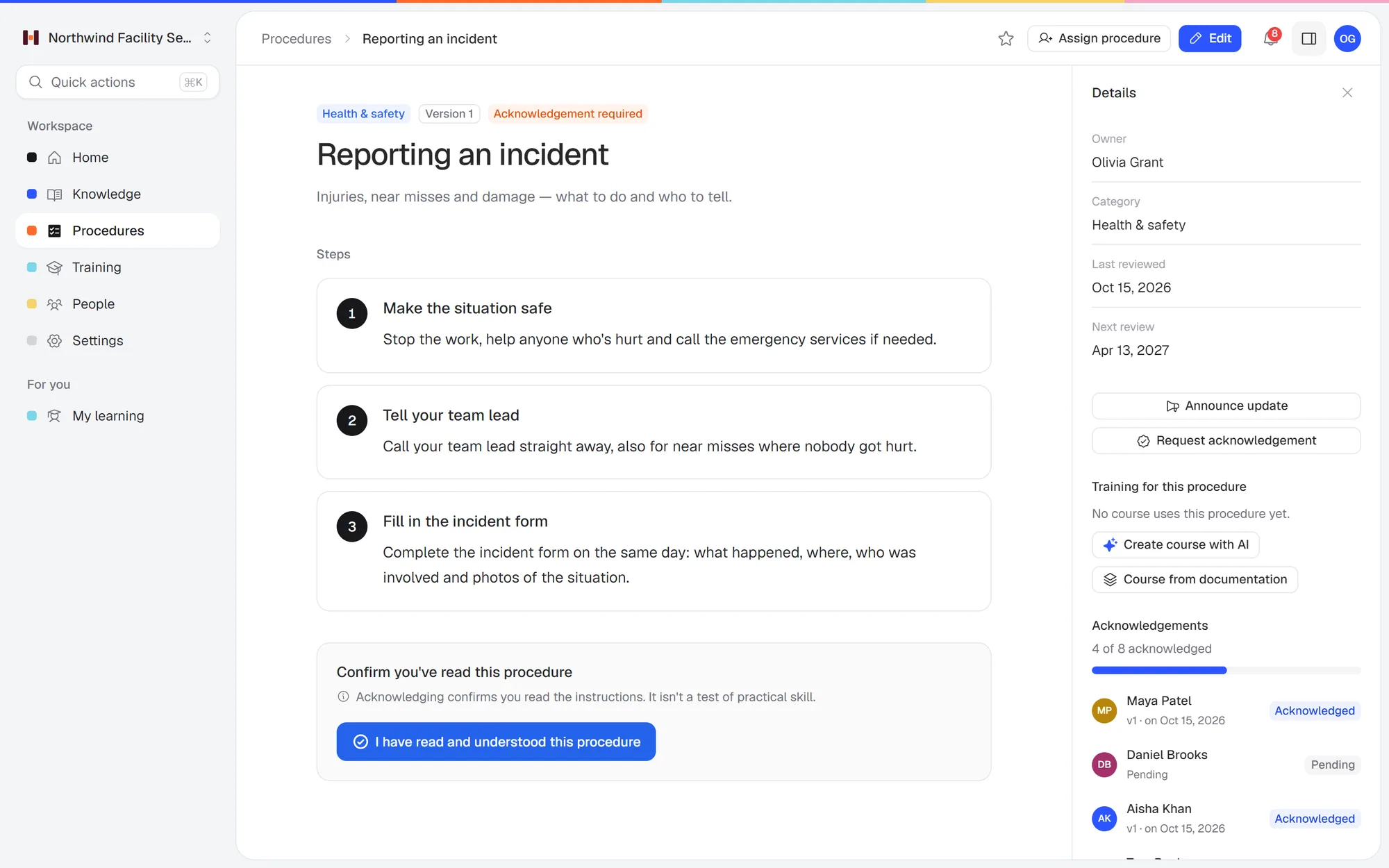 Who has read the current version of a procedure, without building a flow.
Want the procedures to stick, too? Our list of the best SOP software for small business compares tools that track who read what.
FAQ
What is a good replacement for SharePoint for a small business?
For a team wiki with procedures and training, Helpable. For a simpler wiki, Notion, Confluence or Slab. For file storage, Google Drive, Dropbox or Box.
Is SharePoint still worth it for a small business in 2026?
For file storage and co-editing inside Microsoft 365, often yes, since it's included in your plan. As a team wiki or training tool, many small teams find it too much work to set up and keep up to date.
Can SharePoint track who read a document?
Not on its own. You need a Power Automate flow, Microsoft Forms or a paid add-on. Helpable records read acknowledgements per version on every plan.
Can SharePoint do employee training?
Not on its own. Microsoft's training product, Viva Learning, is separate and needs Teams and a premium license for assigning training. Microsoft Forms can make quizzes, but they aren't linked to a page or a reading record.
Does Helpable integrate with SharePoint?
Not directly. You upload documents from SharePoint (Word, PDF, text) into Helpable, and the AI turns them into draft articles. A Microsoft Teams integration is planned.
Is there a free SharePoint alternative?
Confluence and Slab are free for up to 10 users, and Notion has a free plan (checked Oct 17, 2026). None of them track who read a page.
Try it with your 20 most-asked documents
Upload the documents your team asks about most and see if they find answers faster. Start a free 14-day trial of Helpable, no credit card needed.