Short answer: For a small business that wants one place for team knowledge and a help center for customers, Helpable is our pick: an internal knowledge base, a public help center, SOPs and training in one tool, from $29 a month. If you only need a free internal wiki for up to 10 people, Confluence or Slab work. If you only need a customer help center and have budget, Helpjuice or Document360.
A small business usually needs a knowledge base for one of two reasons. Either the same questions keep landing on the owner ("how do we invoice this client?"), or customers keep asking things that could be answered on a page. Some tools do one of those. A few do both.
Below are ten tools small businesses search for most, split by what they're built for. Prices come from each vendor's own pricing page, checked on October 17, 2026.
Knowledge base software at a glance
| Tool | Internal wiki | Public help center | Price (checked Oct 17, 2026) | Free plan or trial | Read confirmations or training |
|---|---|---|---|---|---|
| Helpable | Yes | Yes | $29/mo for 3 people, $9/extra person | 14-day trial | Yes |
| Notion | Yes | Publish pages | Plus $10/member/mo yearly; Business $20 | Free plan | No |
| Confluence | Yes | Limited | Free up to 10 users; Standard $7.15/user/mo | Free plan | Via Marketplace apps |
| Slab | Yes | No | Free up to 10 users; Startup $6.67/user/mo yearly | Free plan | No |
| Slite | Yes | Public docs | Basic $10/user/mo yearly | 14-day trial | No |
| Nuclino | Yes | Publish pages | Starter $6/user/mo yearly ($8 monthly) | Free plan (50 items) | No |
| Tettra | Yes | No | $8/user/mo billed yearly ($10 monthly), 10-user minimum | 30-day trial | No |
| Guru | Yes | Not described | Not public | Book a call | Verification only |
| Document360 | Yes | Yes | Not public | Not stated | No |
| Helpjuice | Yes | Yes | $249/mo for 30 users | 14-day trial | No |
Read confirmations means the tool records who read a page, so you know the team saw an important update. Training means assigning content with quizzes and tracking progress.
Internal, public, or both?
Decide this first. It cuts the list in half.
- Internal knowledge base: how your team works. Procedures, policies, client notes, "who to call when". Only your people see it.
- Public help center: answers for customers. Pricing questions, how-tos, policies. Google can find it.
- Both: many small businesses need the same answer in two versions. "Reporting a problem after a visit" is an internal procedure and a customer article. Keeping both in one tool means you update it once.
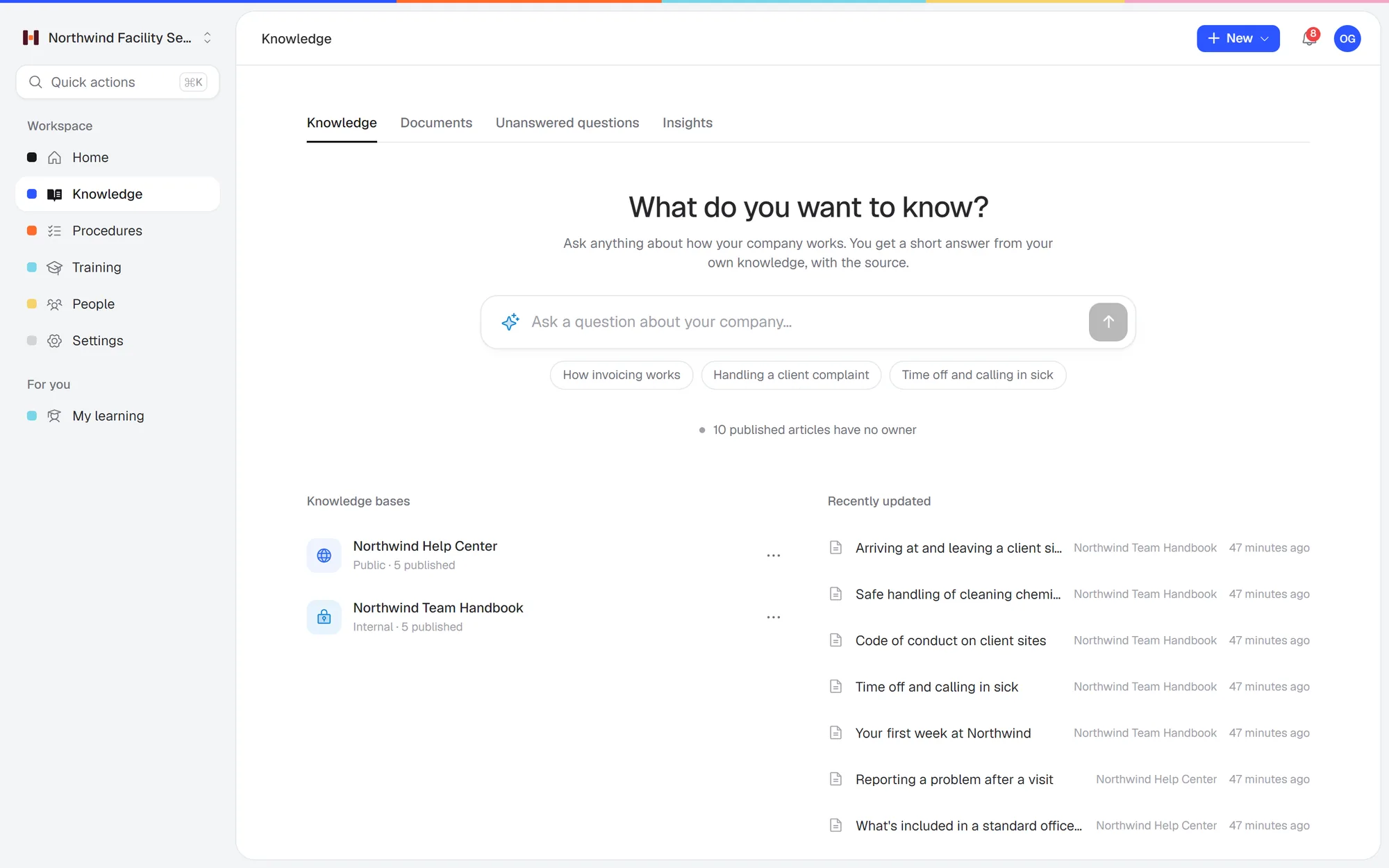 One place for both: an internal team handbook and a public help center, with AI search on top.
1. Helpable
Built for: small teams that want team knowledge, a customer help center, SOPs and training in one place.
Helpable is training software for teams of 5 to 50 people, with your knowledge base and procedures in the same tool. Every plan includes an internal knowledge base and a public help center. Your team asks questions in plain words and gets a short answer from your own articles, with a link to the source. When nothing is written down yet, it says so, and those unanswered questions show you what to write next.
On every plan:
- An internal knowledge base and a public help center
- AI search with a link to the source, and a list of unanswered questions
- Upload PDF, Word, text, Markdown or CSV files and get draft articles to review
- Step-by-step procedures with read acknowledgements per version
- Training with quizzes, assigned with due dates
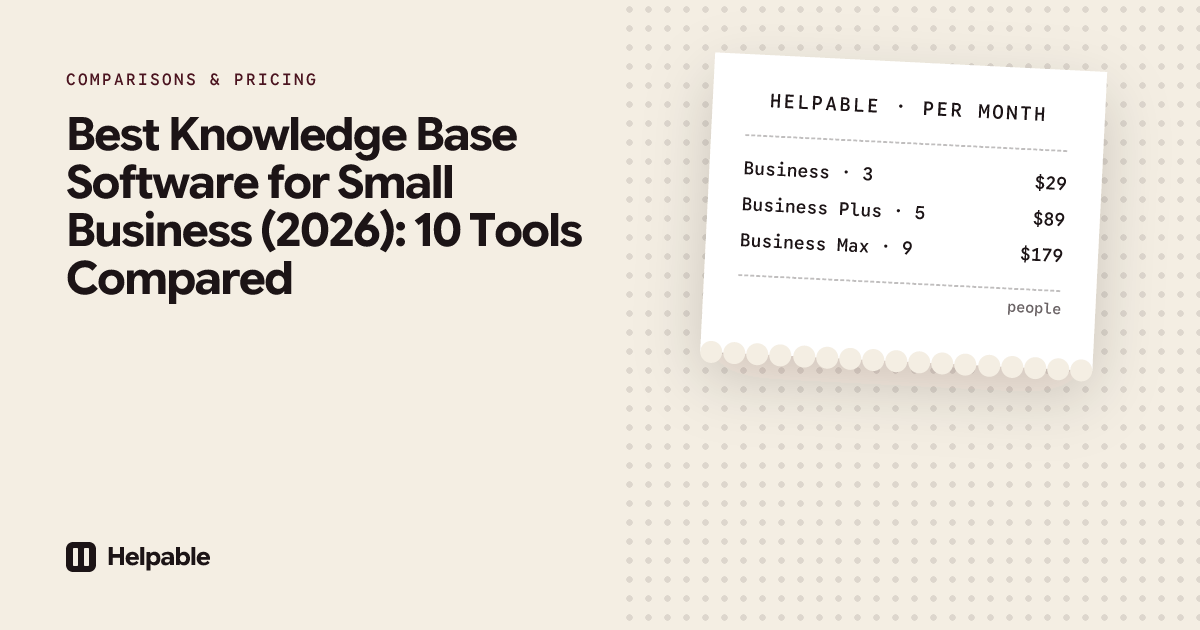
Plans: Business $29 a month for 3 people (one internal and one public knowledge base). Business Plus $89 for 5 people adds three of each, your own domain for the help center, video lessons and certificates. Business Max $179 for 9 people adds ten of each and white label. 14-day free trial, no credit card. See plans.
Not the right fit if: you need a big integration catalog (Slack is in development; Microsoft Teams, Google Drive and Notion are planned) or a free plan.
2. Notion
Built for: a flexible workspace of docs, wikis and databases you shape yourself.
Price (checked Oct 17, 2026): free plan. Plus $10 a member per month billed yearly ($12 monthly). Business $20 billed yearly ($24 monthly), with Notion AI included. Pages can be published on a notion.site address (notion.com/pricing).
Pick Notion if:
- Your team already works in Notion for projects and notes, and the wiki is one more set of pages there.
- You want flexible databases and are happy to design and maintain the structure yourself.
- You need a plain internal wiki at a low price per person. Plus is $12 a member monthly ($10 yearly), so 10 people pay $120 a month ($100 yearly). Helpable Business is $92 for 10.
Pick Helpable instead if:
- Customers need answers too. Notion is an internal workspace that can publish pages on a notion.site address. Every Helpable plan includes a public help center next to the internal knowledge base, so team answers and customer answers live in one tool and you update them in one place.
- You need to know who read it. Notion has no read confirmations, assigned trainings or quizzes. In Helpable people confirm they read each new version of a procedure, and you see who hasn't yet.
- You want AI answers on every plan. Notion's full AI is on Business at $24 a member monthly ($20 yearly), so 10 people pay $240 a month ($200 yearly). Helpable's AI search, with a link to the source, is on every plan; Business is $92 for 10.
More detail: Helpable vs Notion.
3. Confluence
Built for: a team wiki in pages and spaces, closely tied to Jira.
Price (checked Oct 17, 2026): free for up to 10 users and 2 GB. Standard $7.15 a user per month on monthly billing at 10 users ($720 a year for 1–10 users billed yearly). Premium $14.10 a user per month (atlassian.com).
Pick Confluence if:
- Your team plans its work in Jira. Confluence's link to Jira is hard to replace, and Helpable has no Jira connection.
- You need a free internal wiki for up to 10 people. The free plan includes 10 users and 2 GB of storage.
Pick Helpable instead if:
- Your team doesn't work in Jira. Confluence is built for software and project teams, so frontline teams often find its spaces and page trees heavy. Helpable comes with the structure in place: knowledge base, help center, procedures and trainings.
- Customers need a help center. Confluence is mainly an internal wiki. Every Helpable plan includes a public help center next to the internal knowledge base.
- You need to know who read it. Confluence has no built-in read confirmations or quizzes; they come from Marketplace apps. Helpable has read acknowledgements per version, quizzes and progress per person on every plan.
More detail: Helpable vs Confluence.
4. Slab
Built for: a clean internal wiki with search across connected tools.
Price (checked Oct 17, 2026): free for up to 10 users. Startup $6.67 a user per month billed yearly ($8 monthly). Business $12.50 billed yearly ($15 monthly) adds AI answers. 30-day money-back guarantee (slab.com/pricing).
Pick Slab if:
- You need a free internal wiki for up to 10 people.
- You only need an internal wiki and want a low price per person as you grow. Startup is $8 a user monthly ($6.67 yearly), so 25 people pay $200 a month ($167 yearly). Helpable Business is $227 for 25.
- You want search that also looks in the other tools you connect.
Pick Helpable instead if:
- Customers need answers too. Slab has no public help center; guests only see the topics they belong to. Every Helpable plan includes a public help center next to the internal knowledge base.
- You need to know who read it. Slab has no read confirmations or training. In Helpable you ask people to acknowledge a procedure, assign a training with a quiz and a due date, and see who finished.
- You want AI answers on your first plan. Slab's AI answers start on Business at $15 a user monthly ($12.50 yearly), so 10 people pay $150 a month ($125 yearly). Helpable's AI search is on every plan; Business is $92 for 10.
5. Slite
Built for: an AI-first internal knowledge base with "Ask" answers.
Price (checked Oct 17, 2026): Basic $10 a user per month billed yearly, with 30 AI questions per seat a month. Pro $20 adds an AI agent and a custom domain for public docs. 14-day free trial, no credit card (slite.com/pricing).
Pick Slite if:
- You want AI answers from the first paid plan. Basic includes 30 AI questions per seat a month.
- You publish some docs for the public and want them found in Google. Slite indexes public docs for search engines and gives AI answers on them.
Pick Helpable instead if:
- You need to know who read it. Slite has no read confirmations or training. Helpable records who acknowledged each version of a procedure, and lets you assign trainings with quizzes and due dates.
- Your knowledge is mostly "how we do it". Helpable has step-by-step procedures with photos, and turns them into a short training with a quiz.
- You want your own domain on the help center. Slite's custom domain for public docs is on Pro at $20 a user billed yearly, so 10 people pay $200 a month. Helpable includes your own domain on Business Plus: $129 a month for 10.
6. Nuclino
Built for: a lightweight, fast team wiki.
Price (checked Oct 17, 2026): free for up to 50 items. Starter $6 a user per month billed yearly ($8 monthly). Business $10 yearly ($12 monthly) adds AI and SSO (nuclino.com/pricing).
Pick Nuclino if:
- You want a simple, low-cost internal wiki. Starter is $8 a user monthly ($6 yearly), so 10 people pay $80 a month ($60 yearly). Helpable Business is $92 for 10.
- You want to try it free first. The free plan holds 50 items, enough to test with a handful of pages.
- You like to see your wiki as a list, a board or a graph.
Pick Helpable instead if:
- Customers need a help center. Nuclino can publish pages as a website. Helpable includes a public help center next to the internal knowledge base on every plan, with your own domain from Business Plus.
- You need to know who read it. Nuclino has no read confirmations or training. In Helpable people confirm each new version of a procedure, and you assign trainings with quizzes and see progress per person.
- You want AI on every plan. Nuclino's AI is only on Business at $12 a user monthly ($10 yearly), so 10 people pay $120 a month ($100 yearly). Helpable's AI writer and AI search are on every plan; Business is $92 for 10.
7. Tettra
Built for: an internal knowledge base that answers repeat questions in Slack.
Price (checked Oct 17, 2026): $8 a user per month billed yearly ($10 monthly), with a 10-user minimum. 30-day free trial (tettra.com/pricing).
Pick Tettra if:
- Your team works in Slack and Google, and you want repeat questions answered right in Slack. Slack AI answers are included. Helpable's Slack integration is still in development.
- You have 10 people or more and want a low price per person. 10 people pay $100 a month, or $80 billed yearly. Helpable Business is $92 for 10.
- You want a longer trial. Tettra's runs 30 days; Helpable's runs 14.
Pick Helpable instead if:
- You're under 10 people. Tettra's 10-user minimum means a 4-person team pays $100 a month ($80 billed yearly). Helpable is $38 a month for 4.
- Customers need answers too. Tettra is an internal knowledge base, and its "External sites" feature is in beta. Every Helpable plan includes a public help center.
- You need to know who learned it. Tettra has no read confirmations or training. Helpable has both on every plan, with progress per person.
More detail: Helpable vs Tettra.
8. Guru
Built for: verified company knowledge that shows up inside the tools your team already uses.
Price (checked Oct 17, 2026): not public; book a call (getguru.com/pricing).
Pick Guru if:
- You're a larger company that wants verified knowledge pushed into the tools people already use, like Slack, Teams and the browser.
- You want verification workflows that keep internal knowledge marked as checked and current.
Pick Helpable instead if:
- You want to see the price first. Guru shows no price, plan or trial; you book a call. Helpable's plans are on the pricing page, with a 14-day free trial and no credit card.
- Customers need a help center. Guru is built for internal company knowledge, and its pricing page doesn't mention a public help center. Every Helpable plan includes one.
- You need to know who learned it. Guru's pricing page lists verification workflows and no quizzes. Helpable has read acknowledgements per version and trainings with quizzes on every plan.
More detail: Helpable vs Guru.
9. Document360
Built for: structured product documentation and help centers, public or private.
Price (checked Oct 17, 2026): not public; custom quote after a short form. Some AI features are add-ons (document360.com/pricing).
Pick Document360 if:
- You write product documentation, manuals or API docs, public or private.
- Your setup needs several workspaces or languages, or SSO, and you're fine with a quote based on that.
Pick Helpable instead if:
- You want to see the price before a sales call. Document360 gives a custom quote after a form. Helpable's prices are on the pricing page, with a 14-day free trial.
- Your team needs answers too. Helpable puts an internal knowledge base, step-by-step procedures and training with quizzes next to the public help center, so customer answers and team know-how live in one tool.
- You want AI included. Document360's Eddy AI is included, but the AI Premium Suite and AI Chatbot cost extra. Helpable's AI writer and AI search are on every plan, with AI credits included.
More options: Document360 alternatives.
10. Helpjuice
Built for: a customizable knowledge base, often as a customer help center, with private internal sections.
Price (checked Oct 17, 2026): flat pricing. $249 a month for 30 users, $449 for 100 users with AI, $799 unlimited. 14-day free trial, no credit card (helpjuice.com/pricing).
Pick Helpjuice if:
- You have 25 to 30 people and want one flat price. $249 a month covers 30 users. Helpable Business is $227 for 25.
- You're growing toward 100 people and want AI at a flat price. $449 a month covers 100 users with AI.
- Your main job is a customizable help center for customers, with private sections for the team.
Pick Helpable instead if:
- You're under about 20 people. Helpjuice's entry price is $249 a month, for 5 people or 30. Helpable Business is $92 for 10.
- You want AI on your first plan. Helpjuice's AI starts at $449 a month. Helpable's AI writer and AI search are on every plan.
- You need to know who read it. Helpjuice has no read confirmations or training. Helpable has read acknowledgements per version and trainings with quizzes on every plan.
What a team of 10 or 25 pays
| Tool | Team of 10 | Team of 25 |
|---|---|---|
| Helpable Business | $92/mo | $227/mo |
| Helpable Business Plus (own domain, 3+3 knowledge bases) | $129/mo | $249/mo |
| Notion Business | $240/mo ($200 yearly) | $600/mo ($500 yearly) |
| Confluence | Free (up to 10 users) | Standard, from $7.15/user/mo |
| Slab | Free (up to 10 users) | $200/mo ($167 yearly) on Startup |
| Slite Basic (yearly) | $100/mo | $250/mo |
| Nuclino Starter | $80/mo ($60 yearly) | $200/mo ($150 yearly) |
| Tettra | $100/mo ($80 yearly) | $250/mo ($200 yearly) |
| Helpjuice | $249/mo | $249/mo |
Monthly billing unless noted, checked Oct 17, 2026. Guru and Document360 don't publish prices. Confluence's per-user price drops as the team grows; use its calculator for your exact size.
Already paying for Microsoft 365 or Google Workspace?
Then you already have SharePoint or Google Sites. Both can hold an internal wiki. Neither has read confirmations, quizzes or assignments built in, and both need someone to set up structure and permissions. If that's working for you, keep it. If nobody can find anything, see SharePoint alternatives for small business.
How to choose
- Who needs to find answers? Team only: an internal wiki. Customers too: a tool with a public help center.
- Does it matter who read it? For safety rules, policy changes and new procedures, yes. Pick a tool with read confirmations.
- Who keeps it up to date? If it's the owner after hours, AI drafting from existing documents and a list of unanswered questions save the most time.
- How will you grow? Per-user pricing ($6–$24 a person) adds up. Check the price at the size you expect next year, too.
Take an accounting office of 15. Staff ask the same questions about client deadlines and software settings, and clients ask about document checklists every tax season. One internal knowledge base for staff and one public help center for clients, kept in one tool, covers both. Read more about knowledge base software and internal knowledge bases. If your knowledge is mostly step-by-step procedures, also see the best SOP software for small business and the best employee training software.
FAQ
What is the best knowledge base software for a small business?
For teams that want an internal knowledge base and a customer help center in one tool, with read confirmations and training, Helpable. For a free internal wiki up to 10 people, Confluence or Slab. For a customer help center only, Helpjuice or Document360.
What is the best free knowledge base software?
Confluence and Slab are free for up to 10 users, Notion has a free plan, and Nuclino is free up to 50 items (checked Oct 17, 2026). Free plans rarely include a public help center or read confirmations.
What's the difference between an internal knowledge base and a help center?
An internal knowledge base is for your team and stays private. A help center is public, for customers, and can show up in Google. Helpable includes both on every plan.
Does Microsoft have a knowledge base tool?
SharePoint, included in Microsoft 365 Business plans, can be used as an internal wiki. It has no built-in read confirmations, quizzes or public help center.
Can a knowledge base answer questions with AI?
Yes. In Helpable, your team asks in plain words and gets a short answer from your own articles with a link to the source. Notion, Slab, Slite and Guru also offer AI answers, often on higher plans.
How much does knowledge base software cost?
From free (up to 10 users on Confluence or Slab) to $249 a month and up for help-center tools (checked Oct 17, 2026). Helpable is $92 a month for 10 people on Business.
Start with the ten questions you hear most
Write down the ten questions your team or customers ask most, put the answers in Helpable and share the link. Start a free 14-day trial, no credit card needed.


