Customer service training software
Helpable is customer service training software with a knowledge base, procedures and quizzes in one place. New agents take tickets on their own in their first weeks, every customer hears the same answer about refunds and billing, and your senior agent stops answering colleagues all day.
- Same answer, whoever picks up
- New agents ready sooner
- See who is ready for what
Where it pinches in a customer service team
Mixed answers on refunds, saved replies with last year's policy, a new agent who needs weeks before the queue: here is how you handle each with Helpable.
From scattered answers to a team that knows them, in three steps
Most teams start with their refund policy and the questions that fill the queue. The first step takes an afternoon.
- 1Every answer in one placeUpload your policies, product notes and saved replies, or add a link. The AI writer turns them into draft articles you check and publish.
- 2New agents learn it in their first weekStart from the customer service basics template or let AI build lessons and a quiz from your articles. Assign it with a due date and reminders.
- 3Everyone works with the current ruleWhen a policy changes, publish the new version and agents confirm it. You see per agent who is up to date and how they scored.
Everything to give one answer and know who is ready
What a support lead uses to give one answer in every channel, get new agents onto the queue and keep simple questions out of the inbox.
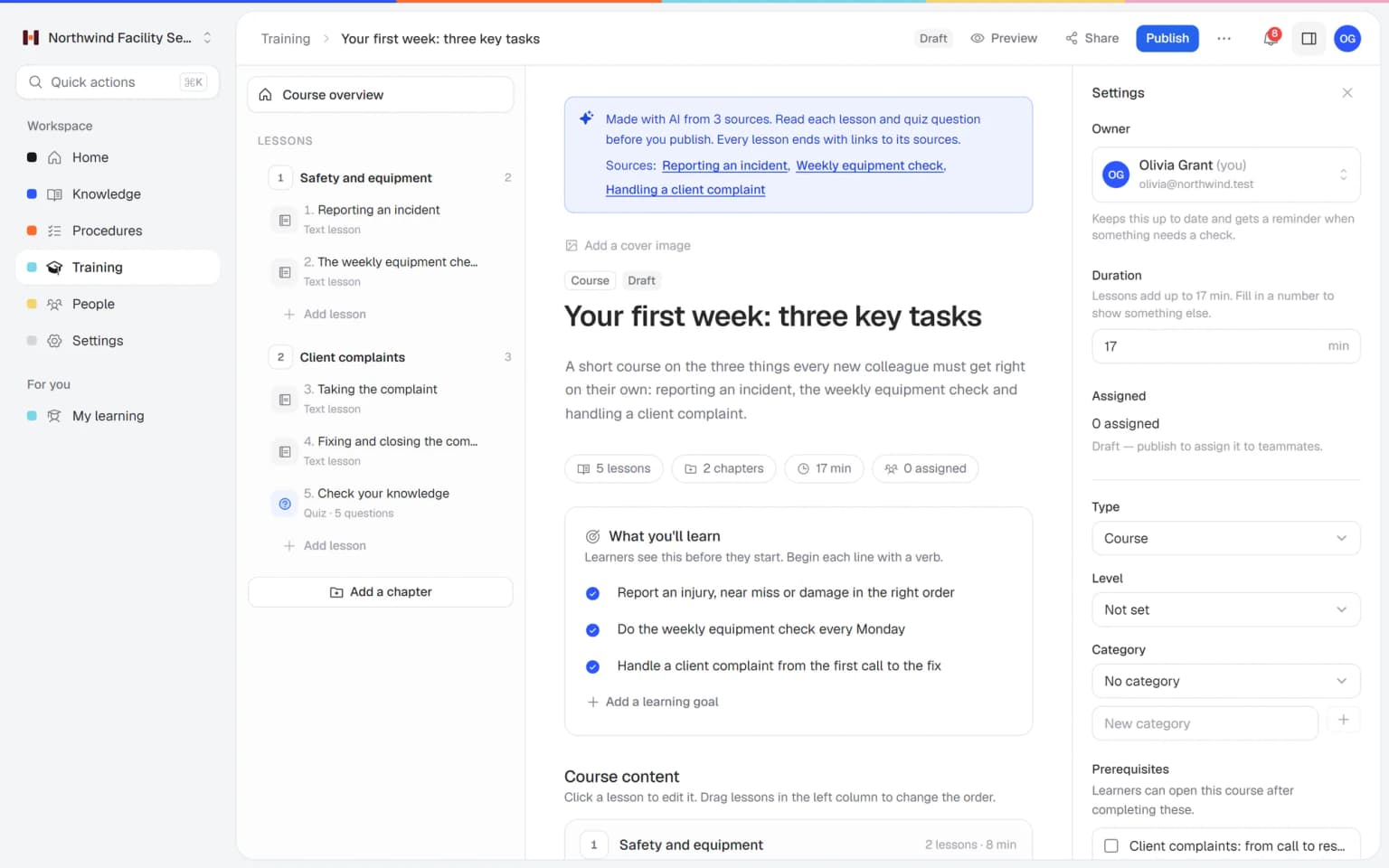
A training for new agents, made from your own help articles
Pick the articles and procedures on refunds, billing or a new product, and AI turns them into lessons and a quiz, with a link to the source in every lesson. You check it and assign it, and new agents learn from the same text customers read.
- Made from your own knowledge base
- A quiz with a pass mark included
- A link to the source in every lesson
- You approve it before anyone sees it
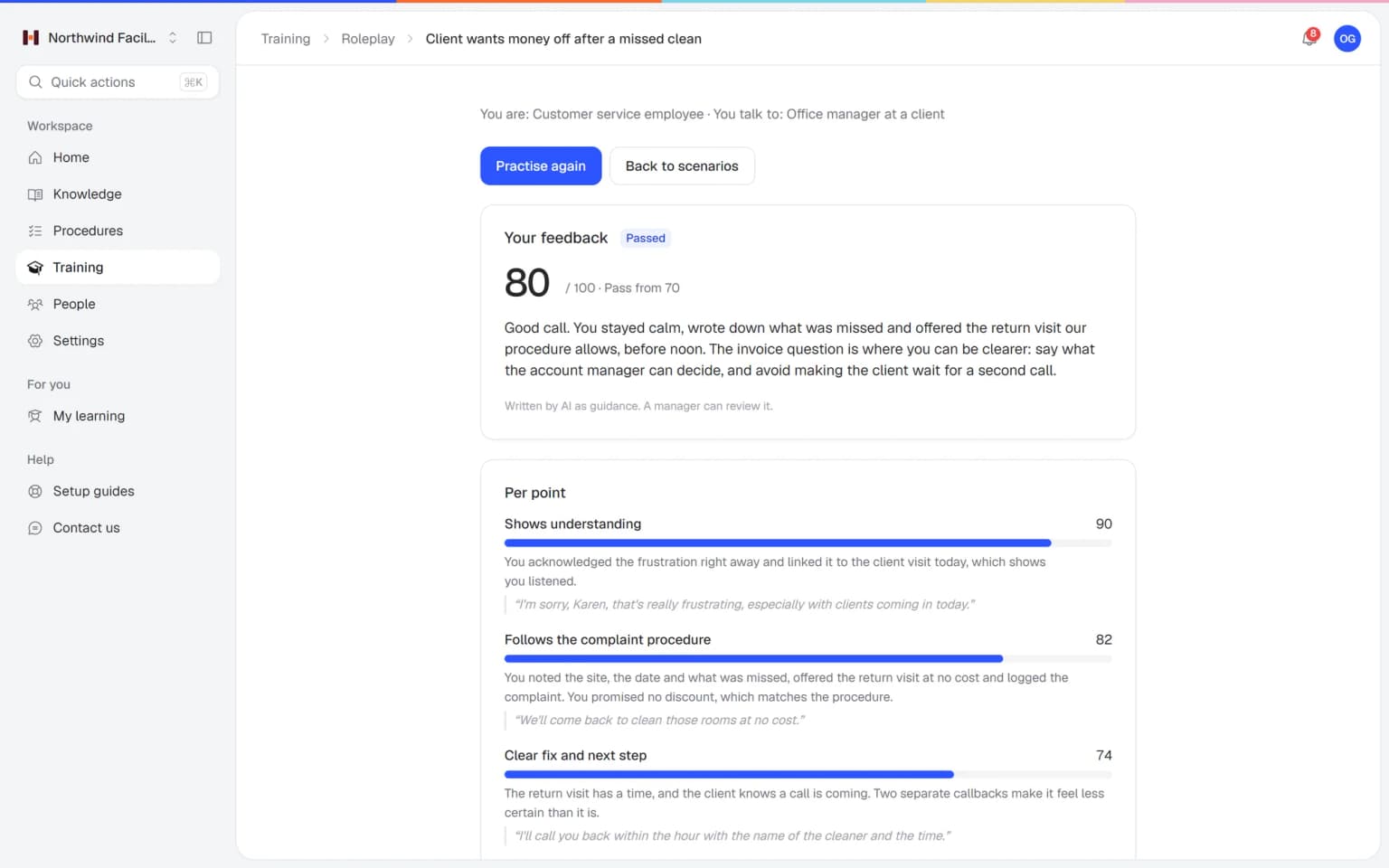
Your team practices the angry customer before they meet one in the queue
An order never arrived, a refund takes too long or someone wants to cancel. Agents practice those conversations with an AI that plays the customer, in a scenario you build from your own refund and complaint procedures. Every conversation ends with a score and concrete tips.
- Scenarios from your own procedures
- A score and tips after every conversation
- A team lead reviews and adds a note
- You see who is ready for the queue
What else belongs with your customer service
For the agent looking for an answer in the middle of a chat, the team lead checking which rule applied when a customer complained, and customers who read in their own language.
Made for customer service teams of 5 to 50 people
One fixed price for your whole support team
Try Business Plus free for 14 days. No credit card needed.
Business
Your knowledge base for team and customers, written faster with AI.
- AI answers with the source
- An internal knowledge base and a public help center
- AI writes first versions from your own documents
- Start from what you have: documents, Word files and your website
- Procedures everyone follows, with read confirmations
- Your help center on your own web address
- 250 AI credits per month
Business Plus
Train your team on that knowledge: courses, quizzes and progress per person.
- Everything in Business, plus:
- Training with quizzes, due dates and reminders
- See per person who finished what
- Practice conversations with AI, included
- Video lessons and final tests
- Certificates you can show clients and inspectors
- Results exported in one click
- 3 help centers and 3 internal knowledge bases
- 750 AI credits per month
Business Max
Training that runs by itself, and proof of who really knows what.
- Everything in Business Plus, plus:
- New colleagues get their training automatically
- A fixed onboarding route from day one
- Learning insights: who really studied and who clicked through
- Skills matrix and a training record per person
- Practical work signed off on the floor
- Locations with their own managers
- Refresher training that comes back by itself
- Certificates that expire on time, in your own design
- Your help center fully in your own brand
- 10 help centers and 10 internal knowledge bases
- 1,500 AI credits per month
Questions about customer service training software
What is customer service training software?
Customer service training software gets new agents onto the queue with your products, refund rules and tone of voice, and shows the support lead which agent is ready for billing, returns or technical tickets. Helpable combines training, step-by-step procedures and a knowledge base for teams of 5 to 50 people.
Does Helpable have a template for customer service training?
Yes. Helpable includes a customer service basics template among its six ready-made templates. You adjust it with your own products, policies and examples before you publish it.
Can agents look up answers in Helpable while they work?
Yes. Helpable has an internal knowledge base with one search across articles, procedures and training, so agents can find an answer while they help a customer.
Can Helpable also help our customers find answers?
Yes. Helpable includes a public help center where you publish articles for customers. The help center can be multilingual.
How do we make sure agents know about a policy change?
In Helpable you publish a new version of the procedure with a short change summary and ask agents to confirm they read it. A per-person overview shows who still needs to.
Can we bring our existing handbooks and policies into Helpable?
Yes. Helpable reads the handbooks and policy documents you upload and proposes article drafts, and the AI writer drafts an article from a PDF, Word, TXT, Markdown or CSV file or a link. A team lead checks and approves every draft before agents use it.
Does Helpable connect to our helpdesk or ticket system?
No. Helpable has no link with helpdesk or ticket systems. Agents keep Helpable open in a browser tab next to the helpdesk, search for the answer there and send customers a link to the article in your public help center.
How do we see which agent is ready for which type of question?
Helpable shows per agent which training is finished, how they scored on each quiz and which policy versions they confirmed. Make a training per topic, such as returns, billing or technical questions, and you see who can take those tickets. Results per team come with Business Max.
What does Helpable cost for a customer service team, and which plan do we need?
Helpable starts at $29 per month for Business, with 3 people, procedures, read confirmations, an internal knowledge base and a public help center on your own domain. Business Plus ($89) has 5 people and adds training, quizzes and practice conversations with AI. Business Max ($179) adds automatic assignment for new agents, recurring training, certificates with an expiry date and up to 10 knowledge bases, for example one per brand.
How is Helpable different from a shared drive or a group chat?
Helpable keeps one current version of every answer and policy, each with an owner and a review date, and asks agents to confirm the changes. In a shared drive or a group chat, old answers stay next to new ones, and you can't see who read the latest rules.
Is Helpable available in Dutch, and where is our data stored?
Helpable works in English and Dutch, and your public help center can be multilingual for customers who speak another language. Your data is stored in the EU.
Is there a free trial of Helpable?
Yes. Helpable has a free trial of 14 days on Business Plus, and you don't need a credit card. You can add your first answers and policies on the day you sign up.
Read more
Customer service training software, knowledge base and help center
Support leads search for this when new agents need weeks before they take tickets alone, when saved replies still mention last year's policy, or when the same five questions fill the inbox every day. These are the common questions, answered for how a support queue really runs.
Customer service training: onboarding new agents faster
With Helpable, new agents learn your products, systems, refund rules and tone of voice in a learning path before their first ticket, so they handle real questions on their own sooner. Most teams onboard by shadowing. The new agent sits next to a senior for two weeks, and the senior spends half the day answering colleagues.
Put the basics in a set order: the product, the helpdesk you use, refunds and escalations, how you write to customers and a quiz at the end of each part. Start from the customer service basics template, or let AI draft lessons and a quiz from your published articles and procedures. You check every draft, and each lesson links to its sources. On Business Max, new agents are enrolled automatically when you add them to the team. Make a training per ticket type, such as billing or technical questions, and you see who is ready to take them. There is no link with helpdesk or ticket systems, so agents keep Helpable open in a tab next to the helpdesk. That is what customer service training software should do for a small team: shorter shadowing, the same answers and a clear view of who is ready. Read more about employee onboarding software.
Keeping macros and saved replies up to date after product changes
In Helpable every answer and policy has an owner and a review date, so when the product or the refund rule changes, you update the article once and every agent learns the new version. Saved replies in the helpdesk go stale quietly: the product team ships a change on Tuesday, and on Friday an agent still pastes the old steps.
Write the source answer as an article or procedure in Helpable and keep the macro short, with a link to it. When something changes, publish a new version with a short summary, announce it to everyone assigned and see per agent who confirmed it. Read confirmations are part of every plan, as the page on read and acknowledge explains. The review date reminds owners of answers nobody has checked in months, and Insights flag public articles that are getting old.
Customer service knowledge base and help center in one
With Helpable, your public help center for customers sits next to the internal knowledge base for agents, so customers and agents read the same answer to the same question. Repeat questions about delivery, passwords, invoices or returns get an answer before they reach the inbox, and agents reply with a link to the same article.
A knowledge base for customer service only helps if agents trust it, so every article has an owner and a review date. Internal notes, escalation steps and edge cases stay in the internal knowledge base, visible only to your team. The help center gets your logo and colors, can be in more than one language and runs on your own domain on every plan. Agents search once across articles, procedures and training, or ask Answers a question in their own words and get a short answer from your own content with a link to the source. Read more about knowledge base software.
Using customer feedback and failed searches to fix your help center
In Helpable, Insights show what customers search for in your help center, which searches found nothing and which articles readers marked as unhelpful, so you know what to write or fix next. Every article ends with a simple question asking whether it helped. Each no is a sign that the answer is unclear or out of date.
Searches that found nothing are grouped into content gaps with a priority, and one click turns a gap into a draft article. Your agents feed a list too: when Answers can't answer an internal question, it lands on a list of gaps for the team lead, and an agent can mark an answer as wrong with a short note. After you publish, you see the views and helpful votes of the new article. Insights come with every plan, see help center insights.
Practicing difficult customer conversations
With AI roleplay in Helpable, agents practice the hard conversations before they meet them in the queue, such as a refund request after the return period, an angry customer whose order never arrived or someone who wants to cancel. An AI plays the customer, and the feedback checks every answer against your own refund and complaint procedures, with a quote from the conversation for each scoring point.
A team lead can review the conversation, correct the score and add a note. AI Roleplay Studio is included in Business Plus and Business Max, and multiple-choice practice uses no AI credits.
Customer service quality and consistent answers across the team
For quality and consistency, Helpable shows per agent which training is finished, how they scored and which policy versions they confirmed, so a coaching conversation starts from facts. Two agents who learned from the same procedures give the same answer, and a customer who asks twice hears the same thing.
Write your complaint handling, escalation steps and tone of voice as procedures with numbered steps and examples. Quizzes with a pass mark check what agents know about your policies, and certificates show who is cleared for a product line. On Business Max those certificates expire, so people refresh what they know. Reports per training and agent export to CSV on Business Plus, and results per team come with Business Max. The interface is in English and Dutch, and your data is stored in the EU. Plans and add-ons are on the pricing page.
Give customers the same good answer every time
Start with your refund policy or the customer service basics template. Your first training can be ready this afternoon.
Start free trial- 14 days free
- No credit card needed
- Cancel any time