Short answer: What an LMS costs depends mostly on its pricing model. Per-user plans grow with every person you add. Flat plans charge one price for a band of users. Enterprise systems use custom quotes with annual contracts and setup fees. For a team of 10 to 50, budget for the subscription plus the hours it takes to build training, and check minimums and add-ons before you sign.
Prices on vendor websites are hard to compare, because each one counts users differently. Below, we explain the common models, work out what teams of 10, 25 and 50 pay under each one with example rates, and list the questions to ask every vendor. Helpable's own prices are on the pricing page and in a table further down.
How much does an LMS cost?
There is no single market price. Two tools with the same features can cost very different amounts for your team, depending on:
- who counts as a user: everyone with an account, or only people who log in that month;
- the minimum: some plans bill for a minimum number of users or a minimum yearly amount;
- the contract: monthly, yearly up front, or multi-year;
- what is included: AI, certificates, reports and support are sometimes paid extras;
- setup: self-service, or a paid onboarding project.
For a small team, the yearly total is usually the clearest number to compare. Multiply the monthly amount by 12 and add any one-time fees.
What pricing models do LMS vendors use?
| Pricing model | How it works | Good for | Watch out for |
|---|---|---|---|
| Per active user | You pay for each person who logs in during the month | Teams where only some people train each month | Hard to predict; busy onboarding months cost more |
| Per registered user | You pay for every account, active or not | Stable teams where everyone trains | Minimum user counts; paying for people who left |
| Flat tiers | One price for a band, such as up to 20 or up to 50 users | Small teams that want a fixed budget | Jumping to the next band when you grow by one person |
| Custom quote | Price agreed per contract, often with setup fees | Large companies with special needs | Annual lock-in, minimum spend, slow to start |
| Open source plus hosting | Free software, you pay for hosting and admin time | Teams with an IT person | Updates, security and support are your job |
| Free plan | Free with limits on users, content or features | One small, simple training | Limits you hit quickly; see our guide to free LMS options |
What do 10, 25 and 50 people pay under each model?
The table below uses example rates only. They are not the prices of any real product. They show how the same team pays very different amounts under each model.
Example rates used:
- Per active user: €7 per active user per month. Say about two-thirds of the team logs in during a typical month (7, 17 and 33 people).
- Per registered user: €5 per user per month, with a minimum of 20 users.
- Flat tiers: €95 a month for up to 20 users, €185 for up to 40, €295 for up to 100.
- Custom quote: a minimum of €6,000 a year (€500 a month), plus a one-time setup fee of €2,000.
- Open source: €25 a month for hosting, plus 5 hours of admin a month at €40 an hour (€225 a month in total).
| Pricing model (example rates) | 10 people | 25 people | 50 people |
|---|---|---|---|
| Per active user | €49 a month (€4.90 per person) | €119 a month (€4.76 per person) | €231 a month (€4.62 per person) |
| Per registered user, minimum 20 | €100 a month (€10.00 per person) | €125 a month (€5.00 per person) | €250 a month (€5.00 per person) |
| Flat tiers | €95 a month (€9.50 per person) | €185 a month (€7.40 per person) | €295 a month (€5.90 per person) |
| Custom quote | €500 a month + €2,000 setup (€50.00 per person) | €500 a month + €2,000 setup (€20.00 per person) | €500 a month + €2,000 setup (€10.00 per person) |
| Open source plus admin time | €225 a month (€22.50 per person) | €225 a month (€9.00 per person) | €225 a month (€4.50 per person) |
What this shows:
- Minimums hurt small teams most. With 10 people, the per-registered-user plan costs twice what the rate suggests, because you pay for 20.
- Quote-based pricing only gets cheaper per person at scale. For a team of 10, the minimum spend makes each person expensive.
- Open source is cheap in money and expensive in time. The admin hours are the main cost, and they land on someone in your team.
- Per active user looks cheapest on paper, but your bill changes every month.
What does Helpable cost for 10, 25 and 50 people?
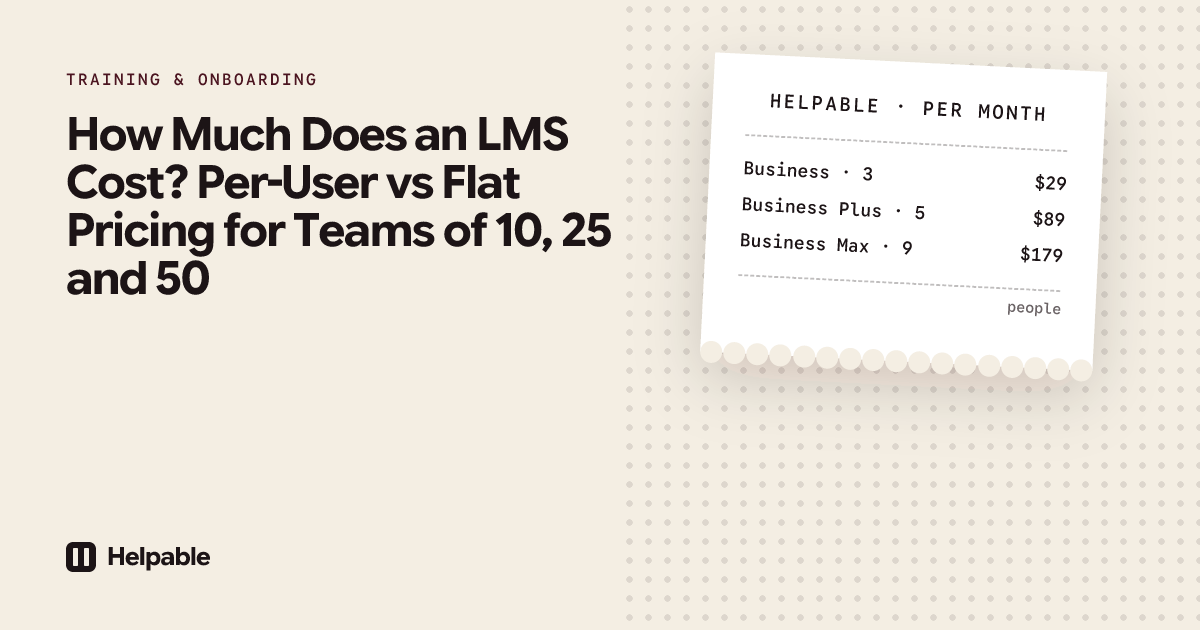
Helpable is training software and an LMS for teams of 5 to 50 people, with your knowledge base and procedures in the same tool. Plans start at $29 a month for up to 3 team members, with a 14-day free trial and no credit card needed.
Helpable combines a fixed plan price with a fixed price per extra person. Each plan includes a set number of team members; on Business, Business Plus and Business Max you add more people one by one.
| Helpable plan | Team members included | Price per month, including VAT | Each extra person per month |
|---|---|---|---|
| Business | 3 | $29 | not possible, upgrade instead |
| Business | 3 | $29 | $9 |
| Business Plus | 5 | $89 | $8 |
| Business Max | 9 | $179 | $7 |
To find your price, take the plan's price and add the extra people. The calculator on the pricing page does this for you and shows which plan fits your team best. The AI credits come with the plan and stay the same when you add people.
What is included in every plan:
- unlimited training, with lessons, video, documents and quizzes;
- assigning training with deadlines and email reminders;
- progress per person, certificates and read confirmations;
- your knowledge base and step-by-step procedures;
- AI credits every month for AI drafting and AI answers, with extra packs if you need more.
Some features depend on the plan. Automatic assignment for new members and teams starts on Business Plus. Recurring refresher training and certificates that expire are on Business Max. AI Roleplay Studio, where employees practice conversations with an AI character, is an add-on at $39 a month.
There is no required setup fee. You set Helpable up yourself, and you can cancel any time; your plan keeps working until the end of the paid period. Paying yearly costs less than paying monthly.
Which hidden costs should you budget for?
The subscription is only part of the bill. Ask about each of these before you sign:
- Setup and onboarding fees. Some vendors charge a one-time fee to configure the system.
- Minimum contract length. A yearly contract paid up front is hard to leave if the tool does not work out.
- Minimum users or minimum spend. As the table shows, this hits teams of 10 hardest.
- Paid add-ons. Certificates, advanced reports, AI, custom branding or extra storage can cost extra.
- Price increases at renewal. Ask how much prices rose in recent years and whether there is a cap.
- Content creation time. Someone has to write the training. Say a manager spends 8 hours on your first onboarding training at €35 an hour. That is €280 of time, once.
- Admin time. Adding people, assigning training and chasing late finishers takes time every month. Reminders and automatic assignment reduce it.
- Leavers. On per-registered-user plans, you pay for people who left until you remove them.
What does an enterprise LMS cost, and does a small team need one?
Enterprise LMS pricing is almost always a custom quote. Contracts usually run for a year or more, often with a setup project, a minimum number of users and support tiers. Prices are rarely published.
That model fits companies with hundreds or thousands of learners, a training department and requirements such as SCORM, single sign-on and HR system integration. A team of 5 to 50 rarely needs those, and pays for setup and features it will not use. For a small team, a tool with a published price and a monthly option is easier to start and easier to stop. See what an LMS built for small business includes.
A worked example: a restaurant with 20 staff in shifts
A restaurant has 20 staff: kitchen, floor and bar, many part-time, with new people every season. The owner wants every new hire to finish food safety and house rules training in their first week, and wants to see who is done.
They compare three models with the example rates from above:
- Per registered user with a minimum of 20: €100 a month, €1,200 a year. Because staff change every season, someone must remove leavers each month, or the bill grows past 20.
- Per active user: around 14 people log in during a normal month, so about €98. In a month with five new hires and a refresher for everyone, it rises to €140. The yearly total is hard to predict.
- Flat tier up to 20 users: €95 a month, €1,140 a year. Predictable, but the 21st person moves them to the next band.
Then they add the hidden costs. The owner plans 6 hours to build the first training from the existing kitchen handbook. If the tool can turn that handbook into a draft with AI, the owner's job becomes checking and editing, which takes less of those hours.
In Helpable, they compare Business (3 people included, $9 per extra person) and Business Plus (5 included, $8 per extra person) for 20 people, using the calculator on the pricing page. They only pay for the people who are in the team; someone who leaves stops counting once they are removed.
Which questions should you ask every LMS vendor about price?
- What will we pay per year for 10, 25 and 50 people, all-in?
- Who counts as a user, and is there a minimum?
- Is there a monthly option, or only yearly contracts?
- Is there a setup or onboarding fee?
- Which features cost extra: AI, certificates, reports, branding, storage?
- How are AI features charged, and what happens when we run out?
- How much did prices rise at the last renewal?
- What happens to our data and content if we stop?
- Can we test everything in a free trial before we pay?
How can a small team keep LMS costs low?
- Start with one training. Pick the training that saves the most time, such as onboarding, and expand later.
- Reuse what you have. Turn your existing handbook and procedures into training.
- Let AI write the first draft. You check and adjust, which takes far less time than a blank page.
- Pay yearly only when you are sure. Use the trial and a few months of monthly billing first.
- Remove leavers. On per-user plans, this is the easiest saving.
When Helpable is not the right fit
Helpable is not the right choice when:
- you need a free plan for the long term (Helpable has a free trial only);
- you need SCORM or xAPI support;
- you want to sell training to people outside your company;
- you need HR system integration or single sign-on;
- you train many hundreds of people and need an enterprise contract.
Price is one of six things to weigh. Our guide on how to choose learning management software for a small business covers the other five.
FAQ
How much does an LMS cost per user?
Per-user LMS pricing is quoted per user per month or per year. Multiply the rate by the people who will use it, then check for a minimum user count and paid add-ons. For small teams, the minimum often matters more than the rate.
Is per-user or flat pricing cheaper for a small team?
It depends on the minimums and bands. Flat pricing is easier to budget and often cheaper per person when your team sits near the top of a band. Per-user pricing can be cheaper for very small teams if there is no minimum.
How much does an enterprise LMS cost?
Enterprise LMS pricing is usually a custom quote with a yearly contract, a setup fee and a minimum number of users. It is built for large organizations, and a team of 5 to 50 rarely needs it.
Are there free LMS options?
Yes: free plans with limits, open-source software you host yourself, free school tools, and free trials of paid tools. Each has a cost in limits or time. See our guide to free LMS options for small business.
Does Helpable charge per user?
Partly. Each plan has a fixed monthly price that includes a set number of team members. Beyond that, each extra person costs a fixed amount per month: $9 on Business, $8 on Business Plus and $7 on Business Max. Business holds up to 3 people.
Do Helpable prices include VAT?
Yes. The prices shown for Helpable plans include VAT.
Is there a setup fee for Helpable?
No setup fee is required. You set it up yourself. If you would rather have the Helpable team move your knowledge and first training in for you, that is an optional one-time service.
Work out what your team would pay
Count your team, pick the smallest plan that covers it, and test everything for 14 days before you pay. See what your team would pay or start your free trial.
Last checked: October 16, 2026. Example rates on this page are illustrations, not prices of real products.